
No search results were found in Documentation!
 RGLAS
RGLAS Hello, I can’t change the earlier message, but I think I found the problem.
I had to search in the AMP settings
I’ve had to unchecked Templates at Homepage
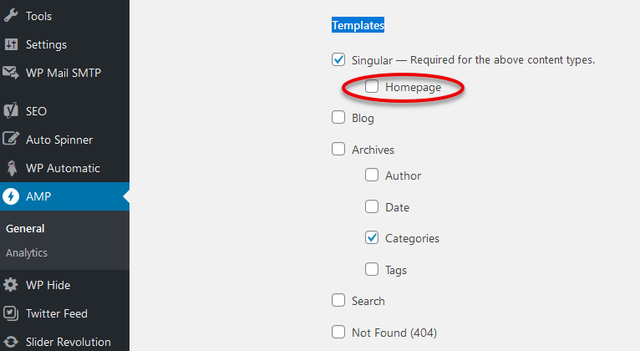
-
This reply was modified 6 years by
RGLAS.
 claddam
Hey all, hoping someone can help me.
When I edit the homepage, I can see the icons next to the menu but on my home page, they’re gone. I’ve installed the Fonts Awesome plugin but can’t workout how to show the items. They disappeared the second I removed the background image.
Thanks for your help
Screenshots:
https://ibb.co/0QHTcL1
https://ibb.co/4P9gv8y
 Sal+Pimienta
 Hey, any update on why I cannot get a compatible AMP page for the homepage (www.sal-pimienta.com). Thanks
 pfdera
My website: http://www.prüfungsfragen.de
I use the demo-theme: Royal Pub
I need help with the following points. I am a beginner and this is my first theme that I adjust.
1) Change links under each post
At the end of each article-post are links shown to more articles. Those links refer only to articles of the same category as the article above.
I would like to show links of a different category und each article.
https://prnt.sc/u3wktd
Reason:
I have one general category (“Prüfungstipps”) with topics that are interesting to all visitors und more categories (“Schule”, “Ausbildung”, “Studium”, “Fortbildung”) where visitors are mainly interested in one single article. All other articles in the same category are for the most visitors not relevant. Therefore I would like to link to the post from the general category under each article.
2) Comments under each post
Please scroll down the homepage http://www.prüfungsfragen.de
Here I could insert the comment-box.
I would like to have the comment-box under each article and do not know how to implement
this. On the homepage I would like to remove the comment-box and have only comment boxes under each (or at least several) posts.
I followed the instructions https://forum.tagdiv.com/enabledisable-comments/
I enabled in the WordPress-settings each post for comments – do I need to insert a special wordpress-block in addition?
The comment-box on the homepage can be activated or deactivated only by changing the box in the template settings under “DISABLE COMMENTS ON PAGES”.
3) Star rating
On your template
https://demo.tagdiv.com/newspaper_pro/td-post-this-new-headphone-from-sony-cancel-out-almost-every-background/
is a star rating shown, what I like.
I would like to use it one my site, which is based on the Royal-Pub-Theme.
Do you have an instruction for me, how I can use this star rating?
4) Mobile version
The footer of your template (Royal Pub) is show on the computer screen in the right order, that means I would like to have the newsletter box in the lower right corner as shown here: https://prnt.sc/u3x4sb
If I open the same page on my cellphone it looks like here: https://prnt.sc/u3x3ez
I would like (only in the mobile version) to change the order of those two boxes. The newsletter box should be before the lighter box, which contains “Prüfungsfragen.de” and further formal links like the imprint.
Is there a way to change the order only in the mobile version?
 andrewwhiteside
Hi there. I have tried putting Block 88 and Block 102 on my homepage, but they only link to posts, they don’t actually embed video or audio in them. Is this right?
UPDATE – Please ignore this post – i have resolved the problem – just needed to embed the video or audio URL into the ‘Featured’ vid/audio slot on the post
 nikhilgoyal015
I am not able to edit my homepage with td composer. It just keeps loading. I used it recently and it was working fine but now it’s a big issue. Please help me fix it.
Sal+Pimienta Hey Vlad,
Sorry to bother you again. I found the issue with the homepage. In the link you show me – to manage the AMP manually by pages, for the homepage I get the following “No hay plantillas compatibles para mostrar esto en AMP.” which roughly translates into “There aren’t any compatible templates to show this in AMP form”.
Which I guess explains why I cannot manage to get the homepage (www.sal-pimienta.com) to get a positive result in the google AMP test. Any advice?
Thanks
 eniss4y
Hello,
How can I change background image in the footer “footer-bg.png” and in the header “homepage-background2” for the template BEAUTY PRO ?
Thank you.
 frequencesas
Hi,
The instragram plugin on my homepage doesn’t work.
Can you help me ?
 thahorse
Hi Team,
I love the theme, been using successfully ( http://www.dividendreditus.com ) without much trouble, until I tried to update it to latest version (10.3.6.1).
Currently it sits at 10.3.2:
https://ibb.co/zNSZH3z
1) When I try to update it to latest version, it seems to break the theme/make it vanish :
Before:
https://ibb.co/1YcczXM
After:
https://ibb.co/9ps7b0t
That image is from a post, but it is the same for all pages, including homepage.
2) I get no errors when I update; it says it updates sucessfully, and when checking console when loading pages, there are no new errors that show. Nothing “appears” to be broken according to browser console or WordPress.
3) I tried it twice, and now reverted back to yesterday’s save; so that i goes back to 1.3.2.
4) What gives?
Thanks in advance for your help/suggestions,
Bryan
 dsk
dskHello!
Downloaded a demo with ‘beauty pro’ theme. There is no video in the background demo theme as earlier seen.
On the home page , when I edit using row in the empty space- it asks for youtube id. Does that mean I need to have a youtube channel first and then upload? If so, I tried using another id from my channel but there was no change. What if I have paid for a video and I just want to upload it and play in the background without using youtube.
Please advice.
Thanks
 theincredibleyaya@gmail.com
 Hi,
This is my site:
http://www.thecreatecafe.com
First, in the “hero” image – I cannot change that blue overlay in tagDiv composer. I see the blue swatch in TD composer, I click on it to edit but nothing happens. When I enter a hex number nothing happens.
Second, see the red hover links at the header menu – it’s the default color that came with the demo – I want to change it to the magenta color I’m using in other parts of the site (the magenta color is in the buttons in the “hero” image) … I go to composer and find the “hover link” section, enter the hex number for the magenta, and nothing happens.
Third, same issue with the hover color for the Post Titles in the homepage.
 Vlad S
 Hello !
The ads that you see on homepage from tagDiv are most-likely to come from Theme Panel – Ads. You can insert the adsense ad code in theme panel, over the old Newspaper Theme ads. Also you can follow our guide here for using AdBox element: https://www.youtube.com/watch?v=biTpVVlr8j8
Thank you !
 Calin
Calin Hi angelahou,
You can make a landing page using tagDiv Composer, in this way you can build the page how you like.
Also if you want you can check some pages/homepages from cloud templates, maybe you found something that you like and all you need to to is to make some adjusts.
-> https://i.imgur.com/GGGH0u3.png -> https://i.imgur.com/uiEatmO.png
Hope this will help you!
 Christoph
 Hello Calin
Thank you for this information. I suggested, that this could be one of the problems. I don’t know how it works with the purchase keys, but I already registered the website with the purchase key from newspaper. So I don’t think you can change key to other homepage, when you already decided. I will try it later on for an other, new website with the newsmag. And if I will have problems with the key, I will inform you.
Thank you and have a good day.
 adrian_van_hal
Hello,
At the homepage of the stunning influencer demo theme a module named post loop has been added.
Is it possible to exclude a categorie from the post that are shown? It is possible to exclude postID’s.
Many thanks,
Adrian
 stuartfurniss
Hi
I’ve recently been approved for Google Adsense and have ads running on my blogposts using the Tag(Div) Ads widget and choosing the sidebar option.
However on my homepage im still seeing the Newspaper default ads that came with the theme.
I’ve tried to change this using the TagDiv Composer and pasting the adsense code into the relevant element option but the ads don’t appear…
any idea what i’m doing wrong ?
 xuandung
Hello, I have imported demo data of https://demo.tagdiv.com/newspaper_london_news_pro
When viewed on the homepage, its footer is normal, while on the category pages, the error is shown in the picture.
I opened the designer and it displayed normally, I updated it again, but still it didn’t display correctly.
Please check it out and help me fix it.
Thank you very much.
Here is the administrative login:
http://novodia.digital/

 prophecywatchman
Please answer me why my website homepage and articles, photos, etc get messed up automatically when you update? My website looks like junk now. I went to restore it to save the last settings, and even still the photos are missing. My logo is gone, entire website is jacked up.
 Tommycreative
Hi,
tagdiv composer hasn’t uploaded the page for a few days now in order to edit my homepage.
I don’t know what the problem is. Maybe an Admin-ajax.php error, but I don’t know how to fix it.
How can I fix it?
Thank you very much.
 nicholasyou
 My TD Composer for the Homepage is getting an ERROR but it worked before I made a change to the footer.
It is not related to PHP version or WP-memory. I updated the PHP version to 7.4. WP Memory Limit is updated to 256 MB but I am still getting the ERROR.
Please listen to my issue…
I CANNOT EDIT THE HOMEPAGE IN TD COMPOSER. IT SAYS THERE IS AN ERROR. This is not caused by PHP or WP Memory Limit. It happened when I was editing the footer 2 days ago. I saved and it errored when I refreshed.
Errors at columns: 3(models) : 4(dom). The model does not match the content Current state has involved an issue.
PLEASE CHECK FOOTER AND FIX THE COLUMN ERROR. THIS IS A CRITICAL ERROR WITH YOUR THEME (IN THE CSS).
I think the error is caused by the middle column in footer. Please just delete the Raw HTML element in the middle column in the footer row.
 itechguides
I installed Newspaper mobile plugin and started optimizing my site, https://www.itechguides.com/. I just noticed a weird thing, one of my categories, https://www.itechguides.com/category/buying-guides/ displays error 404 on mobile. The category is okay on a desktop.
No other category displays error 404. I also noticed that my mobile homepage is taking too long to update to the mobile theme.
 kv2020
 Is there anyway at all that one of the blocks or any of them show hours ago on the homepage?
 vampireprincess
Hi I have few problems again 🙂
1. I would like to ask is it possible to create a night mode / day mode like on this site
https://yonkov.github.io/post/add-dark-mode-toggle-button-to-wordpress/
2. Problem with homepage editing and saving
3. Problem with category page
 domien
Greetings, we are getting a major error all over our website from quite a while, which we are unable to resolve or find out why its happening, and it has to do with how the heading title tags are appearing on the homepage, posts and pages.
1. If we select H2 in the tagdiv composer, it shows as H4. This is whats happening on our homepage.
https://photographycourse.net/
https://ibb.co/zRFzBM7
https://ibb.co/PwYPgN5
2. The same error is occurring on the posts. The Sidebar posts heading titles are setup as h4 (default), but those sidebar posts titles are showing as h3 instead.
https://photographycourse.net/understanding-camera-metering-modes/
3. I have a question regarding the related posts we are showing in the end of the posts. Is there any way to change the heading title tag to h4? As it is showing as h3 right now, and we don’t want that. I don’t see any options to change that either. How can this be fixed?
Please let us know.
Thanks!
Domien


