No search results were found in Documentation!
 Calin
Calin Hi,
If I’m right, then you want to set on your homepage a new block, if yes, then you can add some new blocks using the tagDiv Composer.
Homepage – How to build and set it -> https://forum.tagdiv.com/newsmag-homepage-how-to-build-and-set-it/
Hope this will help you!
Thank you!
 aam1182
Hi –
Two things:
1. Where do you change the words “to restro” on that homepage image? All I see is where you change the title “Welcome”?
2. How do you change the photo behind the footer content? I have changed it in theme options –> footer background image, but it is not changing it on live site. http://955.130.myftpupload.com
Thanks!
 cyrus
cyrus Hi Calin,
1.How do I make a Block that shows articles, may be mix articles from posts, and video’s from video page? Blocks and Grids only show posts, I’d like to create a block in homepage that shows Recent Posts and at least 1 Video that leads to the Video Page
2.And how do I create one video image or video Colum Text on Home Page below Block articles so that it leads to all the video pages?
Thank you,
Cyrus
aam1182 Thank you! And where do you change the words “to restro” on that homepage image? All I see is where you change the title “Welcome”
 monsef10
excerpts are not displayed in the mobile version of my website in category pages and in the homepage. I tried changing all the options available but no luck
 datatohost
Hi
In revistawinner.ec in the section of youtube playlist in the homepage i put the videos in order using the plugin that comes with the theme and paste the video code “qyU19Y3wfBQ” that i get from the link “https://www.youtube.com/watch?v=qyU19Y3wfBQ” and it should appear on the portada youtubeplaylist videos but it doesnt
revistawinner.ec view JPG001 https://www.dropbox.com/s/gmmokyua4367ez9/JPG001.jpg?dl=0
When i enter to edit the youtube video playlist using my wordpress user and password and try to edit and add the code qyU19Y3wfBQ it saves the code but it doesnt show the video on the playlist.
JPG002 https://www.dropbox.com/s/9v9kseszb1zozrf/JPG002.jpg?dl=0
I tried to recreate the index page (portada) with youtube video playlist in other wordpress page and the videos doesnt show.
https://revistawinner.ec/inicio/
Using the “tagDiv Composer” editor that the theme recommends to use and the video list doesn’t show
JPG003 https://www.dropbox.com/s/eggufq03x2o8256/JPG003.jpg?dl=0
i made my hosting provider check if it is something wrong with the modsecurity or file permissions.
If you see something please help me, do i need to send you the wordpress user and password? my hosting provider told me that the resources are perfect and is not the server that causes this.
Regards,
Xavier
Calin Hi,
You can edit the homepage with tagDiv Composer, check the mobile display, click on flex block and in css tab set a margin bottom -> https://i.imgur.com/nZM8pU4.png
Or you can use a custom css like this one -> https://i.imgur.com/shXLYuW.png
.page .td_block_big_grid_flex_1{

    margin-bottom: 2px !important;

}
Thank you!
 INVESTOR
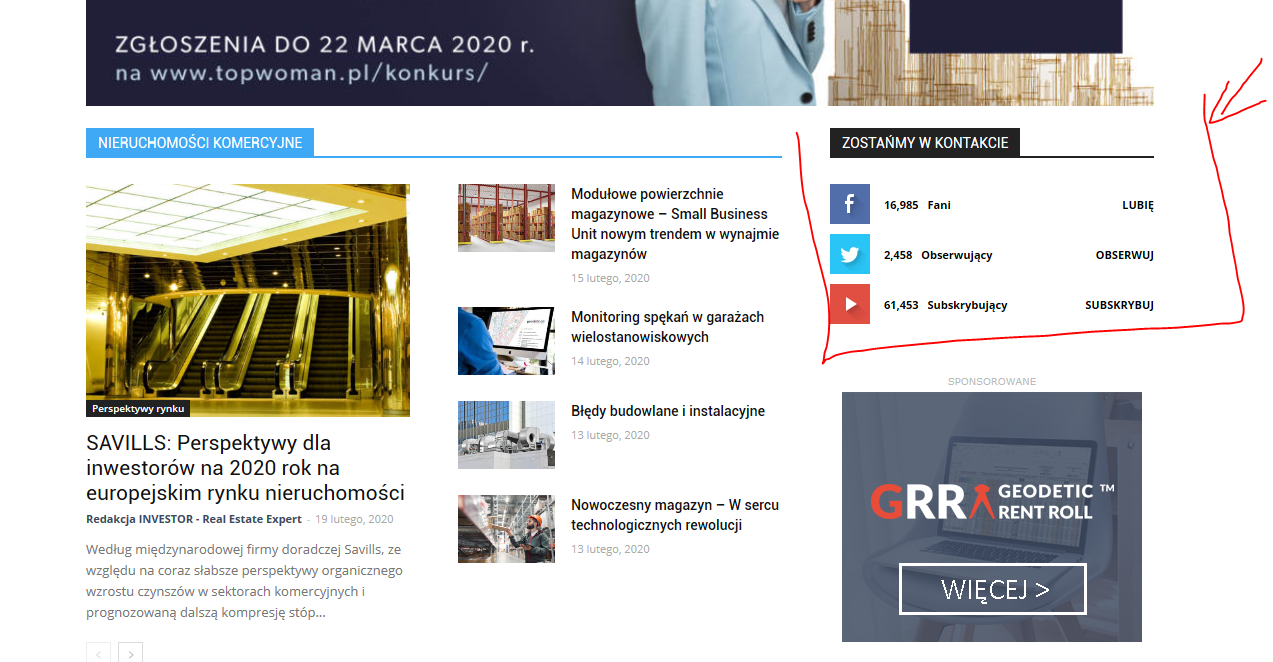
Hi, I have the Newspaper theme on my site, I want to update my social networks on the home page but after changing all links that I need in the theme panel – nothing changes. I still can see icons that I don’t want to be active (for example I don’t want Twitter, but want LinkedIn instead) and links which are visible don’t work properly, for example YouTube doesn’l link to my chanel .
How can I edit this block anyway? I can’t even change the area where this is placed on my homepage. Can’t find the way to edit this part.
My site homepage is: https://investorrealestateexpert.co/
What I’m talking about is:
https://investorrealestateexpert.co/wp-content/uploads/2020/02/investor-wycinek.png
thanks in advance for your help
Calin Hi,
In order to set some shortcode on homepage you’ll need to edit it with tagDiv Composer add a column text or text with title and set the shortcode in text area -> https://i.imgur.com/CSPcls9.png
Hope this will help you!
Thank you!
 NMI
NMIHi!
Hope you can help with some issues we are having. I can send pictures and access to back end if needed
1. we don’t understand why the H1-H6 info from the theme settings are not being applied.
In the theme settings I have changed all possible fonts with H1-H6 title to the font we want. But it doesnt apply
https://fm.lujong.org/what-is-lu-jong/ (it should look like in the Homepage, but Homepage was done overriding, so manually in each block) This is not ideal, therefore my question to do it from the Theme Panel and that it works.
2. I dont know how to work with the mobile version. In other themes I had the option to set a block to be visible only to Desktop and other just visible for mobile/tablet. This affects to pictures, slides that we would change depending on the size of the screen, etc.
3. How can I do animations of elements, like fade in…I didn’t find it so far.
4. Would there be a way to do with you TD composer a Biography structure similar to this one?
https://www.leadershipfromwithin.org/tulku-lobsang/
Calin Hi,
If you want to edit the footer, or the header, then you’ll need to edit it from a page, for example, you can edit the homepage, click on edit with tagDiv Composer -> https://i.imgur.com/uweNRrc.jpg after that go down to the footer end edit it how you want (now you can customize the the whole web-page from fronted).
Also the pages that are build with tagDiv Composer will display only shortcodes in backend.
Thank you!
 saafindiaus.org
How to remove latest article from homepage
 Vlad S
 Hello !
In order to setup a homepage you will have to create a page using tagDiv Composer, or import a homepage from cloud library and set it as first page. Find out more about it here: https://forum.tagdiv.com/homepage-how-to-build-and-set-it/
Thank you !
 Blo
BloHello I want to add an adrotate advert to the homepage. I need adrotate because I want to schedule an image to change in the middle of the night.
I added a “raw html” block and then tried to paste the shortcode like this:
[adrotate group="1"]
And then like this:
<?php echo adrotate_group(1); ?>
None of them is working.
How should I add it?
 alanrup
Hello,
I’m trying to add my youtube videos to the video playlist that is on the homepage of the Newsmag4 theme. I removed the videos put there for the demo and when I tried to add mine everything is just blank. I’ve deactivated all the plugins and tried but it still didn’t work so it isn’t a plugin causing the problem. Let me know what you need from me to help me out with this problem. Thank you.
 rajneeshhaldkar
Sir
Thumbnail not show on mobile theme and desktop thumbnail not fit in my homepage how to fix it
gotechfield.com
 codeofarms
 Thank you for your answer. I needed to add it with full demo content to get the homepage design. Thank you.
Calin Hi,
If you want to display multiples authors on the modules from homepage you’ll need to make some changes in theme core, the modules can be found on this path -> wp-content/plugins/td-standard-pack/Newspaper/includes/modules -> https://i.imgur.com/lxoZveZ.png
Hope this will help you!
Thank you!
Calin Hi,
I just checked your homepage and the single video do not appear in the second YouTube play list -> https://i.imgur.com/s8EXp0o.png what you can do is to make a new play list and check the results.
Let me know the results!
Thank you!
cyrusHello, I have 3 specific questions, that were answered previously that I am not clear on. I would very much appreciate if the person took their time on these questions to answer and provide step by step visual Would that be Okay?
1. I want to create a Video page only where the shows from my U Tube channel are displayed one by one from first to last on that page? Under Video Playlist in Builder, after I put the channel link to all videos inside of
List of youtube id’s separated by comma (ex: NRuE38Bl5Mo, 1ZgoluYjuZM, 0K-0vkFfUmY):
It remains blank. Please describe how to fix that?
2. When I post an article with a video by just putting a link inside the article, the video does not show in fueatured image, as its a video. So, I have to add the same image in the feutured image for it to show in the articles thumbnail sections. But once you go into the article, that there is 2 of the same. How do you do an article, where the article is posted as a video, and the thumbnail posts? So that my articles and videos are mixed so times in the timeline>
3. How do I put a section in my homepage for pictures, and maybe a side bar or widget for videos that lead to the video page? Particularly on mobile device.
4. Is there a way to put 2 of the twitter icons for 2 different twitter accounts with the builder or theme? Since the list has all the social media, but only 1 twitter box. I have 2 Twitter addresses I want to put. One for company, one for persona.
Thank you for your response and time.
Cyrus
 NickDeBaerdemaeker
Hi,
While testing a new page I added following css to the live css
.home .titelhoogte .post-title {height:40px}
.page-id-82863966 .titelhoogte .post-title {height:80px}
.page-id-82863966 .td-module-thumb
{
max-width: 200px;
max-height: 200px;
}
.td_module_container {height:1256px!important}
.td_module_wrap {height:256px}
I have since removed that code, but the td module wrap mistakenly shows a height of 256px on IE and Chrome, leaving way too much white space where this shouldnt’happen ! This doesn’t happen in firefox.
Where can I fix this ?
The 256 is referenced in index:1187, whatever that may mean.
clearly visible on the homepage here http://www.enola.be
Calin Hi,
All the homepage that are in tagDiv Cloud Library can be get from here https://i.imgur.com/X31tJkk.png -> https://i.imgur.com/FTtNeQ6.jpg also the homepage can be edited with tagDiv Composer -> https://i.imgur.com/fGBvREi.jpg
If this is not what you mean, please provide some more details and some screenshots.
Thank you!
 meri
meri Hi Calin,
I do not want to disable the date everywhere, only on specific pages, like the homepage.
How should I proceed?
Thanks
Calin Hi,
yes, if you set a banner/image as ad this will be display in the whole place where the ad is set (sidebar post, footer, header etc.) -> https://forum.tagdiv.com/newsmag-custom-ad-spots/ on homepage you have some more control over the ad box, you can edit it with tagDiv Composer, set a new row and if this will not do what you need you can set an inner row in that row until you get the space that you want for your banner, after that set and ad box wit the banner -> https://i.imgur.com/tszz9iC.png
Hope this will help you!
Thank you!
codeofarmsHello,
We have imported the demo (sans content) for “Newspaper Magazine“, however, we can’t seem to find the homepage template in the Cloud library. Where can we find it?
Thank you,
Caleb