
No search results were found in Documentation!
 Dansports
Since Today i can’t edit my homepage with the TD Composer as it shows the following error:
Error at columns elements 9(models):10 (dom). The model does not match…
Checking Theme and Plugins for Updates
I tried to deactivate and activate all plugins step by step.
RE-Installed the Tag Div Composer
Increased the WP Memory to 96 M on wp-config.php
Nothing affects the error message.
Here is a screen, hope you can figure it out:
https://share-your-photo.com/e158d30907
Thanks.
 seanhelmes
 How would that help? I don’t want to offset the posts that show in the top 10 most viewed posts list, I just want them to show the actual top 10 most viewed posts. If one of those top 10 most viewed posts is showing on the homepage which is a unique articles page, how can I get the top 10 list to show the actual top 10? A lot of those top 10 will likely be shown on the homepage as our homepage drives a lot of top content.
seanhelmesI have unique articles enabled on my newspaper theme homepage but I want to not have that unique articles rule applied to just my most popular posts list module that appears in my website’s sidebar (it is a sidebar widget from your theme showing most recent popular in last 7 days posts). How can I achieve this?
seanhelmesHow can I hide content that shows in big grid from other modules on my NewsPaper theme homepage? Right now I have it so most recently published posts categorized as “Featured” show in the big grid at top of homepage. I have a section below that called “Recent News” which shows the most recent items categorized as “News”. If someone categorizes a post in “News” and “Featured” it currently shows in both the big grid and recent news module below the big grid. I know I can exclude anything categorized as “Featured” in the recent news module I have below it, but that is not what I want. I want the most recent news to show in the recent news module, but only if that post is not currently showing in the big grid that appears above it on my homepage. Offsetting posts won’t work here either, because that would not be showing my most recent news posts in the module. Basically I need a rule to not show recent news posts if they are also currently being featured in the big grid above it. Please help.
 12familyde
 Hi …
I of course do understand, that running processes need to be done. But the thing with custom work – is a long requested discussion on this board. So I also understand, that it’s simply not a wanted part of TagDiv. As other companies are always able to do custom work – just because it’s good money for them – the can be sure, that no nonsense will be done with their themes, and they are having a good payed testdrive for future implementations, which they even got payed for … It’s a kind of a internal political question.
So I will need to hire a freelancer to do this for us. But it’s not what I wanted. For example the Soledad-Team had rebuilt a festure, which I missed from your theme. They have got about 350 dollars from us for this. The next theme update included this feature. Just because it was there – and it was good …
They simply were not able to build homepage blocks from tags – they only used posts. That was a long awaitd feature for the community.
However: I sure do understand, that there is a current timezone in which it is not possible to do sch things. But I do not understand, why this is the case for years now. The newspaper theme is one of the most complex theme on the themeforest market. So I am not willing to believe, that a company, who built such a complex theme, would not be able to fulfill a request within a few weeks, where a freelancer can do this job within a few days …
We have chosen this theme (again) as it’s maybe the most professional designed piece of code on the market. As we are not a blog, but a good running (growing) online magazine, it’s most important for us to stay flexible and open minded – but all this within a stable theme-solution.
Best and warmest regards
Torsten
 myspicynacho
I changed the layout of my homepage at startforart.com
My new blog posts have gone from 1000-5000 views a post, to 0.
The last 5 posts i have uploaded now have all got 0 views on the wordpress>posts dashboard. The weird thing is a couple of them have a comment, has there been a glitch or have i received or a huge drop in traffic?
 CrackMasterK
 Here is the complication if you look at the home page the widget is showing the white on transparent.
However on the event page it shows it as normal.
This is a weird situation it is showing.
Even more weird is on the home page if I click “Customize” at the top it will show the correct purple background on the homepage. (As shown on the photos above. once I close “Customize” it goes back to the transparent background (On the homepage)
 jonasorting
I have migrated from Visual Composer to Tagdiv Composer.
I use a handful of plugins on our homepage (Feedzy RSS for instance).
There are text blocks (“Text with title”, “Column Text” etc) where I use shortcodes to display content, like [feedzy-rss feeds=”http://somepage.com/feed”%5D. This works very well.
However, when I later want to edit the page, I no longer get to edit the shortcode but its rendered content.
So where the text block should contain [feedzy-rss feeds="http://somepage.com/feed"] it now contains
<div class="feedzy-rss">
<ul>
<li class="rss_item" style="padding: 10px 0 17px;"><span class="title"> <a href="http://somepage.com/link" target="_blank" rel="noopener"> A thing </a> </span>
<div class="rss_content"></div></li>
<li class="rss_item" style="padding: 10px 0 17px;"><span class="title"> <a href="http://somepage.com/anotherlink" target="_blank" rel="noopener"> Another thing </a> </span>
<div class="rss_content"></div></li>
</ul>
</div> eduardo
Hello guys!
I’m still not using TagDiv Composer, for now I use Visual Composer, but I’m thinking of using TagDiv Composer.
On the homepage of the site, I use Big Grid 7, but in the square that stands the image and the text, there are some images that are small and a small gray block appears. See image: https://www.screencast.com/t/DJd7XZfis
In the categories, I use the Big Grid 5 and the same problem occurs, the gray block appears on the sides. See image: https://www.screencast.com/t/x4bkImiitm5
How do I not show this gray block? Do the images need to fit to a fixed pattern?
Will TagDiv Composer also have these Big Grid? From what I’ve read, if I use the TagDiv Composer I’ll need to create the page from scratch, if using Visual + tagDiv Composer will conflict.
I await contact.
My site is: https://mobilidadesampa.com.br/
 menneskedyr
 Open your homepage in admin and look for a panel called “Page Template Settings”.
 F27Corsair
Hi there,
I am looking for a way to highlight certain pages (not posts) and would like to be able to place them on the homescreen. I can’t find a way to accomplish this and have only novice skills. Do you have any suggestions on how to integrate an element on the homepage that shows pages rather than posts? Thanks.
-Travis
 sejpost
We have mutliple content blocks on our homepage: http://www.CoronadoTimes.com
We added a new one called “Real Estate”. We have one story in that new category, but when we save the new content block, it doesn’t show on the homepage. Also, in the TD Composer view, it shows up when I add the category id, but then after saving it, it says “NO POSTS” in the TD Composer view – see image:
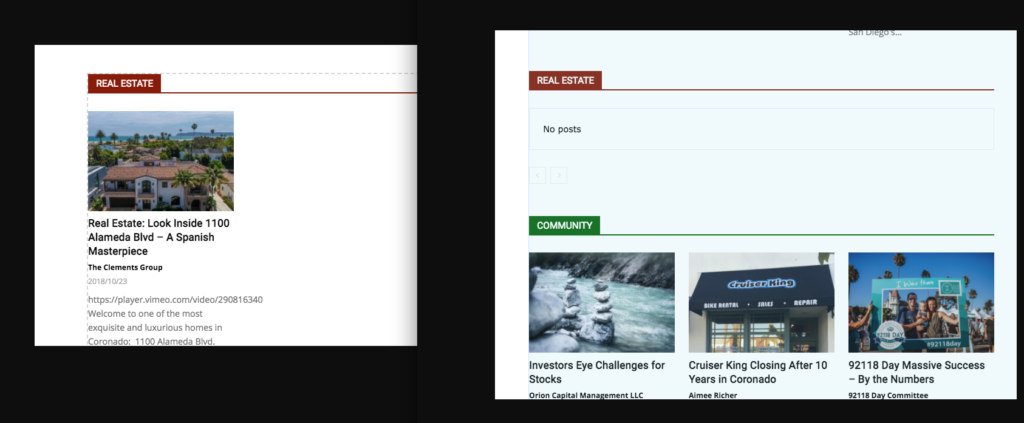
Why isn’t the single post showing? I want this post to show up in the REAL ESTATE NEWS block on the homepage:
https://coronadotimes.com/news/2018/10/23/real-estate-look-inside-1100-alameda-blvd-a-spanish-masterpiece/
Thanks,
Steve
 ctoweett
 The mobile theme has its own design. If you want your homepage to be the same on desktop and mobile, then deactivate the mobile plugin. After all, the theme is responsive.
 Cuddlepill
 Ah yes! I’m referencing the tagDiv Newsletter plugin. It’s on my homepage – the field and button are being formatted strange (email field used to be centered and button was on the lower right corner). See screenshot here: https://drive.google.com/file/d/1U9D6K3NczP1eXtGC4uYSVVgjnSW1OzJs/view?usp=sharing
 zinger
Hi there, I seem to be having an issue with the mobile theme. I have it installed, but the styling is not taking affect when I view on mobile. I look at the homepage, and it using the default mobile styling, however if I click on (some) posts or archive pages, it is showing the mobile styles.
Please advise.
 finsof2018
Hello,
I hope you can help me on this.
my theme is getting all messed up after few hours, with no apparent reasons. When it happens, I just go to the homepage page, click edit and then right away click the save bottom and the theme comes back to normal.
I need your help:
https://1drv.ms/u/s!Auwo-MFMlVZYgpEvnCP_KS0rYgaQ-w
 Simion C.
 Hi,
I believe it will be added eventually in the pages or homepages section of the cloud library plugin.
You could copy the content from here in case you install the demo without content
– https://forum.tagdiv.com/topic/wish-about-the-demo/
– https://forum.tagdiv.com/topic/getting-started-from-demo-best-practises/
So the homepage for the gaming demo is here – https://www.screencast.com/t/ePeymfvqeE
Thanks
 pixo
pixoHi,
my instagram plugin is broken. I have set up a completely new wordpress site.
I haven’t made any changes on your theme. This is a clean setup. Could you help me? Thanks in advance!
Errors:
Warning: Illegal string offset ‘td_instagram’ in /homepages/7/d478529097/htdocs/relaunch2018/wp-content/themes/Newspaper/includes/wp_booster/td_remote_cache.php on line 102
Fatal error: Cannot use string offset as an array in /homepages/7/d478529097/htdocs/relaunch2018/wp-content/themes/Newspaper/includes/wp_booster/td_remote_cache.php on line 102
 Javier
The gaming homepage is not available without installing the full demo, please advice i already have content on my site.
 kennytran
After clicking demo installing button, there is a popup saying:
“INSTALL THE FULL DEMO. Are you sure you want to install the full demo? This will import homepages, sample content with images, backgrounds, template layouts, fonts, colors. Notice: The demo can be fully uninstalled and the system will attempt to rollback to your previous state. Any content, menus and attachment created by the demo are removable via the uninstall button. Please backup your settings to be sure that you don’t lose them by accident.”
However, there is no button to click (to proceed).
Please advise. Thank you.
 Catalin
 Hi,
Edit that homepage template with TD Composer and remove that section from there. It is talking about News Sticker.
Thanks.
 Calin
Calin Hi,
First you need to have set page template Pagebuilder+ last articles +pagination ( https://www.screencast.com/t/yLEVb5j1YrH5 ), if this is set so, go down in page until you’ll see the “Homepage Latest Articles” ( https://www.screencast.com/t/X4QH5mFhYu ).
Most popular it is in Appearance Widgets https://www.screencast.com/t/ejAdZpvpXl4
Hope this will help you.
Thank you.
 youcantapme
I configured the footer from Newspaper theme panel, I configured it easily and it shows on the home page.
But the footer is not shown on posts and also the header display is different from the homepage.
Catalin Hello manuangel,
If you want to sort the Category, you need to use such a plugin with this functionality like Category Order and Taxonomy Terms Order plugin, that should allow you to change the default order of the categories – https://wordpress.org/plugins/taxonomy-terms-order/
Also, if you want to remove the Sub Footer Copy text, you need to use a bit of CSS code to hide it.
div.td-pb-span.td-sub-footer-copy{

display:none;

}
I have inspected your homepage and I saw that your “Ultimi Articoli” comes from the Page Template -> Pagebuilder+Latest Articles+Pagination. So, if you want to remove it, you need to change the page template from here -> https://www.screencast.com/t/sNEj33kRuzdG TO moe any other element from your page, you should use the TD Composer drag and drop functionality. Check here -> https://forum.tagdiv.com/tagdiv-composer-tutorial/
Thanks for your understanding!
 jacquelinehb
Hi, the rev slider at the top of my homepage displays our latest articles. It show the main image plus the article title. However, the title shows up in white large font that makes it impossible to read. I can’t find anywhere where I can change the text to modify it so that it is legible. For example, maybe putting a transparent background behind the text so that the words pop out more. Or even having the option of removing the featured image and it be a black wall where just the headlines show (this is not ideal but wondering if it is possible).
Thank you
