
No search results were found in Documentation!
 Catalin
 Hello Aldemi,
If you want to have for each menu item a different color, you have to use a bit of Css. Place the code below in Theme panel->Custom Css area, like this: http://screencast.com/t/hdusc4o0C1
Each item, has a different ID, like this: http://screencast.com/t/r8nmHtzg
li.menu-item-912 a {

color:red!important;

}

li.menu-item-913 a {

color:green!important;

}

li.menu-item-914 a {

color:pink!important;

}

li.menu-item-915 a {

color:blue!important;

}
For your second request, you can control the “Homepage-News” from SEO Yoast plugin->Title&Meta section, like this: http://screencast.com/t/InZUJXjXiU. Plese install this plugin and follow the steps.
Hope this helps and let us know how it goes!
Thank you for the message
 Bogdan B.
 Hello,
@JCAires If you want to just target the h1 on the homepage, you can use css to do it like so:
.home h1{

font-family:

font-size:

color:

etc.

}
@Arafat The test is correct. You have no h1 tag on your homepage.Just the h3 tags for the module titles. This seo site testing does not search your entire site for h1 tags. It just inspects the link you give it. If you type just your website, then only the home page will be scanned for h1 tags. Try it with a link to a post and you will see the h1 will be there.
Thank you!
 Akpan Promise
When you scroll down, that is to those with a pagebuilder+homepage format for our front page. If you check and see the home articles, you may want to see more stuff then you click website/page/2/, you simply see a media(in this case, a picture), or you will see nothing at all[that is when I have checked other Newspaper site]
Some site seem to have a working next page i.e /page/2/ (or more)
Am I the only one experiencing this?
 tropene
Try to setup the slideshow on my homepage, have setup everything like documentation tell. Even disable all my plug-ins to make sure it is not an conflict. I have made an template with one slide (more comes..). Then I create an page and pick the template I have made from the dropdown menu in page settings. Then I save and open the page to see the result, but no slideshow. Why? When I create a slideshow and set in the shortcodee the slideshow comes up, but cover the sidebar and other element since I choose fullwidt I supose. Have set in the tag #header in the field “Offset Containers:”. Please help me with this issue.
 Aldemi
Hello My Friend,
Good Morning!
1 —–it is possible to let each title (text) of the home page menu
with a different color from each other?
ie, contains seven titles on the menu
and I would leave each with a different color on text
as the image of this site here : http://www.screencast.com/t/6HsfYV8kHg
EX:
Home # 3b9c00
SPORT # 4g9d65
HOUSE DESIGN # 14jc13
LIFESTYLE # 2a9c10
2 ——- I edited the theme demo version default
but always appears at the top tab, in the address bar
the Homepage-News name along with the name of my site
How to exclude the word, homepage-news?
of my theme homepage
look: http://www.screencast.com/t/epF50c5EMzBk
I only want to leave the name of my initial site
thank you so much
 thesend
 Any clue?
In this situation visual composer is useless and my homepage completely unavailable.
Thanks in advance.
 Andrei L.
 Hi
Try to deactivate the lazy load animation from theme panel: http://screencast.com/t/zHmGOzLi6Oc8
I am not sure how you set up your homepage but if you’re using the blog template you can change the module used to display the post with one which display excerpts: http://screencast.com/t/yRypVzWjP – http://screencast.com/t/pebH7hrP1b For more details please check our documentation regarding the homepage setup: https://forum.tagdiv.com/newsmag-homepage-how-to-build-and-set-it/
IF this is not what you mean please provide more details and your site url so I can inspect this closer.
Thanks!
Andrei L. Hi @jaysmg
The classic blog from our demo it’s built with module 15 + sidebar right: http://screencast.com/t/7wTLBKtpVG5e You can try to use module 15 that will display entire post content, or you can add from WordPress in every post the read more button where you want to stop displaying the content in homepage, like here: http://screencast.com/t/fdekkT2jVj
Hope this help.
Thanks!
 lakewoodweb
 Is it possible to do this using a module? My homepage is using block 21 with a load more button, and I’d like to display ads between posts. Is this possible with your theme?
Thanks in advance!
Aldemi Hello My Friend Catalin,
Good Morning!
1 —–it is possible to let each title (text) of the home page menu
with a different color from each other?
ie, contains seven titles on the menu
and I would leave each with a different color on text
as the image of this site here : http://www.screencast.com/t/6HsfYV8kHg
EX:
Home # 3b9c00
SPORT # 4g9d65
HOUSE DESIGN # 14jc13
LIFESTYLE # 2a9c10
2 ——- I edited the theme demo version default
but always appears at the top tab, in the address bar
the Homepage-News name along with the name of my site
How to exclude the word, homepage-news?
of my theme homepage
look: http://www.screencast.com/t/epF50c5EMzBk
I only want to leave the name of my initial site
thank you so much
 peravoj
On mobile phone LG G4 that i have for testing i noticed that homepage is not displaying correctly. Im using stock internet browser from google (not chrome – in chrome its opening fine). 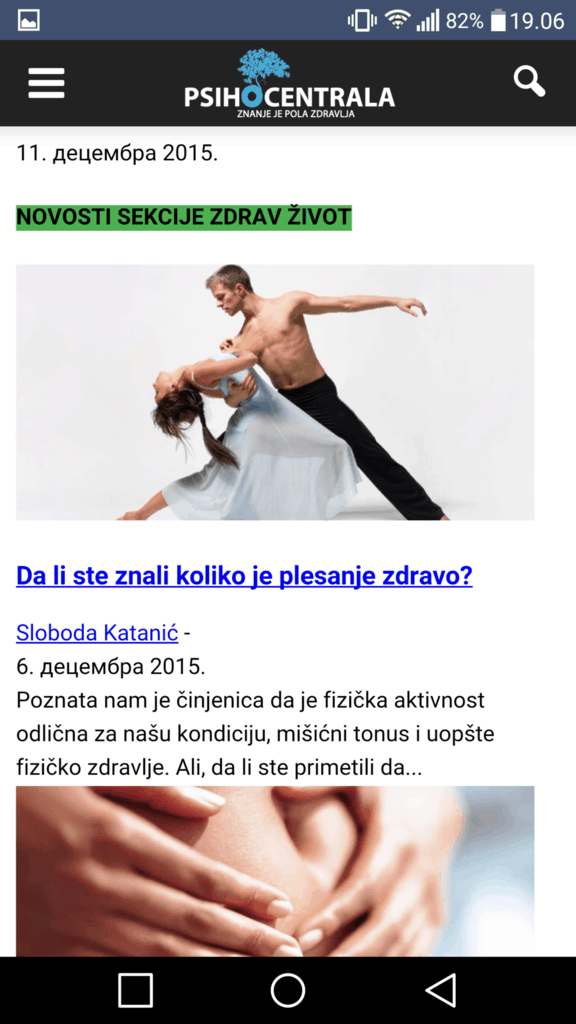
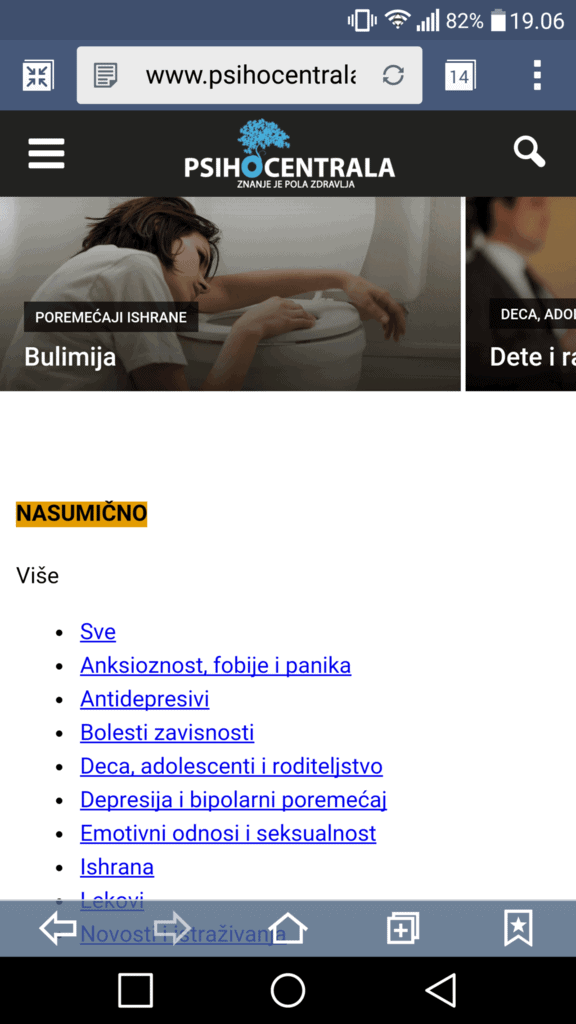
Is there any way to fix this?
 mboydnv
 Alin,
The problem also exists on your demo site:
view any page and add subpages, it doesn’t 404.
http://demo.tagdiv.com/newspaper/homepage-magazine/
then add the /page/2/ to the url and voila!
http://demo.tagdiv.com/newspaper/homepage-magazine/page/2/
http://demo.tagdiv.com/newspaper/homepage-magazine/page/3/
http://demo.tagdiv.com/newspaper/homepage-magazine/page/4/
http://demo.tagdiv.com/newspaper/homepage-magazine/page/5/
http://demo.tagdiv.com/newspaper/homepage-magazine/page/6/
etc
 JCAires
The title has my question. The theme default is black, but all of my other tabs are in blue (http://www.photocommand.com). How can I change this last one? I could not find it.
Also, is it possible to have this one title differently set for my two languages? qTranslate-X does not separate this one section. Thank you.
JCAires Thank you all for the help. Bogdan, you are right, the “problem” occurs only on the homepage. I am going to fit in a text box somewhere in the page, as suggested by Chris. Thanks.
 nahidmmc
How can i make my homepage top block like this http://prntscr.com/9d84im , here the left side block should be carousal block.
 schindyguy
I cannot use the themes “header” ad slot because I have a custom post type for sponsored articles I do not want adsense appearing on (and additionally slowing down the load time of the sponsored posts). My dev created a /s/ slug to represent the sponsored post type and we tried adding a conditional to the header ad slot to not load the adsense responsive code when /s/ is present in the url but while we were successful in hiding the ad (a big no no for google) the ad scripts still appear and slow down the load time so I’ve had to abandon using the header ad slot all together. If you have any other suggestions to prevent adsense header ad slot from loading ads/adsense scripts on a certain “sponsored” post type or urls that have /s/ in them please let me know – otherwise I have been forced to use the workaround:
I created a custom ad slot 1 with google responsive code on the homepage using VC which works, but I don’t have the same ability to do that on category pages. The theme panel > layout settings > categories section seems restrictive in how it can be customized. How would I add a “custom ad slot 1” ad to the top of every category page? Similarly, how can I define a post template to use “custom ad slot 1” as a header (almost all of my posts are set to default or from panel post templates)?
Thanks in advance for reading all that! Looking forward to your reply
 jaysmg
I want to lower my HTTP Requests and there are some scripts I would like to remove like the script that fades in the images on scroll and some others. Where can I find the file in the ftp so I can alter this?
Also, how do I make the homepage show excerpts of each post instead of displaying all the content?
 zlato
zlato Chris S Thx
Would not it make sense that all titles in in H1?
Yoast : “In classic HTML, there would be 1 H1 tag on each page, maybe a couple of H2’s etc and these would all combine to form an outline of the entire document.”…
In the case of HTML4, it seems logical to use one H1 per page, of course being the main title of that page. In most cases, that’s not your brand name or website name (on your homepage it probably is, and that’s fine).
https://yoast.com/headings-use/
Thx
 gmaio
gmaioHi there,
I’m able to show an advertising banner (size 970×90) on my site homepage (please see http://screencast.com/t/ZlWAdGDr1sj) and I have obtained this behaviour by modifying the file “single.php” of my Newsmag child theme; I’ve added the following code snippet:
<div class="td-container">
        <div class="td-container-border">
                <div class="td-pb-row">
                <?php echo do_shortcode('[td_block_ad_box spot_id="custom_ad_1"]'); ?>
                </div>
        </div>
</div>
The custom_ad_1 ad_box contains the Google DFP tag code.
What I’m trying to do now is to show the same banner under every category
top posts grid which don’t have this banner at moment (please see http://screencast.com/t/X4fBKGQs8). How could I get it?
Tnx a lot for any appreciated help
Giuseppe
Bogdan B. Hello,
We have no reports of search engines not finding the h1 tags on our theme. If you are searching for it in the homepage, then you are not going to find a h1 tag if the page title is not set.
Here is a search on our official demo: http://screencast.com/t/xll5QXEHTw It finds a h1 tag on the post but no h2. And it’s right. There is no h2 set on that post.
Please do a search on a post or page that has a h1 set and see if it will not show up at all.
Let us know how it goes.
Thank you!
Bogdan B. Hello,
Block 16 by default shows the author name: http://screencast.com/t/GGnWhB4I, but in order to make it show the avatar it will need further customization. you can follow this topic to see how it can be done: https://forum.tagdiv.com/topic/customizing-excerpts-homepage-block-12/
For the excerpts, they were hiden on tablets and mobile phones as a design choice.You can make them reappear with this custom css:
@media (max-width: 1018px) and (min-width: 768px){

.td_block_16 .td-excerpt {

display:block!important;

}

}
@media (max-width: 767px){
.td_block_16 .td-excerpt {
display: block!important;
}
}
Thank you!
Bogdan B. Hello,
@Gregor007
You can add content blocks to your page using visual composer. Please follow this tutorial: https://forum.tagdiv.com/how-to-use-visual-composer/
You can also follow this video tutorial to see how you can set up your homepage: https://www.youtube.com/watch?v=ss-BEobegAw
@philooo
Unfortunately filtering custom post types is not yet implemented in our modules and blocks. Blocks can display CTP-s but you will need custom modifications to make the blocks filter custom post types. You will most likely need to hire a freelancer to help out on this one as it will require quite a bit of php knowledge and we cannot offer any custom work at the moment.
Thank you!
Bogdan B. Hello,
1) Please check your homepage again and recreate it in visual composer. If you have a row inside of another row, please remove them as these situations can cause errors. Please use a default layout to see if the issue is still there.
2)You can use this custom css code in the theme panel->custom css box:
.td-pulldown-filter-display-option{

display:none!important

}
Thank you!
 MissMyra
Hello,
We’ve just installed a widget side bar with my perusal information an photo. For some reason, you now only see the side bar on the lowest part of the website. Obviously, we would like to have this information on the above part of the homepage. What do we do wrong? Thank you very much!
(http://blog.happysinglemoms.nl)
Thanks!
Best, Myra
 Barun
BarunI am purchasing Newspaper theme. Some problem I am facing.
My website address : http://lnx9.cloudhostdns.net/~a9a78e32/
Problems are :
1. When I opening it in Mobile It appears left & some portion missing from left. Its showing only in Homepage. Other category page is OK.
Snapshot: http://lnx9.cloudhostdns.net/~a9a78e32/mobile.jpg
2. I don’t want Latest tab in category section
Snapshot : http://lnx9.cloudhostdns.net/~a9a78e32/latest%20remove.jpg
Please help. Thank You.

