
- NewsmagAbove footer ads
- NewsmagSmart list ads
- NewsmagUsing other ads
- NewsmagArticle ads
- NewsmagSidebar ads
- NewsmagHeader ads
- NewsmagTheme thumbs
- NewsmagFont customization
 delfinista
Hello,
every time I post and attach an image, the server creates 20 different versions of that image with different sizes, which apparently are needed since each one is used for each individual Blocks.
We would like to avoid it. How can we do?
Do we need to disable the blocks we don’t care about in Block settings> Thumbs on module blocks?
If we turn them all off, what happens?
Also … what is the module blocks of the mobile version?
Last request: our server is overloaded with 20 different versions of the same image, is a reverse procedure possible on the Regenerate Thumbnails plugin, or can I delete all 20 regenerated versions and leave only the original image file?
 Pulau777
Hi,
I´m having problems when I use images as backgrounds in the row settings (css tab). I´m using the Gourmet Template, and when I try to replace the header image, the image looks bigger (not as cover image should be), and also with compressed effect. Images are only being problematic when used as backgrounds, as for featured image is working fine.
I´m graphic designer so please dont reply me with image sizes, resolution and this kind of things, must be something with some configuration or with tagdiv composer, cause when I replace the image with a different one, and then change again to the same image as before (in the same setting action) also looks like blured.
As I see in the source code in internet the image is this kind of image:
url(“https://XXXXX.XXX/wp-content/uploads/2020/03/header_youtube4-300×169.png”) !important
Why is using this image and not the original?
 ttz
ttzHello,
I am using the Life News demo with Header Template 5 from the cloud library. On mobile I’d like to use the responsive version of the desktop theme (Life News demo) as homepage and on posts pages/templates the mobile theme would be used with amp support. On mobile homepage the theme render the header logo responsively it sizes the logo image flexible to the mobile screen-size, but the mobile theme what I use on mobile post pages showing a fixed size logo image no matter what is the mobile screen-size. How can I set the mobile theme to size the logo image flexible to the mobile screen-size and with the same size the logo is on the mobile homepage?
Thank you,
 Vlad S
 Hello !
That is a suggestion from gtmetrix and google to use the perfect sizes but that will affect your website in other ways. Because using another thumb for mobile will create additional images on your website which will lead to more space occupied on your server.
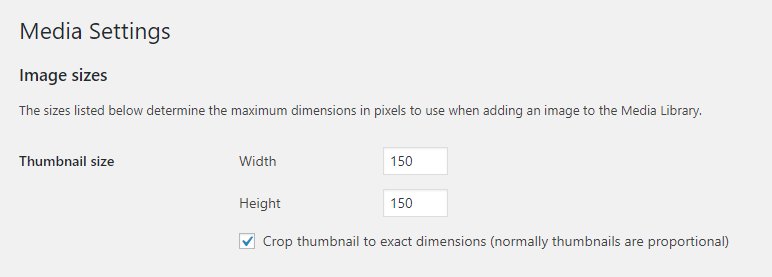
Most of the results from gtmetrix and google page speed are suggestions. You can add another size for your thumbs in wordpress here:
Go to your WordPress dashboard.
Navigate to the Settings > Media tab.
Look for the Image sizes > Thumbnail size section.
Change the default width and height of your thumbnails in pixels.
Thank you !
 CatchThatSports
Hi I would like to know how to make my header and header logo have the same height on all screen sizes. Thank you.
Like the first image below, 2&3 are what happens when I minimize window.
Thank you.


 SeaBlueHK
 Sorry I don’t quite get it. Which plugin do you mean?
Here are my settings now:


When I tried write post > upload feature image
It creates all the thumb sizes that I need. (Correct, which is what I want)
But when I add images to the post content > upload images
I do not want all those thumb sizes to be generated as I do not need them.

Could you please explain more? Thanks for your effort!
SeaBlueHKHello, is there a way to set to:
– Only generate all needed sizes for feature images ONLY.
– Other images used inside posts will only save it’s original file and generate a 150×150 thumbnail.
 spataro16
Lets say I have a featured image for a post that is 1080 by 720. Later that same image is used in things like small to medium sized thumbnails throughout my site, but the image is still 1080 by 720.
Does that affect performance in a negative way? I’ve compressed the images all down to about 30-80KB, so they are pretty optimized at those sizes already.
But just curious if there is a way to serve that same image in thumbnails, but instead of using the 1080 by 720 sized featured image, I can upload a 500 by 500 sized image to be used for the thumbnails instead, pretty much to further improve performance.
In web dev world it’s named responsive images. When the code pulls a different sized image based on the space it will fill or the size of the screen viewing the website.
 Calin
Calin Hi,
If the images from mega menu have different sizes then you can use a regenerate plugin like this one from our documentation -> https://forum.tagdiv.com/thumbnails-fix-strange-looking-images-on-blocks/
If this is not what you need, or the problem persist, please provide a link to your website where I can inspect the situation.
Let me know the results!
Thank you!
 awtownn
 To clarify my question. Images seem to insert into TD Composer, but not backgrounds.
When I click Row button in a row > CSS > Background Image the Add Media box appears. I select an image and then receive the error message. I’ve tried various images and sizes. These same images can be inserted or added as an inline single image or image in classic mode or via WPBakery.
How to solve this?
awtownnI’m in TD Composer trying to set a background image in a row. The error “Invalid data Current state has involved an issue.” appears. I’ve tried various images and various sizes.
Then, went to another page and used WPBakery. Images insert fine. And, inserting images in Classic mode works fine.
What’s wrong with TD Composer?
Calin Hi,
If you use the responsive version, then you can force the google to provide only the selected ads from theme panel -> https://i.imgur.com/Z6HlEpC.png
Also I found this imformation on google ads support -> Image sizes for image ads -> https://support.google.com/google-ads/editor/answer/57755?hl=en
Thank you!
 noahlievable
Whenever I post a new article the featured image, while having the same px sizes, will show up differently on the blocks. Sizing is all different and not symmetrical to the others. Why is this? How can I fix this?
 barbitania
 Hi Vlad!
Thank you for your answer.
Ive checked the photos of the below block (“M2” from the Category layouts) and the horizontal images are bigger than 800x600px so they should be enough… still they are cut weirdly to uneven sizes. How can we solve it?
Also if we use vertical images than they will not crop perfectly to the same size as other images?
(Or…am I understanding right?: to achieve a seamless look like on your demo pages ALL the featured images would need to have same width-and-height ratio because they are NOT being cropped to a specific block grid size?)
Also there is an other problem: if you check the upper block (which is “Big Grid 12”) our problem is that the images are showing up too big. (Only the top parts of the heads are visible even though the images have a lot more content than that)
You can find a screenshot here to be sure we are looking at the same view: https://www.dropbox.com/s/e5m8nseqkfcn2v8/Screen%20Shot%202020-02-26%20at%2022.31.27.png?dl=0
Can you tell me if these problems have solutions?
Thank you,
Anna
Vlad S Hello !
From what I can see on your website your images are more Vertical or don’t meet the minimum sizes because they are small. We recommend using at least 800×600 images. At the size they are now, making them show in full will stretch and distort the image badly.
I hope this was helpful !
Thank you !
barbitaniaHi!
I have issues with the images of the blocks. The images don’t cover the block area, rather it seems like the image is placed at the block area as is (even if it is too big) and then the excess is being cut off. Or if the image is vertical, then there is an ugly empty space left at the side edges.
What i want to achieve is a kind of “background-size:cover, background-position:center” look. But it seems like the images are not applied as background, but as simple images so these rules cannot be applied.
Example: http://desarrollo.rondasomontano.com/revista/category/economia/
Here You see on the upper big blocks how little of the images can be seen, most of them are cut off. Also the below smaller block images have the problem that they don’t have an even shape (the vertical image is just being there small and thin!)
What is the solution for this?
Thank you in advance for your answer,
Bests,
Anna Balizs
Calin Hi,
That depend on what you want to do, if you want to change the image/thumb you need to set a different size also is need some custom work, the sizes can be seen in theme panel -> https://i.imgur.com/DTXkYMl.png also please notice that those implementations are not covered by the team support -> https://forum.tagdiv.com/support-policy-2/
If you want us to help you with this implementation you can make a request here -> https://tagdiv.com/premium-customization-services/
Thank you for your understanding!
Vlad S Hello !
Please note that page speed is not covered by the support team. And as you can see here: https://gtmetrix.com/reports/bestardecom.info/kF8XXXq5 On the waterfall your page is slowed down mainly by the host, the coblocks plugin and the image sizes.
If you want to improve page speed you can contact our customization team here: https://tagdiv.com/premium-customization-services/
Thank you !
Vlad S Hello !
You can adjust the image sizes when using the tagDiv Composer as you can see here: https://www.screencast.com/t/3Ko9y4jv
Thank you !
 drevio
Hello, I was checking my website on Google Structured Tool, and since I change to NewsPaper, I checked, and I’m curious why my single image, produce so many links and I’m afraid it will be read by Google as spammy.
Google read it as a hidden images. I checked on Google Structured Tool. and yes, it will looks so spammy, and your site can be penalized, like mine!
<p>
<img class=”aligncenter size-large wp-image-14989″ data-src=”https://www.domain.com/wp-content/uploads/2020/01/Greenery-Wedding-Invitation-Set-Template-4-731×1024.jpg” alt=”” width=”731″ height=”1024″ srcset=”https://www.domain.com/wp-content/uploads/2020/01/Greenery-Wedding-Invitation-Set-Template-4-731×1024.jpg 731w,
https://www.domain.com/wp-content/uploads/2020/01/Greenery-Wedding-Invitation-Set-Template-4-214×300.jpg 214w,
https://www.domain.com/wp-content/uploads/2020/01/Greenery-Wedding-Invitation-Set-Template-4.jpg 1500w” sizes=”(max-width: 731px) 100vw, 731px” /></p>
I only show one images, but those URL appears on Google Structured Tools!
Please let me know how to hide them. or delete them.
They generate in all images.
 jrvalle
For about 15 days we have a problem with the use of the blog2social plugin.
Having contacted your support service, I have been told that the problem is that the line:
Example: <meta property=”og:image” content=”https://www.burgosdeporte.com/wp-content/uploads/2020/02/Pablo-Infante.jpg”>
Appear twice as you can see below
<!DOCTYPE html>
<!–[if IE 8]> <html class=”ie8″ lang=”en”> <![endif]–><!–[if IE 9]> <html class=”ie9″ lang=”en”> <![endif]–><!–[if gt IE 8]><!–><html lang=”es”> <!–<![endif]–>
<head>
<meta http-equiv=”content-type” content=”text/html; charset=utf-8″>
<title>“Jugar dos semifinales en ocho años está al alcance de muy pocos” | Burgosdeporte</title>
<meta charset=”UTF-8″>
<meta name=”viewport” content=”width=device-width, initial-scale=1.0″>
<link rel=”pingback” href=”https://www.burgosdeporte.com/xmlrpc.php”>
<meta property=”og:image” content=”https://www.burgosdeporte.com/wp-content/uploads/2020/02/Pablo-Infante.jpg”>
<link rel=”icon” type=”image/png” href=”http://burgosdeporte.com/wp-content/uploads/2019/11/icono_peq_transparente-1.png”>
<link rel=”apple-touch-icon-precomposed” sizes=”76×76″ href=”http://burgosdeporte.com/wp-content/uploads/2019/10/Burgos_deporte_corto_logo_cuadrado.jpg”>
<link rel=”apple-touch-icon-precomposed” sizes=”120×120″ href=”http://burgosdeporte.com/wp-content/uploads/2019/10/Burgos_deporte_corto_logo_cuadrado.jpg”>
<link rel=”apple-touch-icon-precomposed” sizes=”152×152″ href=”http://burgosdeporte.com/wp-content/uploads/2019/10/Burgos_deporte_corto_logo_cuadrado.jpg”>
<link rel=”apple-touch-icon-precomposed” sizes=”114×114″ href=”http://burgosdeporte.com/wp-content/uploads/2019/10/Burgos_deporte_corto_logo_cuadrado.jpg”>
<link rel=”apple-touch-icon-precomposed” sizes=”144×144″ href=”http://burgosdeporte.com/wp-content/uploads/2019/10/Burgos_deporte_corto_logo_cuadrado.jpg”>
<!– Open Graph Meta Tags generated by Blog2Social 611 – https://www.blog2social.com –>
<meta property=”og:title” content=”“Jugar dos semifinales en ocho años está al alcance de muy pocos””>
<meta property=”og:description” content=”El mítico jugador del Mirandés, Pablo Infante, rememora la primera semifinal de Copa
Tiene el honor de ser el máximo artillero de la Copa del Rey de 2012″>
<meta property=”og:url” content=”https://www.burgosdeporte.com/index.php/2020/02/11/jugar-dos-semifinales-en-ocho-anos-esta-al-alcance-de-muy-pocos/”>
<meta property=”og:image” content=”https://www.burgosdeporte.com/wp-content/uploads/2020/02/Pablo-Infante.jpg”>
<!– Open Graph Meta Tags generated by Blog2Social 611 – https://www.blog2social.com –>
<!– Twitter Card generated by Blog2Social 611 – https://www.blog2social.com –>
As much as we seek, we do not find the origin of the first line. Could you help us identify it and thus be able to find the solution?
Thank you
 Diario Freestyle
I´m starting my first blog and I´m having troubles setting the correct image size on different categories postst. I have different sizes on different pages posts and I´m not able to set the featured image as it should be. Here you see the examples: (Not sure gow to upload images to this forum, god help me haha)
<img src="https://i.ibb.co/rcRF9Wf/Sin-t-tulo.jpg" alt="<img src=”https://i.ibb.co/rcRF9Wf/Sin-t-tulo.jpg” alt=”Sin-t-tulo” border=”0″ />” />
<img src="<img src=”https://i.ibb.co/f82MJL9/1.jpg” alt=”1″ border=”0″ />” alt=”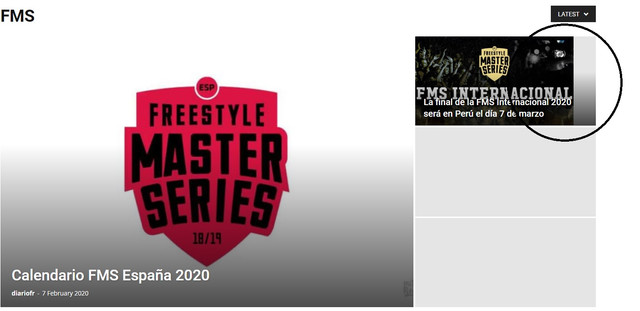 ” />
” />
 Sibi Paul
I wish to Keep a Unique Style for my website Images and Styles.
Lare Image: 1200 x 630
Medium: 600×315
Small: 300×160
But, when we Upload 1200×630 Size Images to WordPress,
Random Images Automatically Creating.
So, I changed WordPress Settings – media – Thumbnail sizes to ZERO.
Now, I want to change These Themes Image Sizes…
to Stop, Creating Themes Sizes,
Also, I want to Change All my Thumbnails to the above Proposition.
Simply, I Just Want to Avoid Irregular Sizes and Auto Creations.
When I Upload a 1200×630 Image, Then Theme will create an extra two images ( 600×315 & 300×160 )
then, Theme should use those sizes wherever on the page.
Simply wants to Avoid Irregular sizes like ( td_324x160.png )
I hope you understand,
if not, Kindly ask me for more details…
Vlad S Hello !
The product featured images come from woocommerce. Please follow this tutorial regarding this matter: https://iconicwp.com/blog/manage-woocommerce-product-image-sizes-3-3/
Thank you !
 bburzycki
Looking for some guidence on header image size options or custom options and why I cannot for the life of me seem to find the color change option for the Widget titles?
Maybe its all just lack of sleep, but any help would be great.



