- NewsmagAbove footer ads
- NewsmagSmart list ads
- NewsmagUsing other ads
- NewsmagArticle ads
- NewsmagSidebar ads
- NewsmagHeader ads
- NewsmagTheme thumbs
- NewsmagFont customization
 Simion C.
 Did you maybe disable the other wordpress thumb sizes somehow? But I don’t think that’s the case if it worked before and now it’s not. Does it let you select other image sizes if you switch to a different theme as a quick test? Because it seems to work fine on my side.
If you want I can take a look as well. You can send an email at contact@tagdiv.com and provide admin login for the website. I will investigate the problem.
Thank you!
 Calin
Calin Hi,
Based on your screenshot, I understand that you are referring to the thumbnails used in Flex Blocks. These allow you to choose the specific thumbnail format for each block individually.
Please make sure that the thumbnail size you want to use is enabled in the Theme Panel. After that, you should regenerate the thumbnails so the required thumbnail version is properly created and available for use.
Normally, when an image is uploaded and the thumbnail size is already enabled, the thumbnail is generated automatically. However, if that thumbnail size was enabled only after the images were uploaded, the corresponding thumbnail version does not exist yet. In that case, the block will use the full-size image instead.
To resolve this, you will need to use a thumbnail regeneration plugin to generate the missing image sizes.
-> https://forum.tagdiv.com/theme-thumbs/
-> https://wordpress.org/plugins/search/Regenerate+Thumbnails/
Thank you!
 PolishExpress
Hi,
I need clarification on how the image size selector works in Newspaper, especially when using separate templates for desktop and mobile (Single Post Desktop + Single Post Mobile).
Google Discover requires an image ≥1200px in the HTML.
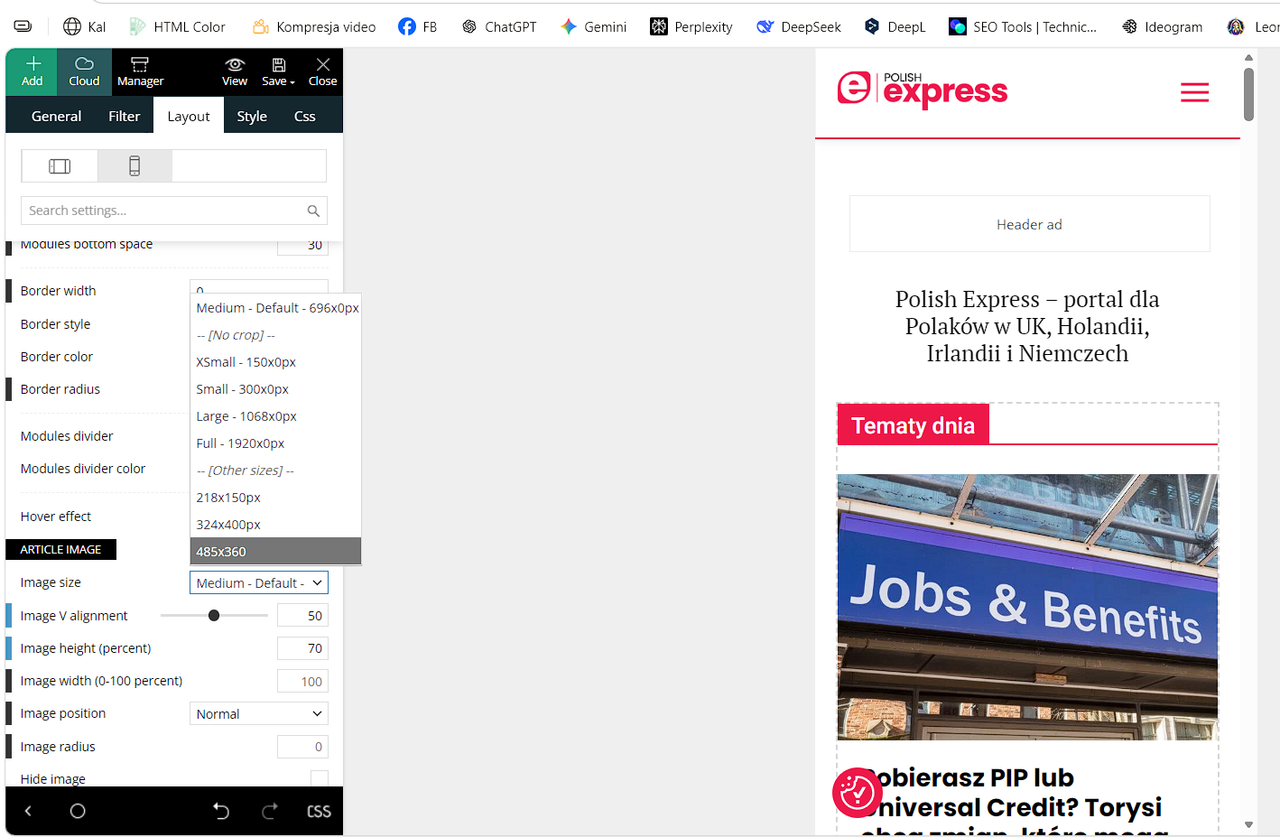
However, the size dropdown (Medium 696, Large 1068, Full 1920, etc.) seems to limit the maximum size included in the HTML.
My questions:
If I select “Full – 1920px” in the mobile template, can mobile devices download the full 1920px file?
Some users report this happens when Mobile Theme or optimization plugins break srcset.
Does selecting Medium/696 or Large/1068 in the mobile template remove larger sizes from the HTML and srcset?
If yes, Discover cannot detect a 1200+ px image.
How does the Mobile Theme handle image sizes when a separate mobile template is used?
Does it override the desktop template or generate its own srcset?
What is the recommended setting for publishers who rely on Google Discover when using separate mobile and desktop templates?
Full/1920 or something else?
I need an official explanation of how this mechanism works so I can configure the theme correctly.
https://i.postimg.cc/Y9Cp6MwT/Zrzut-ekranu-2026-05-06-153554.png
Thanks.
Calin Hi,
The situation is as follows: when the sidebar is removed, a larger image thumbnail is required. However, the issue occurs because the image doesn’t have a thumbnail generated for that size, so it appears as if no thumbnail is available.
This can be resolved by using a thumbnail regeneration plugin to generate the missing image sizes. https://wordpress.org/plugins/force-regenerate-thumbnails/
 muterobert
Is it possible to define my own image size options for Flex Blocks (and/or other blocks)?
For instance, on our front page there is a Flex Block 2 with a viewport image size of 400×0. But the closest options I can select from the Flex Block options are 696×0 or 300×0. The larger one is not optimal for page speed optimization, and the smaller one is not optimal for visual quality. For one image I understand this isn’t a significant issue, but our front page has nearly 50 thumbnails, so the inefficiency adds up.
Ideally I’d like to be able to define the actual viewport size of 400×0 to achieve optimal quality/page speed optimization.
 Chris Baird
 Where do I find a list of image sizes that a given template uses?
If I deactivate the thumbnails in the theme panel – does old (now unused) thumbs get removed?
Working on optimizing site.
Chris BairdIf I activate a new template for the fill site- does the backend take care of activating and deactivating the necessary image sizes for the layouts?
What’s the best image size to use overall? For featured image?
Calin Hi,
You can explore all our demos here: https://demo.tagdiv.com/select_demo/newspaper-prebuilt-websites/?demo-type=all and choose the one that best matches your image sizes and overall layout.
If the issue only affects the single post template, it can be adjusted quickly and easily. However, if changes are needed across the entire site, it’s definitely possible, but it will require a bit more work—each flex block may need to be adjusted individually to ensure the images display properly.
Also, if you can share a link to your website, I’d be happy to take a closer look and suggest the best solution. In some cases, it might be enough to regenerate the images or change the thumbnail size used in the blocks.
Thank you!
 albaniatoday
Why are the images on my homepage or in the sidebar lower quality, but when I open the article the same image appears with much better quality? Is this related to WordPress image sizes or compression?
https://albaniatoday.al
Calin Hi,
I have a suggestion regarding the header AdSense code. Please add it in Theme Panel → Ads → Header.
Make sure the AdSense code is not restricted to a fixed size, so it can use the auto option and adapt to different device sizes: https://i.imgur.com/hfDjxO4.png
Then, in the ad box settings, select “Source code from the theme panel”:
Also, please make sure that no other code is selected for that ad (Image Ad or Custom Ad).
 icedge
 Why WordPress + Newspaper creates ~27 image sizes
Two things are happening at once:
1️⃣ WordPress core creates image sizes
By default WordPress generates:
thumbnail
medium
medium_large
large
plus retina variants (2x)
2️⃣ Newspaper theme (tagDiv) adds many custom sizes
Newspaper is optimized for:
blocks
sliders
modules
mobile / tablet / desktop
retina (2x)
So it registers 20+ custom image sizes, which is why every upload explodes into ~27 files.
👉 This is normal behavior for Newspaper — not a bug.
What image sizes does Newspaper REALLY use?
In practice, Newspaper mostly uses these core groups:
✅ Commonly used sizes
td_696x0 → main article featured image
td_1068x0 → full-width layouts
td_300x220 → small blocks
td_534x462 → medium blocks
td_80x60 → widgets / lists
Retina (2x) versions of the above
⚠️ Many other sizes are edge cases (rare modules, legacy layouts, demos).
Option 1 (Recommended): Reduce image sizes SAFELY ✅
Step A: Disable unused sizes via code
Add this to functions.php (or a custom plugin):
add_filter(‘intermediate_image_sizes_advanced’, function ($sizes) {
$allowed = [
‘thumbnail’,
‘medium’,
‘large’,
‘td_696x0’,
‘td_300x220’,
‘td_534x462’
];
foreach ($sizes as $key => $value) {
if (!in_array($key, $allowed)) {
unset($sizes[$key]);
}
}
return $sizes;
});
📌 This:
Keeps only important Newspaper sizes
Stops WordPress from generating the rest
Option 2: Disable Retina Images (Huge win 🚀)
Newspaper creates 2x images by default.
Turn them off:
Newspaper → Theme Panel → General Settings → Retina Display
➡️ Disable Retina Images
💡 This alone can cut image generation almost in half.
Option 3: Use a plugin (Easiest, no code)
Install Disable Media Sizes or Perfmatters.
Then:
Disable unused WordPress sizes
Leave Newspaper core sizes enabled
⚠️ Don’t blindly disable everything — Newspaper needs some sizes to avoid layout breaks.
Option 4: Regenerate after cleanup (IMPORTANT)
After changing sizes:
Install Regenerate Thumbnails
Regenerate
Delete old unused thumbnails (plugin or server cleanup)
❌ What NOT to do
Don’t disable all td_* sizes
Don’t edit Newspaper core files
Don’t rely only on CDN offloading (it hides the problem but doesn’t fix disk usage)
Best setup for Newspaper (my recommendation)
✅ Disable Retina
✅ Keep 6–8 essential sizes only
✅ Use Bunny / CDN for delivery
✅ Use WebP/AVIF
This keeps:
Layout intact
Disk usage low
CDN fast
 robinspaul
 Thank you so much Calin,
Regarding your below answer about changing the image on the home page of Blockchain Demo:
(“3. You should replace the image with an image that has the same height if you want to look the same https://prnt.sc/ki3r43B-oi4e or at least the height to be bigger than the width for that image”), whatever size we replace it goes to the bottom of the home page blue banner.
I was wondering whether you can let us know the size of the image you used in the above answer? We tried with different sizes, but all of them go to the bottom part of the blue area.
Also, could you please let us know how we can hide the image on Mobile View – the image on the right hand side of the blue home page banner of Blockchain Demo?
Thanks
 DocDigit
 Thank you for this. Will check it.
Can’t you consider handling picture sizes with em (like font sizes) instead of creating different preconfigured images sizes?
DocDigitDear team,
Can you tell me what it would cost to create a widget for Newspaper:
Removing a blog article results in leftovers of various image sizes of the main image.
They are scattered over file locations in /httpdocs/wpcontent/uploads/YYYY
I am looking for a widget that checks the images of non-existing newsarticles and remove them from these directories.
Example:
I have removed a blog article with image afblg.jpg as the main blog image
Newsletter created (depending on the template to be used) a scala of variations of this image:
afblg.jpg
afblg-150×150.jpg
afblg-218×150.jpg
afblg-265×198.jpg
afblg-300×300.jpg
afblg-324×400.jpg
afblg-356×220.jpg
afblg-485×360.jpg
afblg-545×486.jpg
afblg-80×60.jpg
All these images should be removed from /httpdocs/wpcontent/uploads/YYYY/* after the referring blog article is deleted from the Worpress trashcan.
It would be great if users can contribute Newspaper widgets themselves to provide it to the Newspaper community.
Perhaps that may be a very good idea for the new year 2026!
Best regards,
DD
 fedeacyl
Good evening.
I created a page with TagDivComposer, which has a title, then a body with two columns, and then an image below it. The layout looks perfect in the design, and I can edit it for all device sizes. However, when I open it on a mobile phone, only the title, the right column, and the bottom image appear; the left column is hidden. If I rotate the phone to landscape mode, the space where the left column should be is empty.
What could be the reason? It’s really frustrating.
Thank you very much.
 Harry Richards
I am having trouble with my background ad again. I followed the steps in the documentation exactly (https://forum.tagdiv.com/background-ads/). I also ticked the boxed layout under Theme Colors. The problem is that the background doesn’t scale well for different screen sizes. While it looks fine on my screen, the background is running off the page on my client’s screen. Does the background image have to have a certain dimension for this to be avoided? Also, when I tick the boxed layout different elements on the page all have different widths now, which looks messy. How can I avoid that? Thanks
 ETCOO3
Good day, I have tried several times, including reinstalling the demo content, but I can’t seem to change the logo in the Doctors Pro menu as well as the footer. I have tried all formats permitted, sizes, and resolutions, but I thought I saw them changed in the Theme Panel and in the WordPress (customise) backend (besides the footer).
It just refreshes itself in the preview and reverts to the default image or logo.
I am using the Newspaper default in one license, and in this case, Doctors Pro is the one with the issues; however, I can change the Newspaper default theme for the other site without any issues.
With regards to the body, how do I change the image on the homepage in Doctors Pro and in both Newspaper 12 default and Doctors Pro, how do I change the footer copyrights?
Well done once again, with these great themes.
Many thanks.
Simion C. Hi,
That is possible, you can use your own ads if you want.
The ad box element https://forum.tagdiv.com/ads-adsense-overview/ supports simple ads like images and links, like this one https://prnt.sc/Ya7HNQ9byN8v
The sizes are up to you. It depends on where you display the ad and how much space is available there. You can set different images or sizes per device if you want or hide them per device https://prnt.sc/4j1JBrb40TTA There are also options to set the width/height you want in the composer regardless of what size your image is.
I suggest experimenting a bit with the ad box, and let me know if I can help more.
Thanks.
 Swapnil123
Hello,
I am using the Newspaper theme and I would like to add my own personal/custom ads instead of using Google AdSense. Could you please guide me on:
How to upload my custom ad images (e.g., banners, squares, etc.).
What image sizes/dimensions are recommended for different ad placements (header, sidebar, in-article, footer, etc.).
How to insert these custom ads in the theme (e.g., through tagDiv Composer, widgets, or shortcodes).
If there are any specific settings I need to adjust in the theme panel.
I want to make sure the ads are responsive and display properly across devices.
Thank you!
 clover
Hello TagDiv Support,
I’m using Newspaper 12 with the Travel Pro demo.
When I open a single post, the featured image appears very zoomed in instead of showing in its normal proportion.
I have checked the Theme Panel → Template Settings and Post Settings, but I can’t find the exact option to disable cropping or set the featured image to display in full/original size. I also don’t see the “Template for Single Posts” option you mention in your documentation, so I think the site is still using the default theme templates from the demo import.
Could you please let me know:
Where exactly I can change the image crop settings for the featured image in single posts for the Travel Pro demo?
If I need to adjust image sizes in Theme Panel → Image Settings, which image size ID is used for the single post header so I can change only that one?
Thank you for your help!
Best regards,
Calin Hi,
I understand the situation. In this case, I recommend disabling the theme panel thumbnails and keeping only the one for full-width (1920px). Also, consider disabling the default WordPress image sizes, as shown here: https://i.imgur.com/ZRlMLtq.png.
Before making any changes, be sure to back up your database. After that, you can clean the _wp_attachment_metadata entries a database cleanup should handle it.
You might also consider using a plugin like WP-Optimize to assist with the cleanup process.
 regio-online
 Hi Calin,
Thanks for your tips regarding the recommanded thumbs settings. Your suggestion to regenerate would works if those thumbs where on the sae server in our uploads folder. That is however not the case.
Simply put: we have no thumbs. We only have one size (full or 1920) on Google Drive. Inside the _wp_attachment_metadata rows in our postmeta each thumbnailsize for our theme is described and shown if needed, but it does not fysicly exsist anywhere. It is just the one Google Drive image served in different sizes described in that table. There are about 13 sizes and each size is described twice in one row. There is one row for each image and there about 35.000 images. You can do the math for that is over 910,000 seperate rules in postmeta,
Example of _wp_attachment_metadata (first few lines of one row only):
a:7:{s:5:”width”;i:2560;s:6:”height”;i:1394;s:4:”file”;s:40:”Isolatie-Foto-gemeente-Altena-scaled.jpg”;s:8:”filesize”;i:317478;s:5:”sizes”;a:19:{s:6:”medium”;a:6:{s:4:”file”;s:79:”https://drive.google.com/thumbnail?id=1425AFrPRIGp9vQy9TsJIg8W9A1X2G1vo&sz=w300″;s:5:”width”;i:300;s:6:”height”;i:163;s:9:”mime-type”;s:10:”image/jpeg”;s:8:”filesize”;i:10721;s:3:”url”;s:79:”https://drive.google.com/thumbnail?id=1425AFrPRIGp9vQy9TsJIg8W9A1X2G1vo&sz=w300″;}s:5:”large”;a:6:{s:4:”file”;s:80:”https://drive.google.com/thumbnail?id=1425AFrPRIGp9vQy9TsJIg8W9A1X2G1vo&sz=w1024″;s:5:”width”;i:1024;s:6:”height”;i:558;s:9:”mime-type”;s:10:”image/jpeg”;s:8:”filesize”;i:71200;s:3:”url”;s:80:”https://drive.google.com/thumbnail?id=1425AFrPRIGp9vQy9TsJIg8W9A1X2G1vo&sz=w1024″;}s:9:”thumbnail”;a:6:{s:4:”file”;s:79:”https://drive.google.com/thumbnail?id=1425AFrPRIGp9vQy9TsJIg8W9A1X2G1vo&sz=w150″;s:5:”width”;i:150;s:6:”height”;i:82;s:9:”mime-type”;s:10:”image/jpeg”;s:8:”filesize”;i:3789;s:3:”url”;s:79:”https://drive.google.com/thumbnail?id=1425AFrPRIGp9vQy9TsJIg8W9A1X2G1vo&sz=w150″;}s:12:”medium_large”;……… etc.
So, you see that the image sizes need to be cleared inside the database and can not be regenerated.
regio-online In the meantime I also figured out that it is the plugin WP Media Folder that creates the largest amount of db rows in postmeta, wich have everything to do with the set image sizes in the themepanel of Newspaper and WP Core.
In have a question regarding those imagesize settings.
The WPMF Google Drive addon or the theme creates a db row _wp_attachment_metadata, wich holds references to the image file on Google Drive, but does so many different times in many different sizes (se below. I only mention the image size not the whole code. Every size is mentioned twice):
————
https://drive.google.com/thumbnail?id=19EI*************ZWn&sz=w300
https://drive.google.com/thumbnail?id=19EI*************ZWn&sz=w1024
https://drive.google.com/thumbnail?id=19EI*************ZWn&sz=w150
https://drive.google.com/thumbnail?id=19EI*************ZWn&sz=w768
https://drive.google.com/thumbnail?id=19EI*************ZWn&sz=w1536
https://drive.google.com/thumbnail?id=19EI*************ZWn&sz=w2048
https://drive.google.com/thumbnail?id=19EI*************ZWn&sz=w150
https://drive.google.com/thumbnail?id=19EI*************ZWn&sz=w218
https://drive.google.com/thumbnail?id=19EI*************ZWn&sz=w300
https://drive.google.com/thumbnail?id=19EI*************ZWn&sz=w324
https://drive.google.com/thumbnail?id=19EI*************ZWn&sz=w485
https://drive.google.com/thumbnail?id=19EI*************ZWn&sz=w696
https://drive.google.com/thumbnail?id=19EI*************ZWn&sz=w1068
https://drive.google.com/thumbnail?id=19EI*************ZWn&sz=w1920
https://drive.google.com/thumbnail?id=19EI*************ZWn&sz=w1600
https://drive.google.com/thumbnail?id=19EI*************ZWn&sz=w2200
https://drive.google.com/thumbnail?id=19EI*************ZWn&sz=w2800
https://drive.google.com/thumbnail?id=19EI*************ZWn&sz=w3400
https://drive.google.com/thumbnail?id=19EI*************ZWn&sz=w4000
——————-
This looks generated by WPMF, but it are the themepanel block settings => Thumbs on Modules/Blocks and I quess the WordPress thumbnail, meium, large and full settings.
At the moment I have all the thumb sizes turned on (except the retina), but I use 3 blocks in my pages, Beginning with one Big Grid Flex Block 6, several Big Grid Flex Block 1 and several Flex Block 1. With Flex Block 1 I use different views and image sizes to show.
However if I fill out ‘full’ or ‘1920×0’ the images fit in every Block in any size. It is good to know that before I upload an image through the WPMF Google Drive folder in WP Media Library, I first resize every image to max 1400w x 600h in jpg format and compressed to on everage 120Kb an image. At the moment there are over 35.000 images on Google Drive (about 3.5GB total in size).
Question (at last): if I can set every block in my pages to the full or 1920 setting, could I then disable all other thumbnail size settings? There is only one size image on Google Drive, but is delivered (as seens in the db row) in different size.
That is accumulating a lot of unnessary data it seems making my postmeta table very large and prone to disrupption of service.
If it is possible as I asked, I will have to contact WPMF for a way to get rid of the bloat of information no longer needed.
Hope you can make some sense om my message, because even writing it down was complex for myself.
 Ans
Ans Thanks for your reply.
To be clear, for https://imgur.com/PajVRJT, please press the 2nd button in thumbnail regeneration plugin. Did you see if these td_xxx sizes image can be generated in server in your test? Thank you.
My expericence: thumbnail regeneration plugin can show the td_xxx sizes in dashboard page but cannot regenerate those images in server in real run after pressing the button.
Ans Please press the 2nd button in thumbnail regeneration plugin to see if these td_xxx sizes’ image can be generated in server? Thank you.
My expericence: thumbnail regeneration plugin can show the td_xxx sizes in dashboard page but cannot regenerate those images in server in real run after pressing the button.
(FYI, the thumbnail regeneration plugin not updated for 2 years)