
- NewsmagLogo & Favicon
- NewsmagWhat’s included in Newsmag theme package
- NewsmagMain menu
- NewsmagHeader styles
- NewsmagFooter templates
- NewsmagTheme colors introduction
 jim-2
jim-2 eltasjobs
 The LOGO is OK but the MENU is vertical and appears like a broken site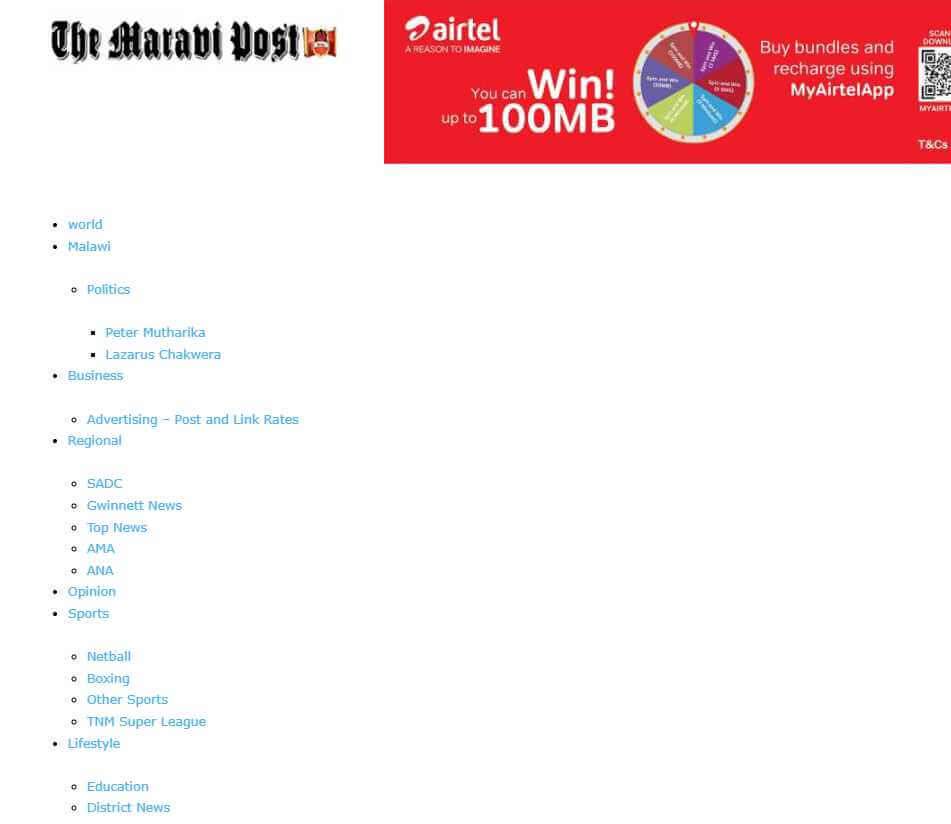
 Børnenes Aarhus
 Hello again,
I have quickly looked into things.
On the front page, I can still see <h1> on both of my logos.
I have disabled them in the frontend under Header logo (Disable H1 on logo) by unchecking the box. The same has been done for the logo in the footer.
I have also gone into Theme panel > Logo and Favicon > LOGO H1 ON PAGES (I have switched it off, so it is now gray instead of blue).
I have checked various subpages, and I believe the issue only affects the front page.
What can we do to move forward from here? This could potentially cause SEO problems for me.
 Anamaria
 Hello,
I checked and those are two different templates also, for desktop -> https://i.imgur.com/awI9Jjo.jpeg
Also, I see that you haven’t changes the logo for mobile. For mobile please edit with tagDiv Composer, select the viewport on phone, select the header logo and change it => https://i.imgur.com/cR7F0v4.png
Thank you!
eltasjobs The Menus and LOGO have been working for the past two years. They were configured correctly. Something happened and I cannot figure it out. I have reloaded the LOGO and updated the MENU. I know it is not a configuration issue
eltasjobsMy MAIN MENU and website LOGO have just stopped showing on desktop. Website https://www.maravipost.com Please help. I have tried everything
 perspektive
Hey how can i Add the normal website logo (“Perspektive”) that can be seen on the normal menu to the sticky Menu?
https://ibb.co/5WZBMmJM
perspektive-online.net
Thanks!
perspektiveHi, I would like the mobile menu widget and the magnifying glass icon that you see at the top next to the website logo to be right-aligned (like the red arrow is showing)
How can I do this?
(perspektive-online.net)
Thanks!
 Nagarig
Hi team, please help us with the Mobile view header design. In mobile view, Menu, logo, and search icon should be in one line. But currently there is a blank space above the logo.
 JGL
JGL Hello team,
I disable the H1 on logo and issue resolved, thank you!
 sco
scoHello,
(1) In woocommerce store, when a product is linked to a brand, I don’t find how to add the brand name or logo to the product page.
How to achieve this?
(2) The brand page doesn’t recognize the woocommerce templates for taxo. already used on the website.
Thanks in advance for your help !
 Bettina
 Hello!
Check this guide: https://forum.tagdiv.com/add-logo-newspaper/
Clear all the cache and check again.
If you can’t handle it, then I can try to help you. Please contact us via email at contact@tagdiv.com and provide the following:
– admin url and credentials
– a link to this topic in order to identify you
Thank you!
 Caprold
 I deleted the original icon and wording originally, they just keep re-appearing. But I see now – once I clicked the mobile-size screen options, it was evident they were still there and intermittently loading.
I tried deleting the tagDiv Mobile Theme plugin, but it leaves the mobile version with an unbranded logo (just text) that I could not figure out how to edit, and also erased the content in my hamburger menu on the mobile end.
Thanks for your help!
Bettina Hello!
You should edit the homepage with the tagdiv Composer, click on the logo and remove those text and image: https://app.screencast.com/GzlhC6XKWygKT
You can also delete the element and add another header logo. There is a recycle bin basket for every element: https://www.screencast.com/t/wFYdqgpo6pT
I recommend you uninstall the Mobile theme and AMP plugin.
Thank you!
CaproldHi all,
I have WP Super Cache installed and all throughout the day at various times the stock logo from the prebuilt site keeps re-appearing right next to my custom logo until the WP Super Cache’s cache is deleted, or caching is turned off and back on again. I don’t know why it’s doing this; I got a screenshot from Google Search Console that showed the same thing – the stock logo to the right of my custom logo. I don’t know how to fix this.
Thanks!
Site is: 604news.com
Screenshot of Search Console result: https://604news.com/cache-issue.png
Newspaper theme, with News Hub Pro prebuilt
Bettina Hello!
Hide or delete the SVG code from there: https://app.screencast.com/h9spxPWv5feo0
You can also add a new logo shortcode and set it up as you want.
Thank you!
 Tony
TonyI am continuing to have issues getting my logo to replace the template default on mobile devices despite changing the logo under ‘phone viewpoint’. Under HEADING LOGO element, I have changed both the LOGO IMAGE and the LOGO RETINA IMAGE to my logo (sized 272×90). But it will NOT change from the default. See images below…
The image below is the logo I am attempting to put in.

FIRST IMAGE: What the site looks like on a mobile phone

SECOND IMAGE: The settings I have changed…

THIRD IMAGE: The logo header under PHONE VIEWPOINT in the Cloud editor.

Two things I can think of that may be preventing this from displaying properly? First of all, I am in the wrong place, maybe it’s under a different setting elsewhere in template settings?
Or… I have to use a specific image size for that particular logo, to which it is forcing the original logo to display instead?
Any help would be appreciated!
Anamaria Hello,
Please check with the tagDiv Composer and disable the H1. For example, H1 from logo(header, footer, mobile, sticky) : https://forum.tagdiv.com/topic/6-h1-tags-on-front-page-bing-have-deindexed-my-site/
Thank you!
Caprold Hi Betina,
I deleted the installation and reinstalled the theme a couple of times as well as the News Pro template, lost a few articles but everything was working fine til an hour ago: I turned off the “view count” button in the theme panel, and then the responsive version started being shown on desktop sites, and people also started seeing the original stock “NewsHub” logo alongside mine after I had deleted it (and after they had seen only mine).
I have no idea what’s going on now but at least the articles are displaying, despite the rest being broken
Børnenes AarhusHi tagDiv Support Team,
I’m having an issue where the <h1> tag around the logo isn’t being removed, even after enabling “Disable H1 on logo” in both the frontend (tagDiv Composer) and backend (Theme Panel). I’m running Newspaper version 12, updated from version 8, and working in a test environment to redesign my site. My goal is to fix a “Multiple H1” issue flagged by Screaming Frog, where the logo has an empty <h1> alongside the page title’s <h1>.
Here’s what I’ve tried:
In tagDiv Composer (Frontend):
I imported a new header from Cloud Library.
Edited the “Header Logo” block, found “Disable H1 on logo” (a checkbox), checked it (enabled it), and saved the template.
Assigned the new header to the homepage in Theme Panel > Header > Main Menu.
In Theme Panel (Backend):
Went to Theme Panel > Header > Logo.
Found “Disable H1 on logo” (another checkbox), checked it (enabled it), and saved settings.
Cache Clearing:
Cleared W3 Total Cache (“Empty All Caches”).
Cleared Chrome browser cache and tested in incognito mode.
Despite these steps, the <h1> tag remains in the source code. Here’s an example of what I see when inspecting the page in Chrome:
html
<h1><span class=”tdb-logo-img-wrap”> </span></h1>
This empty <h1> causes a “Multiple H1” issue, as my page titles (e.g., from “Single Post Title”) also use <h1>.
What could be overriding the “Disable H1 on logo” setting? Is this a known issue after updating from version 8 to 12? Could old templates or settings from version 8 be interfering? Any help would be appreciated!
 Simion C.
 I modified the code for the height of the logo to also include tablet, now it looks fine https://prnt.sc/oVcD3y8s9FtZ
Thank you!
 GusV
GusVHello Support Team,
I am trying to to upload my custom logo onto the Header Template – Magazine PRO which is visable in the Tagdive page editor however when I save it the header does not show on the live browser please see images:
http://greatincomes.com/wp-content/uploads/2025/03/1.jpg
http://greatincomes.com/wp-content/uploads/2025/03/2.jpg
Thanks
Gus
 accursi
 You are great!
You ran everything.
JUST ONE THING…
The logo in video resolutions from 768 to 1024 is huge across the header.
What CSS solution should I make?
Thank you Thank you Thank you
Simion C. Checking now.
1. There was some padding there and that caused the menu items to appear not centered vertically. I removed that padding and it looks fine now https://prnt.sc/1doWFdOfs8jq
2. The logo on mobile was already looking fine by the time I checked https://prnt.sc/jYinsehWY0dz I see you corrected the problem in the meantime.
3. The logo is first loaded in full size and then resized by the CSS code. To remove that effect or at least reduce it, the CSS code could be loaded faster, in this panel here https://prnt.sc/RAk9j2_ZLHB8 I moved parts of the code there, and now the header doesn’t even jump on refresh/load. It loads much better. Please check it as well.
Thank you!
accursi Two problems remain.
1) I can’t remove the zoom effect of the loading header SVG logo.
2) One concerns the topbar: the menu items are no longer centered in the gray bar.
We need help!
Thank you!



