
- NewsmagLogo & Favicon
- NewsmagWhat’s included in Newsmag theme package
- NewsmagMain menu
- NewsmagHeader styles
- NewsmagFooter templates
- NewsmagTheme colors introduction
 grecofra
Hello,
Can you help me to find where this code is located in order to cancel it? It triggers only on mobile device and shows an advertising 320x100px sitewide. It seems inside tha <body> and <header> but I can’t find wher it is. It’s not in Theme panel—> ADS or in header.php, etc.
This is the code:
<div id=”eadv_pos_7_f266282e8212cb442d88b92eda347b96″ style=”width: 320px; height: 100px !important;” class=”eadv-docked eadv-docked-bottom”><iframe id=”eadv_iframe_i16366_f7_f266282e8212cb442d88b92eda347b96″ style=”width:320px !important;height:100px !important;border:0px none;” scrolling=”no” frameborder=”0″ marginwidth=”0″ marginheight=”0″ sandbox=”allow-forms allow-pointer-lock allow-same-origin allow-scripts allow-popups allow-popups-to-escape-sandbox” srcdoc=”<!DOCTYPE html><html><head><title>eADV</title><meta charset=&quot;utf-8" /><style>body{height:auto !important;text-align:center;margin:0;}</style></head><body><script type="text/javascript">var eadv_pbnf = ‘1’;</script><script type="text/javascript" src="https://delivery1.eadv.it/delivery.php?c=12&f=7&vc=99077f0660a78&id=16366&url=ilfattodicalabria.it&m=iframe&pare=0g784g909e4g1509873310905&cv=&dv=x:414|y:736|ww:414|wh:736|flash:0|position:docked|connection:unknown|protocol:http&si=1467&rc=f266282e8212cb442d88b92eda347b96&m=js"></script></body></html>”></iframe></div>
I inserted in my website a few code for display advertising. I copied code from the Ad network and I inserted it in sectione Theme panel –> ADS. In this section there are 4 code that I can modify or cancel without problems.
The problem is the code above because I can’t find where it is and of course I’m not able to cancel it from my website. I hope you can help me.
Thanks,
Michele
 emil_bo
Hello, I am using style 11 of the Newspaper theme. However, the height of the logo area (where the site title is displayed in text) is too big (too much white space), and I would like to make it smaller, such that all content from below moves up accordingly. Please help me with some advice on what kind of custom CSS I might use to achieve this.
In CSS terms, I see that classes td-header-sp-logo or td-banner-wrap-full are responsible for styling this area. I have tried to adjust the height with custom CSS, but with no effect. Please advise.
 brue
brue I m talking about just switching element for languages (or anything).
Ok, for Top Bar i managed to implement <?php stl_show_selector('oneline', '/', 'ћирилица', 'латиница') ?> by editing header header-style-1.php (since i m using that one).
But trick is, that i ‘ve seen only when i implemented it, that it wont be visible on mobile, as Top Bar isn’t visible for mobiles.
So, i m trying now to edit header-menu.php and put that line, but i m not sure where it would be good to place it in code (as i m not programmer).
My question is – where to put that line in code of header-menu.php so result would be that switch between menu items and search on the right at desktop, and between logo and search on mobile. Therefore in both cases, just left from search. If not possible, then in all cases far right, after search.
Thanks.
-
This reply was modified 8 years by
brue.
 lemads
 Thanks for the reply. I’m not so good at that code thing, so can you help med more specifically
Lets say that the website is
http://byroetistruer.dk/
And the image is
http://byroetistruer.dk/struernyhed/wp-content/uploads/2017/11/logo_web.jpg
How would that look in the code
 Zeeshank9
I updated Newsmag 4 , And my home goes blank. Nothing on home page and also nothing on posts, Only logo and Menu appears, Help Please Thanks
 Edward
 This HTML-code for example:
<a href="https://demo.tagdiv.com/newspaper/" target="_blank"><img alt="" src="https://demo.tagdiv.com/newspaper/wp-content/uploads/2017/04/newspaper-rec300.jpg" /></a>
where:
https://demo.tagdiv.com/newspaper/ – is your “McDonald website” 🙂
https://demo.tagdiv.com/newspaper/wp-content/uploads/2017/04/newspaper-rec300.jpg – is your “McDonald logo” 🙂
Live example:

lemadsIt’s easy to ad an image til an ad widget. But how do I make the image a link to the ads website.
Like: An image of McDonald logo goes to McDonald website when its clicked
Regards
 Simion C.
 Hi,
There are options to display the normal header logo or the mobile logo, when the menu is sticky. This setting is in the theme panel
– https://www.screencast.com/t/yM7MNOb1EIU
So you can either show the default website logo, or the logo used on mobile.
Thanks
 Bogdan B.
 Hello,
The footer logo can be changed from the footer settings here: https://www.screencast.com/t/EKAvhjG6B7p
For the mobile version. it depends if you use the mobile theme plugin or not. If you do not use it, then it;ls the same setting as above. If you use the plugin , then all of the mobile theme settings will be found in the mobile theme section at the very bottom of the theme panel
Thank you!
 Arafat
Sticky menu problem, this my desktop site logo: https://prnt.sc/h5mkj2 and Mobile site logo: https://prnt.sc/h5mkou
I want to use sticky menu on my site but when I scroll up or page up then sticky menu show mobile site logo: https://prnt.sc/h5mkou
How to solve this problem?
Simion C. Hi,
The mobile theme plugin does not add extensive options to customize the website specifically on mobile. All the settings can be seen on the mobile theme settings, in the theme panel
– https://www.screencast.com/t/wk19vspF
– https://www.screencast.com/t/jbi3duoZS
Here you can find more information about the mobile theme
– https://forum.tagdiv.com/the-mobile-theme/
The logo in the footer when on mobile, will be the one set in the footer section
– https://www.screencast.com/t/hw4o2S9jbKlQ
The About us text can also be modified there, in that section.
If you would like to place a revolution slider on a mobile page, enter the slider shortcode in the mobile editor for that page
– https://www.screencast.com/t/OKRydevZWSd9
– https://www.screencast.com/t/YLe8R2WIAu
– https://www.screencast.com/t/c7iKYrjQddP
Thanks
Simion C. Hi,
There will have to be a header, to display the website logo and navigation menu. The header cannot be disabled.
The logo can be changed in the theme panel
– https://forum.tagdiv.com/logo-favicon/
The demo you have installed uses header style 11, this header style does not have a limit for the logo size. You can use any image size as logo.
You will have to create your own menu, based on your own categories for posts. Here is more information about creating the menu, and also the mega-menu option
– https://forum.tagdiv.com/main-menu/
– https://forum.tagdiv.com/mega-menu/
The revolution slider can be configured to display posts from the categories you want
– https://forum.tagdiv.com/import-revolution-sliders-on-demos/
So after setting the header and revolution slider as needed, you can go ahead and choose which block type, grid or full grid you want on the homepage. You can view them all as I mentioned in the live demo (Features menu).
First please check this tagDiv composer tutorial
– https://forum.tagdiv.com/tagdiv-composer-tutorial/
Blocks have many configuration settings, this is a guide where each is explained
– https://forum.tagdiv.com/block-settings-guide/
Modules that form blocks and grids will display the post title, additional post meta, and excerpt. The meta information can be disabled if you wish
– https://www.screencast.com/t/DF872Ac2sR
Excerpt length can be controlled as well – https://forum.tagdiv.com/excerpts-introduction/
When the module is clicked you will be directed to the post page, that is the intended functionality.
The baby blog demo consists of the revolution slider on top, then a latest articles section with a sidebar. The latest articles section is automatically added when the required page template is selected. More about it here
– https://forum.tagdiv.com/page-templates-2/
Posts will have to be created and published. Edit published posts and modify them if you wish. The tagDiv composer cannot be used to edit posts, it is a page editor.
Please correct me if I misunderstood something, and let us know if you need further help.
Thanks
 jcellis15
How do you get rid of the logo in the footer that came with the theme.
Also howdy you get rid od that same logo when it comes to the mobile style?
 Karan Gandhi
Dear Team,
I have installed the mobile plugin in my site http://www.baqqit.com
however I want to edit the footer logo image and About us…how to do it…
Also, how to edit the mobile template layout…like i want to show some rev_slider over there…how can i
 thepostmillennial
Hi there,
I hope you are having a nice day so far. I love the Newspaper 8 theme but one thing I haven’t been able to figure out is how to only enable the mega menu. Is it possible to have a menu format that looks like https://www.huffingtonpost.com/ with the mega menu toggle on the left, my logo in the middle and then my social profiles on the right?
Thanks so much for reading and I look forward to hearing from you.
Best, Madison
 Little Nik
 Hi Simion,
Thank you so much for this – I forgot to mention sorry I’m using the baby blog demo which I’m loving – it’s clinical like I wanted.
What I’m struggling to work out how to do (or find which of the elements it actually is) is have it set up how i’m trying to. For instance I’d like my home page for the moment to literally be no header, my logo, the rev slider, then two blocks for the content etc, the instagram below it, then the footer.
I was hoping that when you’re actually looking at the home page, it stays neat and almost at a glance so the two blocks will have their respective images on them with only one short paragraph underneath so the page doesn’t start looking busy or have two much content to scroll down. Once you then click the image/paragraph you’re then ‘taken’ to the content instead of it being on the homepage if that all makes sense?
It’s currently set up using big grid 4 I think so I’d managed to get the two images on there when I placed them from the elements menu, but once I started editing it, when I preview it it’s all on the actual home page rather than behind the image in the block as I’d hoped. Have I selected the wrong element?
I’m sorry for such basic questions! I have to say I’m also struggling to work out where’s the best place to edit the actual posts. It seems that you select the elements and layout from the TagDiv composer and then go into my wordpress admin page to actually edit the content – is this correct please? If in the TD composer page the blocks look how i want them to. If i go into the WP admin page and then save and preview after the text and images are altered it looks entirely different and is all on the home page as i mentioned above?
Simion C. Hi,
That is referring to having a different logo on post pages. If you want to create such conditions, you can try and do it where the theme uses the uploaded logo in the theme panel. These are the files where you can make the code customization
– https://www.screencast.com/t/HZUWTLvpm
– https://www.screencast.com/t/sDpMh4gcB
Thanks
 lehrhauseditors
 Hi there
I just found this tutorial – https://www.webhostinghero.com/how-to-change-the-custom-logo-depending-on-the-page-in-wordpress/. How can we use the function they provide with the Newsmag theme?
Thanks!
 Thalisson
 Hello,
I already did this using Jetpack. But the mistake continued.
There are some errors in the theme. It even gets correct for a while, but after uploading new images, unfortunately changes.
Yesterday I uploaded my LOGO and it went to Google News image hours later.
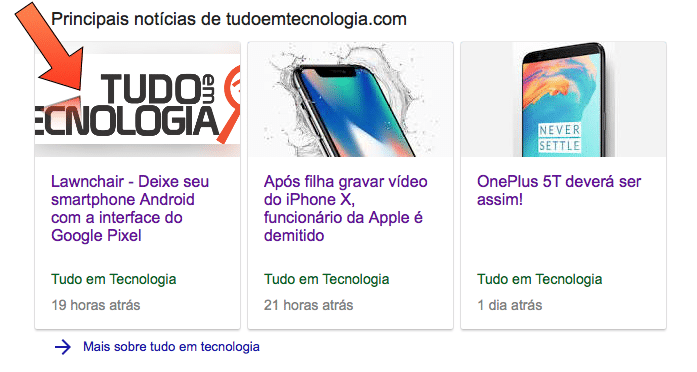
Thanks
Simion C. Hi,
So you want to prevent the dragging of the logo image, from what I understand. There are some solutions in this topic
– https://stackoverflow.com/questions/7439042/css-js-to-prevent-dragging-of-ghost-image
Try the CSS method maybe – https://www.screencast.com/t/pbXpV0aFz
.td-header-sp-logo img {

-webkit-user-drag: none;

-khtml-user-drag: none;

-moz-user-drag: none;

-o-user-drag: none;

user-drag: none;

}
Thanks
 Catalin
 Hello Ryansmccain,
Notice that you cannot use at the same time the Text Logo and Tagline with the Image Logo, sorry! You should choose only one of them.
Thanks for your understanding!
Simion C. Hi,
I understand now what you mean. You want to create some space above and below the logo image, in order to display a background color. Something like this maybe
– https://www.screencast.com/t/yhsqEsnJLG
.td-header-style-9 .td-banner-wrap-full.td-logo-wrap-full{

padding-top: 50px;

padding-bottom: 50px;

}
Set a background color for the header as shown in the theme panel, and use the code.
Thanks
 haqemcom
 If i want to edit the logo, what file name for edit?
 Ryansmccain
 Oh I see. I read this incorrectly:
“The other header styles use only images for logos.”
I read that like it meant the others use ONLY images and this one uses images AND text.
thanks.
Catalin Hello JessieT,
Our theme has a big list of header styles which uses the logo in different dimensions, according to our documentation here -> https://forum.tagdiv.com/header-styles/ If you want to use the Logo in full-width you should use the header style 10 for example because this kind of header uses the logo in full-width.
Thanks for your understanding!

