No search results were found in Documentation!
 RaiderReader
 Sorry Again!
This has no dividers by the logo: https://app.screencast.com/G8nU5FUkp8Yx9
This one does when you are signed in as a user: https://app.screencast.com/e93P2SDUUXnz7
 Mix King
Hello,
I’ve noticed an issue when sharing articles on certain social media platforms:
The display is abnormal, either failing to show the article’s image preview or truncating the title.
Alternatively, the platform may directly display the website logo instead of providing a preview of the shared content.
I would greatly appreciate guidance on resolving these issues.
Thank you
https://app.screencast.com/eo7w3FqczBYRt
https://app.screencast.com/lQmFAc8dg4A3p
 Bettina
 Hello @ziamoon!
You can delete the logo element and add the other one. So, the overlapping settings will be deleted as well.
If you use the translations from the theme panel, then you can change the default language displayed on your website.
I recommend you use the gTranslate plugin.
This issue with AMP scan failure has already been discussed here: https://forum.tagdiv.com/topic/after-update-theme-9-to-12-site-loading-very-slow-without-enabling-caching-on/ and here: https://forum.tagdiv.com/topic/site-scan-failed-try-again-amp-newspaper-theme/
Please use the correct filter for each page: https://forum.tagdiv.com/flex-block-settings-guide/
Thank you!
 Anamaria
 Hello,
@jtoney Please provide the link to your website.
@MusicAndGigs For mobile please edit with tagDiv Composer, select the viewport on phone, select the header logo and change it => https://i.imgur.com/cR7F0v4.png https://www.youtube.com/watch?v=HXQQygkCCJo -> https://forum.tagdiv.com/add-logo-newspaper/
For mobile menu, you need to edit the page to change the logo -> https://i.imgur.com/yoigVA1.png
Thank you!
 MusicAndGigs
 I have the same error but mine is that my mobile site has the websites standard logo (Chained) and I can’t find the option to change it yet the Desktop and Tablet version are my website… http://www.musicandgigs.com
 jtoney
When I’m on the mobile version of the website it’s constantly losing the menu and logo.
I can go back and disable and enable it but after some time it disappears.
 ziamoon
I am reaching out to address a few issues I’ve encountered on my website, which is hosted on a LiteSpeed server. Your assistance in resolving these matters would be greatly appreciated.
City Logo Overlap on News Headings:
Issue Description: The city logo overlaps with the news headings when viewed on a laptop screen at 100% zoom. However, the display appears normal on a 24-inch screen.
Desired Outcome: I would like to resolve the overlap issue so that the logo and news headings are displayed correctly across all screen sizes, particularly on laptop screens at 100% zoom.
Permanent Chinese Language Option After Exploring Translation:
Issue Description: After exploring translation features on my website, the Chinese language now appears permanently as an option for users. This was not intended to be a permanent feature.
Desired Outcome: I would like to completely remove the translation feature from my website, ensuring that the Chinese language option no longer appears to users.
AMP Site Scan Failure:
Issue Description: When attempting to run a scan for AMP, I encounter an error message stating, “Site scan failed. Try again.” This issue persists despite multiple attempts.
Additional Context: It’s important to note that my website is hosted on a LiteSpeed server, and switching to Nginx or Apache servers is not an option for me.
Desired Outcome: I seek guidance on resolving the AMP site scan failure to ensure the site is fully compatible with AMP standards without encountering scan errors.
Displaying News Opinions from Another Category on the Main Page:
Issue Description: I am trying to add news opinions from a specific category to display on the main page, but they are not showing up as expected.
Desired Outcome: I need assistance in correctly configuring the website to display news opinions from the specified category on the main page, ensuring they are visible to visitors.
 keverix3
Please take a look at the front page of my site, https://theindustry.biz
1. Feature images for logos are not resizing to fit.
2. My sitemap is unable to fetch posts it’s stuck at 0
3. When I add ad code after the posts it is not showing on the site, worked before.
Thanks
 kreativewire
How can I get all the logos to fit inside this circle? Veracity Networks looks correct, rest don’t.
 happypeoplepickleball
https://demo.tagdiv.com/newspaper_shop_kids_store/
How do I edit the Header Logos across the top of this page?
Free Shipping, Free Returns, Reward Program…..I like the look of the logos (images) but I need to change the text on them.
Where can I find the My Account and Cart at the top right? Is this a section? Header?
Thanks
Anamaria Hello,
1. You can upload the font to the theme panel under “custom fonts” by following the instructions at https://forum.tagdiv.com/font-customization/. After doing this, you should typically not experience this problem.
2. You have a cloud template, so you need to make the changes with tagdiv Composer and delete the logo from the theme panel. For mobile please edit with tagDiv Composer, select the viewport on phone, select the header logo and change it => https://i.imgur.com/cR7F0v4.png https://www.youtube.com/watch?v=HXQQygkCCJo -> https://forum.tagdiv.com/add-logo-newspaper/
3. Usually, the color and image are set on the row, so please edit with tagDiv Composer and select the row and go in the tab CSS https://i.imgur.com/UkgqKNM.jpg -> https://forum.tagdiv.com/topic/background-color-of-the-main-menu-be-changed/
Thank you!
 Amer Staubmann
would you please describe or give a link how I can add a short movie in header Background behinde logo and name of the site?
 peters1964
Hello,
1. i would like to set the fonts on the website and the following pages uniformly. Where exactly can I do this? I don’t want to use Google fonts because of the General Data Protection Regulation.
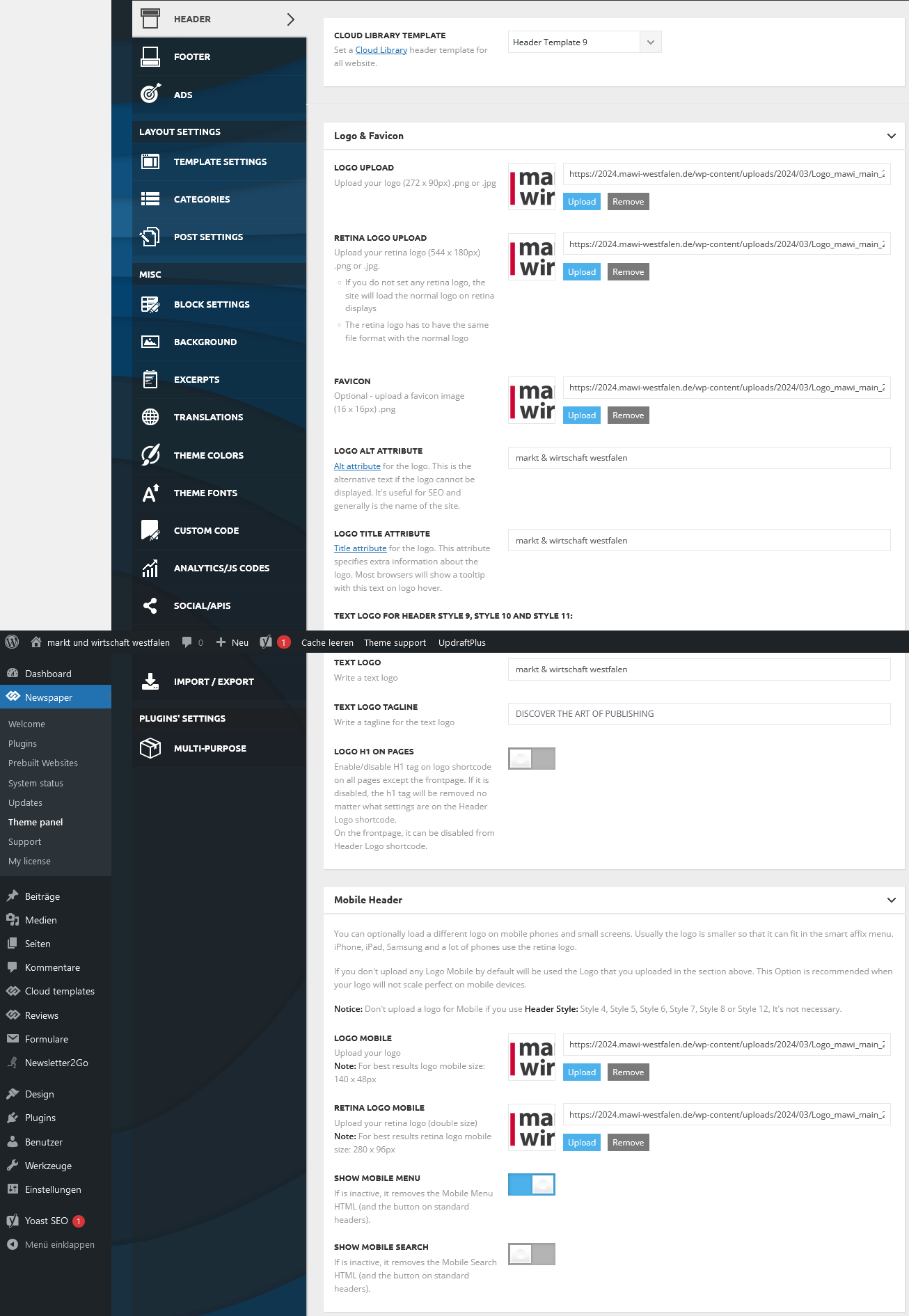
2. my logo on the website is not displayed in the header on my mobile phone. What do I need to change in the settings or do I need to install the mobile theme panel?
https://2024.mawi-westfalen.de/wp-content/uploads/2024/03/Screenshot-2024-03-17-at-17-26-00-Theme-panel-‹-markt-und-wirtschaft-westfalen-—-WordPress.png
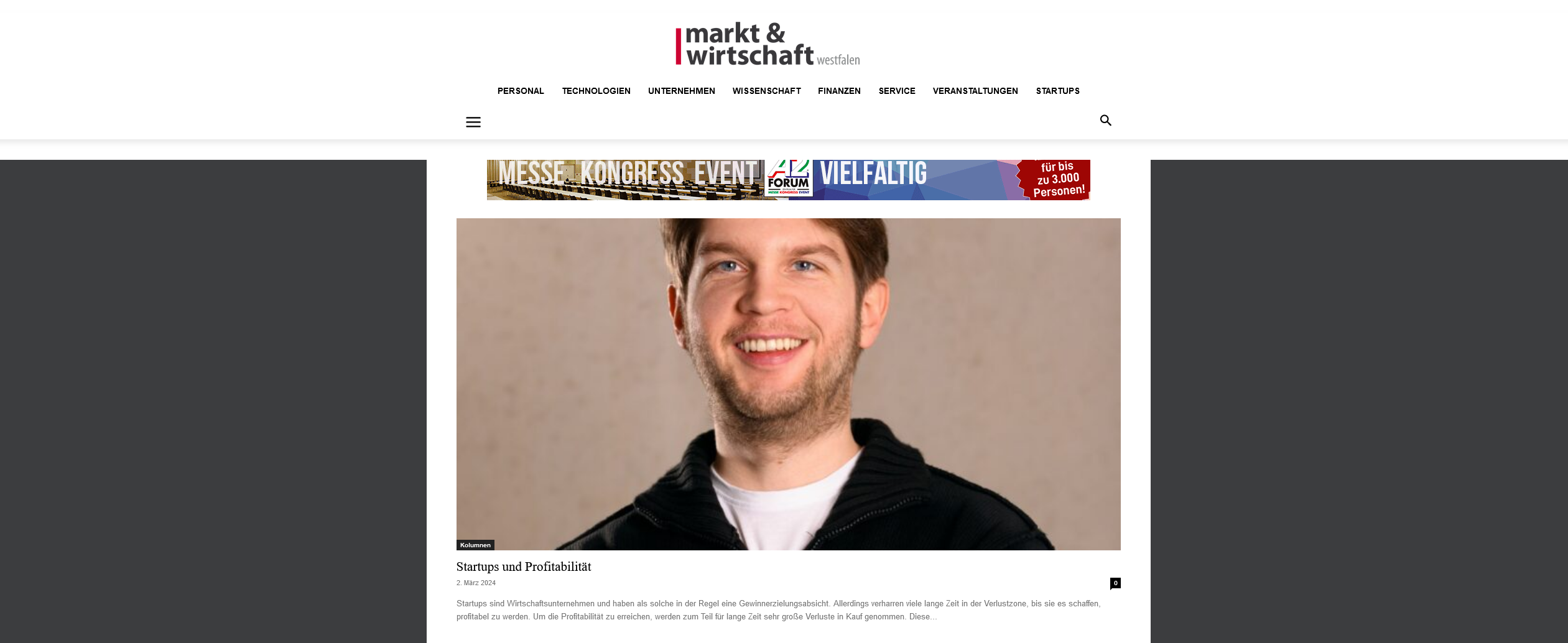
3. where can I set the background color for the header area?
https://2024.mawi-westfalen.de/wp-content/uploads/2024/03/Screenshot-2024-03-17-at-17-42-11-Home-markt-und-wirtschaft-westfalen-1.png
Thank you for your support.
Christiane
 Chaonya
Website: Africa Bush Expeditions
Theme: Parenting
Images are uploaded to WordPress media gallery but cant insert into block elements including logo and icon.
Also website updates and changes are not reflecting on mobile site.
 ozkrsanchez
Please show me how to use “Form Gallery” component, I need to use this tool.
I will use it for a carousel of images (logos).
Anamaria  mudiii3
I’ve successfully updated the logo text in the sticky mobile header, and this change is visible on all pages except the homepage. On the homepage, the sticky header still displays the default “town talk” text.
website: https://kashmirdastak.com/
Bettina Hello @newsblaze!
Check in the TagDiv Composer and disable the H1. For example, H1 from logo(header, footer, mobile, sticky): https://forum.tagdiv.com/topic/6-h1-tags-on-front-page-bing-have-deindexed-my-site/
Thank you!
 newsblaze
But a few days ago, I notices that I have 2 H1 hags, both for the logo image.
Each one rendered by different code.
I saw that many people have complained about this, without it being resolved.
This file may contain the location of that:
td-cloud-library/shortcodes/header/tdb_header_logo.php
The function render() is called twice and I believe that inserts the two lines below into the HOME page.
I did have a standard logo and a retina logo, but I removed the retine logo because I thought that might be the cause of this, but removing it didn’t help.
One is probably display:none; in the CSS
Isn’t there a better way to do this than to have two complete H1s in the page ?
Some software may see the CSS, but some is not that smart.
For example, RankMath thinks there are 2x H1 tags
I think Google ignores one of them.
But I saw that some people using Newspaper theme had up to 6 H1 tags.
In the rendered page, here are the two lines:
Line 456
<style>.tdb_header_logo{margin-bottom:0;clear:none}.tdb_header_logo .tdb-logo-a,.tdb_header_logo h1{display:flex;pointer-events:auto;align-items:flex-start}.tdb_header_logo h1{margin:0;line-height:0}.tdb_header_logo .tdb-logo-img-wrap img{display:block}.tdb_header_logo .tdb-logo-svg-wrap+.tdb-logo-img-wrap{display:none}.tdb_header_logo .tdb-logo-svg-wrap svg{width:50px;display:block;transition:fill .3s ease}.tdb_header_logo .tdb-logo-text-wrap{display:flex}.tdb_header_logo .tdb-logo-text-title,.tdb_header_logo .tdb-logo-text-tagline{-webkit-transition:all 0.2s ease;transition:all 0.2s ease}.tdb_header_logo .tdb-logo-text-title{background-size:cover;background-position:center center;font-size:75px;font-family:serif;line-height:1.1;color:#222;white-space:nowrap}.tdb_header_logo .tdb-logo-text-tagline{margin-top:2px;font-size:12px;font-family:serif;letter-spacing:1.8px;line-height:1;color:#767676}.tdb_header_logo .tdb-logo-icon{position:relative;font-size:46px;color:#000}.tdb_header_logo .tdb-logo-icon-svg{line-height:0}.tdb_header_logo .tdb-logo-icon-svg svg{width:46px;height:auto}.tdb_header_logo .tdb-logo-icon-svg svg,.tdb_header_logo .tdb-logo-icon-svg svg *{fill:#000}.tdi_10 .tdb-logo-a,.tdi_10 h1{align-items:flex-start;justify-content:center}.tdi_10 .tdb-logo-svg-wrap{display:block}.tdi_10 .tdb-logo-svg-wrap+.tdb-logo-img-wrap{display:none}.tdi_10 .tdb-logo-img-wrap{display:block}.tdi_10 .tdb-logo-text-tagline{margin-top:2px;margin-left:0;display:none}.tdi_10 .tdb-logo-text-title{display:none}.tdi_10 .tdb-logo-text-wrap{flex-direction:column;align-items:flex-start}.tdi_10 .tdb-logo-icon{top:0px;display:block}@media (max-width:767px){.tdb_header_logo .tdb-logo-text-title{font-size:36px}}@media (max-width:767px){.tdb_header_logo .tdb-logo-text-tagline{font-size:11px}}@media (max-width:767px){.tdi_10 .tdb-logo-img{max-width:160px}}</style><div class=”tdb-block-inner td-fix-index”><h1><span class=”tdb-logo-img-wrap”> </span><span class=”tdb-logo-text-wrap”><span class=”tdb-logo-text-title”>AxcessNews</span><span class=”tdb-logo-text-tagline”>Business News Channel</span></span></h1></div></div> </div></div><div class=”vc_column tdi_12 wpb_column vc_column_container tdc-column td-pb-span4″>
Line 470
<style>.tdi_26 .tdb-logo-a,.tdi_26 h1{align-items:flex-start}.tdi_26 .tdb-logo-a,.tdi_26 h1{justify-content:center}.tdi_26 .tdb-logo-svg-wrap{display:block}.tdi_26 .tdb-logo-svg-wrap+.tdb-logo-img-wrap{display:none}.tdi_26 .tdb-logo-img-wrap{display:block}.tdi_26 .tdb-logo-text-tagline{margin-top:2px;margin-left:0;display:none}.tdi_26 .tdb-logo-text-title{display:none}.tdi_26 .tdb-logo-text-wrap{flex-direction:column;align-items:flex-start}.tdi_26 .tdb-logo-icon{top:0px;display:block}</style><div class=”tdb-block-inner td-fix-index”><h1><span class=”tdb-logo-img-wrap”></span><span class=”tdb-logo-text-wrap”><span class=”tdb-logo-text-title”>AxcessNews</span><span class=”tdb-logo-text-tagline”>Business News Channel</span></span></h1></div></div> </div></div><div class=”vc_column tdi_28 wpb_column vc_column_container tdc-column td-pb-span4″>
Bettina Hello @MarijaZT!
This issue has already been discussed here; please check: https://forum.tagdiv.com/topic/using-featured-image-instead-of-logo-when-posting-post-link-on-socials/
Thank you!
 max-4
max-4 Hi, I just visited your site: https://glamsham.com/ you have the h1 tag twice and 4 times alt=”Logo”
max-4 Hi,
It’s simple when you put the sticky header with the logo that already gives you 2 h1 tags plus 2 for mobile, then you have to deactivate 3 and leave only one, problem, that’s it you still keep 4 times the title tag and 4 times the Alt tag, and with respect to Google it’s forcing on the title and keywords at the same time, really bad for SEO.
 jozefradi
 Hello, The main problems were. 1) The footer and header were not the same on all pages. Example, in the articles it was different and in the pages too. 2) With the mobile phone you see differently depending on the mobile phone and as if the mobile page is missing. 3) While I share my articles on social platforms, I take the cover logo as an image and not that of the individual post.
 Siebren10
Hi! Since several days, the results in Google Search show a ‘default app’ text in the logo area of http://www.streamwijzer.nl, even though the favicon in tabs is still being showed. What’s going wrong? I have a logo to all settings in the Theme Panel for several years already.
Warm regards,
Siebren | Streamwijzer
Anamaria Hi,
You need to translate the English (original language) header for each language in part – https://i.imgur.com/CDmeHCf.png you should have them for each language cloud template – https://i.imgur.com/4agmUtg.png
A much simpler and faster alternative is to duplicate the cloud template you want to use in another language, edit it and select the desired language – https://i.imgur.com/z1CqgBo.png (edit the name) – https://i.imgur.com/dPX8ROs.png – https://i.imgur.com/Lc81IgP.png This method needs to be used to translate all cloud templates.
The pages are created with tagDiv Composer which is a page builder, when WPML is used it cannot translate everything that was built with the page builder and must be edited for each language separately. Please open the page in the editor and click on translate – https://i.imgur.com/TXH6y1c.png. After, if you duplicate the template, you can edit it to change the logo, menu, and whatever you want.
When you make the corrections, make sure you are on the page with the language you are editing, and if you use the cache, or object cache, please clear it.
Thank you!