- NewsmagLogo & Favicon
- NewsmagWhat’s included in Newsmag theme package
- NewsmagMain menu
- NewsmagHeader styles
- NewsmagFooter templates
- NewsmagTheme colors introduction
 Lucian
 Hi,
You can do this from Appearance -> Menu, add a new menu item and in Navigation Label section add image source like this: http://screencast.com/t/AInGu7tZfwA
Image Source should look like this:
<img src="http://demo.tagdiv.com/newspaper/wp-content/uploads/2013/08/logo-top2.png" />
And you will get this result: http://screencast.com/t/pVqRCnkBmfs
Also use css to style the image if it doesn’t fit well.
Thanks
 JasonEdwards
Hello
Is it possible to use ads or a static jpeg next to the header logo and to have these changing within each category?
For example I want to use a Main logo throughout the site and next to it on the right use a logo that will differ depending on the section/category you are in. If you were on a business news page it would show a company business logo on the right, if you were in the sports section it could show a different logo, sports related. I have companies that wish to sponsor categories of the website and so their logo or ad would link to a sponsor page.
I hope this makes sense.
Thank you
Jason
 r1kay
r1kayWhen viewing my site on mobile, the retina logo gets loaded after the whole page is rendered. So it leaves a blank spot on top of the page untill the page is finally loaded. Is this a known issue?
 adhi
adhiin theme option – theme color -> header color : we can choose color…
but can you make image for background in header?
i mean if we choose header style 6 – menu + (full width logo)
is very cute if can put image background in below logo
Thanks
Lucian Hi,
Thanks Christopher!
@mavincan
Why do you not use our log-in modal these allows users to log-in and register http://screencast.com/t/oaxswL5JmJw
Lucian Hi,
I have checked your site and seems like you have managed to get the logo showing, it looks fine. If you have any other problems please let me know.
Thanks for your message!
 dhvanesh
Hi,
Is it possible to have site logo beside navigation in header?
Like this: http://www.screencast.com/t/iMHBEc5W
 simchris
 See how to with WordPress docs; the login form is not part of the theme, but can be modified through CSS and the functions.php file where most things are modified without a plugin; see:
http://codex.wordpress.org/Customizing_the_Login_Form
Change the Login Logo
To change the WordPress logo to your own, you will need to change the CSS styles associated with this heading:
<h1>Your Site Name</h1>
WordPress uses CSS to display a background image — the WordPress logo — in the link (<a>)inside the heading tag (<h1>). You can use the login_enqueue_scripts hook to insert CSS into the head of the login page so your logo loads instead.
To use the code below, replace the file named site-login-logo.png with the file-name of your logo, and store your logo with your active Theme files in a directory named /images:
function my_login_logo() { ?>
    <style type="text/css">
        body.login div#login h1 a {
            background-image: url(<?php echo get_stylesheet_directory_uri(); ?>/images/site-login-logo.png);
            padding-bottom: 30px;
        }
    </style>
<?php }
add_action( 'login_enqueue_scripts', 'my_login_logo' );
The size of your logo should be no bigger than 80 x 80 pixels (though even this can change with custom CSS). Adjust the above padding-bottom value to the spacing you want between your logo and the login form.
-
This reply was modified 12 years by
simchris.
 shariarkuasa
Hi,
ON my website the logo doesn’t show on mobile (v 4.0.1). I’m using header style 3 and I did upload the logo for both desktop and mobile menu on theme panel. Please have a look http://getandroidstuff.com/
 mavincan
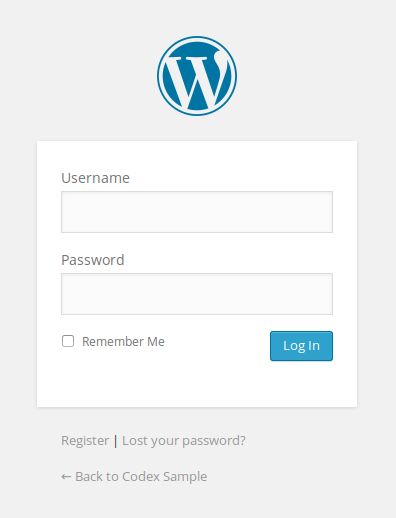
 Thank you Lucian but my question is about changing login logo. When a user want to login to my blog which appears. (default wordpress logo).
http://codex.wordpress.org/images/6/60/login_form.png
i solved that problem with login logo plugin but i still wonder if there is a way changing that logo without using a plugin. Theme uses a lot of plugin and they are already uses my server sources too much.
Thank you for your kindly help.
Mehmet.
Lucian Hi,
The big slider will be fixed in the next update to work on 980px to, about the logo from your header can be adjusted with a CSS, we will fix this in the next version to.
Thanks!
Lucian Hi,
Use this plugin WP User Avatar and then go to Users > Your Profile chose the user you want and change the avatar image like this:
http://screencast.com/t/gucZzlBJ3r71
Thanks
 substreamjacob
 I had to revert my theme back to 1170px because the big slider doesn’t currently work with 980px. Here is a screenshot of the overlap.
-
This reply was modified 12 years by
substreamjacob.
substreamjacobHey guys, I have a header banner with the dimensions of 728x90px. I’m running my ads through an ad management service (BuySellAds) and have the shortcode pasted into the “Header ad” box in the Theme Panel.
My problem is that when the site’s responsive settings are set for 980px, the ad overlaps my logo. I can see that there is enough space to the right of the ad to move it away from the logo while keeping it within the 980px, but I can’t figure out for the life of me how to do it.
Any assistance would be so greatly appreciated.
 Smedstrup
 Can you give me a code that will work so I have the right Menu on the mobile version?
I want the menu right next to the “Home” logo to be shown
SmedstrupThe last couple of months, I have not been able to customize the theme. I can enter, but I cannot “unfold” the different settings like Newspaper: Colors, Nespaper: Logo ect.
So right now, I cannot change anything about the visual look of the site.
At the same time, if I try to set a background picture, this will not show.
I had a background picture earlier, but suddently it was removed, and at the same time it stoppede working with the theme customization.
I Hope you can help me!
mavincanHi, i’m new here. i’ve just move my wordpress blog to newspaper 4.0. is there a login logo setting in theme properties? i couldn’t find it. must i install a plugin for that? thank you
Lucian Hi,
Please add this CSS in Theme Panel > Custom CSS:
@media (max-width: 767px) {
.mobile-logo-wrap img {
top: 0px;
width: 157px;
}
}
Thanks
-
This reply was modified 12 years by Lucian.
Lucian Hi,
You have no menu because you use the top one and that one it’s hidden on mobile, If you want you can add a menu or you can add this
CSS in Theme Panel > Custom CSS:
@media (max-width: 767px) {
.td-header-menu-wrap {
display: block !important;
}
.mobile-logo-wrap img {
top: 0px !important;
}
}
This way you will set the top menu to appear on mobile too. Unfortunately it will look like this: http://screencast.com/t/h2aWk9lQDKOS
Thanks
Lucian Hi,
You can add it using the “Header Ad” section in Theme Panel > Ads, follow this guide (How to make responsive text/flash or image ads:) – https://forum.tagdiv.com/ads/
Replace the images in the code with yours.
Thanks
 Marius
 Hi,
That logo is used on mobile/phones (logo that appear in menu on phones), we do that implementation because on desktop if you use a colored menu bar(let say black) and above you have a black logo + banner is fine on desktop but if you go on phone the logo will be on menu bar (black on black)
About your previous implementation you use the .affix selector, now is .td-affix try with this selector.
Thanks!
 mehedi
Hi,
I added my logo to the main menu by following this forum post: https://forum.tagdiv.com/topic/moveplace-logo-in-menu-when-scrolled-down-and-menu-fixed/
It worked perfectly before but it doesn’t seems to be working after I updated my site to Newspaper V4.
FYI, I am using Smart Snap Always from the Header Settings.
Please help.
Thanks!
 rbaccaro
Hi Lucian and team,
I would like to give you couple feedbacks about the Login/Registration forms from the point of view of the user. It looks beautiful, but it is missing couple options to be the best login form I have seen for WP.
+ Login
– missing a “Keep Me Connected” checkbox
– would be nice to have fields in theme Translation menu, for the “Remember Password” notification email
+ Register
– validate username only with alphanumerics, but excluding -, _, spaces and at least 4 chars, see below
– would be nice to have fields in theme Translation menu, for the “Welcome” notification email
– create a option to insert a link, target new window, in case the user wants to read the Terms of Use, for example
+ Logout
– settings to decide where the user should be redirected after logout
I tried the validate_username and seems your theme override the function. See below:
add_filter( ‘validate_username’, ‘username_restrictor’ , 10, 2 );
function username_restrictor( $valid, $username ) {
if ( ! $valid || ( is_user_logged_in() && current_user_can(
‘create_users’ ) ) )
return $valid;$username = strtolower( $username );
if ((!ctype_alnum($username)) || (strlen($username) < 4)) {
$valid = false;
} return $valid;
}
Thanks!
 meremetia
Hello,
Could you please assist me how to avoid this logo overlapping on mobile view?
the logos I uploaded are 300×100 and 600×200 as instructed

thanks
 Pjump
PjumpHi,
How can I add a image align to the right in the area hilighted in the image bellow:

Thanks