
- NewspaperWhen tagDiv Composer is Not Working
- TutorialsSystem status parameters guide
- NewspaperCache plugin – install and configure
- NewsmagRequirements for Newsmag
- NewspaperRequirements for Newspaper
 ppoteau
 Hello,
It’s still showing the same thing.
System Status
PHP Version
8.3.20
WP Memory Limit
40 MB
⤏ We recommend memory to at least 256 MB. Read more
PHP Execution Time
60
PHP Max Input Vars
5000
ppoteauHello,
Can someone tell me how to increase the memory limit? It says:
WP Memory Limit
40 MB
⤏ We recommend memory to at least 256 MB. Read more
 anonymouscanadian
 System Status
PHP Version
8.2.27
WP Memory Limit
256 MB
PHP Execution Time
500
PHP Max Input Vars
5000
anonymouscanadian System status is all green marked still facing the front end page builder is unable to add element in the web page.
WordPress and plugins
WP Home URL i https://anonymouscanadian.com
WP Site URL i https://anonymouscanadian.com
WP version i 6.7.2
WP multisite enabled i No
WP Language i en
WP Memory Limit 256 MB/request
WP_DEBUG False
Caching plugin WP super cache – for best performance please check the plugin configuration guide here.
PHP extensions
mbstring available
GD library available
php.ini configuration
Server software i Apache
PHP Version i 8.2.27
post_max_size i 128M – You cannot upload images, themes and plugins that have a size bigger than this value. To see how you can change this please check our guide here.
max_execution_time 500
max_input_vars 5000
SUHOSIN installed false
Theme config
Registration key i 0e75bf30 – **** – **** – **** – d0a18e04165c Reset key
Theme name i Newspaper
Theme version i 12.7
Theme database version i 12.7
HTTP channel test wordpress
Installed demo i UrbanEdge – demo ID: urbanedge | install type: full
I have added the .htaccess code from you
<IfModule mod_substitute.c>
SubstituteMaxLineLength 10M
</IfModule>
-
This reply was modified 1 year by
anonymouscanadian.
 simchris
 what php version? how much memory set for wordpress? what is the resource timeout time?
 nearview
 @anamaria,
Please see the site info below.
### wp-core ###
version: 6.7.2
site_language: en_US
user_language: en_US
timezone: America/New_York
permalink: /%postname%/
https_status: true
multisite: false
user_registration: 0
blog_public: 0
default_comment_status: open
environment_type: development
user_count: 15
dotorg_communication: true
### wp-paths-sizes ###
wordpress_path: /code
wordpress_size: 94.86 MB (99465258 bytes)
uploads_path: /code/wp-content/uploads
uploads_size: 0.00 B (0 bytes)
themes_path: /code/wp-content/themes
themes_size: 8.03 MB (8415114 bytes)
plugins_path: /code/wp-content/plugins
plugins_size: 28.00 B (28 bytes)
fonts_path: /code/wp-content/uploads/fonts
fonts_size: 2.28 MB (2386544 bytes)
database_size: 29.67 MB (31113216 bytes)
total_size: 134.83 MB (141380160 bytes)
### wp-active-theme ###
name: Newspaper Child theme (Newspaper-child)
version: 9.0c
author: tagDiv
author_website: http://themeforest.net/user/tagDiv/portfolio
parent_theme: Newspaper (Newspaper)
theme_features: core-block-patterns, post-formats, post-thumbnails, automatic-feed-links, html5, woocommerce, bbpress, align-wide, align-full, editor-font-sizes, widgets-block-editor, editor-style, menus, widgets
theme_path: /code/wp-content/themes/Newspaper-child
auto_update: Disabled
### wp-parent-theme ###
name: Newspaper (Newspaper)
version: 12.6.9
author: tagDiv
author_website: https://themeforest.net/user/tagDiv/portfolio
theme_path: /code/wp-content/themes/Newspaper
auto_update: Disabled
### wp-themes-inactive (1) ###
Twenty Twenty-Five: version: 1.1, author: the WordPress team, Auto-updates disabled
### wp-mu-plugins (1) ###
Pantheon MU Plugin Loader: version: 1.0, author: Pantheon Systems
### wp-plugins-active (41) ###
Advanced Custom Fields: version: 6.3.12, author: WP Engine, Auto-updates disabled
Autocomplete WooCommerce Orders: version: 3.4.0, author: QuadLayers, Auto-updates disabled
Bulk Move: version: 1.3.0, author: Sudar, Auto-updates disabled
Classic Editor: version: 1.6.7, author: WordPress Contributors, Auto-updates disabled
Classic Widgets: version: 0.3, author: WordPress Contributors, Auto-updates disabled
Code Snippets: version: 3.6.8, author: Code Snippets Pro, Auto-updates disabled
Convert Pro: version: 1.8.1, author: Brainstorm Force, Auto-updates disabled
Convert Pro – Addon: version: 1.5.14, author: Brainstorm Force, Auto-updates disabled
Disable Bloat for WordPress & WooCommerce: version: 3.5.0, author: Disable Bloat, Auto-updates disabled
Disable Comments: version: 2.4.7, author: WPDeveloper, Auto-updates disabled
Duplicate Page: version: 4.5.4, author: mndpsingh287, Auto-updates disabled
FluentSMTP: version: 2.2.90, author: FluentSMTP & WPManageNinja Team, Auto-updates disabled
Gravity Forms: version: 2.9.4, author: Gravity Forms, Auto-updates disabled
Gravity Forms ActiveCampaign Add-On: version: 2.1.0, author: Gravity Forms, Auto-updates disabled
Gravity Forms Advanced Post Creation Add-On: version: 1.5.0, author: Gravity Forms, Auto-updates disabled
Gravity Forms Authorize.Net Add-On: version: 2.11, author: Gravity Forms, Auto-updates disabled
Gravity Forms Google Analytics Add-On: version: 2.3.0, author: Gravity Forms, Auto-updates disabled
Gravity Forms reCAPTCHA Add-On: version: 1.6.0, author: Gravity Forms, Auto-updates disabled
GTM4WP – A Google Tag Manager (GTM) plugin for WordPress: version: 1.20.3, author: Thomas Geiger, Auto-updates disabled
Legendary Core for WordPress: version: 1.01.134, author: support@legendarydata.com, Auto-updates disabled
Legendary Data – Search Plugin: version: 1.00.022, author: Alvin Kreitman / Legendary Data, Auto-updates disabled
Molongui Authorship: version: 5.0.15, author: Molongui, Auto-updates disabled
Native PHP Sessions for WordPress: version: 1.4.3, author: Pantheon, Auto-updates disabled
Redirection: version: 5.5.2, author: John Godley, Auto-updates disabled
Simple User Avatar: version: 4.7, author: Matteo Manna, Auto-updates disabled
tagDiv Cloud Library: version: 3.8 | built on 10.02.2025 10:50, author: tagDiv, Auto-updates disabled
tagDiv Composer: version: 5.3 | built on 10.02.2025 10:50, author: tagDiv, Auto-updates disabled
Temporary Login Without Password: version: 1.9.0, author: StoreApps, Auto-updates disabled
The Events Calendar: version: 6.10.2, author: The Events Calendar, Auto-updates disabled
TotalPoll – Pro: version: 4.11.0, author: TotalSuite, Auto-updates disabled
User Role Editor: version: 4.64.4, author: Vladimir Garagulya, Auto-updates disabled
WooCommerce: version: 9.7.1, author: Automattic, Auto-updates disabled
WooCommerce.com Update Manager: version: 1.0.3, author: Automattic, Auto-updates disabled
WooCommerce Authorize.Net Gateway: version: 3.10.10, author: SkyVerge, Auto-updates disabled
WooCommerce Memberships: version: 1.26.11, author: SkyVerge, Auto-updates disabled
WooCommerce Subscriptions: version: 7.2.1, author: WooCommerce, Auto-updates disabled
WP-DraftsForFriends: version: 1.0.2, author: Lester ‘GaMerZ’ Chan, Auto-updates disabled
WP All Import – ACF Add-On: version: 3.3.9, author: Soflyy, Auto-updates disabled
WP All Import – User Import Add-On Pro: version: 1.1.8, author: Soflyy, Auto-updates disabled
WP All Import Pro: version: 4.10.1, author: Soflyy, Auto-updates disabled
WP Crontrol: version: 1.18.0, author: John Blackbourn, Auto-updates disabled
### wp-plugins-inactive (7) ###
EWWW Image Optimizer: version: 8.1.2, author: Exactly WWW, Auto-updates disabled
Featured Image Admin Thumb: version: 1.6, author: Sean Hayes, Auto-updates disabled
Pantheon Advanced Page Cache: version: 2.1.1, author: Pantheon, Auto-updates disabled
WP Fusion Lite: version: 3.44.8, author: Very Good Plugins, Auto-updates disabled
Yoast SEO: version: 24.7, author: Team Yoast, Auto-updates disabled
Yoast SEO: News: version: 13.3, author: Team Yoast, Auto-updates disabled
Yoast SEO Premium: version: 24.5, author: Team Yoast, Auto-updates disabled
### code-snippets (12) ###
snippet-5: name: Customize WP Login Screen, scope: global, modified: 2025-02-11 16:10:24
snippet-6: name: Issue Archive and Current Issue Shortcode, scope: global, modified: 2025-02-11 16:20:31, tags: [Shortcode]
snippet-7: name: Remove unnecessary fields from user edit screen, scope: global, modified: 2025-02-11 16:26:01
snippet-9: name: WordPress Admin Styles, scope: global, modified: 2025-02-04 16:55:35
snippet-12: name: Disable Yoast Redirects, scope: global, modified: 2025-02-21 18:52:27
snippet-13: name: Remove WooCommerce Payments Menu Item from Admin, scope: global, modified: 2025-02-05 18:01:46
snippet-14: name: WooMemberships Paywall Message, scope: global, modified: 2025-02-20 21:10:16
snippet-15: name: Disable Contributor upsell widget, scope: global, modified: 2025-03-11 14:14:04, tags: [Molongui Authorship]
snippet-16: name: IMPORT SCRIPT – For Guest Authors and Image Attachments, scope: global, modified: 2025-03-18 18:35:41, tags: [WP All Import]
snippet-17: name: Latest Poll Shortcode, scope: global, modified: 2025-03-11 14:14:52, tags: [TotalPoll Pro]
snippet-18: name: Rotate ConvertPro CTAs Shortcode, scope: global, modified: 2025-03-11 14:41:26, tags: [ConvertPro, Shortcode]
snippet-20: name: Add Hide Featured Image Checkbox and functionality., scope: global, modified: 2025-03-18 19:46:30
### wp-media ###
image_editor: WP_Image_Editor_Imagick
imagick_module_version: 1693
imagemagick_version: ImageMagick 6.9.13-17 Q16 x86_64 18482 https://legacy.imagemagick.org
imagick_version: 3.7.0
file_uploads: 1
post_max_size: 100M
upload_max_filesize: 100M
max_effective_size: 100 MB
max_file_uploads: 50
imagick_limits:
imagick::RESOURCETYPE_AREA: 251 GB
imagick::RESOURCETYPE_DISK: 9.2233720368548E+18
imagick::RESOURCETYPE_FILE: 24576
imagick::RESOURCETYPE_MAP: 126 GB
imagick::RESOURCETYPE_MEMORY: 63 GB
imagick::RESOURCETYPE_THREAD: 1
imagick::RESOURCETYPE_TIME: 0
imagemagick_file_formats: 3FR, 3G2, 3GP, AAI, AI, APNG, ART, ARW, AVI, AVS, BGR, BGRA, BGRO, BIE, BMP, BMP2, BMP3, BRF, CAL, CALS, CANVAS, CAPTION, CIN, CIP, CLIP, CMYK, CMYKA, CR2, CR3, CRW, CUR, CUT, DATA, DCM, DCR, DCX, DDS, DFONT, DNG, DOT, DPX, DXT1, DXT5, EPDF, EPI, EPS, EPS2, EPS3, EPSF, EPSI, EPT, EPT2, EPT3, ERF, EXR, FAX, FILE, FITS, FLV, FRACTAL, FTP, FTS, G3, G4, GIF, GIF87, GRADIENT, GRAY, GRAYA, GROUP4, GV, H, HALD, HDR, HISTOGRAM, HRZ, HTM, HTML, HTTP, HTTPS, ICB, ICO, ICON, IIQ, INFO, INLINE, IPL, ISOBRL, ISOBRL6, J2C, J2K, JBG, JBIG, JNG, JNX, JP2, JPC, JPE, JPEG, JPG, JPM, JPS, JPT, JSON, K25, KDC, LABEL, M2V, M4V, MAC, MAGICK, MAP, MASK, MAT, MATTE, MEF, MIFF, MKV, MNG, MONO, MOV, MP4, MPC, MPEG, MPG, MRW, MSL, MSVG, MTV, MVG, NEF, NRW, NULL, ORF, OTB, OTF, PAL, PALM, PAM, PANGO, PATTERN, PBM, PCD, PCDS, PCL, PCT, PCX, PDB, PDF, PDFA, PEF, PES, PFA, PFB, PFM, PGM, PGX, PICON, PICT, PIX, PJPEG, PLASMA, PNG, PNG00, PNG24, PNG32, PNG48, PNG64, PNG8, PNM, POCKETMOD, PPM, PREVIEW, PS, PS2, PS3, PSB, PSD, PTIF, PWP, RADIAL-GRADIENT, RAF, RAS, RAW, RGB, RGBA, RGBO, RGF, RLA, RLE, RMF, RW2, SCR, SCT, SFW, SGI, SHTML, SIX, SIXEL, SPARSE-COLOR, SR2, SRF, STEGANO, SUN, SVG, SVGZ, TEXT, TGA, THUMBNAIL, TIFF, TIFF64, TILE, TIM, TTC, TTF, TXT, UBRL, UBRL6, UIL, UYVY, VDA, VICAR, VID, VIDEO, VIFF, VIPS, VST, WBMP, WEBM, WEBP, WMF, WMV, WMZ, WPG, X, X3F, XBM, XC, XCF, XPM, XPS, XV, XWD, YCbCr, YCbCrA, YUV
gd_version: bundled (2.1.0 compatible)
gd_formats: GIF, JPEG, PNG, WebP, BMP, AVIF, XPM
ghostscript_version: 9.27
### the-events-calendar ###
### wp-server ###
server_architecture: Linux 6.1.112+ x86_64
httpd_software: nginx/1.27.1
php_version: 8.3.19 64bit
php_sapi: fpm-fcgi
max_input_variables: 10000
time_limit: 120
memory_limit: 1024M
max_input_time: 900
upload_max_filesize: 100M
php_post_max_size: 100M
curl_version: 7.61.1 OpenSSL/1.1.1k
suhosin: false
imagick_availability: true
pretty_permalinks: true
htaccess_extra_rules: true
current: 2025-03-20T14:32:51+00:00
utc-time: Thursday, 20-Mar-25 14:32:51 UTC
server-time: 2025-03-20T10:32:50-04:00
### wp-database ###
extension: mysqli
server_version: 10.4.25-MariaDB-log
client_version: mysqlnd 8.3.19
max_allowed_packet: 67108864
max_connections: 1024
### wp-constants ###
WP_HOME: https://dev-hartfordbusiness-com-wp.pantheonsite.io
WP_SITEURL: https://dev-hartfordbusiness-com-wp.pantheonsite.io
WP_CONTENT_DIR: /code/wp-content
WP_PLUGIN_DIR: /code/wp-content/plugins
WP_MEMORY_LIMIT: 512M
WP_MAX_MEMORY_LIMIT: 1G
WP_DEBUG: true
WP_DEBUG_DISPLAY: false
WP_DEBUG_LOG: true
SCRIPT_DEBUG: false
WP_CACHE: false
CONCATENATE_SCRIPTS: undefined
COMPRESS_SCRIPTS: undefined
COMPRESS_CSS: undefined
WP_ENVIRONMENT_TYPE: undefined
WP_DEVELOPMENT_MODE: undefined
DB_CHARSET: utf8mb4
DB_COLLATE: undefined
### wp-filesystem ###
wordpress: writable
wp-content: writable
uploads: writable
plugins: writable
themes: writable
fonts: writable
mu-plugins: writable
### acf ###
version: 6.3.12
plugin_type: Free
update_source: wordpress.org
ui_field_groups: 3
php_field_groups: 0
json_field_groups: 0
rest_field_groups: 0
post_types_enabled: true
ui_post_types: 27
json_post_types: 0
ui_taxonomies: 17
json_taxonomies: 0
rest_api_format: light
admin_ui_enabled: true
field_type-modal_enabled: true
field_settings_tabs_enabled: false
shortcode_enabled: false
registered_acf_forms: 0
json_save_paths: 1
json_load_paths: 1
-
This reply was modified 1 year by
nearview.
simchris usually means server overloaded, not enough memory, server updates interfere, auto WP updates turned on (not good idea), etc.
(I don’t work here)
Sometimes turning on debug mode and then looking at the error log can help, if it continues
 digitaldevil
When i activating plugin like ” tagDiv Cloud Library”, “tagDiv Composer” and ” tagDiv Standard Pack”.
My hosting CPU uses and Menory uses reaching 100% use and then my website is showing 503 error.
Please help me to solve this issue.
 lubesngreases
 Hi Bettina,
Thank you for your response.
Upon reviewing the Newspaper theme’s changelog, I noticed the addition of the ‘new: Added a new shortcode Page Content Renderer;’ block in recent theme updates.
This new block, located in plugins\td-composer\legacy\Newspaper\includes\td_config_blocks.php at line 35935, utilizes the function td_config::get_pages_options_array(), which retrieves all pages regardless of their status.
The function itself is defined in plugins\td-composer\legacy\Newspaper\includes\td_config.php at line 7467. After activating the td composer plugin, we observed memory usage exceeding 550MB.
Our website contains 281 pages with substantial content. Consequently, when this block is loaded, we experience significant slow query issues. Please refer to the attached screenshots for details. When we modified the query to retrieve only 10 published pages per page, memory usage decreased to 50-55MB.
We attempted to override this method within our child theme, but were unsuccessful. Could you please advise if there is a method to resolve this issue through the child theme, or if a patch is planned?
Attachments:
Memory usage with all pages condition: https://prnt.sc/IZBUzIGel0fm
Memory usage with published and 10 pages counts condition: https://prnt.sc/5hJOSCjOLFEK
Thank You.
 yunie_
After installing the latest newspaper theme, I am unable to activate tagDiv Composer and tagDiv Cloud Library.
When activating cloud library, it says theme version does not support it.
When activating composer, it causes a critical error.
My wordpress version is WordPress 6.7.2
PHP Version – 7.2.34
WP Memory Limit – 40 MB
PHP Execution Time – 1000
PHP Max Input Vars – 1000
lubesngreases Hi Bettina,
Thank you for your response.
After updating the Newspaper theme from version 12.6.8 to 12.6.9, our development team has identified a significant increase in memory consumption.
Key Observations:
– Before the update: The site performed well with a 512MB memory limit.
– After updating to 12.6.9: we had to increase the memory limit to 2GB, forcing us to increase the memory limit. However, our hosting provider does not recommend this change.
– Impact: Page load times have doubled, and excessive database queries (such as get_pages_options_array) appear to be contributing to the issue.
Live Comparison:
– Site with Newspaper 12.6.9 (Experiencing Issues): https://lngqa.wpengine.com/
– Live site running Newspaper 12.6.8 (Working Fine): https://www.lubesngreases.com/
Also please check the below screenshots of https://lngqa.wpengine.com/ site for before and after theme upgrade.
Before screenshot: https://prnt.sc/76MPjOxvUNNw
After screenshot: https://prnt.sc/Z0T_GDZLL5hV
Since this issue is directly tied to the latest theme update, can you please:
1. Confirm whether changes in version 12.6.9 could be causing increased memory usage?
2. Provide guidance on resolving excessive memory consumption and database queries?
3. Let us know if a fix or patch is planned?
We appreciate your prompt assistance in resolving this. Let us know if you need further details.
Thank you!
lubesngreasesHello,
We recently updated our website to theme version 12.6.9 along with its required plugins. After the update, we observed a significant decline in performance:
– Page Load Time: The site’s loading time has doubled.
– PHP Memory Usage: Increased from 45-50MB to over 530MB.
– Database Queries: Certain functions like ‘get_pages_options_array’ appear to be rendering all posts, leading to slow and duplicate queries.
Could you please investigate these issues in this theme version and provide guidance on resolving them?
Thank you!
 Anamaria
 Hello Gus,
Please follow the steps from this topic https://forum.tagdiv.com/topic/error-at-zones-6models-1dom-the-model-does-not-match-the-content-currene/ if you have a child theme; please use the main theme.
Usually the “Invalid reply from server endpoint error” is caused by insufficient WP_Memory_limit, if you’ll set it to 256M, and is still not working, please double it and check the rest of the settings from our guide -> https://forum.tagdiv.com/requirements-for-newspaper/ also make sure that you are using SSL and you have a good bandwidth, the one from our server is 1GB/s and the one that I use at home is 500MB/s, if you have low bandwidth, then you can access parts of the cloud, this can be done from the frontend, for example, if you are on a post -> https://i.imgur.com/4G74M7F.jpg or from tagDiv Composer -> https://i.imgur.com/2F6MhfI.png or from backend -> https://www.screencast.com/t/wekHmc7kJ8J
Thank you!
 unyil
unyilHow to fix Invalid reply from server endpoint when load cloud library, i’ve disabled and re enable tag plugin, disabled other plugins, increase wp memory limit, add line .httaccess like this https://app.screencast.com/NMizSk8qvgToy
Anamaria Hello,
You can ask your host to increase this parameter. Also, check this https://docs.presscustomizr.com/article/171-fixing-maximum-upload-and-php-memory-limit-issues
Thank you!
 Ervin108
 Hello Anamaria,
thank you for your answer. I realized that I included memory_limit line only in wp-config that was located in public_html folder, but not in wp-config of my actual website database folder. Now it works and system status says I have 256M.
There is however one more thing in system status that I am trying to figure it out. That is “max_execution_time” which is 30 but it should be at least 60.
To fix this I am looking at my “.htaccess” file, according to your guidelines. (It seems I dont have php.ini ).
My .htaccess looks like this:
# BEGIN WordPress
# The directives (lines) between “BEGIN WordPress” and “END WordPress” are
# dynamically generated, and should only be modified via WordPress filters.
# Any changes to the directives between these markers will be overwritten.
<IfModule mod_rewrite.c>
RewriteEngine On
RewriteRule .* – [E=HTTP_AUTHORIZATION:%{HTTP:Authorization}]
RewriteBase /
RewriteRule ^index\.php$ – [L]
RewriteCond %{REQUEST_FILENAME} !-f
RewriteCond %{REQUEST_FILENAME} !-d
RewriteRule . /index.php [L]
</IfModule>
# END WordPress
Please advise me where should I include “php_value max_execution_time 300” line that should be done according to your guidelines for fixing this.
thank you
Anamaria Hello,
1. Yes, this was removed, unfortunately.
2. Please provide a screenshot about how you have set it, please make sure that it is set like this define( 'WP_MEMORY_LIMIT', '256M' );
Thank you!
Ervin108 I appreciate your help, but as you might noticed from my question I am quite a beginner, so this one sentence answer doesn’t really help me.
I dont see anything about “changing memory allocation in hosting platform” in the offical guidlines from tagdiv. I only see that for this problem one should change wp-config.
simchris You have to change memory allocation in your hosting platform/account also, not just in wp-config.
Ervin108Hello,
1. I recently bought Newspaper Theme. First I was thinking to use prebuilt Black Version PRO demo – but then I saw this: https://demo.tagdiv.com/newspaper_black/
Problem is that I can not find this “Newspaper black” prebuilt website…only “Newspaper black – version Pro” is available in demos directory. Was “Newspaper black” removed from directory ?
2. My WP Memory Limit system status shows problem – 40 MB/request. I tried to follow your guideline for changing this value in wp-config.php file. However in my wp-config.php file there is no any such line “define( ‘WP_MEMORY_LIMIT’, ’40M’ );. So I tried solve this by just adding the line “define( ‘WP_MEMORY_LIMIT’, ‘256M’ )” into my wp-config.php file but Newspaper system status still shows there is problem because of “40 MB/request”.
I did however tried to instal Newspaper black – Pro and edited it a little and so far there seems to be no problem.
 Wriper
Hello,
We have 500 – 1500 users at same time on website.
Post views counter is crashing or website when enabled. We use dedicated server.
Are there any limit we should enable?
PHP Version
7.4.15
WP Memory Limit
256 MB
PHP Execution Time
120
PHP Max Input Vars
2000
Also what about that WP post views plugin. Which plugin is that? This one https://wordpress.org/plugins/wp-post-views/ ?
But website crash as soon as we enable post views so probably not even plugin is suitable for us.
Thank you
 DNL
DNLI selected to use the News Hub Pro template in Newspaper and no matter what I do, Newspaper never takes over the prior theme and squishes it to some sort of mobile view on desktop. I’m so confused. I’m new to wordpress and I’ve tried watching hours of videos and now I have memory loss. Please advise? Thanks.
 griffo
Dear TagDiv Support Team,
I am experiencing an issue with the Newspaper theme. The Theme Panel is not saving changes, including translations, Custom Code, and other essential settings. Despite multiple troubleshooting attempts, the problem persists. Below is a summary of the actions I have taken:
Checked for Plugin Conflicts:
All plugins were deactivated to identify potential conflicts, but the issue remains.
File and Folder Permissions:
File and folder permissions were checked and set to 755 for folders and 644 for files.
.htaccess and PHP Configuration Adjustments:
Server limits such as max_input_vars, max_execution_time, and memory_limit were increased.
Reinstalled the Theme:
The theme was reinstalled manually to ensure no corrupted files, but the issue persists.
Despite these efforts, the Theme Panel still does not save configurations. The rest of the site works correctly, but I cannot apply important changes through the panel.
Could you please advise on additional steps or provide specific instructions to resolve this issue? If needed, I can provide temporary access to my WordPress or server for further investigation.
Thank you in advance for your support, and I look forward to your guidance.
Best regards,
Fabio
Email: fabio@dermonews.com.br
Domain: http://www.dermonews.com.br
 andre1981
Hello, I’m configuring the theme (12.6.8), but when saving any information in the theme panel, it keeps saving forever.
I have already disabled the cache plugins, increased memory to 512, PHP Version 8.3.10 and nothing happens.
Can you help me?
 Pazan
PazanHello,
I’m experiencing an issue with the Newspaper theme and the tagDiv Composer. When I click on “Edit Content” in the frontend editor, the screen keeps loading indefinitely, and I’m unable to make any changes to the content.
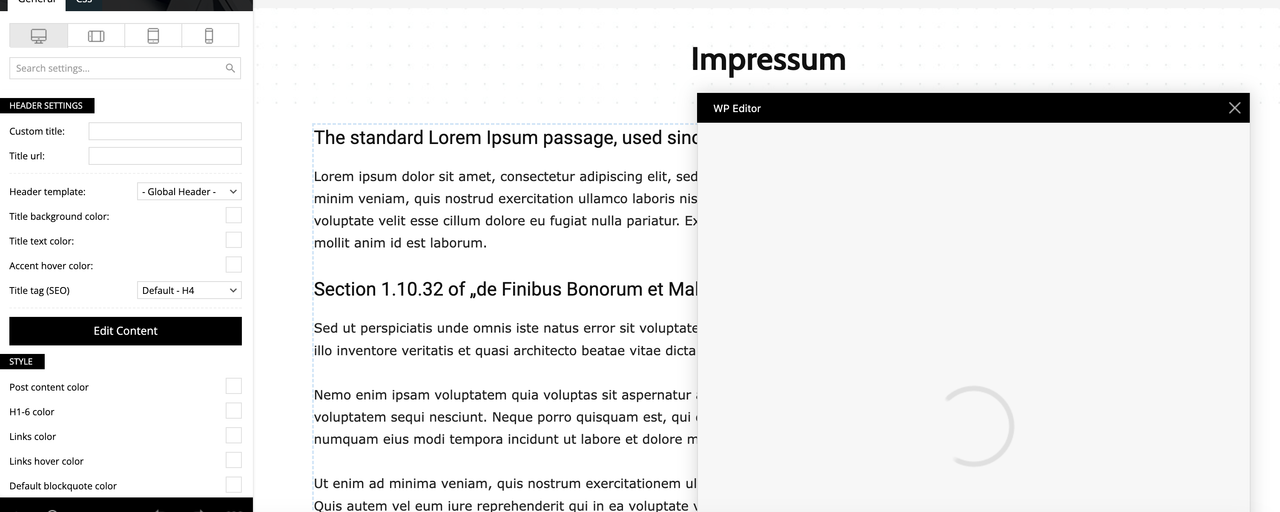
Here is some information about my setup:
Theme: Newspaper (Version 12.6.8)
Page Builder: tagDiv Composer
PHP Version: 8.0.30.4
WordPress Version: (6.7.1)
Memory Limit: 256M (recently increased, confirmed in the system status)
Server: GoDaddy hosting
Steps I’ve Already Taken:
Increased PHP memory limit to 256M in wp-config.php.
Cleared browser and WordPress cache.
Despite these actions, the problem persists. Could you please advise me on how to resolve this issue? I’m unsure if it’s a conflict or a server-related problem.
Thank you in advance for your help!
Best regards,
(Philipp)


