
- TutorialsWhat is Ajax preloading?
 Balasahu
Social Icon not showing in my mobile theme above menu.
Also How I can disable the Login option in Mobile as it is showing by default.
Please Help!!!
 gpantalone
Hello, I’m not able to find the style settings to edit the basic features (background color, font color etc.) of the mobile menu which appears after clicking the breadcrumb icon. Can you please tell me where those settings are? Thanks!
 Calin
Calin Hi,
If you are using the mobile theme plugin, then you need to set the mobile menu in Theme panel> Mobile menu > Header -> https://i.imgur.com/jy4O54u.png
Thank you!
Calin Hi,
Unfortunately there is no option to display the top menu on mobile devices, but if you do not use the mobile theme plugin then you can use a custom css to display it (if you want I can help you with this, just provide me a link to your website), but if you use the mobile theme plugin, then you can not display it.
Thank you!
 Suprovat Roy
I use this theme couple of months ago. But I do not understand how I can change the Mobile menu display. Now it can not customizable. Is there any way to change the mobile menu Display. I am using a custom template now. My website is phbazar.com
 Topfgartenwelt
 Dear Calin, I have tried to use Defer Java Script again. But there are two problems:
If I use the plugin Defer Java Script (option defer, excluded theme Newspaper) –> everything works fine with Firefox, but in Chrome the main menu doesn’t work; if I enable the option async there are no pictures shown in Chrome.
As an alternative i’ve tried the code that you have linked in your last post. But then the theme doesn’t work properly with Firefox nor with Chrome.
So what I should do? If I do nothing the pagespeed for mobile sites drops down to ~60.
Thank you very much!
Greetings Kathrin
 brian_mugo
after installing newspaper x theme, my website appearance on mobile has been affected more so on adsense even after switching off smart side bar. my website http://www.254news.co.ke on mobile version is not appealing, no menu, please any help
 Livingstone
How do I show the date in the top menu on mobile?
 Times-Independent
 Thank you Vlad. Your instructions edits the web version menu font size. My question is mobile menu font size. I’ve made changes here >> Theme panel> theme fonts> mobile menu but the change is not reflecting in the mobile menu view.
 collablight
Hello,
On the newsmag theme I have both a top menu and a main menu. The Main Menu shows up when I go to it on mobile, but the top menu does not. Is there someway to get them both to show up on mobile? Or what is your recommended approach to this?
Thanks!
 AdminDetikBolaAsia
I just installed latest newspaper theme, install new mobile theme plugin with AMP. After i clear the cache and view my website https://detikbolaasia.com/ my Menu gone when i’m viewing with my mobile phone. Is there any way to solve it?
 Nagarig
1. Sometimes TagDiv Editor does not save the edited template. And sometimes it takes forever to save.
2. How to add custom or different widgets from another plugins to sidebar?
3. In Logs, I am seeing /post name/?tdb_action=tdb_ajax What is ?tdb_action=tdb_ajax
4. In Mobile view, why it shows # at the end of homepage URL/Post URL? For example: if we visit domain.com and open Menu from left side, URL change to domain.com/#
5. I am unable to edit Footer with TagDiv. There is no Option to Edit with TagDiv.
6. I have increased Row Width of Menu Bar but now I can not see STICKY MENU option in theme panel.
Please Help. 🙂
Calin Hi,
Let’s try one more time together.
In order to set on “SIGN IN / JOIN” button -> https://i.imgur.com/MOMLh9P.png the link you need to go on this file -> wp-content/plugins/td-standard-pack/Newspaper/parts/header/top-menu.php the file will look like this -> https://i.imgur.com/OZMeu9s.png -> https://i.imgur.com/Bge4quX.png the rest of the code is no need to be removed.
For mobile the changes need to be made in this file -> wp-content/plugins/td-composer/legacy/Newspaper/parts/login.php -> https://i.imgur.com/A9w20Gw.png -> https://i.imgur.com/yYIuJvZ.png also if is do not work you can set theme in this file too -> wp-content/plugins/td-composer/mobile/parts/login.php -> https://i.imgur.com/S1YKCxJ.png
Hope this will help you!
Thank you!
Times-IndependentMobile menu font size not updating when changed in theme panel> theme fonts> mobile menu. Cleared cache … no changes. AMP plugin is activated. Please advise.
 RAKESHVARMA8
Hello Sir,
When I Install newspaper mobile theme & Activate then Some Features like; mobile menus, search button, footer pages doesn’t open & many mores. So Plese help me…
Calin Hi,
I just checked your website and now you are no longer using the mobile theme plugin.
If you still want to use the mobile theme plugin make sure that you have enabled the mobile theme thumbs -> https://i.imgur.com/xvwyMQx.png also make sure that you do not have a plugin conflict.
The logo and mobile menu can be set from here -> https://i.imgur.com/xkSQysk.png also the about us section can be set from here -> https://i.imgur.com/e2hkXRO.png or remove with custom css.
If you are using the mobile theme plugin, you’ll gain a better speed then responsive version of theme, but in order to achieve that speed you’ll need to create a new content for pages because in the most of cases those were made with builders ( tagDiv Composer, WPBakery ) and you need to use only the mobile editor ( you need to set the content for pages in mobile editor and this content will be display on mobile theme)
-> https://i.imgur.com/9d0UWLT.png
Also you can show the responsive version on mobile theme -> https://i.imgur.com/m0bVB5T.png you can check more details about mobile theme in our documentation -> https://forum.tagdiv.com/the-mobile-theme/ or if you want to have the responsive version only, you can use the amp option from mobile theme -> https://i.imgur.com/oofST3D.png (to use the mobile theme template on amp) or you can disable the plugin.
Thank you!
Calin Hi,
2) To remove these elements from mobile theme plugin you need to use the general options from theme panel -> https://i.imgur.com/OHn8b8W.png -> https://i.imgur.com/YVSImVJ.png -> https://i.imgur.com/iOnV1KC.png these will apply on mobile them plugin too.
3) For this you need to use a cloud header from tagDiv Cloud Library, edit it with tagDiv Composer and check the website manager -> https://i.imgur.com/TkOKFjN.png also the menu can be change by click on it -> https://i.imgur.com/hG8Vp14.png
If you want to set a background image you can do it from theme panel -> https://i.imgur.com/iWbulCV.png make sure that this option is enable -> https://i.imgur.com/AsyXkt7.png also if you have set a background color, clear it or set an opacity to can see the background image.
Thank you!
Calin Hi,
If you want to replace the url of this button -> https://i.imgur.com/kA9kuwa.png on mobile theme then you need to make the changes in this file wp-content/plugins/td-composer/mobile/parts/login.php -> https://i.imgur.com/1OwWNwH.png if you are not using the mobile theme the file sis on this path -> wp-content/plugins/td-composer/mobile/parts/login.php -> https://i.imgur.com/Vn8d3qi.png
To replace the link from this popup ->https://i.imgur.com/AalcaLI.png you need to replace it in this file wp-content/plugins/td-standard-pack/Newspaper/parts/header/top-menu.php -> https://i.imgur.com/ati1qar.png
Hope this will help!
 ludyma
 Good. It takes a day for the answer and only you will answer me the same as always in a matter of disconnecting the mobile theme, I already made a video before and showed you that even removing all the pluging the page is adapted to mobile devices, it is not shortened. It is enlarged and everything is cut, I put the video back. Please tell me why the theme is not adapted to devices.
As I was saying, I wait for the answer for a whole day and leave questions unanswered, could you answer them please, I will attach them again.
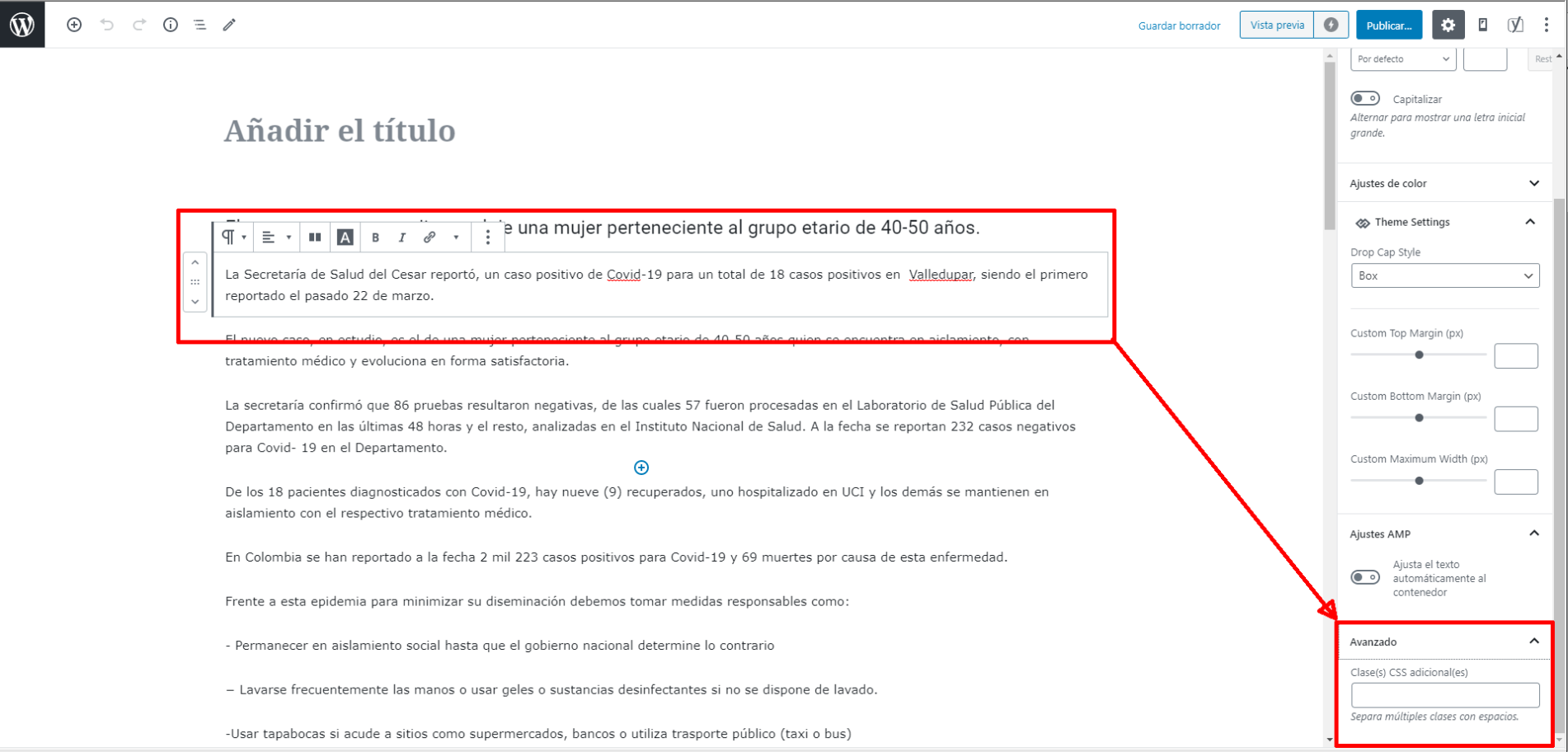
Hello, could you tell me what is the use of the field indicated in the screenshot? naun I’m not very in html, could you tell me xintasis or how to use the newspaper x
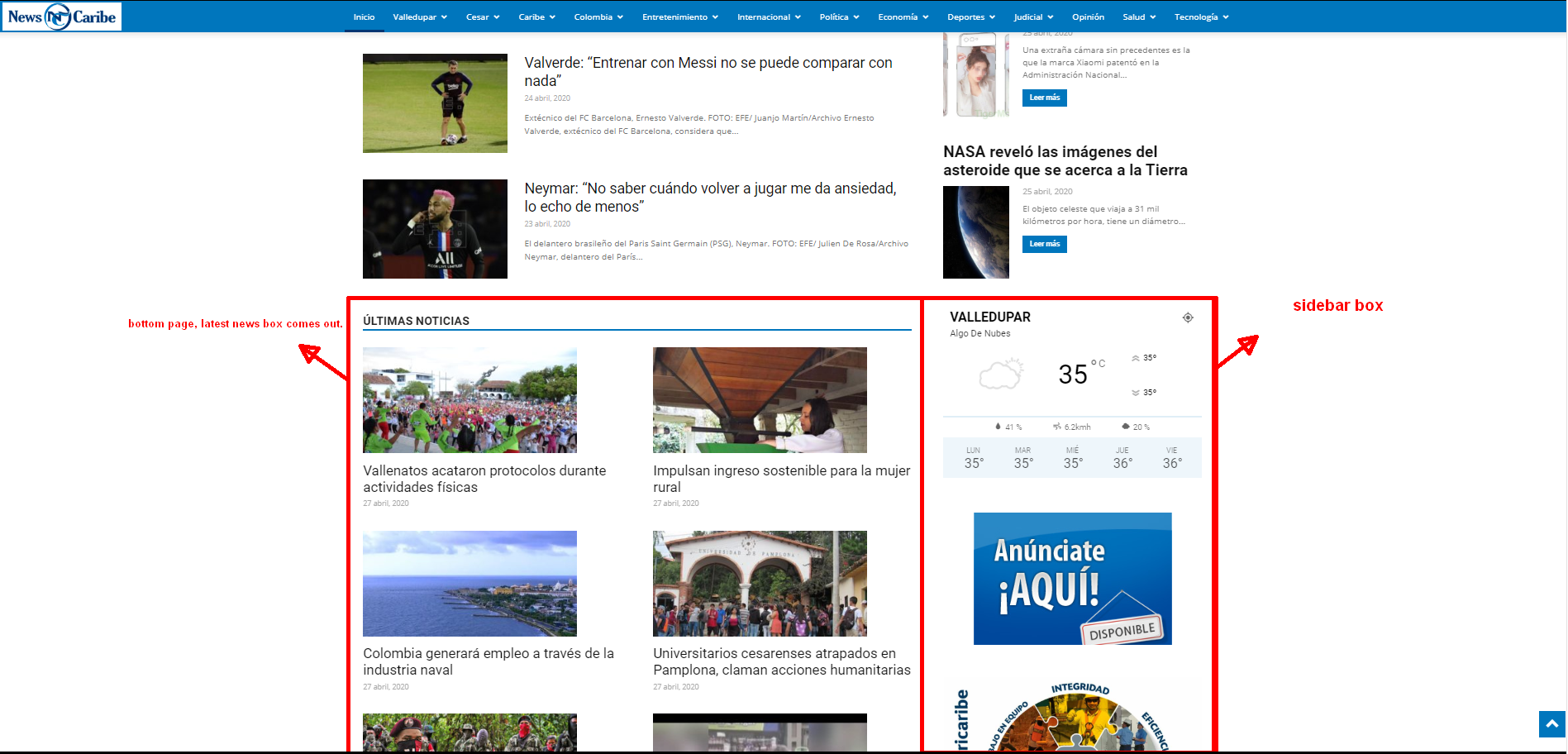
The other question if you go down at the bottom of the futer is the contact and privacy options, bottom right, you will see that the location of page upload covers that menu, how can I solve it, how do I change the page upload site or a little higher so that it bea well the menu.
 Calin
Calin Hi,
The cloud templates can be edited with tagDiv Composer, also in order to display the header menu sticky you can use the website manager -> https://i.imgur.com/fsg3TbA.png -> https://i.imgur.com/n0yuZVK.png for mobile you need to do the same.
Thank you!
Calin Hi,
You can achieve the menu on mobile only if you are using a cloud header and not the mobile theme plugin , you need to edit the cloud header with tagDiv Composer choose the mobile device -> https://i.imgur.com/EXyDGZM.png after that you need to add a new row above the logo or under it, depends on where you want to have the menu -> https://i.imgur.com/rbeUBKj.png set the mobile menu -> https://i.imgur.com/5IXiUfZ.png and set the text color ->https://i.imgur.com/VBqKyHL.png
The color from header background can be change like this -> https://i.imgur.com/YNOosVE.png -> https://i.imgur.com/DIuLiuj.png
Hope this will help you!
Thank you!
 Patrick93
Hello,
my page “jumps” during loading.
In the attachment I have attached two pictures.
fail-1.jpg (https://www.bilder-upload.eu/bild-022554-1587927428.jpg.html)
fail-2.jpg (https://www.bilder-upload.eu/bild-292b93-1587927456.jpg.html)
I hide the title via display:none.
It will appear for a short time when the page loads anyway. (fail-1.jpg). Please read it yourself when calling this page: https://modusx.de/ernaehrung/
When loading my contributions the headline jumps. First a different font is loaded.
(fail-2.jpg). Bitte testen Sie es selbst: https://modusx.de/muskelerhalt-trotz-trainingspause/
My third problem is the menu icon on the mobile device. Here its first an “X” icon instead of the menu icon. Unfortunately I could not screenshot it, because the screenshot function of my mobile device takes too long.
How can I fix these two problems?
 DiegoBrands
Hi team, I am attempting to edit the social media icons that are on my site on its mobile version. How would I accomplish this?
Chasepotential.com
 BlackPirates
I’ve add a top header menu, in newspaper theme, and in desktop is ok.
But in mobile the menu has a display:none, how can I show the top header menu for mobile? Is there an option in the theme? How can change the background-color? (In desktop is white, but in mobile is black, and I can’t find where change in theme options).
thank you,
regards.
 Pixel Cities
Hi Guys,
Editing Header in TagDiv Composer.
I have made a custom header in composer, but in ‘mobile view’ I simply would like my logo positioned centre and mobile menu aligned far right?.. no search icon
Can you please advise on the correct way to do this as ‘Ive tried various ways but I can not get both logo ‘centred’ and menu ‘aligned far right’ to display in one row ? it always pushes into two ??
This is the site for a reference
https://www.ircatoday.com/coronavirus-support/
Kind Regards
Mark



