
- TutorialsWhat is Ajax preloading?
 jkakade
Under Theme Panel > Custom Code > Custom CSS, I have inserted my desired coding for backlinks:
.tdi_57 a {
cursor: pointer;
border-bottom-width: 1px;
border-bottom-color: #9a58b5;
text-decoration: underline;
}
But it isn’t reflecting on the mobile version of my site. I even added it in Custom CSS > Advanced CSS and also in additional CSS from the Customization menu.
 knthdgd
Hi.
My mobile menu won’t show on mobile when clicking the hamburger.
It worked a couple of month ago, but now it doesn’t.
feedball.app
Please help.
 YTGAW
YTGAW finally, i solved this problem. i am not using mobile theme, but Hamburger menu not working without mobile theme plug in, now i installed and working fine.
https://i.ibb.co/3m0b8qK/Screen-Shot-2024-03-26-at-2-39-31.png
 Anamaria
 Hello,
I just checked, and for me, your menu works on the mobile. Can you please provide a video?
Thank you!
YTGAWhi, my mobile menu is not working on phone. I see the hamburger menu but when I click it jump to next page. i really need to fix this. my site is here.
 frankiefop
 I understand I need to create my own menu but I can’t seem to get the same feature just like the one in the demo. I wanted to know the features to use to make the mobile menu look like that in the demo.
Any idea?
Anamaria Hello,
Please try to use this custom code css .td-mobile-content .td-mobile-main-menu {
display: flex!important;
flex-direction: column;
}
You can change the flex-direction: column-reverse.
Set the code in Theme panel>Custom code>Custom css
Thank you!
Anamaria Hello,
@jtoney Please provide the link to your website.
@MusicAndGigs For mobile please edit with tagDiv Composer, select the viewport on phone, select the header logo and change it => https://i.imgur.com/cR7F0v4.png https://www.youtube.com/watch?v=HXQQygkCCJo -> https://forum.tagdiv.com/add-logo-newspaper/
For mobile menu, you need to edit the page to change the logo -> https://i.imgur.com/yoigVA1.png
Thank you!
 jtoney
When I’m on the mobile version of the website it’s constantly losing the menu and logo.
I can go back and disable and enable it but after some time it disappears.
 haipo
haipo Hi Anamaria
I did as you instructed
but still the mobile menu is diverted.
You are invited to check my control pannel and see that you have a CSS problem when working RTL.
Of course that I can build the menu upside down for mobile but this is not a good solution
frankiefop Thank you, Anamaria, however, I was unable to replicate the menu as found in the Urban Observer pre-built template I used, despite following the link in (1) above.
Please, can you help me with a better way for my mobile menu to look like that of Urban Observer template?
Screenshot: https://imgur.com/a/Sx1FwXB
I will be glad if you assist me with more direct and simple steps. I am a newbie to Newspaper Theme.
For (3), I want to show Adsense ads.
Best regards.
frankiefop1. I just realised that my mobile menu is no longer showing, instead, I am seeing “Popup modal”, please how do I make the mobile menu show because it was showing before when I installed the demo (Urban Observer).
Screenshot: https://imgur.com/a/VuIvqYG
2. Post inline ads not working… If I add ad codes in the 3 inline ad spaces, there all cluster together. No option to select paragraphs where the inline ads will show. How do I fix this, please?
Screenshot: https://imgur.com/a/gK5tYyz
3. Ads in the Theme panel are not working. I have inserted all ad codes but nothing is showing up on the site. Is there a way to use the ad codes on the Theme panel?
Screenshot: https://imgur.com/a/6IbT2j9
My URL: https://converseer.com/
Best regards.
 bob@mrrogersweborhood.com
okobserver.org Mobile menu not displaying correct color.
—
Screenshot of website on mobile phone: https://www.dropbox.com/scl/fi/id13mdmw5n6n23o8qpez0/2024-03-20-Screenshot-from-mobile.jpg?rlkey=6uycw3q59mj0v1ustuo2b3mvm&dl=0
Screenshot of tagdiv editor: https://www.dropbox.com/scl/fi/l6orq69izudth4nwzl90e/Screenshot-2024-03-20-12.49.00.png?rlkey=hzmju83irotxeopu5nxxdbkdz&dl=0
—
Header is supposed to be blue rather than black.
Can you please assist?
Thanks.
 Suliman Razvan
 Hi Anamaria,I don’t have the strength to write you the whole story again. This is the last link when I have contacted you regarding my problem:
https://forum.tagdiv.com/topic/mobile-menu-not-working-after-update-to-newspaper-12-6-3/
and this is my link to my website (u’ll see that my mobile menu it is not working… and it is waiting for a solution from you, for some time)
Thank u.
 dacorti
Hi, on https://attractiveitaly.com I’ve got the following issues: images not loading and the drop-down menu not working on desktop; on mobile same issue for the images and menu button not working at all. Any suggestion?
Thanks
 curistorian
Hi – I am not able to get the appearance of the mobile menu module to show properly on mobile devices. See screenshots below. The mobile device does not display the font changes that are visible on the tagdiv composer. I have tried clearing cache etc.
https://ibb.co/7CZztS8 – what appears on iphone device
https://ibb.co/HggWBgK – what the tagdiv editor shows
Suliman RazvanI have announced countless times that there is an issue between AIOSEO and tagDiv Mobile Theme main menu, which is not working. I had promises that it will be solved in a future update but…it seems that tagdiv team are not really interested in AIOSEO users, they favor those from Yoast more. I still have hope that it will be resolved. Thank u.
 fm
fmHello,
after the theme update we have another problem of our Site https://autogazette.de
The background colour of the menu/Icon headers of the articles are now black on the mobile site and no longer blue as on the desktop site, Exception is the Resort elektroautos (see Side Bar like “Anzeige”, “Transoformation” etc.)
On the Home-Page is ist correct in Blue:
https://autogazette.de/Homepage Header in Side bar in blue, this ist correct
When I try to make changes under Theme Colors, it does not work because Save Settings does not work (the save icon rotates and rotates without saving)
Furthermore: What are the names of the this items the are now black in the panel? So i can change it?
Thanks in advance, Frank
Anamaria Hello,
I think that is the structure you made for the menu because here is the latest item from the menu: https://i.imgur.com/dW0BYaw.png. So, for mobile, I suggest remaking the menu and assigning it to display well.
Thank you!
Anamaria Hello,
1. You can upload the font to the theme panel under “custom fonts” by following the instructions at https://forum.tagdiv.com/font-customization/. After doing this, you should typically not experience this problem.
2. You have a cloud template, so you need to make the changes with tagdiv Composer and delete the logo from the theme panel. For mobile please edit with tagDiv Composer, select the viewport on phone, select the header logo and change it => https://i.imgur.com/cR7F0v4.png https://www.youtube.com/watch?v=HXQQygkCCJo -> https://forum.tagdiv.com/add-logo-newspaper/
3. Usually, the color and image are set on the row, so please edit with tagDiv Composer and select the row and go in the tab CSS https://i.imgur.com/UkgqKNM.jpg -> https://forum.tagdiv.com/topic/background-color-of-the-main-menu-be-changed/
Thank you!
haipoHi Team,
I’m using the RTL template.
And I have an issue with the order the the menu is displayed in mobile.
It is displayed upside down (In the reverse order)
Can you fix it please?
–
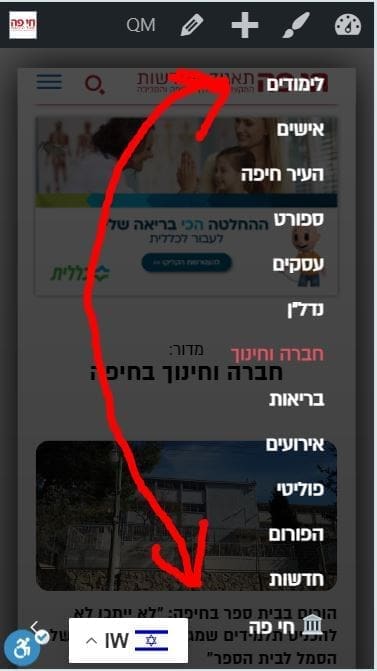
–
Thanks,
Yaron
 jayflyer
I just started noticing this after the theme update yesterday.
below is what it says under inspect element. you can inspect yourself as well on my site jayflyer.com
<div class=”td-scroll-up td-hide-scroll-up-on-mob” data-style=”style1″><i class=”td-icon-menu-up”></i></div>
 Alex
Alex Hi @Anamaria,
We used WP Rocket before and had a conversation with WP Rocket support team. To date, Newspaper and WP Rocket do not properly work together.
The preload function is for single post featured image. This feature doesn’t seem to properly work with EWWW plugin. I will make a new thread when finish testing.
Our server is optimised, as well as the theme.
– This thread (which was not started by me) is about the poor INP poor performance. It is the theme’s elements that make it fail (buttons, popups, mobile menu, comment form fields etc). It fails on your main demo – mobile origin – Despite you used a mobile page for home page, INP fails throughout your whole demo website.
You should probably improve the theme, so it meets the required criteria in 2024. It currently does not.
 fm
fmHello,
We have installed the latest version of Newspaper today. Since then, the menu on our smartphone at https://www.Autogazette.de no longer works.
Our technician can’t find a reason.
I would be grateful for any tips.
 cerclealgerianiste
 Thank you for your answer, but the translation is already made in this translation menu, but this doesn’t appear correctly anyway.
The Web responsive version is correct and well translated but when we activate the mobile version, it appears not translated.
Is there any other menu we can specifically change for mobile version translation ?
Thanks a lot for your time
Regards,



