
- NewsmagMain menu
- NewsmagIntroduction
- NewsmagLogo & Favicon
- NewsmagBackground introduction
- NewsmagTheme colors introduction
 nibbl
nibblGood afternoon again.
The question is, I do not understand how the mobile version works here.
As I understand there are two options
1) as a plugin
2) as a template
1) the mobile version as a plugin – as I understand it is limited to only one menu https://disk.yandex.ru/i/EBAnwTLwv_hOhQ am I right, or after all there is a way to move the blocks and display ads through tagdiv?
2) mobile version as a template – tell me where to turn it on and how to link it to a template, as well as configure it through tagdiv to make it the version I need.
PS in the last post I wrote how to enable infinite scrolling in mobile version, both based on plugin and in template, and it does not work(
Thank you very much in advance and very much looking forward to hearing from you
Website example https://nibbl.ru/
 Anamaria
 Hello,
You can choose between mobile horizontal menu -> https://i.imgur.com/iaey0g9.png and mobile menu -> https://i.imgur.com/qv8yo8u.png
To set the menu on the element, you need to edit with tagDiv Composer, select the viewport on the phone select the mobile menu and set the menu -> https://i.imgur.com/13785vs.png
Thank you!
Anamaria Hi,
You can edit the mobile header with tagDiv Composer -> https://i.imgur.com/EJRp0P8.png
To change the font and colour for the mobile menu please go in Theme Panel -> Theme Colors -> Mobile menu/mobile search => https://www.screencast.com/t/0CvSgXp9H to set a background image go in Theme Panel -> Background -> Mobile menu/mobile search => https://www.screencast.com/t/uvDejzbX to change the font from Theme Fonts => https://www.screencast.com/t/ANBQe7hQhJd
Thank you!
 thatdev
Hi,
I am using newspaper theme with responsive design, don’t have separate mobile design. But I want to change the look of mobile menu sidebar. How can I do that?

 Rustam Hayat
Hello dear staff,
hope everyone will be fine, I am facing a problem with this theme (NewspaperVersion: 11.5.1) on mobile as on the mobile browser, it is not showing the Header main menu still it is showing the theme defaults menus like news, fashion, gadgets, lifestyle and video etc. Please suggest me a valid plugin for the mobile version and also a proper guide me for to make it look valuable to others.
Many Thanks
Rustam Hayat
 swaghermagazine
 I turned the logo off on the mobile view and that has seemed to fix it. I can see my menu bar again, but what is part of our name cut off on desktop view? Please review this image. https://snipboard.io/lzaiM4.jpg
swaghermagazinehttp://swagheronline.com
Greetings,
I recently added a mobile page and was playing around with my mobile settings before being able to add it correctly. Now I no longer see my menu on mobile. You can also barely see the Search Bar, but I am unsure if that can be moved. How do I display the Menu on Mobile?
 wicky37
hello,
is it possible to adjust the breakpoint for the switch to the mobile menu?
regards,
Sander Noorman
 ziraf
zirafIs there any documentation to custom mobile theme?
Mobile theme is very nice to get nice page speed score. But i wonder if there’s some menu for customization? because I want to modify it for some page.
It would be nice if we have control module from tagdiv composer that we want to activate to mobile theme or any other custom.
Thank yous
 jsupple05
Hi, I have a strange problem that has occurred after updating to Newspaper version 11.5.1. Every time I edit my homepage with tagdiv composer on desktop version, it saves but also over-rides the mobile version so that it serves the desktop version on mobile as well. I can fix this by editing the mobile version of the homepage, but this then serves the mobile version on both mobile and desktop.
I think I have temporarily fixed this by going into the pages menu on wordpress wp-admin and editing the mobile page that is listed there in addition to the desktop homepage separately. But I am going to have to do this complicated workaround every time I edit the homepage now which is annoying.
The homepage and mobile homepage were created on an older version of the cloud templates system and they are only editable in the wp-admin through the regular Pages menu, they do not appear in the newer Cloud templates menu under Page templates > Homepage templates. Any idea how I can fix this? The website url is https://www.solidarity.net.au/
 tenacemente
Salve, il mio servizio di Hosting mi segnala ‘elevato utilizzo della CPU’. Sto cercando di rimuovere quante più richieste possibili, vorrei sapere se “js/mediaelement/mediaelementplayer-legacy.min.css
” è associato al tema, e vorrei sapere come eliminare le icone social dal menu della versione mobile: https://imgur.com/a/xHCQOG9
 frontsidetv
Hi
I have problem finding where i can change the social menu id / links on the mobile version. It still links to tagdiv social media platforms. Others are fine.
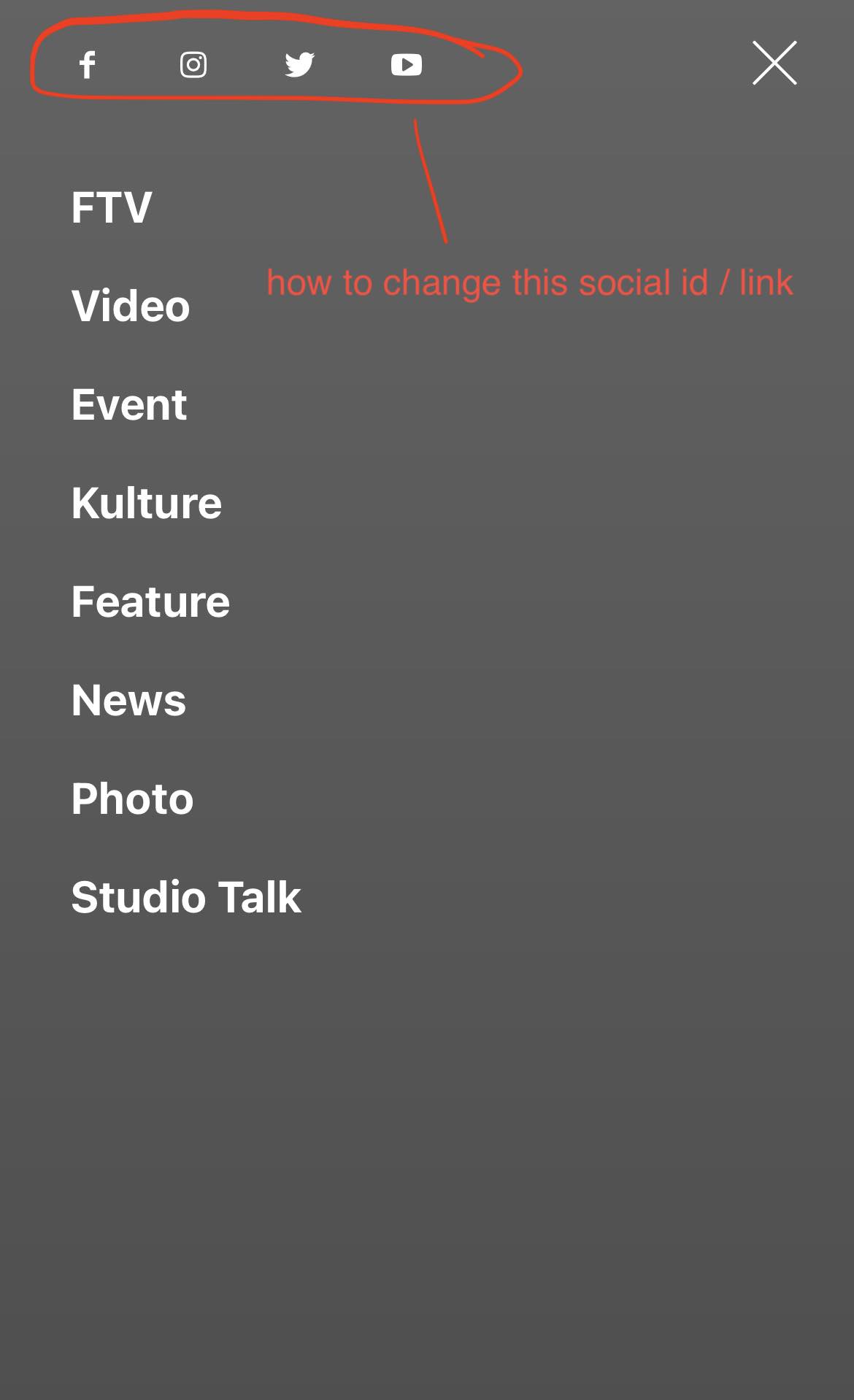
 robinheymans
Hi,
I’m trying to replace the default desktop (and mobile) menu with an alternative menu (I tried the Max Mega Menu plugin) but I can’t get it to show up. Is there a specfic component/shortcode I need to use in my header template? It seems like the “header main menu” component doesn’t support menu’s from other plugins?
Kind regards,
Robin
 Bettina
 Hello @rjsurjo!
Here you can remove/set a picture for mobile menu background: https://www.screencast.com/t/x3Xrln2b88x
And the background color here: https://www.screencast.com/t/PbU3hQpDqHh
If you use the mobile theme plugin, then check the settings in the theme panel -> mobile theme -> mobile menu/search background and theme panel -> mobile theme -> theme colors -> mobile menu.
Hope that helps you!
Thank you!
 christopherkevil8838
 I’m a bit unclear on how to edit the mobile pages (#2 option). When I click on “mobile” to the right of the tagDiv button, it gives me a drop down menu that is different from the one that is shown in your 10.3.7. Update link.
Instead, I see three choices: 1 “load mobile page from Cloud” or 2 “create blank mobile page” or 3 “no mobile page, please create or import mobile page” and then
4 “Documentation”. Only the first two are active links.
Please advise how I can follow the instructions outlined in the 10.3.7 update link
 cashflow270
 I am using the mobile theme plugin. When I go to the theme panel > mobile theme > I changed the gradient and the background image for search/menu. No changes happen. The only way to change the gradient is in custom CSS. How can I fix this?
 davinity12
 Hi,
So I was able to insert a mobile menu. I changed the “select menu” setting to main menu, however, when clicking on the 3 bars, nothing happens.
christopherkevil8838 Thank you, Bettina! I see where I can add the header date I can’t see where it goes after I click it? Where is it?
I think I may have to put it back into the header since my header logo it too wide.
On a related issue, I can see that on the mobile portrait view of site omits my header logo completely and instead substitutes the Amsomia default menu. In the landscape view and the tablet view, the correct header is displayed, even if it is squeezed with the Email US button on the right side is pushed to the center.
So it looks like my header logo is too big for the banner and I will have to reduce its width. What is the maximum width of the header logo I can use so that it looks good in both mobile views?
Also how can I change my header logo?
-
This reply was modified 3 years by
christopherkevil8838.
-
This reply was modified 3 years by
Bettina Hello @cashflow270!
Here you can remove/set a picture for mobile menu background: https://www.screencast.com/t/x3Xrln2b88x
And the background color here: https://www.screencast.com/t/PbU3hQpDqHh
If you use the mobile theme plugin, then check the settings in the theme panel -> mobile theme -> mobile menu/search background and theme panel -> mobile theme -> theme colors -> mobile menu.
We have 3 options for mobile versions that you can use:
1. Responsive version: A responsive version of your website looks similar to the desktop version. Edit the page with TagDiv Composer. Click on the mobile viewport: https://www.screencast.com/t/XDQJedlggSB; there you can see your mobile version and edit or adjust the elements to look better.
2. Mobile pages: https://tagdiv.com/newspaper-10-3-7-update-brings-customizable-and-fast-mobile-pages
3. Mobile theme plugin: The Mobile Theme is a performance-optimized theme included in the main Newspaper theme that only loads on mobile devices. It comes with its own templates and design for pages, posts, categories, etc., so your current templates from the desktop theme will get converted to the mobile theme layout. Please see https://forum.tagdiv.com/the-mobile-theme/ and https://forum.tagdiv.com/mobile-theme-introduction/ for more information.
A full explanation is here: https://www.youtube.com/watch?v=SpGkOnJeNZY
You can choose to use whichever one is more affordable and useful for you.
For the option 1 and 2, you need to uninstall the Mobile Theme plugin.
Thank you!
 Edragon
 Hi Bettina
We do use Mobile Theme plugin, and the problem is that if I switch AMP ON it ruins mobile menu, if AMP is OFF mobile menu works perfectly with Mobile Theme plugin. At the moment we switched AMP off and everything works as it should, but previously AMP was on or whenever you turn it ON it, mobile menu is locked, it shows a full menu with submenu and if there are more than 10 then the rest of the menu is not accessible anymore. This means that MOBILE+AMP, like it has been shown in tagDiv AMP Plugin Tutorial, does not work together properly. I tested it with other website and the same thing happened so I am pretty sure that you can repeat that process too.
-
This reply was modified 3 years by
Edragon.
cashflow270I need to edit the mobile menu. There is an image behind the blue coloring and I can’t get rid of the coloring. https://ibb.co/Qnqvsmx
Edragon Looks like AMP is what is breaking menu on mobiles. When I switch amp off, menu works perfectly as it should. But whenever I switch AMP ON, it breaks menu.
Edragon Sorry, it’s actually still a problem. I accidentally clicked EXIT MOBILE VERSION where menu worked as it should. But when I switch back to mobile ?amp version then menu is not working properly again
EdragonNoticed that if menu is bigger/longer (let’s there are more than 10 menu links) than your mobile screen then you can’t access rest of menu, since you can’t scroll mobile menu.
Example: mkuubis.ee
Bettina Hello @raketenaffiliate!
It could be the problem from safari. Maybe the font you use is not compatible with the browser.
Go in Theme Panel -> Theme Colors -> Mobile menu/mobile search.
Thank you!



