
No search results were found in Documentation!
 Calin
Calin I understand what you mean.
Our theme offers two possibilities, the mobile menu (where the menu that it is opened can not be edited to have the layout that you want, you can only set socials and menu elements) and the popup modal, this allow you to set a page as menu (you can create the page like you want and assign it in the popup modal, then when you click on that popup modal, then that menu (custom page) will be open.
Thank you!
 travelingsession
 My mobile menus stopped working after 11.4.2 as well. The page appears to go into a modal when you click the menu. Did anyone find a solution? Reading through the thread, I’m not using any caching plugins because I’m on a CDN. Before this happened, I had AMP deactivated. I have AMP turned on now to try and resolve the issue.
 WalnutHillDesign
 Reverting back to 11.4.1 using the theme panel resolved the mobile menu issue. You’ll likely need to update/activate the dependent tag div plugins as well.
WalnutHillDesign Same problem here. The page just appears to zoom in a little like a popup, but the mobile menu doesn’t load. Running backups now and will try to revert to 11.4.1.
Major problem on a site that is 70% mobile traffic with a 5-10k daily visitors.
WalnutHillDesign We had the same issue a few weeks ago and after trying everything under the sun to troubleshoot it, we ended up just doing a complete site restore from a server backup. That brought it back to life, but now are reluctant to do any updates at all.
This might be the final straw for us with tagdiv. This theme has been nothing but one issue after another for us and has cost a ridiculous amount to deal with these problems. I’ve come to the conclusion that the TD Composer is just not a stable page builder.
Now our mobile menu stopped working.
I wish we didn’t use it, but it seemed like a good decision at the time. I’ll be redeveloping our Newspaper sites with Elementor Pro as soon as time allows.
Good luck.
 benjaone1
 I don’t want to edit how the website looks on mobile. I want to edit the menu sliding in from the left when pushing on the hamburger icon on mobile.
I want to change the look of my mobilemenu. I don’t see where I can do this from the “mobile menu”.
Thanks.
Calin Hi,
This problem is not a general one, it depends on more factors, for example we saw that users with strong cache plugin like litespeed, W3 Total.
If you want, you can contact us via email and will check the mobile menu.
Also, soon will be a new theme update and maybe then you’ll no longer have this problem, we hope to be the next week.
Thank you!
 nyesteb
 Hello!
No. I activate and deactivate the AMP plugin, then deactivate the Mobile Theme plugin (30sec) and activate the AMP plugin. In this case works well the AMP plugin, can use the settings menu. After this (50sec) I activate the Mobile Theme plugin, then the settings menu, and the full AMP menu goes away. I show this in this video. As if there were a conflict between the two plugins. There had been no such problem before.
 Anamaria
 Hello,
For the mobile menu, you can’t change the animation. Also, the mobile menu page can be edited from Theme Panel -> Theme Colors -> Mobile menu/search -> https://i.imgur.com/AeYyV12.png or Background -> https://i.imgur.com/JjkfQvZ.png the menu is set with tagDiv Composer -> https://i.imgur.com/CsLVSbx.png
Also, if you want you can create a page with a menu and set the id page to the modal popup, this has a few triggers or you can set it as a button, which will appear only after the button is pressed. -> https://forum.tagdiv.com/modal-popup/
Thank you!
Calin Hi,
I’m sorry, unfortunately I do not see any menu to slide on this website https://tecmundo.com/ neither desktop nor mobile.
If I’m right you want something like this https://i.imgur.com/o5ETzlN.png this is the default option in our theme for mobile menu.
Thank you!
 Nickolas Combatente
how i can edit the animation and the page that appears when we touch the mobile menu?
this page: https://imgur.com/a/uVj3lNC how i can edit her? and the animation that appears behind her?
this page appears when we touch the mobile menu, with this url: domainname/#, but we cannot find her in wordpress pages section
Nickolas Combatente is not like that, is like what this guys have in they site: https://tecmundo.com/ if you use the inspect mode and put in they mobile version you gonna see a menu that slide to left position
nyestebHi!
For long time I had no problem with this theme and plugin, but I noticed a few week ago that the AMP plugin only runs in transition mode. If I set to Standard, the plugin switch back to transition.
I thought I would turn it off and reset it. Since then, if the Tagdiv Mobile theme is turned on, AMP will not appear in the menu and there is no setting, just turn it off on the plugin manage page.
What can I do?
The page: https://hirmagazin.eu
Thank you!
Balazs
 forevermogulmag
How do I get rid of the tag line on the mobile menu header? I don’t know what I am missing in the settings.
 Shubham Patel
 I want it for mobile. I have added modal pop-up menu in place of mobile menu element in mobile header. I already sent my header template file through Google drive. You can import that template through WordPress import tool and see and in cloud template section.
Nickolas Combatentein my website i want to make a scrollable menu to da left, like a header menu, because now when the size of the header menu is bigger than the size of the mobile screen that him sits in, the header menu is dropped to the bottom like this:https://imgur.com/a/Vl213Ym And im not finding a way to do this with tagdiv composer and i wanna know if has one?
 Bettina
 Hello @bezukhof!
I can see that you use a very old theme version, so I gladly recommend you to make a full backup and update the theme and plugins. That one is a sticky mobile menu. You can disable/enable sticky mobile menu and main menu when you access Website Manager, like this: https://www.screencast.com/t/EdpjIpsBHunx
Thank you!
Calin Hi benjaone1, the mobile menu can be set with tagdiv Composer only if a cloud template it is used, then from tagDiv Composer you’ll need to set on mobile port view and set the mobile menu that you want to use -> https://i.imgur.com/F4mbshi.png
If is a standard header, then the menu that will be used is the one from the responsive version, and in case that the mobile theme plugin it is used, then the mobile menu can be set from the theme panel > mobile theme > header > mobile menu.
Thank you!
Shubham Patel Actually, I want change default Mobile menu with pop-up slider show I can effectively customize it. I removed mobile menu element and added pop-up menu button, removed background and all of pop-up menu button and added icon to button (removed text and used only icon) but this pop-up button is not properly align in the header row, I want to keep my mobile header slim but this pop-up button expands my header row and making it broad. I tried margin, padding, and all to properly fix pop-up button as menu button but it didn’t fixed well. But when I tried fix icon element instead of modal pop-up it fixed well same as default Mobile menu icon.
benjaone1 Hi 🙂
Stupid question, how do I edit the mobile menu with the TD-composer? Since I only know how to edit the frontpage with the TD-composer.
Thanks
Ben
Bettina Hello Ben!
We have an element in the TagDiv Composer called “Mobile menu”. Place it into your header and choose a menu from the element settings.
Thank you!
benjaone1 benjaone1Hi,
I want to add a header cloud template to get the mobile menu.
I like my header as is, I just want the mobile menu.
Any other way to get a new moblie menu will also be great.
Site: http://www.a-c-d.net
Thanks
Ben
Anamaria Hello,
Please make sure you have set the menu for mobile menu -> https://i.imgur.com/lfpQlxQ.png -> https://forum.tagdiv.com/topic/icon-menu-on-phone-view/
Thank you!
 ionutm
 Hello,
I could use your support with some issues on my mobile pages. My website has most of its pages built using tagDiv Composer (and not the responsive version), but I’ve noticed the following behavior when these pages are accessed, namely:
– when a visitor accesses them, they are displayed in the responsive version (which has some design issues)
– when a user accesses them (so after login), they show up as they were designed with tagDiv Composer
Something like this 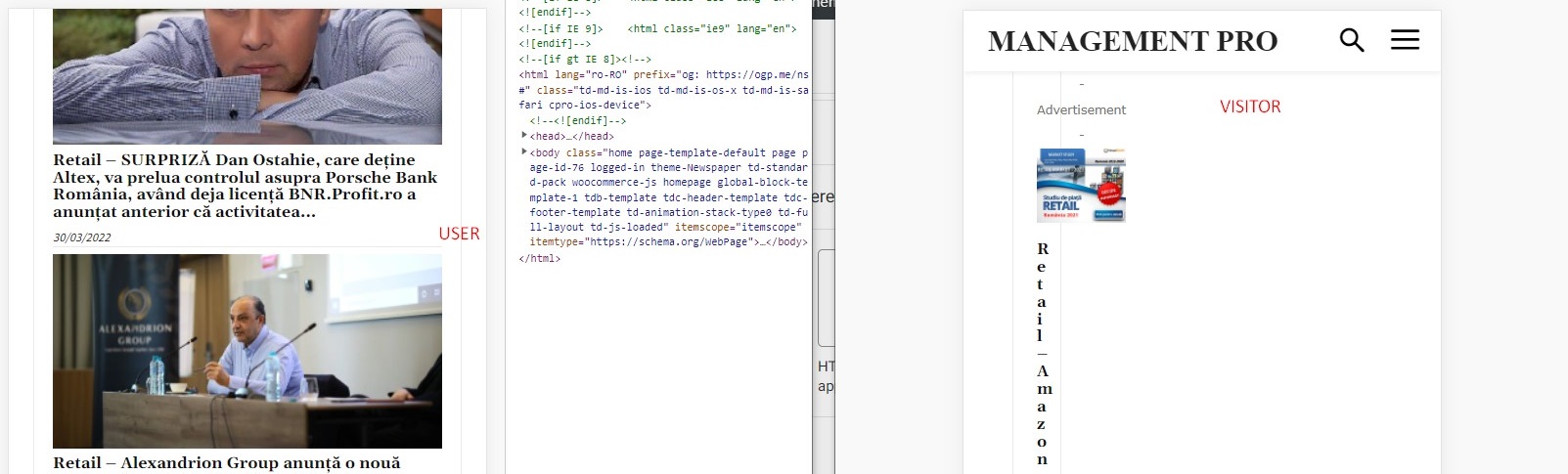
After some debugging, I’ve tracked down these issues to be related to the Wordfence plugin, which is set up in learning mode; the problem is that if I disable Wordfence, I’m losing other page settings like sticky menu setting, login menu setting, colors, etc.
Could you help me further debug it or recommend a solution? I can provide admin login if needed.
Best,
Ionut
-
This reply was modified 4 years by
ionutm.



