
- TutorialsFrom WPBakery to tagDiv Composer
- TutorialsWhat is Ajax preloading?
 Bettina
 Hello!
You can not customize AMP at all because it comes with its own design: https://forum.tagdiv.com/tagdiv-amp-plugin-tutorial/
There are some settings in the Theme panel -> Mobile Theme.
Thank you!
Bettina Hello!
If you mean Mobile Theme, then you can not customize its own layout and edit the pages with TagDiv Composer.
You have only some settings for this layout, which you can find in Theme panel -> Mobile Theme.
Documentation here:
– https://forum.tagdiv.com/mobile-theme-introduction/
– https://forum.tagdiv.com/the-mobile-theme/
If you do not mean about the Mobile Theme plugin, then please provide more information about what you need to achieve, screenshots or an example and your website link in order to help you efficiently.
A solution for sending a screenshot/video is this:
Download, capture, send: https://www.techsmith.com/jing-tool.html
After making the screenshot, you will have a link, paste it here.
Thank you!
 Anamaria
 Hello,
You don’t have the same footer in the posts, because you have the mobile theme plugin (the mobile theme comes with its templates for page, post, category, etc so your current templates from the desktop theme will get converted to the mobile theme layout).
So you can disable it and see the results.
Also, please check the link provided above to that topic with information about each mobile version and how they work -> https://forum.tagdiv.com/topic/mobile-version-not-working-properly-2/
Thank you!
 Rahul chauhan
when i access my blog via mobile its open normally in amp theme mode but when click on 2nd or next page its suddenly becomes in default mobile view mode and only home page opens. Sometimes the screen also appears blank. How to solve it?
 Tughan
 Thanks a lot, everything is fine right now and working great!
May I request guidance in one thing too? Sorry if I missed it in any of these guides, I checked them twice but I’m not a native speaker.
When I type /?amp, it works great but homepage has a different design than the mobile page I created for homepage. Am I not allowed to customize the amp for now or am I missing something again?
Thank you for your patience and support! Amazing theme!
 menneskedyr
 Thank you for the quick response, but that’s not quite it. Yes, TD Composer has a lot of queries and we live with it, but this was caused by a single (double, actually) repeating query from TD Standard Pack apparently fetching the site logo, using what seems to be a highly inefficient function:
attachment_url_to_postid()
And it was doing it twice, once for the desktop and once for the mobile logo, on every single page load. This caused mysqld to spike to 200% and above.
I see now that I have posted the wrong screenshot above, sorry. Here’s the correct one:
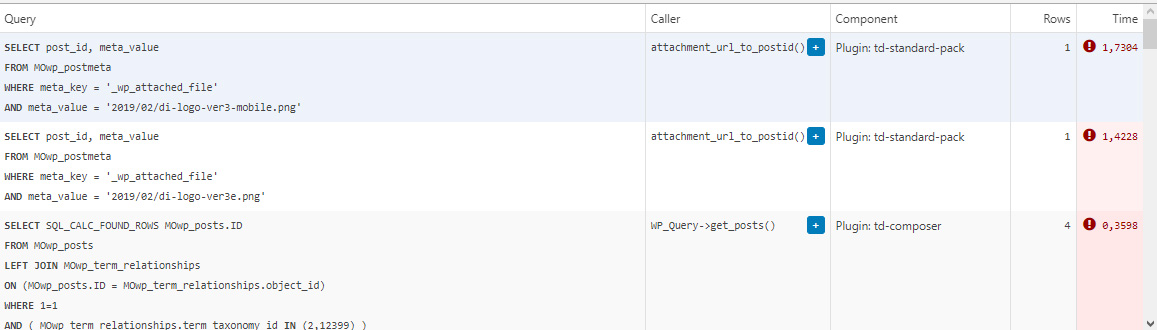
This morning I managed to patch up the problem, it’s a crude solution but may help someone. In header template I found that it was loading the logos from
plugins/td-standard-pack/Newspaper/parts/header/header-menu-h1.php
(yours may be different of course)
There I simply removed the PHP block fetching the logos and hardcoded the HTML for the logos in. As soon as I did that, the SQL spike went away. So I’d say it’s a bug, or inefficient code at least.
To be clear, we’re running the latest versions of WP, PHP, MySQL, the theme & plugins, all on a solid VPS. Yes there is quite a bit of SQL load, we’re working to optimize it with new blocks and Cloud Templates, but this was something else. Could be related to the latest Standard Pack update, don’t know, team didn’t report it before.
-
This reply was modified 4 years by
menneskedyr.
Bettina Hello!
I provide the same response, because someone required “how the ads of the mobile theme should be configured” and this is the only way you can apply the ads there.
Other ads should be configured with a plugin called Ad Inserter plugin. Also, there are auto ads, etc. That’s why we need more details in order to help you efficiently.
There are a lot of cases, that’s why I specified “case”.
We have 3 options for the mobile version, not only Mobile Theme plugin.
If a case required more investigation, then how can I describe this more clear? Sometimes a case is different then how you described in a topic.
Thank you for your understanding!
 iitob
iitob “I just checked your case, and it seems that my colleague replied to you and set it on the issue list for more investigation.”
You need to make this more clear then. If there is no current fix for this, people need to know. We’ve spent all the time switching over to Newspaper and using your mobile theme, but are now losing 60% of the revenue from anchor ads because they wont display with your mobile theme on most devices.
This issue has been brought up by multiple people, and each time one of you gives the same old “Please put the ad code in the mobile theme section” response, completely ignoring the detail people have provided you on this issue.
 srpskiposlovniimenik
Theme is broke again from no reason, homepage and category is ok and mobile too but article page showing me error with td composer a try to reinstall but still is error here 
Anamaria Hello,
I checked your menu on mobile and work => https://i.imgur.com/8lWU2vZ.png
Also, I saw you have the mobile theme plugin activated, and on the main page is disabled that’s why the menu is ok, but for posts/categories template, etc you need to set the menu in Theme Panel -> Mobile Theme -> Header -> Main menu => https://i.imgur.com/AjjhTfB.png
Thank you!
Bettina Hello!
Let me explain you which options of mobile versions are:
1. Responsive version: A responsive version of your website is looking similar like on desktop, edit the page with TagDiv Composer, click on the mobile viewport: https://www.screencast.com/t/XDQJedlggSB ; there you can see your mobile version and you can edit the elements there.
2. Mobile pages: https://tagdiv.com/newspaper-10-3-7-update-brings-customizable-and-fast-mobile-pages/
3. Mobile theme plugin: The Mobile Theme is a performance optimized theme included in the Newspaper main theme and it loads only for mobile devices. It comes with its own templates for page, post, category, etc so your current templates from the desktop theme will get converted to the mobile theme layout. For more details, please take a look here: https://forum.tagdiv.com/the-mobile-theme/ https://forum.tagdiv.com/the-mobile-theme/
A full explanation you can find here: https://www.youtube.com/watch?v=SpGkOnJeNZY
If you created the mobile pages with TagDiv Composer, then when you install Mobile Theme plugin, your pages will be overwritten (disappear) by the plugin layout.
If you use Mobile theme plugin, then you can not edit the pages with TagDiv Composer.
You have only some settings for this layout, which you can find in Theme panel -> Mobile Theme. Please note that if a page is made by Composer, than the content won’t be displayed on Mobile theme version. You should create the content with the Mobile Editor.
Unfortunately, AMP is faster and works better only with Mobile Theme, because it is not compatible with cloud templates.
From my point of view, if you don’t use the Mobile Theme plugin, then there is no reason or benefit from AMP.
Check our documentation about this plugin here:
https://forum.tagdiv.com/tagdiv-amp-plugin-tutorial/
Thank you for understanding!
Bettina Hello!
Please make sure you have the latest version of the PHP, WordPress, theme and plugins(11.3.1).
If that problem is still there, then please execute these steps:
1. disable TagDiv Composer
2. uninstall(delete) TagDiv Composer
3. clear cache (if cache plugin exists)
4. install TagDiv Composer
5. activate TagDiv Composer
6. clear cache (if cache plugin exists)
It seems that you use Mobile Theme plugin. Please note that if you need to use mobile pages or a responsive version, then you need to uninstall the Mobile Theme plugin.
Thank you!
Anamaria Hello,
Please go in Theme Panel -> Mobile Theme -> Grids and set the sort to other option => https://i.imgur.com/G4bf8WU.png
Thank you!
 Calin
Calin Hi Faba,
If you are using the responsive version, to remove the login option you need to disable this option -> https://i.imgur.com/wpVOrPh.png now if you have installed and activate the mobile theme plugin, then you need to disable it from the mobile theme plugin, from this place -> https://i.imgur.com/xuhQo1O.png
I hope this will help you!
 tamsin_lechner
 Hi Bettina
Two things.
1. Please can you delete all the screencast page shares above in the post — Oct 28, 2021 at 4:43 am? It has attracted some unwanted attention!! I can’t find an edit function to do it myself.
2. In response to your question. (FYI I’ve decided not to use Mobile Theme).
In your Theme Documentation for Mobile Theme, it shows “Post Settings” should be displayed between Footer and Theme Colors headings. This heading did not show in my settings list and therefore I could not customise the post settings. I did not follow your suggestion to install Standard Pack as a fix, as I already had it installed. I was able to access and customise all other plugin settings.
https://forum.tagdiv.com/the-mobile-theme/
Thanks, Tamsin
 Faba
FabaHi everyone,
I’ve looking for a solution to this problem, but without success, from the theme panel I have disabled the “sign in option’ although for the mobile version is still there, so I have installed the mobile version of the theme hoping to disable from there,but from there there is no option to disable it, additionally the theme home page doesn’t show the featured image, only if I click on the actual article then it shows it.
Unfortunately I cannot upload any screenshot here to show my real example problem.
Thank you for you support
Fab
 Mark Gilbert
I activated AMP plugin and tried to activate tagDiv Mobile Theme and got this message:
“Fatal error: Cannot declare class Mobile_Detect, because the name is already in use in /homepages/24/d715855802/htdocs/jazzjournal/wp-content/plugins/td-mobile-plugin/Mobile_Detect.php on line 28”
What next?
Thanks
Mark GilbertHello – On advice of Google AdSense I activated AMP plugin (Version 2.1.4) and tried to activate tagDiv Mobile Theme (Version 1.3) but got this message:
“Fatal error: Cannot declare class Mobile_Detect, because the name is already in use in /homepages/24/d715855802/htdocs/jazzjournal/wp-content/plugins/td-mobile-plugin/Mobile_Detect.php on line 28”
What can I do?
Thanks
 lpro
lproHi,
How i show grid 3 featured posts in the homepage mobile theme?
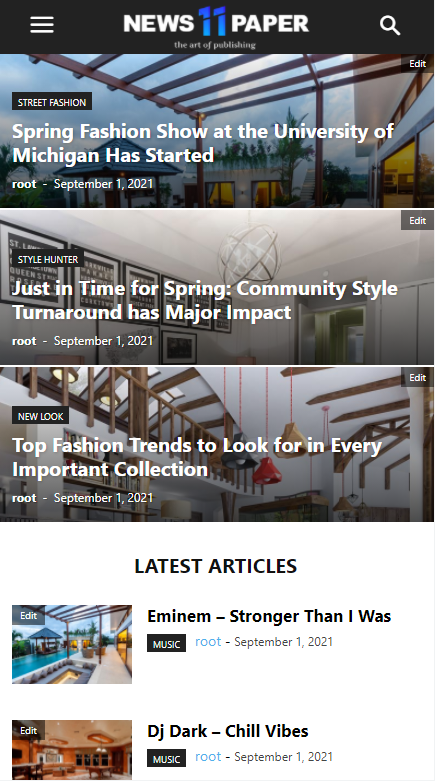
I have only latest articles…

Thx
TughanHeyo,
I bought the Newsletter theme a day ago. I’m all good and pleased with the theme. However, I cannot find enough resources on the internet about the problem I’m dealing with.
I have to versions of mobile theme. Although it perfectly works on my PC. It is broken in my mobile browser and Google does not recognize any AMP.
I checked Mobile + AMP from the Theme Options > Mobile Theme.
I followed the documentation to create a mobile version, I designed mobile header and footer. From tagDiv Composer, I also clicked Manager and set footer and header as the global.
The mobile version looks like this on pc
https://www.hizliresim.com/ahhhpoc
It looks like this on mobile
https://www.hizliresim.com/nnz1opd
I followed the AMP settings recommended on the documentation. Moreover, I found a link on the documentation to check the AMP, when I test my website, it tells
“Not an AMP page
The URL is not an AMP page, nor does it link to an AMP page”
Can someone help me about what I am missing?
 qwenmn
Hi,
I want to hide the sidebar when the size of the screen is small, I notice that the option is only available for elements such as ads. But not for other elements such as Flex Box.
The reason I’m not using the mobile theme is because I want infinite scroll for my mobile visits.
Is there a way I can hide side bar items when the screen is small without mobile theme or AMP?
Bettina Hello!
There is a huge configuration which is tested with our theme: https://forum.tagdiv.com/cache-plugin-install-and-configure/
Let me explain you which options of mobile versions are:
1. Responsive version: A responsive version of your website is looking similar like on desktop, edit the page with TagDiv Composer, click on the mobile viewport: https://www.screencast.com/t/XDQJedlggSB ; there you can see your mobile version and you can edit the elements there.
2. Mobile pages: https://tagdiv.com/newspaper-10-3-7-update-brings-customizable-and-fast-mobile-pages/
3. Mobile theme plugin: The Mobile Theme is a performance optimized theme included in the Newspaper main theme and it loads only for mobile devices. It comes with its own templates for page, post, category, etc so your current templates from the desktop theme will get converted to the mobile theme layout. For more details, please take a look here: https://forum.tagdiv.com/the-mobile-theme/ https://forum.tagdiv.com/the-mobile-theme/
A full explanation you can find here: https://www.youtube.com/watch?v=SpGkOnJeNZY
If you created the mobile pages with TagDiv Composer, then when you install Mobile Theme plugin, your pages will be overwritten (disappear) by the plugin.
This is how that element works there on the mobile version: https://www.screencast.com/t/tt0ZFk3XX5tT
Thank you!
Bettina Hello Tamsin!
In order to have different elements inside for every post, you need to have different template for each post. You can install many cloud post templates and you can see them in a list here when you access a post: https://www.screencast.com/t/9mY3SZgZn
In this case, Global means that the template it’s set up for all posts by default. But, for example, you can have a post with different template and without Global. This you can do by accessing the post you want to choose other template, select from the list the template you need, that’s all. You can see how they are looking by select other template for example. The settings will be different because it’s other template, but when you assign/select the global template again you will have the same settings and you won’t lose it.
Could you explain in detail about Mobile Theme and the Standard Pack suggestion?
For more details, please take a look here: https://forum.tagdiv.com/mobile-theme-introduction/
Hope that is more understandable now!
Thank you!
Anamaria Hello,
Theme Panel interface was not designed to be used on mobile.
Thank you!
 Redlemon
 Hey,
Thanks for your input. You do realize that not all posts are of equal lengths though, right? Nor is it practical to create one template for every number of paragraphs.
I followed the links in the link you shared, and I quickly ended up in this post ( https://forum.tagdiv.com/topic/single-post-content-ad-paragraph-setting/ ) where the user chrisebejermt showcased the actual problem with the behavior of the ads, and this is just for the desktop version ( https://www.screencast.com/t/GYLcHbNP ). In mobile there are equally as many issues, yet some different ones. Like I explained, and you can test this yourself if you’d like, when the number of paragraphs in the article is not exactly the number of paragraphs in the template, it is not impossible that ads are causing paragraphs to go missing. You asked for a video, and I’ll make sure to share one soon. But bear in mind that for the time being I have to manage to find a solution for my client, who needs ads easily inserted in articles, which I clearly can’t give him with Newspaper theme out of the box. And that’s a bummer.



