- ApiUsing the Theme API in plugins
- ApiPractical example – How to add a new Block and Module
- ApiAPI – Smart Lists – Introduction
- ApiAPI – Category top section style – Introduction
- ApiAPI – Category top section template – Introduction
- Apitd_api_module::update
- Apitd_api_module::add
- ApiAPI – Modules – Introduction
 Anamaria
 Hello,
I just checked your website, and now you have the mobile responsive => https://www.screencast.com/t/J0OL9RI85 for the homepage, but for posts seems that the mobile theme is still enabled, but only disabled from the homepage.
So, if you don’t want to use the mobile theme, please deactivate it and clear all cache(also from your browser) and try again.
You can find more information in this video about the mobile versions => https://www.youtube.com/watch?v=SpGkOnJeNZY
Thank you!
 t_kanako0429
I would like to know how to edit my mobile page.
I don’t know how to change the title of the demo site theme. now I chose Classic blog pro, “Classic” appeared.
 Bettina
 Hello!
For cloud templates, you will have more options in TagDiv Composer (https://forum.tagdiv.com/tagdiv-composer-tutorial/), so these settings overwrite the settings from Theme Panel. If you let the settings by default in TagDiv Composer, then the settings from Theme Panel will reflect on your website.
In order to edit your responsive version, you need edit the page with TagDiv Composer, click on the mobile viewport: https://www.screencast.com/t/XDQJedlggSB ; there you can see your mobile version and you can edit the elements there.
If you want to use a mobile page, then you need to assign it to your homepage. For more information about this mobile version please take a look in this article: https://tagdiv.com/newspaper-10-3-7-update-brings-customizable-and-fast-mobile-pages/
If you created the mobile pages with TagDiv Composer, then when you install Mobile Theme plugin, your pages will be overwritten by the plugin.
The Mobile Theme is a performance optimized theme included in the Newspaper main theme and it loads only for mobile devices. It comes with its own templates for page, post, category, etc so your current templates from the desktop theme will get converted to the mobile theme layout. For more details, please take a look here: https://forum.tagdiv.com/the-mobile-theme/
A full explanation you can find here: https://www.youtube.com/watch?v=SpGkOnJeNZY
Thank you!
Anamaria Hello,
The mobile theme comes with its own templates for page, post, category, etc so your current templates from the desktop theme will get converted to the mobile theme layout, the page content is made without builders in mobile editor => https://www.screencast.com/t/xbgZG8kH also, the options that are provided to edit the mobile theme version are limited (this keeps the things simple).
This can be found at the bottom of every page when editing https://forum.tagdiv.com/the-mobile-theme/
For example, to create a contact page you can use only the elements from the mobile editor (so you can only add the elements that are present in the toolbar, without shortcodes(blocks) and the shortcode for the contact form (if you copy-paste the code will not work).
You can check this video about the Newspaper theme version on mobile -> https://www.youtube.com/watch?v=SpGkOnJeNZY
Thank you!
 Sud
SudHi Newspaper X Support team,
This is to update you that I have installed the Newspaper theme on 16th/17th May 2021, on my website – https://discovervibe.blog/. Since then after an initial hike in traffic, it gradually slowed down, then I checked in Google Search Console, and in coverage, it is showing 9 URL’s with Server error (5xx), as per screenshot – http://prntscr.com/13mh3bk
I have check the topic on Forum, but not found the relevant content.
Following are the affected URLs:
– https://discovervibe.blog/wp-content/plugins/td-composer/td-multi-purpose/styles/tds_testimonial/tds_testimonial3.php
– https://discovervibe.blog/wp-content/plugins/td-composer/td-multi-purpose/styles/tds_call_to_action/tds_call_to_action1.php
– https://discovervibe.blog/wp-content/plugins/td-composer/td-multi-purpose/styles/tds_call_to_action/tds_call_to_action2.php
– https://discovervibe.blog/wp-content/plugins/td-composer/td-multi-purpose/styles/tds_testimonial/tds_testimonial1.php
– https://discovervibe.blog/wp-content/plugins/td-composer/td-multi-purpose/styles/tds_testimonial/tds_testimonial4.php
– https://discovervibe.blog/wp-content/plugins/td-composer/td-multi-purpose/styles/tds_testimonial/tds_testimonial2.php
– https://discovervibe.blog/wp-content/plugins/td-composer/mobile/
– https://discovervibe.blog/pf/work-page-3-4/?amp
Pls also let me know, why such irrelevant URLs causing the problem and how to deal with them, if such issues occur in future.
Pls revert ar earliest
Best Regards,
Sudhir
Sudhir
 arvindk
I am trying to run update from my admin end. The update is failing with error:
The update process is starting. This process may take a while on some hosts, so please be patient.
Enabling Maintenance mode…
Updating Theme Newspaper (1/1)
Downloading update from https://cloud.tagdiv.com/wp-content/uploads/2021/03/Newspaper.zip…
Unpacking the update…
Installing the latest version…
Removing the old version of the theme…
Warning: chmod(): Operation not permitted in /usr/share/nginx/html/wp-admin/includes/class-wp-filesystem-direct.php on line 173
Warning: chmod(): Operation not permitted in /usr/share/nginx/html/wp-admin/includes/class-wp-filesystem-direct.php on line 173
Warning: chmod(): Operation not permitted in /usr/share/nginx/html/wp-admin/includes/class-wp-filesystem-direct.php on line 173
Warning: chmod(): Operation not permitted in /usr/share/nginx/html/wp-admin/includes/class-wp-filesystem-direct.php on line 173
Warning: chmod(): Operation not permitted in /usr/share/nginx/html/wp-admin/includes/class-wp-filesystem-direct.php on line 173
Warning: chmod(): Operation not permitted in /usr/share/nginx/html/wp-admin/includes/class-wp-filesystem-direct.php on line 173
Warning: chmod(): Operation not permitted in /usr/share/nginx/html/wp-admin/includes/class-wp-filesystem-direct.php on line 173
Warning: chmod(): Operation not permitted in /usr/share/nginx/html/wp-admin/includes/class-wp-filesystem-direct.php on line 173
Warning: chmod(): Operation not permitted in /usr/share/nginx/html/wp-admin/includes/class-wp-filesystem-direct.php on line 173
Warning: chmod(): Operation not permitted in /usr/share/nginx/html/wp-admin/includes/class-wp-filesystem-direct.php on line 173
Warning: chmod(): Operation not permitted in /usr/share/nginx/html/wp-admin/includes/class-wp-filesystem-direct.php on line 173
Warning: chmod(): Operation not permitted in /usr/share/nginx/html/wp-admin/includes/class-wp-filesystem-direct.php on line 173
Warning: chmod(): Operation not permitted in /usr/share/nginx/html/wp-admin/includes/class-wp-filesystem-direct.php on line 173
Warning: chmod(): Operation not permitted in /usr/share/nginx/html/wp-admin/includes/class-wp-filesystem-direct.php on line 173
Warning: chmod(): Operation not permitted in /usr/share/nginx/html/wp-admin/includes/class-wp-filesystem-direct.php on line 173
Warning: chmod(): Operation not permitted in /usr/share/nginx/html/wp-admin/includes/class-wp-filesystem-direct.php on line 173
Warning: chmod(): Operation not permitted in /usr/share/nginx/html/wp-admin/includes/class-wp-filesystem-direct.php on line 173
Warning: chmod(): Operation not permitted in /usr/share/nginx/html/wp-admin/includes/class-wp-filesystem-direct.php on line 173
Warning: chmod(): Operation not permitted in /usr/share/nginx/html/wp-admin/includes/class-wp-filesystem-direct.php on line 173
Warning: chmod(): Operation not permitted in /usr/share/nginx/html/wp-admin/includes/class-wp-filesystem-direct.php on line 173
Warning: chmod(): Operation not permitted in /usr/share/nginx/html/wp-admin/includes/class-wp-filesystem-direct.php on line 173
Warning: chmod(): Operation not permitted in /usr/share/nginx/html/wp-admin/includes/class-wp-filesystem-direct.php on line 173
Warning: chmod(): Operation not permitted in /usr/share/nginx/html/wp-admin/includes/class-wp-filesystem-direct.php on line 173
Warning: chmod(): Operation not permitted in /usr/share/nginx/html/wp-admin/includes/class-wp-filesystem-direct.php on line 173
Warning: chmod(): Operation not permitted in /usr/share/nginx/html/wp-admin/includes/class-wp-filesystem-direct.php on line 173
Warning: chmod(): Operation not permitted in /usr/share/nginx/html/wp-admin/includes/class-wp-filesystem-direct.php on line 173
Warning: chmod(): Operation not permitted in /usr/share/nginx/html/wp-admin/includes/class-wp-filesystem-direct.php on line 173
Warning: chmod(): Operation not permitted in /usr/share/nginx/html/wp-admin/includes/class-wp-filesystem-direct.php on line 173
Warning: chmod(): Operation not permitted in /usr/share/nginx/html/wp-admin/includes/class-wp-filesystem-direct.php on line 173
Warning: chmod(): Operation not permitted in /usr/share/nginx/html/wp-admin/includes/class-wp-filesystem-direct.php on line 173
Warning: chmod(): Operation not permitted in /usr/share/nginx/html/wp-admin/includes/class-wp-filesystem-direct.php on line 173
Warning: chmod(): Operation not permitted in /usr/share/nginx/html/wp-admin/includes/class-wp-filesystem-direct.php on line 173
Warning: chmod(): Operation not permitted in /usr/share/nginx/html/wp-admin/includes/class-wp-filesystem-direct.php on line 173
Warning: chmod(): Operation not permitted in /usr/share/nginx/html/wp-admin/includes/class-wp-filesystem-direct.php on line 173
Warning: chmod(): Operation not permitted in /usr/share/nginx/html/wp-admin/includes/class-wp-filesystem-direct.php on line 173
Warning: chmod(): Operation not permitted in /usr/share/nginx/html/wp-admin/includes/class-wp-filesystem-direct.php on line 173
Warning: chmod(): Operation not permitted in /usr/share/nginx/html/wp-admin/includes/class-wp-filesystem-direct.php on line 173
Warning: chmod(): Operation not permitted in /usr/share/nginx/html/wp-admin/includes/class-wp-filesystem-direct.php on line 173
Warning: chmod(): Operation not permitted in /usr/share/nginx/html/wp-admin/includes/class-wp-filesystem-direct.php on line 173
Warning: chmod(): Operation not permitted in /usr/share/nginx/html/wp-admin/includes/class-wp-filesystem-direct.php on line 173
Warning: chmod(): Operation not permitted in /usr/share/nginx/html/wp-admin/includes/class-wp-filesystem-direct.php on line 173
Warning: chmod(): Operation not permitted in /usr/share/nginx/html/wp-admin/includes/class-wp-filesystem-direct.php on line 173
Warning: chmod(): Operation not permitted in /usr/share/nginx/html/wp-admin/includes/class-wp-filesystem-direct.php on line 173
Warning: chmod(): Operation not permitted in /usr/share/nginx/html/wp-admin/includes/class-wp-filesystem-direct.php on line 173
Warning: chmod(): Operation not permitted in /usr/share/nginx/html/wp-admin/includes/class-wp-filesystem-direct.php on line 173
Warning: chmod(): Operation not permitted in /usr/share/nginx/html/wp-admin/includes/class-wp-filesystem-direct.php on line 173
Warning: chmod(): Operation not permitted in /usr/share/nginx/html/wp-admin/includes/class-wp-filesystem-direct.php on line 173
Warning: chmod(): Operation not permitted in /usr/share/nginx/html/wp-admin/includes/class-wp-filesystem-direct.php on line 173
Warning: chmod(): Operation not permitted in /usr/share/nginx/html/wp-admin/includes/class-wp-filesystem-direct.php on line 173
Warning: chmod(): Operation not permitted in /usr/share/nginx/html/wp-admin/includes/class-wp-filesystem-direct.php on line 173
Warning: chmod(): Operation not permitted in /usr/share/nginx/html/wp-admin/includes/class-wp-filesystem-direct.php on line 173
Warning: chmod(): Operation not permitted in /usr/share/nginx/html/wp-admin/includes/class-wp-filesystem-direct.php on line 173
Warning: chmod(): Operation not permitted in /usr/share/nginx/html/wp-admin/includes/class-wp-filesystem-direct.php on line 173
Warning: chmod(): Operation not permitted in /usr/share/nginx/html/wp-admin/includes/class-wp-filesystem-direct.php on line 173
Warning: chmod(): Operation not permitted in /usr/share/nginx/html/wp-admin/includes/class-wp-filesystem-direct.php on line 173
Warning: chmod(): Operation not permitted in /usr/share/nginx/html/wp-admin/includes/class-wp-filesystem-direct.php on line 173
Warning: chmod(): Operation not permitted in /usr/share/nginx/html/wp-admin/includes/class-wp-filesystem-direct.php on line 173
Warning: chmod(): Operation not permitted in /usr/share/nginx/html/wp-admin/includes/class-wp-filesystem-direct.php on line 173
Warning: chmod(): Operation not permitted in /usr/share/nginx/html/wp-admin/includes/class-wp-filesystem-direct.php on line 173
Warning: chmod(): Operation not permitted in /usr/share/nginx/html/wp-admin/includes/class-wp-filesystem-direct.php on line 173
Warning: chmod(): Operation not permitted in /usr/share/nginx/html/wp-admin/includes/class-wp-filesystem-direct.php on line 173
Warning: chmod(): Operation not permitted in /usr/share/nginx/html/wp-admin/includes/class-wp-filesystem-direct.php on line 173
Warning: chmod(): Operation not permitted in /usr/share/nginx/html/wp-admin/includes/class-wp-filesystem-direct.php on line 173
Warning: chmod(): Operation not permitted in /usr/share/nginx/html/wp-admin/includes/class-wp-filesystem-direct.php on line 173
Warning: chmod(): Operation not permitted in /usr/share/nginx/html/wp-admin/includes/class-wp-filesystem-direct.php on line 173
Warning: chmod(): Operation not permitted in /usr/share/nginx/html/wp-admin/includes/class-wp-filesystem-direct.php on line 173
Warning: chmod(): Operation not permitted in /usr/share/nginx/html/wp-admin/includes/class-wp-filesystem-direct.php on line 173
Warning: chmod(): Operation not permitted in /usr/share/nginx/html/wp-admin/includes/class-wp-filesystem-direct.php on line 173
Warning: chmod(): Operation not permitted in /usr/share/nginx/html/wp-admin/includes/class-wp-filesystem-direct.php on line 173
Warning: chmod(): Operation not permitted in /usr/share/nginx/html/wp-admin/includes/class-wp-filesystem-direct.php on line 173
Warning: chmod(): Operation not permitted in /usr/share/nginx/html/wp-admin/includes/class-wp-filesystem-direct.php on line 173
Warning: chmod(): Operation not permitted in /usr/share/nginx/html/wp-admin/includes/class-wp-filesystem-direct.php on line 173
Warning: chmod(): Operation not permitted in /usr/share/nginx/html/wp-admin/includes/class-wp-filesystem-direct.php on line 173
Warning: chmod(): Operation not permitted in /usr/share/nginx/html/wp-admin/includes/class-wp-filesystem-direct.php on line 173
Warning: chmod(): Operation not permitted in /usr/share/nginx/html/wp-admin/includes/class-wp-filesystem-direct.php on line 173
Warning: chmod(): Operation not permitted in /usr/share/nginx/html/wp-admin/includes/class-wp-filesystem-direct.php on line 173
Warning: chmod(): Operation not permitted in /usr/share/nginx/html/wp-admin/includes/class-wp-filesystem-direct.php on line 173
Warning: chmod(): Operation not permitted in /usr/share/nginx/html/wp-admin/includes/class-wp-filesystem-direct.php on line 173
Warning: chmod(): Operation not permitted in /usr/share/nginx/html/wp-admin/includes/class-wp-filesystem-direct.php on line 173
Warning: chmod(): Operation not permitted in /usr/share/nginx/html/wp-admin/includes/class-wp-filesystem-direct.php on line 173
Warning: chmod(): Operation not permitted in /usr/share/nginx/html/wp-admin/includes/class-wp-filesystem-direct.php on line 173
Warning: chmod(): Operation not permitted in /usr/share/nginx/html/wp-admin/includes/class-wp-filesystem-direct.php on line 173
Warning: chmod(): Operation not permitted in /usr/share/nginx/html/wp-admin/includes/class-wp-filesystem-direct.php on line 173
Warning: chmod(): Operation not permitted in /usr/share/nginx/html/wp-admin/includes/class-wp-filesystem-direct.php on line 173
Warning: chmod(): Operation not permitted in /usr/share/nginx/html/wp-admin/includes/class-wp-filesystem-direct.php on line 173
Warning: chmod(): Operation not permitted in /usr/share/nginx/html/wp-admin/includes/class-wp-filesystem-direct.php on line 173
Warning: chmod(): Operation not permitted in /usr/share/nginx/html/wp-admin/includes/class-wp-filesystem-direct.php on line 173
Warning: chmod(): Operation not permitted in /usr/share/nginx/html/wp-admin/includes/class-wp-filesystem-direct.php on line 173
Warning: chmod(): Operation not permitted in /usr/share/nginx/html/wp-admin/includes/class-wp-filesystem-direct.php on line 173
Warning: chmod(): Operation not permitted in /usr/share/nginx/html/wp-admin/includes/class-wp-filesystem-direct.php on line 173
Warning: chmod(): Operation not permitted in /usr/share/nginx/html/wp-admin/includes/class-wp-filesystem-direct.php on line 173
Warning: chmod(): Operation not permitted in /usr/share/nginx/html/wp-admin/includes/class-wp-filesystem-direct.php on line 173
Warning: chmod(): Operation not permitted in /usr/share/nginx/html/wp-admin/includes/class-wp-filesystem-direct.php on line 173
Warning: chmod(): Operation not permitted in /usr/share/nginx/html/wp-admin/includes/class-wp-filesystem-direct.php on line 173
Warning: chmod(): Operation not permitted in /usr/share/nginx/html/wp-admin/includes/class-wp-filesystem-direct.php on line 173
Warning: chmod(): Operation not permitted in /usr/share/nginx/html/wp-admin/includes/class-wp-filesystem-direct.php on line 173
Warning: chmod(): Operation not permitted in /usr/share/nginx/html/wp-admin/includes/class-wp-filesystem-direct.php on line 173
Warning: chmod(): Operation not permitted in /usr/share/nginx/html/wp-admin/includes/class-wp-filesystem-direct.php on line 173
Warning: chmod(): Operation not permitted in /usr/share/nginx/html/wp-admin/includes/class-wp-filesystem-direct.php on line 173
Warning: chmod(): Operation not permitted in /usr/share/nginx/html/wp-admin/includes/class-wp-filesystem-direct.php on line 173
Warning: chmod(): Operation not permitted in /usr/share/nginx/html/wp-admin/includes/class-wp-filesystem-direct.php on line 173
Warning: chmod(): Operation not permitted in /usr/share/nginx/html/wp-admin/includes/class-wp-filesystem-direct.php on line 173
Warning: chmod(): Operation not permitted in /usr/share/nginx/html/wp-admin/includes/class-wp-filesystem-direct.php on line 173
Warning: chmod(): Operation not permitted in /usr/share/nginx/html/wp-admin/includes/class-wp-filesystem-direct.php on line 173
Warning: chmod(): Operation not permitted in /usr/share/nginx/html/wp-admin/includes/class-wp-filesystem-direct.php on line 173
Warning: chmod(): Operation not permitted in /usr/share/nginx/html/wp-admin/includes/class-wp-filesystem-direct.php on line 173
Warning: chmod(): Operation not permitted in /usr/share/nginx/html/wp-admin/includes/class-wp-filesystem-direct.php on line 173
Warning: chmod(): Operation not permitted in /usr/share/nginx/html/wp-admin/includes/class-wp-filesystem-direct.php on line 173
Warning: chmod(): Operation not permitted in /usr/share/nginx/html/wp-admin/includes/class-wp-filesystem-direct.php on line 173
Warning: chmod(): Operation not permitted in /usr/share/nginx/html/wp-admin/includes/class-wp-filesystem-direct.php on line 173
Warning: chmod(): Operation not permitted in /usr/share/nginx/html/wp-admin/includes/class-wp-filesystem-direct.php on line 173
Warning: chmod(): Operation not permitted in /usr/share/nginx/html/wp-admin/includes/class-wp-filesystem-direct.php on line 173
Warning: chmod(): Operation not permitted in /usr/share/nginx/html/wp-admin/includes/class-wp-filesystem-direct.php on line 173
Warning: chmod(): Operation not permitted in /usr/share/nginx/html/wp-admin/includes/class-wp-filesystem-direct.php on line 173
Warning: chmod(): Operation not permitted in /usr/share/nginx/html/wp-admin/includes/class-wp-filesystem-direct.php on line 173
Warning: chmod(): Operation not permitted in /usr/share/nginx/html/wp-admin/includes/class-wp-filesystem-direct.php on line 173
Warning: chmod(): Operation not permitted in /usr/share/nginx/html/wp-admin/includes/class-wp-filesystem-direct.php on line 173
Warning: chmod(): Operation not permitted in /usr/share/nginx/html/wp-admin/includes/class-wp-filesystem-direct.php on line 173
Theme update failed.
An error occurred while updating Newspaper: The update cannot be installed because we will be unable to copy some files. This is usually due to inconsistent file permissions. 404.php, images/icons/newspaper.eot, images/icons/newspaper.ttf, images/icons/newspaper.svg, images/icons/newspaper.woff, images/admin-panel/logo-panel.png, images/no-thumb/medium_large.png, images/editor-style/grid-sidebar-desktop.gif, images/editor-style/grid-no-sidebar-desktop.gif, loop-single.php, loop-archive.php, comments.php, search.php, bbpress.php, tag.php, tagdiv-deploy-mode.php, font-newspaper.css, archive.php, attachment.php, sidebar.php, functions.php, author.php, searchform.php, style-woocommerce.css, translation/pt_PT.po, translation/fi.po, translation/tr_TR.mo, translation/nl_NL.mo, translation/el.mo, translation/pt_PT.mo, translation/pl_PL.mo, translation/hi_IN.po, translation/id_ID.mo, translation/ur_IN.po, translation/ru_RU.po, translation/es_ES.mo, translation/el.po, translation/es_ES.po, translation/de_DE.mo, translation/ja.mo, translation/de_DE.po, translation/tr_TR.po, translation/ro_RO.po, translation/th.mo, translation/id_ID.po, translation/ur_IN.mo, translation/th.po, translation/ro_RO.mo, translation/hi_IN.mo, translation/pl_PL.po, translation/mr_IN.mo, translation/default.po, translation/ja.po, translation/default.mo, translation/ta_LK.mo, translation/ta_LK.po, translation/nl_NL.po, translation/ru_RU.mo, translation/mr_IN.po, translation/fi.mo, gutenberg-editor.css, style-bbpress.css, style-buddypress.css, header.php, category.php, woocommerce/archive-product.php, woocommerce/single-product.php, index.php, editor-style.css, loop.php, page.php, footer.php, screenshot.png, includes/tagdiv-page-generator.php, includes/wp-booster/wp-admin/images/font/tagDiv.woff, includes/wp-booster/wp-admin/images/font/tagDiv.ttf, includes/wp-booster/wp-admin/images/font/tagDiv.svg, includes/wp-booster/wp-admin/images/font/tagDiv.eot, includes/wp-booster/wp-admin/images/plugins/tagdiv-amp.png, includes/wp-booster/wp-admin/images/plugins/cloud-templates.jpg, includes/wp-booster/wp-admin/images/plugins/invoice.png, includes/wp-booster/wp-admin/images/plugins/plugins-installed-success.gif, includes/wp-booster/wp-admin/images/plugins/social.png, includes/wp-booster/wp-admin/images/plugins/td-composer.png, includes/wp-booster/wp-admin/images/plugins/tagdiv-newsletter.png, includes/wp-booster/wp-admin/images/plugins/label.png, includes/wp-booster/wp-admin/images/plugins/visual-composer.png, includes/wp-booster/wp-admin/images/plugins/rev-slider.png, includes/wp-booster/wp-admin/images/plugins/mobile.png, includes/wp-booster/wp-admin/images/plugins/standard-pack.jpg, includes/wp-booster/wp-admin/images/plugins/success.jpg, includes/wp-booster/wp-admin/tagdiv-view-welcome.php, includes/wp-booster/wp-admin/css/plugins.less, includes/wp-booster/wp-admin/css/wp-admin.css, includes/wp-booster/wp-admin/css/general.less, includes/wp-booster/wp-admin/css/wp-admin.less, includes/wp-booster/wp-admin/css/welcome.less, includes/wp-booster/wp-admin/plugins/class-tagdiv-current-plugins-deactivation.php, includes/wp-booster/wp-admin/plugins/class-tagdiv-theme-plugins-setup.php, includes/wp-booster/wp-admin/plugins/class-tgm-plugin-activation.php, includes/wp-booster/wp-admin/plugins/class-tagdiv-old-plugins-deactivation.php, includes/wp-booster/wp-admin/tagdiv-view-support.php, includes/wp-booster/wp-admin/js/tagdiv-theme-plugins-setup.js, includes/wp-booster/wp-admin/tagdiv-view-header.php, includes/wp-booster/wp-admin/tagdiv-view-theme-plugins.php, includes/wp-booster/tagdiv-remote-http.php, includes/wp-booster/tagdiv-options.php, includes/wp-booster/tagdiv-admin-notices.php, includes/wp-booster/tagdiv-log.php, includes/wp-booster/tagdiv-util.php, includes/wp-booster/tagdiv-global.php, includes/wp-booster/tagdiv-wp-booster-functions.php, includes/tagdiv-panel-docs.php, includes/js/tagdiv-theme.js, includes/js/tagdiv-theme.min.js, includes/tagdiv-config.php, style.css, single.php
I even tried to chmod entire wp-content directory and its ALL subdirectories to 777 but still the error. Can anyone please help me sort this issue out???
 TAPA-GLOBAL
Hi
Iam using Newspaper theme and using different headers for desktop and mobile.
but when we open the site in mobile its loads the mobile header but it also loads the desktop header and hide but due to loading of desktop header which has images google page speed is 20%
Please can anybody what i can do not to load the desktop header at all
Regards,
Justin
Anamaria Hello,
Seems you use another plugin for AMP, not the AMP from the theme plugins => https://www.screencast.com/t/PShIzBwUIP1 and that plugin or settings can interfere with the theme.
This is a video about Responsive Newspaper Theme, AMP & Mobile Theme, Mobile Pages & Templates -> https://www.youtube.com/watch?v=SpGkOnJeNZY
Thank you!
 Calin
Calin Hi,
That it is the mobile theme version that it is display on desktop, normally, this situation appears when you are using a cache plugin that it is not recognizing that you are using a mobile theme too, and is not knowing what cache version to deliver (for mobile or cache, therefore it is deliver the latest one).
To avoid those problems we recommend to use the WP Super Cache plugin with those settings -> https://forum.tagdiv.com/cache-plugin-install-and-configure/
I hope this will help you!
Calin Hi,
I just checked your website and right now seems that amp version is not apply -> https://i.imgur.com/9xWrH9D.png for this you must make sure that the settings were made correctly and you do not have some extra plugins that are interfering with the mobile theme and amp plugins.
First make sure that those plugins are enabled -> https://i.imgur.com/mCVjOiz.png then choose who you want to use theme (you want the mobile theme only for amp or for amp and mobile version) -> https://i.imgur.com/XLqDhvA.png then you can set the logo, ads and analytic code in Theme panel> mobile theme layout -> https://i.imgur.com/NCBaRnT.png
Also from amp you can set on what elements you want to use it -> https://i.imgur.com/z26ZgFx.png
If this is not working, pleas make a test using only theme plugins and amp.
Thank you!
Calin Hi,
That it is the mobile theme version that it is display on desktop, normally, this situation appears when you are using a cache plugin that it is not recognizing that you are using a mobile theme too, and is not knowing what cache version to deliver (for mobile or cache, therefore it is deliver the latest one).
To avoid those problems we recommend to use the WP Super Cache plugin with those settings -> https://forum.tagdiv.com/cache-plugin-install-and-configure/
I hope this will help you!
 maxcrandale
I am using mobile+AMP on mobile devices. Homepage is as desktop page as reformatted. On AMP pages logo and banners are not seen even i try various ways. http://www.yesilhaber.net is the site. Mobil only theme is not giving what i am looking for. Just AMP is not good on homepage. Why AMP pages not showing logos and banners? I am not sure about AMP pages also counting in google statistics. Even i put necessary codes. How can i handle this. I am subscribed member and have support license? Better open ticket? Thanks.
 mihai_somanescu
Hello,
i ve created a mobile theme using your instructions. it works fine on mobiles, but the problem is that it is also displaying in the desktop version, instead of the desktop layout.
I ve cleared the cache a million times ( i m using the wp super cache), and nothing. I had to go back to „no mobile theme” so my desktop layout will not look like a mess.
Please help.
Thanks
 jayaprakashpv
Hi,
I tried to create mobile theme in tagDiv. But it is not showing in mobile. It is showing default template. How to create our own theme in tagDiv?. My web site is neethimasika.com. Please guide me.
Thank you
 Toma Romica
Hi,
tagDiv Composer slows down my site a lot. I also talked to the hosts (Hostico) and they told me that the theme is to blame and especially this plugin. We activated (from you) the plugins tagDiv Composer, tagDiv Social Counter, tagDiv Mobile Theme and Official AMP for WP. What can I do? I also installed WP Super Cache, with the settings recommended by you, but in vain.
My website is this: https://www.programegratuitepc.com
 giriraj
Hello Team,
I’m getting “Image elements do not have explicit width and height” error message. I’m using mobile theme.
As instructed by your team in other users request, I have tried to remove the image and added, but It doesn’t work
The pixel size is 140 X 48
my site address is https://www.giriblog.com
Pls let me know how to fix it.
Thank You
Giri
 nomadjunkies
Hello,
I’ve installed Newspaper Mobile theme plugin in my website to make my website load faster on mobile device. But I can’t find how can I edit or update the contents of the individual pages for mobile? I am able to edit sections for desktop but there is no such option for mobile theme plugin.
 houmarus
hello
I installed the News Paper theme and created the site, everything works fine
The homepage works fine on mobile, but subpages such as About us, Privacy, PolicyTerms and Conditions do not appear on the mobile browser.
Please help and thanks
 Scholars
Hi, my site is http://www.scholarsinsider.com. I have been editing my site through the theme editor. However, somehow the page layout in my desktop view is different from my mobile view. Please adivse how can I make it sync without creating a mobile page. I want to keep it simple and just edit one page.
mihai_somanescu I have the same problem. When I created a new mobile template, I m getting a default template: old fashioned.
I tried to use the instructions you gave to a previous user, but I cannot find my footer in the website manager, so i can import it or convert it. The only other option available is no footer.
As far as I can tell, my footer is created in the admin/newspaper/ theme panel. Is there any way I can replicate that for my new mobile template?
My website is r3media.ro. Thank you.


 Path87
On my website I am detecting abnormal behavior in the featured image.
If I choose the “Default” or “Style 2” template in the theme settings panel, the featured image is resized to 50% height and 50% width when the page is loaded in frontend. However, this does not always happen: if you reload the page, it goes back to the 696×495 size (the correct dimension), if you reload again it becomes 348×247.5, if I reload again it remains 348×247.5, then it goes back to 696×495 and so on. Of course I’m talking about the website’s desktop mode. AMP and mobile view are perfect.
I’ve tried disabling all plugins, but the problem is still there. I have cleared the cache, but the problem is still there. If I choose another template for posts (“Style 3”, “Style 4” and so on) the featured image does not show any anomalies.
I also disabled the cache plugin (LiteSpeed) which uses the lazy load feature on both the featured image and all other images published, but the problem is still there. Also, this problem is only on the featured image, while all other images are loaded in the correct size.
I also checked the html code with browser console and the image is called to its original size (696×495) and the width and height tags in are set correctly as well. But however the image is displayed at 50% of the actual size.
I know that it is possible to use a template from the Cloud Library for set properly featured image size, but I cannot enable this feature, because in the past the website has crashed due to Cloud Library enabled and now I need to stay with the standard mode.
In the past everything worked fine. Maybe a bug?
 Kerry Adams
 So basically we are stuck with it?
That’s a pain. The mobile theme really doesn’t look/work that well on modern tablets with decent amounts of resolution on them.
Bettina Hello!
If you use Mobile + AMP, then all the configuration can be done from our Theme Panel.
We have 3 options there, so could be easy to switch between them and it should cause no trouble.
Thank you!
 xxxLesy
 Thank you Bettina,
Site: https://www.student.si/
PS: https://developers.google.com/speed/pagespeed/insights/?url=https%3A%2F%2Fwww.student.si%2F
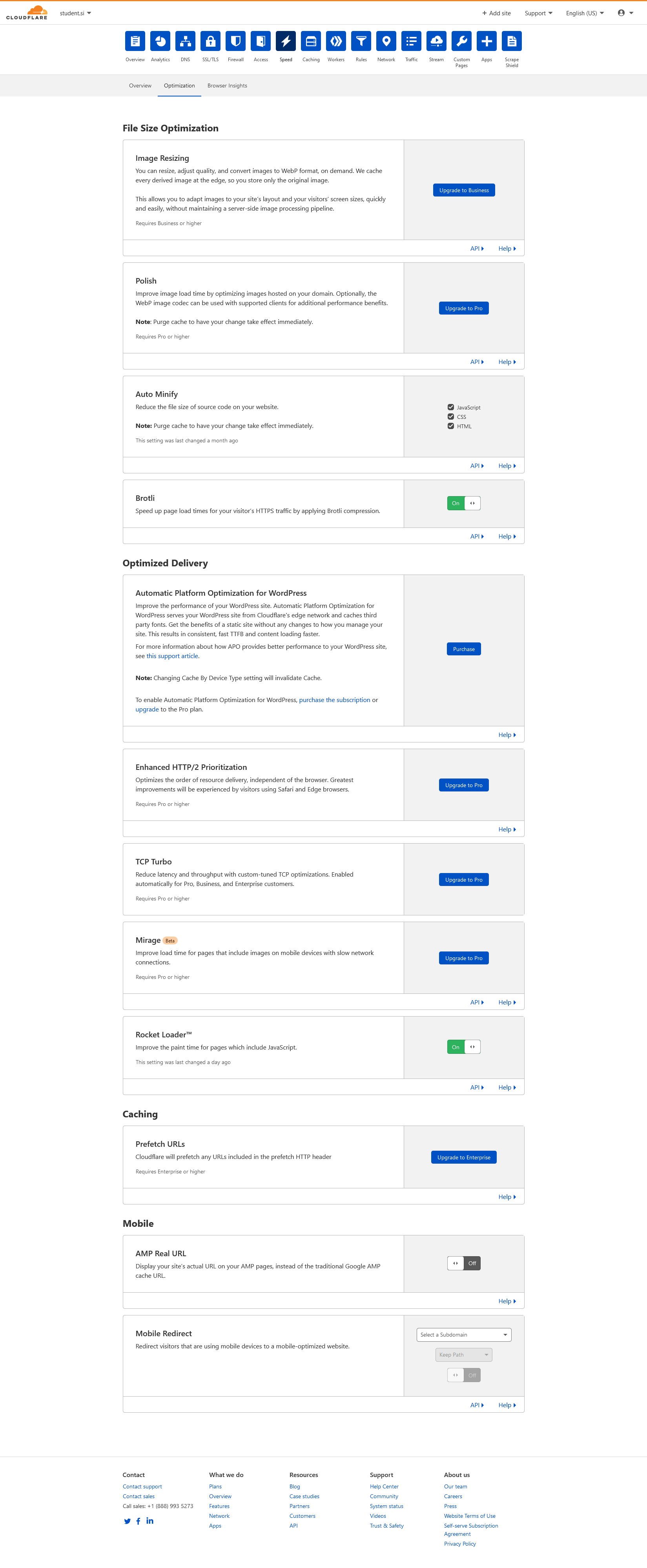
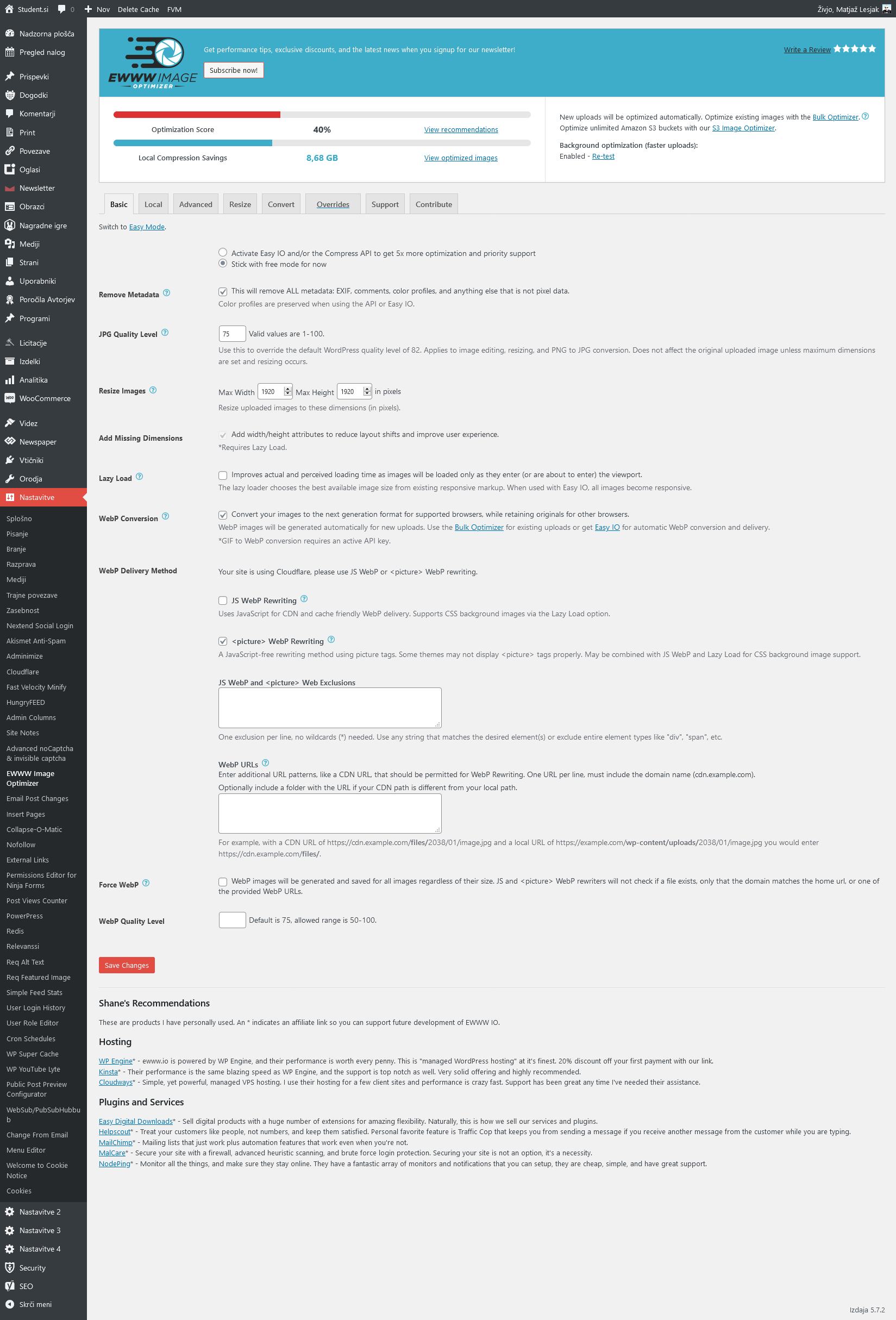
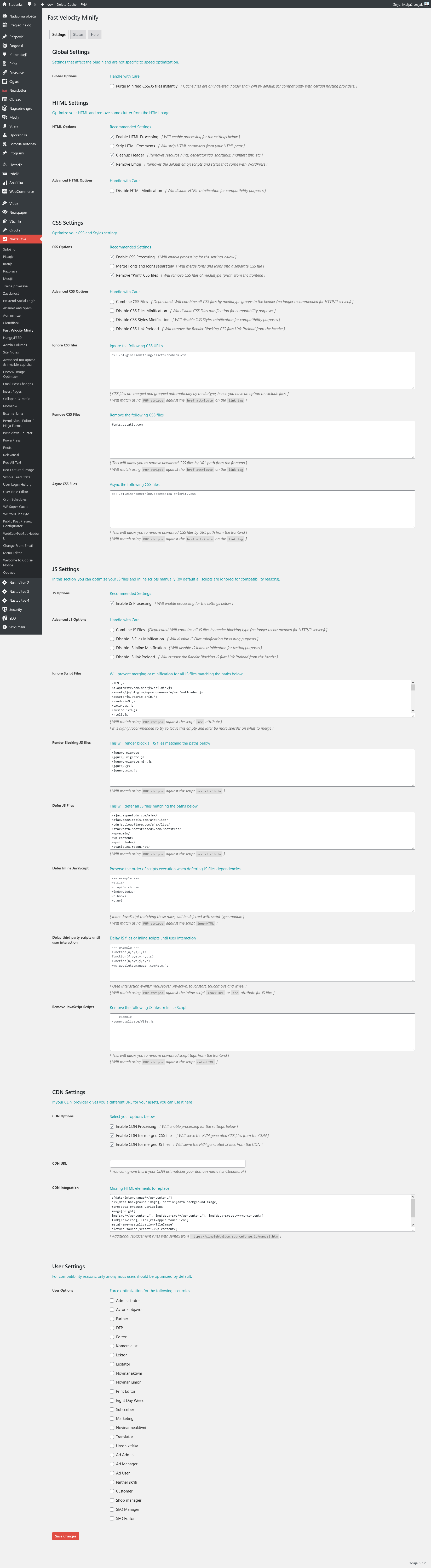
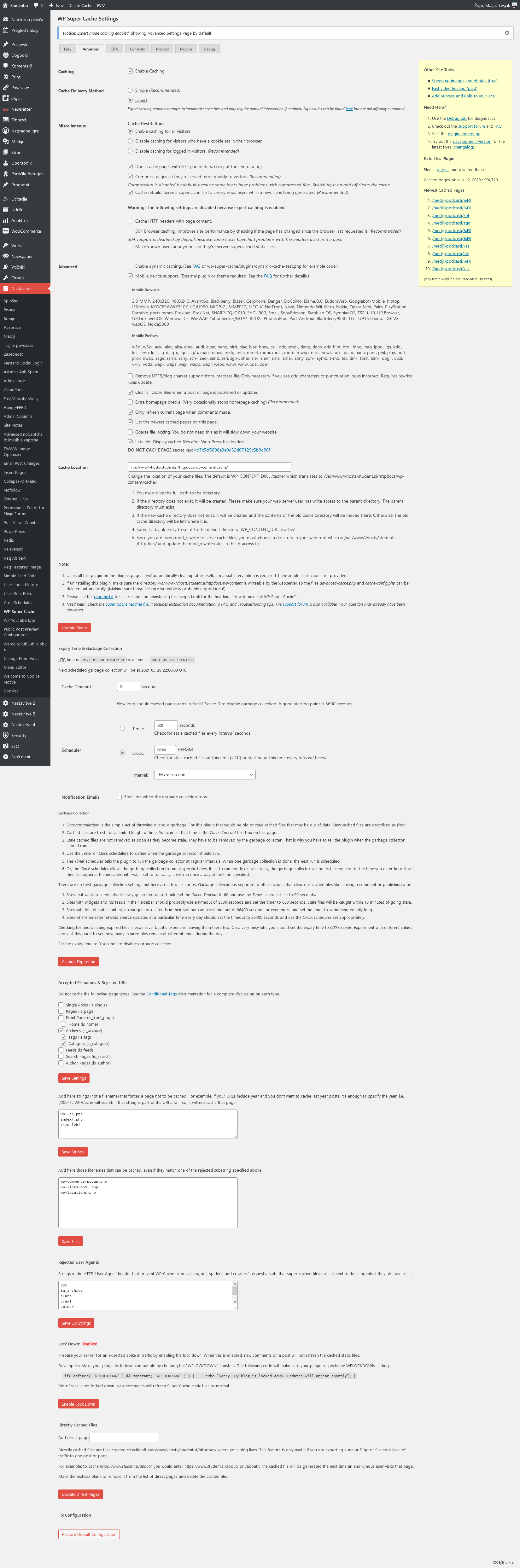
Notice on mobile PS it mostly pulls desktop view (big grid: 1 large article + 3 in row bellow) instead of mobile theme (1 banner + grid: 3 articles in a colum) resulting in huge LCP as it renders desktop size images.
Relevant settings screenshots:
Cloudflare: https://student.si/wp-content/uploads/cloudflare-st.png
Ewww: https://student.si/wp-content/uploads/ewww-st.png
FVM: https://student.si/wp-content/uploads/fvm-st.png
Supercache: https://student.si/wp-content/uploads/supercache-st.png
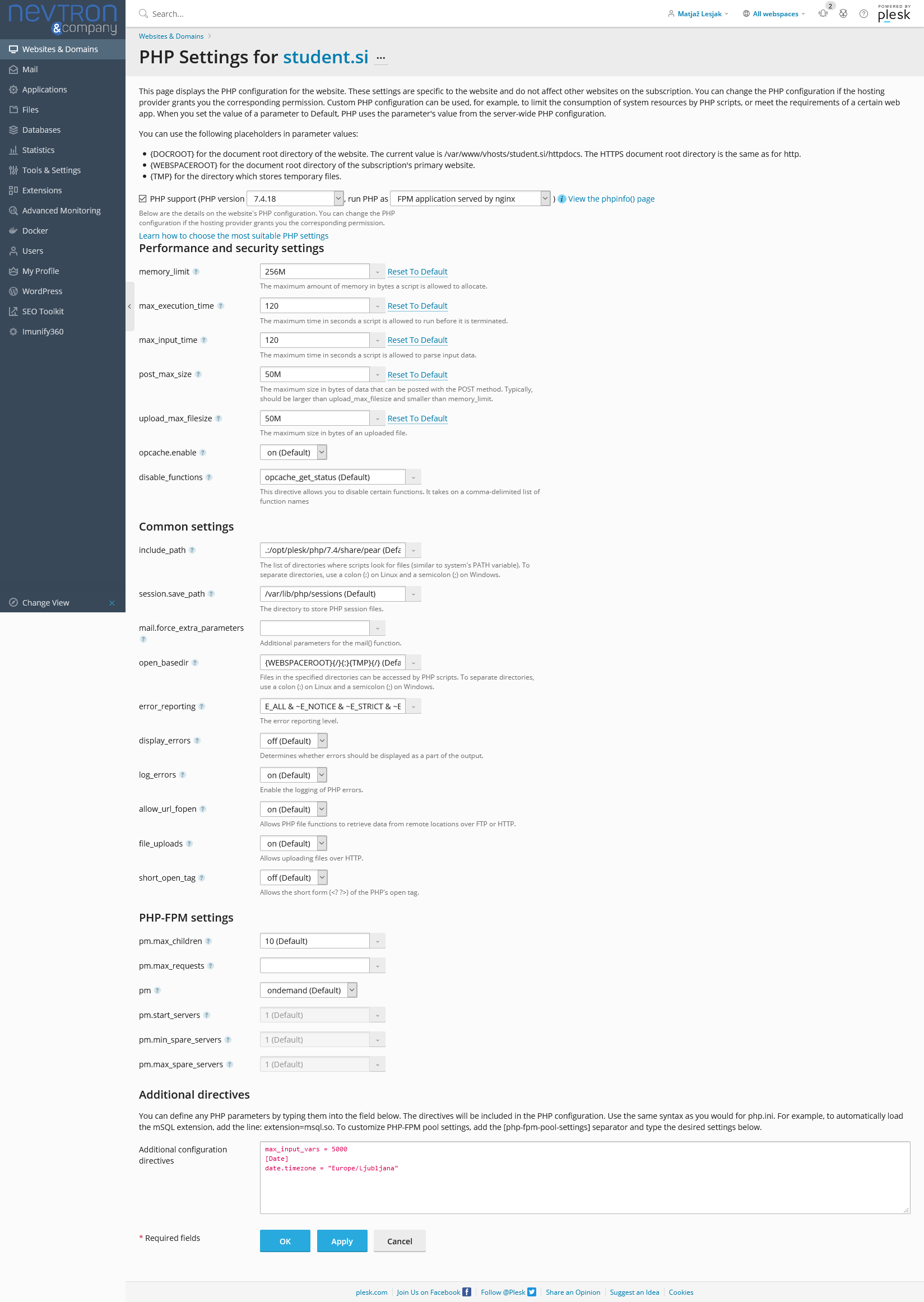
Php: https://student.si/wp-content/uploads/php-settings.png
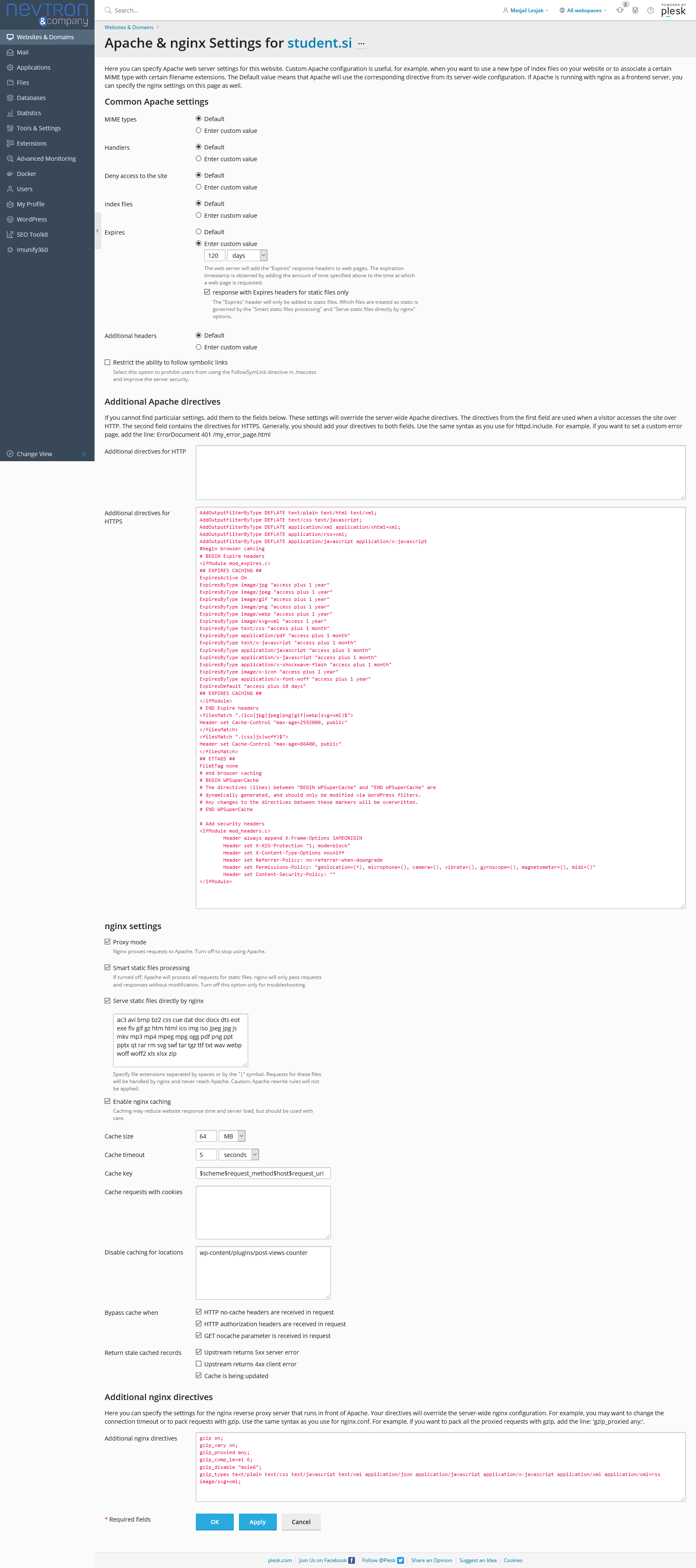
Apace & Nginx: https://student.si/wp-content/uploads/apache-nginx.png
-
This reply was modified 5 years by
xxxLesy.