
- TutorialsFrom WPBakery to tagDiv Composer
- TutorialsWhat is Ajax preloading?
 kapeliotis
Hey! Currently working on the pulses pro theme!
Lets say i have a 3 column row. First row is a big block, rest 2 filled with smaller blocks.
By default, on mobile, they will appear one after another just like they are arranged in the desktop theme (big block column first followed by the rest two smaller blocks).
Lets say i want those to appear in reverse when browsing on mobile (smth like smaller blocks first, then the big one below them). How is that achieveable?
Thanks in advance!
 Tommes
 Hi,
are the cloud templates for AMP sites not on the roadmap? I have now changed this as you suggested.
OK, the mobile pages are then transmitted a bit slower. Now there are other problems, for example there is no navigation anymore. In the Theme Panel, under Mobile Theme, I selected the navigation in the header area and before that the navigation was also shown.
Best regards
 Topfgartenwelt
The header image causes a cumulative layout shift. For the ads in the mobile theme I got the code for a div container which reduced the problem. Can I also use such a div container for the header image? If yes where I have to place it? The code was:
<div style=”width:300px; height:250px;”>
</div>
Greetings Kathrin
 Calin
Calin Hi,
The only template for amp is the one from mobile theme plugin, cloud templates can not be use per amp templates, you can use to use the mobile theme plugin only for amp using this option -> https://i.imgur.com/bXjeltB.png
Hope this will help you!
Calin Hi FrankFlames,
If you are using mobile theme with amp, you can use a code for amp auto ads, this need to be set where Vlad indicate in that screenshot, (the amp auto ads need to be set only once and this will adapt after your post content, for example in a long post content will be display more amp auto ads, this kind of ads cannot be control by the user).
Also you can use the mobile ads for map too -> https://i.imgur.com/LgrxZsg.png
Thank you!
Calin Hi techwikimedia,
If you are using mobile theme plugin, please make sure that these thumbs are enable in theme panel -> https://i.imgur.com/tJwYaS4.png
Thank you!
 Vlad S
 Hello !
Please make sure that you have installed the mobile theme properly as you can find in our guide here: https://forum.tagdiv.com/the-mobile-theme/
Thank you !
 techwikimedia
 I followed your instructions
All System Requirements are as per documentation.
1. Disabled all plugins except tagDiv ones.
2. Clear all cache.
Still, it’s not showing thumbnails on the mobile theme.
Vlad S Hello !
From what I can see your settings are correct but from our experience when the mobile theme is being displayed on desktop that is due cache. You can contact your host, maybe they have some kind of caching service and that should be removed.
Thank you !
Calin Hi,
This is because you are using the mobile theme plugin, you’ll gain a better speed then responsive version of theme, but in order to achieve that speed you’ll need to create a new content for pages because in the most of cases those were made with builders or shortcodes ( tagDiv Composer, WPBakery ) and you need to use only the mobile editor ( you need to set the content for pages in mobile editor and this content will be display on mobile theme)
-> https://i.imgur.com/9d0UWLT.png
Unfortunately if you are using same plugin for shortcodes, this will not work on mobile theme, it will be interpreted as a html text, this will work only on responsive version. Also because amp plugin is use with mobile theme plugin the shortcode will not work on amp too, only if you do not use the mobile theme for amp.
Also you can show the responsive version on mobile theme -> https://i.imgur.com/m0bVB5T.png you can check more details about mobile theme in our documentation -> https://forum.tagdiv.com/the-mobile-theme/ or if you want to have the responsive version only, you can use the amp option from mobile theme -> https://i.imgur.com/oofST3D.png (to use the mobile theme template on amp) or you can disable the plugin.
Thank you for your understanding!
Vlad S Hello !
You can set your custom mobile theme here: https://www.screencast.com/t/WlD0DgsQWU
Please make sure that you write your ad code correctly.
Thank you !
 athenac
 Hi Calin,
Also the mobile theme is not showing on for some reason, not sure why since it was working fine.
Thank you
Vlad S Hello !
It looks like you are using Mobile theme.
The Mobile theme was specially designed for optimization on mobile devices. Unfortunately on mobile theme you cannot do much changes of design. If you want to have the same design as on desktop mode you can achieve that by simply disabling the mobile theme.
You will have to recreate your pages into the Mobile editor or completely disable the mobile theme. The mobile editor will not render shortcodes !
Also you can disable mobile theme on certain pages or posts by following this setting: 
Please take a look here: https://forum.tagdiv.com/the-mobile-theme/
Mobile theme plugin can be disabled from Newspaper Plugins as you can see here: https://www.screencast.com/t/LnkZCEVC
Thank you !
 softincome
 Hello Sir,
I am Already Try All Things. But Not Any Progress, Also Mobile Amp Themes Is Fine. But Computer Mode Not Working , Please Give Me Solutions Visit My Website = www.softincome.in
 roqya_France
 “for me in english font mean police”
I can change it on computer no problem with tagdiv font using theme panel , but on mobile phone it is not changing , except for larger screens, I have iphone 7.
can you help ?
techwikimedia I have installed tech news pro without content and it’s working fine but when i activated Mobile theme, Thumbnails are not showing.
So I deactivated cache plugin(wp super cache) but still thumbnails are not showing on mobile theme.
Website: http://www.techwikimedia.com
athenacHi,
Mobile theme was working fine and today when I checked the desktop version showed up on mobile. Please review. Thanks
Vlad S Hello !
It looks like you are using Mobile theme.
The Mobile theme was specially designed for optimization on mobile devices. Unfortunately on mobile theme you cannot do much changes of design. If you want to have the same design as on desktop mode you can achieve that by simply disabling the mobile theme.
You will have to recreate your pages into the Mobile editor or completely disable the mobile theme. The mobile editor will not render shortcodes !
Also you can disable mobile theme on certain pages or posts by following this setting:
Please take a look here: https://forum.tagdiv.com/the-mobile-theme/
Mobile theme plugin can be disabled from Newspaper Plugins as you can see here: https://www.screencast.com/t/LnkZCEVC
Thank you !
 otobaza
Dear support,
On tech version of newspaper theme I’m facing design issues on mobile-responsive version. Seems all contents, except index page are moved left. Can you please see below screenshot and advice what to do?
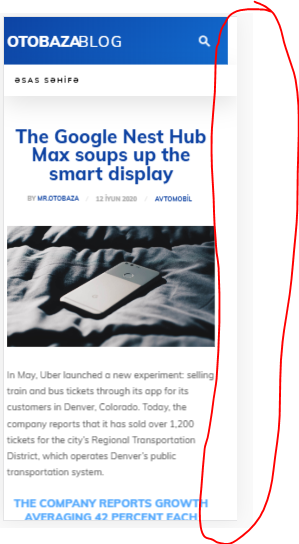
Link for view – https://blog.otobaza.com/2020/06/12/the-google-nest-hub-max-soups-up-the-smart-display/
 Revive the Netherlands
Is it possible to show multiple custom image ads on the mobile theme plugin. On the homepage and in posts. Also when you relaod the page it shows a differant imagas. Im now talking about Adsense but own Images.
Is this hard to do with the mobile theme?
Do we need for this to turn off the mobile theme plugin (website will become slower then)
We to have around 10 advertisers on our website.
There ads management plugins.
Also we can pay the Tagdiv.com programmers to customize the Mobile theme if this a good option.
Domain: revive.nl
Calin Hi,
If you are using the mobile theme plugin, then you need to set the background image in theme panel> mobile theme -> https://i.imgur.com/HdlWfst.png only if you use the responsive version it will apply the settings from here -> https://i.imgur.com/f8lTuEY.png
Let me know the results!
Thank you!
Calin Hi b_chris21,
If you set the code in theme panel, then it will be set between <head></head> tags, where exactly need to be set this code? normal the code set between <head></head> tags is displaying in mobile theme too, but maybe this code need to be set in a specific place.
Thank you!
Calin Hi VirologiaToday,
Using the amp plugin with mobile theme, this will has the mobile theme templates, (this has a different layout from responsive version).
Also you can have different header only if you are using cloud templates for desktop an responsive version for mobile, but using mobile theme or amp these will no longer apply.
Thank you!
Calin Hi fox100,
If you want to change the background image from mobile menu or search , you can do it from theme panel> background -> https://i.imgur.com/a5UgjpK.png also the colors can be change from theme panel> theme colors > mobile menu -> https://i.imgur.com/p6H7Dz0.png and the text size can be adjusted on mobile from here -> https://i.imgur.com/5Oqs6ZH.png
Hope this will help you!
Thank you!
 insert_JSH
I am using a mobile theme.
I am using Newsmag 4.9.4.
When loading a page, it is loaded in two ways.
https://player.vimeo.com/api/player.js (player.vimeo.com)
https://s.ytimg.com/yts/jsbin/www-widgetapi-vflUjHiIA/www-widgetapi.js (s.ytimg.com)
Please let me know how you can disable the above two items.
The HTML code cannot be modified due to hosting server security issues.



