
- TutorialsFrom WPBakery to tagDiv Composer
- TutorialsWhat is Ajax preloading?
 Oliver Smith
Hello, the branding and design of my website means that the mobile theme doesn’t quite suit the design. Because of this, I have to use the original design (without the mobile theme installed, etc). The only issue with this is that there is very little customisation available for my mobile website.
I would like to be able to change the order of the blocks on my mobile website on the tagdiv composer, however I don’t seem to be able to do this without also changing the blocks of the desktop website. Is there anyway I can do this? If not, would you be able to include it into another update? This is quite necessary for my mobile website and if it isnt possible I may have to switch themes.Thank you.
My website is strantmont.com.
 thakkarsanket
 Now I came across a new issue that, the above issue is solved and working on home page only, that I set as a static page. But as soon as I open the posts, the same issue comes.
For this reason Please check this link https://www.screencast.com/t/bfoIo6VZDp2X I have marked it.
I have already cleared cache so many times. But the result comes the same, when I open my website in mobile. Check this:- https://www.screencast.com/t/pAvyF77D3sA
Note: I am using Setting “Use Mobile theme for Mobile+AMP”.
One another issue came that I am not able to “re-edit” any of the footer template after editing and saving the selected template. I am currently using Pulses-Pro Footer template. i.e. there is no option available to “edit template”. Please check this also. Link – https://www.screencast.com/t/AXo7SaBkefvb
In last I want to say that, “I am very dissatisfied after purchasing this theme. It is not working as intended and causing so many problems. It is consuming so much time for making settings done only. So, when can one start blogging? It is taking too much time.
This is my third day and not a single issue is resolved yet.
I think this theme has so many bloatware, you should have tried to make the theme in working condition first and then you should have think of selling this theme.”
 roqya_France
 We cant edit the Title with Tagdiv , it is title of the website https://imgur.com/a/YNIfG6D
Please read again :
I can change it on computer no problem with tagdiv font using theme panel , but on mobile phone it is not changing , except for larger screens, I have iphone 7.
I don’t use Tagdiv mobile.
maybe a special code ?
thanks.
 Calin
Calin Hi,
I add it on our list for request to improve the mobile theme plugin.
Thank you!
Calin Hi,
Unfortunately, on mobile theme for the moment there is no option to set a svg logo, sorry.
Thank you!
 Renu Bakshi
Is it necessary to use a Cache Plugin with Mobile Theme? Can we use Mobile Theme without using a Cache Plugin?
Renu BakshiHow I can check whether my site being shown on mobile devices is using mobile theme or responsive version of the Newspaper Theme?
Thanks & Regards….. Renu Bakshi
 niky23
Hi,
it’s really great to work with your theme. Just a few smaller questions. My site: https://www.dfz21.at/dfz/
– Duplicate content. I simply want to show no post twice espacially on the home. ‘The offset post’ ist only a work arround as i have to set categories only for the home and use everywhere the same cat. Unique articles is not shown in posts… Can i sidewide prevent content to be shown more than once?
– How can i change to block-look of widget boxes in the post-sidebar like more aritcles or featured posts (with smaller picture, eg)?
– whatsapp icon in articles is only shown mobile but not desktop.
– can i make a page that is also in the main menu a megs menu? (i saw only cats in the dropdown)
– More articles below post: how can i NOT show more from author tab?
– thirst block in my default sidebar is the social counter. if i don’t use a header it just shows empty space instead. and so the counter ist not on the same height as the block on the left side.
– can i show something like a more/featured article box in an post with putting some (short)code in a text block?
Thank you for your help, Niky
 Topfgartenwelt
Would it be possible to provide in one of the next theme-updates another slot for inline ads concerning the mobile theme? Because of the new web core vitals its nearly impossible to use for example the article top ad (causes to high largest contentful paint) or the header ad… the footer ad or the post bottom ad don’t work so good…
Greetings Kathrin
TopfgartenweltIs there also a way to use a svg-logo for the mobile theme?
Greetings Kathrin
Topfgartenwelt When I delete the text-logo in the themepanel I have the problem that I lose the name of my blog and in the mobile version instead topfgartenwelt newspaper is shown. So the it seems to be the only possibility to use the svg-logo beside the text-logo, but I don’t like that look 🙁 Is there a way to show only the svg logo on desktop but keep the textlogo for mobile?
Greetings Kathrin
 noahlievable
 Hi Tagdiv Support,
I do not have that button toggled “on” as it is not working well with my site appearance and the “Memberpress” membership plugin I have installed into my website. I was not able to find a way for the two to work together, with Memberpress allowing me to charge for memberships and Newspapers “Login/Logout” not working well with it. It’s been off for some time now.
I don’t know how the login toggle affects the website on the laptop turning into the mobile theme “latest articles” version. It seems a bit separate in application, no?
Please reference this site on your mobile to reference how I’d like my site to appear on mobile. I have attached the below link for context.
Thanks,
Noah
 SquallSFU
Hi guys,
today, after more than two months of work, I finally published my website (http://www.facilesfizioso.it). Newspaper is wonderful and I found myself very well. However, there is one aspect that I have not been able to customize:
In the mobile version, how can I customize the styles of these menus?
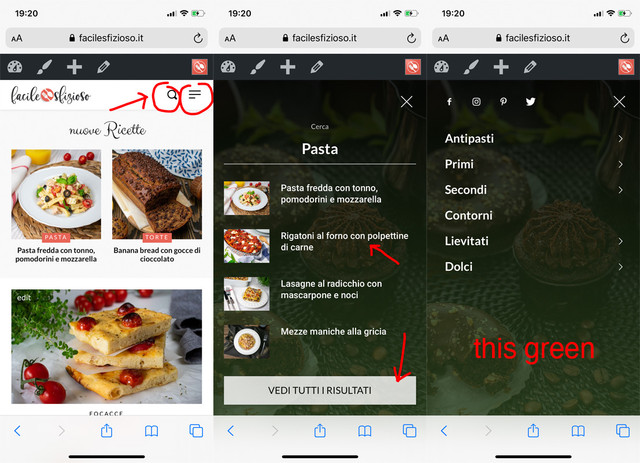
I tried to activate the tagDiv Mobile Theme plugin, but it completely changes the layout of the mobile version.
Thanks for your help.
 demi4444
Hello,
for my site I need to modify the following file:
plugins/td-composer/mobile/search.php
How can I overwrite the file in my Child Theme without modifying the original one?
Thank you
Calin Hi,
If you are using mobile theme plugin, please use this custom css:
.single .td-post-featured-image{

display: none;

}
The code need to be set in theme panel> mobile theme > custom code> css.
Hope this will help you!
Thank you!
thakkarsanket https://techquicker.com/
Now I came across a new issue that, the above issue is solved and working on home page only, that I set as a static page. But as soon as I open the posts, the same issue comes.
And also I came across another issue is that, home page which I set as a custom static page, is not working on mobile as AMP page. As soon as I open home page on mobile i.e. https://techquicker.com/ the theme changes itself. in the beginning it was working. But now I tried to work as your guide available for AMP. But it did not help.
Please help me out.
Thanks.
Renu BakshiI was using a Genesis child theme on one of my wordpress sites. In all the posts I had inserted one image at the beginning of each post using wordpress “Add Media” option. I had also selected the same image using “Featured Image” option. The Genesis child theme showed the image once only at the beginning of the posts.
A few days back I switched to Newspaper theme on this site. Same image started appearing twice at the beginning of every post. One way to resolve this was to delete the image added through the “Add Media” option. As this was a time consuming process, so I selected the template # 5 under the Pose Settings. This solved the problems and the images are now appearing once only on desk top & as well as mobile. So far no issue. Every thing Ok.
Now I want to use mobile theme for mobile devices. But the same image appears twice at the beginning of each post in the mobile devices.
Can you please suggest any other way to resolve this issue.
Thanks & Regards…… Renu Bakshi
 Vlad S
 Hello !
If you don’t have mobile theme or amp then your Website runs on the responsive type of the theme. That view counter is the one from desktop version. Please make sure to clear your cache.
Thank you !
 fatih-2
 Hi Calin
Thank you for the updates.
For anyone using wp rocket with newspaper theme;
I contacted wp rocket support and solved the issue by changing the Cache Life span settings under Wp rocket from 10 hours to 6 hours. And the issue seems solved for the moment. We are still testing tough.
Just a suggestion Calin;
As a fan of Newspaper theme and Wp Rocket and a long user of those 2 applications, I strongly suggest that Tagdiv should also do an official testing of WP rocket and list it under the supported caching plugins. There’s a signaficant pros when using WP rocket with newspaper and works really well. Page loads speeds difference is almost 3 seconds compared to supercache and has better gtmetrix score.
Besides, when we were using wp supercache, from time to time the mobile template was showing on desktop and there was no solution to it. with wp rocket, mobile and desktop caches are kept separetly and we did not encounter this issue eversince.
All the best
Topfgartenwelt Thank you very much! But there is still a problem with the div element. I have set it to 300px – 250px as you have recommended. When scrolling just down there is no CLS (cumulative layout shift) but when scrolling up and down the CLS appears again? What is causing that problem? There is no such problem in the mobile theme what kind of code you have used there?
And there is another problem with the responsive ads – it’s completely irrelevant if i use a div container sized 350×250 or 250×250 AdSense always delivers an ad sized 300×600. Why? There shouldn’t be any place for such a size…
Greetings Kathrin
-
This reply was modified 6 years by
Topfgartenwelt.
Calin Hi,
Unfortunately for the moment only the mobile theme plugin can be use as a template for amp, maybe clouds templates will be implement in the coming updates.
Thank you!
Calin Hi,
Yes, you can achieve this, first you need to open the page in tagDiv Composer editor, this is the look from desktop -> https://i.imgur.com/VjdUpNs.png now set on mobile and on each row in layout tab set the order number -> https://i.imgur.com/elZSSoO.png -> https://tagdiv.com/flexibility-rows-columns-newspaper-theme/
Hope this will help you!
Thank you!
Vlad S Hello !
The Mobile theme was specially designed for optimization on mobile devices. Unfortunately on mobile theme you cannot do much changes of design. If you want to have the same design as on desktop mode you can achieve that by simply disabling the mobile theme.
You will have to recreate your pages into the Mobile editor or completely disable the mobile theme. The mobile editor will not render shortcodes !
Also you can disable mobile theme on certain pages or posts by following this setting: 
Please take a look here: https://forum.tagdiv.com/the-mobile-theme/
Mobile theme plugin can be disabled from Newspaper Plugins as you can see here: https://www.screencast.com/t/LnkZCEVC
Thank you !
Vlad S Hello !
I am sorry for misunderstanding !
For this you will need to edit one of the themes files as you can see below:
Go to: wp-content/plugins/td-composer/mobile/includes/modules/td_module_mob_1.php
Open the file and find this: https://www.screencast.com/t/Yk8aYIJW it should be the start of the code.
Add this line: <?php echo $this->get_author();?>
And this should be the result: https://www.screencast.com/t/P2h1NLli0u3
Thank you !
 acearaujo
Hi Guys, We are very happy with the theme. And our problem now is: A few days ago the visitor counter stopped counting visits from mobile users. We dont have mobile theme or AMP activated.
Can you helps us.


