- ApiUsing the Theme API in plugins
- ApiPractical example – How to add a new Block and Module
- ApiAPI – Smart Lists – Introduction
- ApiAPI – Category top section style – Introduction
- ApiAPI – Category top section template – Introduction
- Apitd_api_module::update
- Apitd_api_module::add
- ApiAPI – Modules – Introduction
 jamancheta
Hi there! I’ve updated my Newspaper layout to 10.2 and I’ve placed my ads on the theme panel of the newspaper theme. I’ve also installed the TagDiv Mobile theme plugin for this one. However, when I opened my website (jamonline.ph), the image ads that I’ve placed doesn’t appear on mobile. It only appears on the desktop.
Thanks for the help!
 Adeba
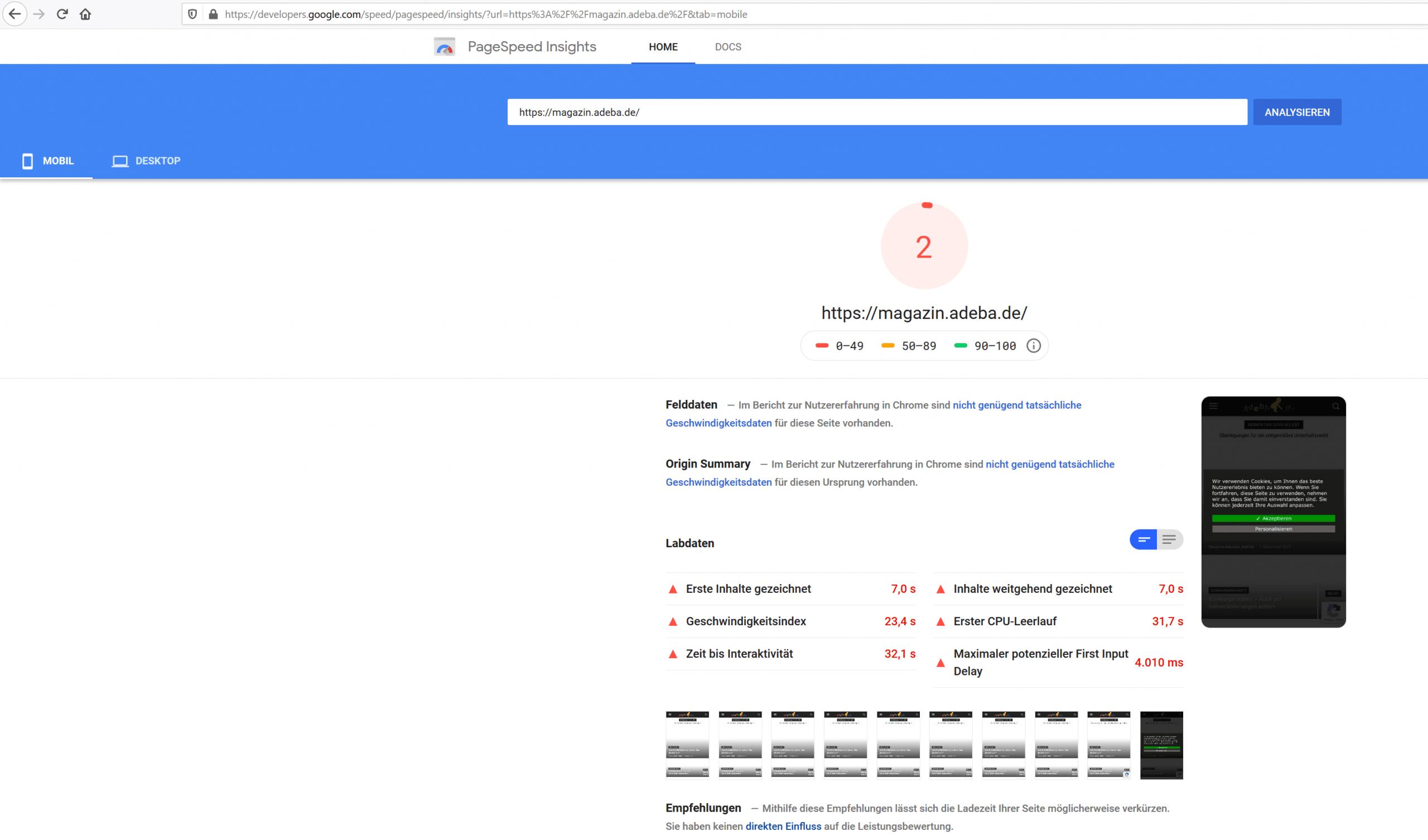
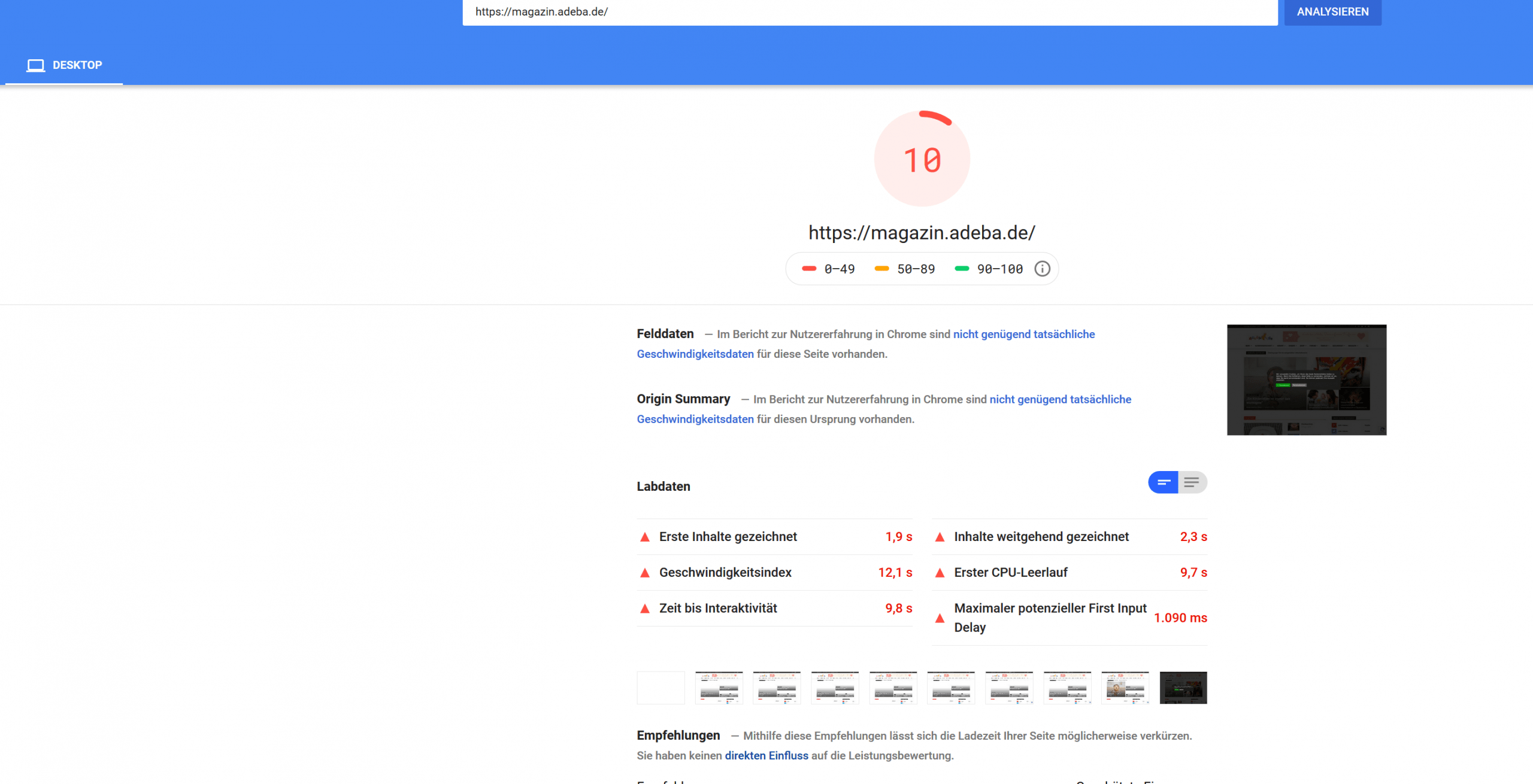
AdebaA new record on my website. After updating to the new design 10.2 and deinstalling Standad Pack I got a new negative speed record.
Sitespeed 2
https://developers.google.com/speed/pagespeed/insights/?url=https%3A%2F%2Fmagazin.adeba.de%2F&tab=mobile
https://magazin.adeba.de/wp-content/uploads/2019/12/2-scaled.png
Sitespeed 10
https://developers.google.com/speed/pagespeed/insights/?url=https%3A%2F%2Fmagazin.adeba.de%2F&tab=desktop
https://magazin.adeba.de/wp-content/uploads/2019/12/1adeba-scaled.png
Even an own server 🙁
So any help is welcome, because things are really getting interesting.
https://tagdiv.com/newspaper-10/
Blazing-Fast Websites
We’ve been working on the idea of making the Newspaper Theme light and fast for a long time. We’re now delighted to give you an excellent way to build a website that is optimized for fast loading speed out-of-the-box.
When you deactivate it, things are starting to get interesting, and your website tends to speed up by itself. ?
 learn4funs
I just inputted Amazon banner ads code on the header bar and top article and same things done on Mobile theme
option in and Amp but On computer and laptop Banner ads working fine but … in MObile, no ads shown. completely blank.
Please let me know how to show ads on my learn4funs.com site so that when any one visit though mobile can see the ads.
need helps
 vv2005
Hello,
I am using Animal Themes Pro.
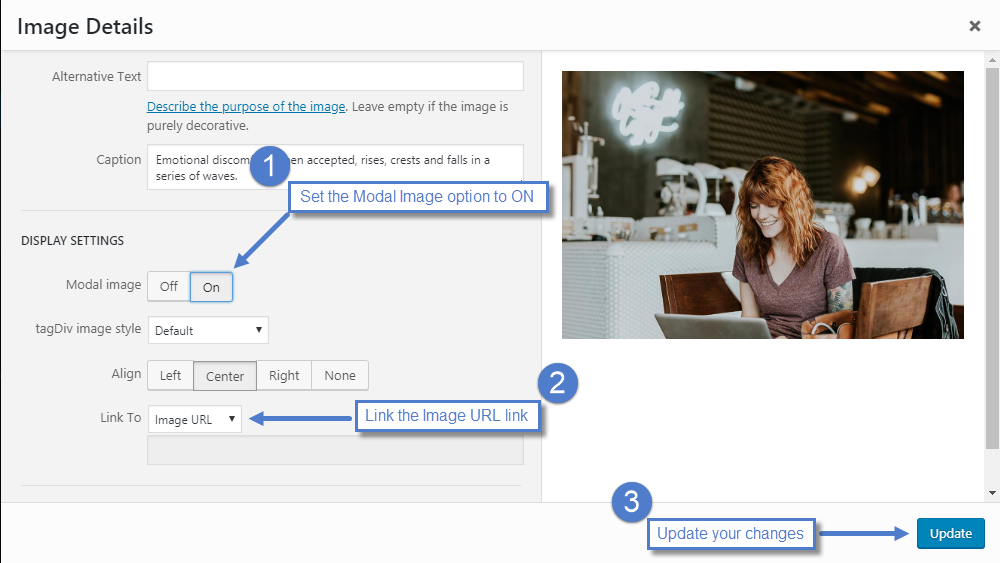
I have gone through this https://forum.tagdiv.com/modal-window/
and have tried editing like this https://forum.tagdiv.com/wp-content/uploads/2015/05/set_modal.png
But I don’t get those modal settings. Here is how mine looks https://prnt.sc/q4ivvo
I tried enabling sitewide modal images using Theme Panel->Post Settings->General Post Settings->General Modal Image(Enable)
It works now for all posts. But the zoom button isn’t working. The image opens in lightbox modal but cannot zoom. On mobile theme, modal image doesn’t work at all.
 chabotjeff
 Hi Sorry for a delayed response. I am trying to use a custom menu for mobile without using the mobile theme plug-in. You said we need to use the cloud template. I am currently using Newspaper Version 9.7.2 with default theme. Which cloud template would you suggest that looks similar to default theme?
Or, do I use a cloud library header template? Thank you.
-
This reply was modified 6 years by
chabotjeff.
 thebaroneditor
After updating the theme, and plugins, the mobile homepage no longer works and shows shortcode. The homepage works on desktop, but the homepage doesnt work on mobile. What is causing this?mobi
 vphdlab
 SOLVED. Deactivated the mobile theme. Much easier, yes maybe a little more manual work. But over all easier to manage.
 Calin
Calin Hi,
The WP Super cache have an option for mobile theme -> http://prntscr.com/q3tqlj -> https://forum.tagdiv.com/cache-plugin-install-and-configure/ in this way will prevent to load the cache from mobile on desktop or tablet.
Thank you!
 Northern Dispatch
Hello! We recently change our theme to NewsMag, except for the missing featured photo for our mobile version, everything is okay. Any help is appreciated.
 gumball44
 Hi,
I’m using WP fastest Cache premium, and I found the issue, the problem come from ” Mobile ThemeCreate cache for mobile theme “.
When I deactivate it, everything is ok.
Does WP super cache allow cache for mobile theme without making AMP deployed on tablets ? or Do we have to deactivate too with WP super chache ?
Kind regards
-
This reply was modified 6 years by
gumball44.
Calin Hi,
Unfortunately I can not check your website -> http://prntscr.com/q3pvww make sure that you do not have set mega menus in mobile theme menu.
Thank you!
Calin Hi,
Usually the mobile theme appear on tablet when you are using some cache plugin and cloudflare.
We recommend to use WP Super Cache -> https://forum.tagdiv.com/cache-plugin-install-and-configure/ and we recommend these configurations for cdn -> https://forum.tagdiv.com/cloudflare-cdn/
Thank you!
Calin Hi,
For this problem you can let the comments enable for all visitors -> http://prntscr.com/q3ocbr or you can replace in theme core the, if you are using single post templates from cloud, you’ll need to change this file -> https://www.screencast.com/t/Ydh9wo0VOK in my case is -> https://www.screencast.com/t/EEcuCDrhqF4i -> wp-content/plugins/td-cloud-library/parts/tdb-comments.php for default post styles the changes must be done in -> wp-content/plugins/td-standard-pack/Newspaper/comments.php -> http://prntscr.com/q3ogwb also if you are using mobile theme plugin -> http://prntscr.com/q3ohzc -> wp-content/plugins/td-composer/mobile/comments.php
Hope this will help you!
Thank you!
 shravan5921
Mobile theme is loading on desktop, using Nginx helper and redis object cache as caching plugins.
Tried clearing cache from both of these plugins, still with no help I’m asking here.
Could it be a plugin issue?
 blarrow
I cannot activate the plugin after updating it to the latest version. It throws an error as follows
Plugin could not be activated because it triggered a fatal error.
Fatal error: Cannot declare class Mobile_Detect, because the name is already in use in plugins/td-mobile-plugin/Mobile_Detect.php on line 28
 chicky365
Hi
I activated the mobile theme last night and added my main menu to it. When I test the menu on my phone, only the “Home” option is working, none of the other menu options do anything?
gumball44Hi,
I want my site to be AMP on mobiles but not on Tablets. How Can I do it ? I tried all configurations “use mobile theme for”, Mobiles, Mobiles + AMP, and AMP. And no way to disable it on tablets.
Waiting for your answer
Thank you
 DKF
DKF Hi Vlad, I sent you an e-mail yesterday. Don’t know if it reached you. It seemed fine at first, but after a while it turned back to mobile theme on ipad again. Can you have another look?
Thanks, Dorien
 lisamariet
 I have the tagDiv Mobile Theme enabled.
I imported the Team Showcase template and edited it. https://prnt.sc/q39s1q
However when viewed on Mobile, it does not look good. https://prnt.sc/q39sy9
The element should have turned into 1 colum view. But is there a way I can edit that my self? Looks like AMP does no optimization of the layout of the element.
This is what looks better for mobile: https://prnt.sc/q39uzz
But when changing it here… it will be applied to all devices.
 UsmanSwift
My site speed has reduced significantly after the update,
especialy on mobile version of theme (Standard Mobile Version)
It has also caused an increase in the server response time
 centurypixel
Hello all,
I am using the latest version of the Newspaper theme which I have recently purchased. I installed the “tagDiv Mobile Theme” plugin and created a new menu called “Mobile Menu” and I have assigned it under Mobile settings, however, the submenu cuts off not showing all submenu items. Please see below screenshots.
Here is where I have selected the menu to be used:
https://www.awesomescreenshot.com/image/4374275/a55019285982c972a3b8371b9219d1fd
Here is the Mobile Menu items and where it cuts of:
https://www.awesomescreenshot.com/image/4374269/27e476d0d90c6a0c717b6711935f119b
Could you please help me with this?
Thanks.
-Serkan Y.
 Vlad S
 Hello !
The designs do not match because you are using the mobile theme. The Mobile theme was specially designed for optimization on mobile devices. Unfortunately on mobile theme you cannot do much changes of design. If you want to have the same design as on desktop mode you can achieve that by simply disabling the mobile theme.
You will have to recreate your pages into the Mobile editor.
Also you can disable mobile theme on certain pages or posts by following this setting: 
Please take a look here: https://forum.tagdiv.com/the-mobile-theme/
Thank you !
Vlad S Hello !
Most important plugins are the tagDiv Composer, TagDiv Standard pack if you’re using it, TagDiv Cloud Library and if you like Mobile Theme. Also we recommend using WP-Super Cache.
Thank you !
Calin Hi,
If you are using the responsive version of Newspaper theme, then you can use flex blocks, the layout of these blocks can be adjust per each device -> http://prntscr.com/q2s0ba, or you canuse the mobile theme plugin and set for the mobile pages a new content in mobile editor ( the content need to be set without builders ).
Thank you!
Vlad S Hello !
That can be changed by going into Theme Panel – Background – Mobile menu as you can see it here: https://www.screencast.com/t/ARCQZv568v1
Thank you !