
- ApiUsing the Theme API in plugins
- ApiPractical example – How to add a new Block and Module
- ApiAPI – Smart Lists – Introduction
- ApiAPI – Category top section style – Introduction
- ApiAPI – Category top section template – Introduction
- Apitd_api_module::update
- Apitd_api_module::add
- ApiAPI – Modules – Introduction
 Calin
Calin Hi,
Usually this situation can appear when you are using the mobile theme plugin, if the responsive version is used, then the same layout should be on mobile as on desktop.
Thank you!
 nicholasdunehew
When I access my website via cell phone/mobile, after clicking the search magnifying glass symbol in the menu bar, my whole screen goes white and I can no longer see any symbol or search bar. It is technically there and still functions properly (although it’s not visible, I can still click and type into it), but I have a feeling its color is blended into the backgrounds (white). I’ve altered my theme’s Mobile Menu / Mobile Search color settings and still cannot find a solution. Perhaps it’s some kind of bug?
My domain is https://brooksysociety.com
Side note: I deactivated and uninstalled the tagDiv Mobile Theme and Official AMP for WP Plugins. The tagDiv Mobile Theme plugin renders my mobile homepage little more than a column of blog posts. It looks cheap, tacky, and utterly uninteresting.
Thank you for your help in advance
nicholasdunehewWhen I access my website via cell phone/mobile, the homepage allows users to scroll from side to side, as well as up and down. I have tested it on multiple iPhone screen sizes and the side to side scrolling persists, is there any way to stop this from happening?
My domain is https://brooksysociety.com
Side note: I deactivated and uninstalled the tagDiv Mobile Theme and Official AMP for WP Plugins. The tagDiv Mobile Theme plugin renders my mobile homepage little more than a column of blog posts. It looks cheap, tacky, and utterly uninteresting.
It seems like there is no middle ground for the homepage display, either users will be inconvenienced by side-to-side scrolling or encounter an uninteresting design.
Is there a way to get the best of both worlds: for my homepage to look the same on mobile as it does on desktop, without bugs like the side to side scrolling?
Thank you for the help in advance!
Calin Hi,
The mobile version is not the same like the desktop when the mobile theme plugin is used. To have the same layout on mobile like on desktop, use the mobile theme plugin only for ump, or disable the plugin.
Thank you!
 bduhamel
 No, my mobile version looks fine in the composer, but it does not load properly on any actual mobile devices. The formatting is way off. I see no way to fix this. It must be an issue with the caching or something. It wasn’t happening until the last theme update.
 Archerix
 “there are no problems with the INP – https://i.imgur.com/gAncpfD.png”, well in reality there is, i have received the warning for “202ms” and yours is “214ms”, so my website is better optimized than yours Demo, meaning tagDiv Mobile Theme is performing better than your newspaper pro on mobile
Everything over 200ms will receive a warning
 platamun47
 I do not know What I would say more
Wp-rocket is only plugin with
a have performance of your mobile theme over 90.
More thinks not working…
I spend 2 mounts clicking and clicking…
Sincerely I’m really dissapointed…
and not working after disabled wp-rocket!
-
This reply was modified 3 years by
platamun47.
 Anamaria
 Hi,
@analia, To add a menu, you need to select the viewport for phone select the hamburger menu and assign the menu -> https://i.imgur.com/0LEgkTh.pngTo change the font and color for the mobile menu please go to Theme Panel -> Theme Colors -> Mobile menu/mobile search => https://www.screencast.com/t/0CvSgXp9H to set a background image go in Theme Panel -> Background -> Mobile menu/mobile search => https://www.screencast.com/t/uvDejzbX to change the font from Theme Fonts => https://www.screencast.com/t/ANBQe7hQhJd
@greenbooks You can use the slide element, but this will display posts. Also, you can use the element gallery with ACF Pro.
Thank you!
Calin Hi,
This depends on how well is your website optimized, for example this demo – https://demo.tagdiv.com/newspaper_pro/ was optimized by our developer and there are no problems with the INP – https://i.imgur.com/gAncpfD.png
Mark Gilbert, here is the section that you can improved – https://i.imgur.com/qYREfsD.png also if you can replace all standard elements and disable the tagDiv Standard pack then you’ll load low resources.
Also, you can use flex blocks and use cache on them – https://forum.tagdiv.com/use-flex-blocks-cache-option/
Another alternative is to try a different cache plugin, like WP Rocket and you can use the page template – https://tagdiv.com/newspaper-10-3-7-update-brings-customizable-and-fast-mobile-pages/
Archerix if the form is on mobile theme plugin, please try the smart list 2 and also, make a test with the mobile theme only for amp and try the page template – https://tagdiv.com/newspaper-10-3-7-update-brings-customizable-and-fast-mobile-pages/
Thank you!
Calin Hi Central, this https://prnt.sc/pT6olWAKrpcZ is not the theme cache, is the cache that applies individually on each flex block and according to our documentation this will be clean at the time that is set – https://forum.tagdiv.com/use-flex-blocks-cache-option/ – https://i.imgur.com/zzwFmEc.png this is how it should work to reduce the database requests made by each flex block.
Hi bduhamel, I think that you are referring that the mobile version is not looking so good like the desktop version, right? If so, then it can be edited using the tagDiv Composer – https://i.imgur.com/4pSTGQZ.jpg – https://i.imgur.com/ena4yXH.png
Thank you!
Anamaria Hi,
Do you don’t want to have a different color for each category? Then use this cutom code css .td-post-category, .td-category-header .entry-category
{
background-color: #4fa1f2;
}
Set the code in Newspaper -> Theme panel -> Mobile Theme -> Custom code.
Thank you!
Anamaria Hello,
You can disable the back to the top from Theme Panel -> Template Settings -> ToTop button => https://www.screencast.com/t/JVYklvqk (if you have the mobile page or mobile resposive)
Also, for the mobile theme plugin, you can only hide using a Custom Code CSS
.td-scroll-up

{

display: none;

}
Set the code in Newspaper -> Theme panel -> Mobile Theme -> Custom code.
Thank you!
Archerix Hi, have recieved the same email
The problem is only in “mobile”, i’m using the tagDiv Mobile Theme
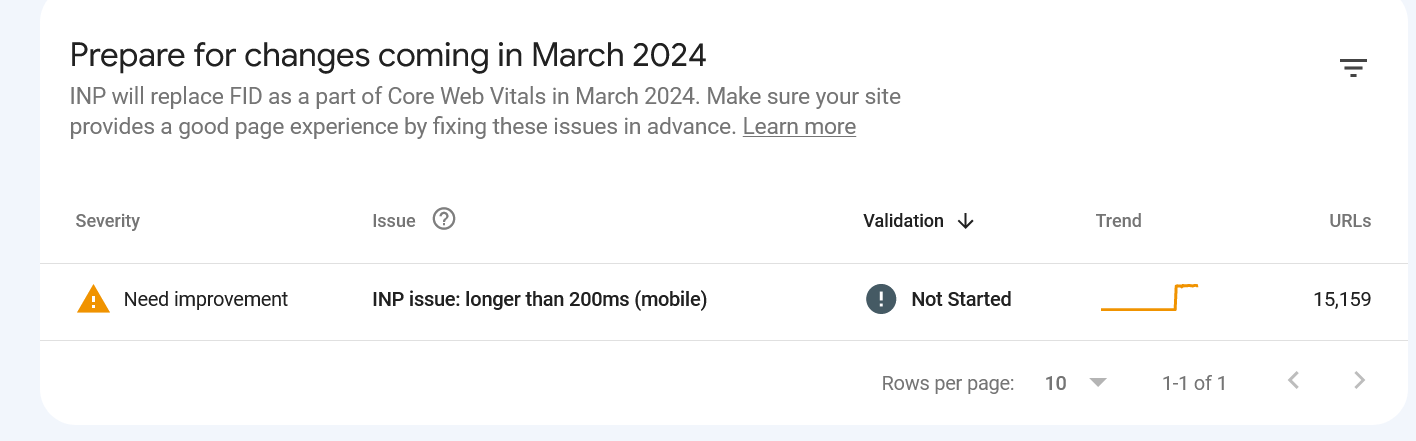
Also, the tagDiv Mobile Theme as a problem with “smartlist” forcing always in mobile the “smartlist 1” ignoring options we have selected and that shows correctly on desltop
 analia
 Hello ! could you tell me where I can modify the menu in mobile ? I can not find the option, I leave screenshot . By the way I do not want to use the plugin tagDiv Mobile Theme leaves me a very basic design. But however I can not find the mobile options without that plugin
 Sikandar
My website is failing badly on Desktop CLS and now INP on mobile. I am not a programmer so I don’t know how to fix and improve things. I tried cache, lazy loading, and thinking about a redesign of the current theme.
https://respawnfirst.com/ this is my website. Please let me know how I can fix CLS and INP issues on my Newspaper theme.
platamun47Dear,
is it possible hide or disable ToTop button on mobile theme plugin?
Thank a lot.
BR.
platamun47 Dear Anamaria,
how to change all category. subcategory tags
for all them in all pages on mobile themes plugin
background color hex code: #4fa1f2
Thank you a lot!
Sincerely
Anamaria Hello,
1. Unfortunately, no.
2. Please let me know if you have the mobile theme plugin installed, if yes, then this option doesn’t work on the mobile theme.
Thank you!
Anamaria Hello,
To display all subcategories please use this custom code css
.td-category {

  overflow: visible;

}
Add this code in the Theme Panel -> mobile theme plugin -> custom css box.
Thank you!
platamun47Dear,
How to change color of subcategory tag into Mobile theme plugin mobile version of site.
https://nook.rs
https://nook.rs/magazin
Please access from mobile device.
Thank you in advance
platamun47Dear,
Would you be so kind as to explain to me.
I have categories and subcategories.
In mobile theme plugin mobile version of site
number of subcategory in category pages is less
then total number of subcategory.
This layout is from a mobile device in a vertical position.
When rotating mobile devices in horizontal position we have
a total number of categories.
Why is that so?
How do I have total subcategory in category pages in all positions from mobile device?
Anamaria Hello,
For this, you will need to use the border-radius css property. Here is an example:
.td-module-thumb .entry-thumb{

border-radius:20px!important;

}
Add this code in the Theme Panel -> mobile theme plugin -> custom css box.
Thank you!
platamun47Dear,
How to set the ‘image radius’ for images in mobile theme plugin version of site.
Thank you in advance.
Anamaria Hello,
If you have created a mobile page, please disable the mobile theme and amp plugins.
Using our theme you can choose from 3 mobile versions
-> mobile responsive => https://www.screencast.com/t/oJ2ShOp47
-> mobile theme plugin => https://forum.tagdiv.com/the-mobile-theme/
-> mobile page => https://tagdiv.com/newspaper-10-3-7-update-brings-customizable-and-fast-mobile-pages/
If you created the mobile pages with tagDiv Composer, then when you install the Mobile Theme plugin, your pages will be overwritten by the plugin (the mobile theme comes with its templates for page, post, category, etc so your current templates from the desktop theme will get converted to the mobile theme layout, the page content is made without builders in mobile editor => https://www.screencast.com/t/xbgZG8kH also, the options that are provided to edit the mobile theme version are limited (this keeps the things simple)).
This is a video about Responsive Newspaper Theme, AMP & Mobile Theme, Mobile Pages & Templates -> https://www.youtube.com/watch?v=SpGkOnJeNZY
So, the mobile responsive is what you see then that you select the viewport on phone => https://www.screencast.com/t/matV17hH, so some settings may apply for each viewport(where is the border blue), and others are not(where the border is black).
The mobile page has the mobile templates from Cloud Library => https://www.screencast.com/t/YCcZ8rL8
Mobile responsive version of the theme and the mobile page editor can be edited with tagDiv Composer, the mobile theme plugin not.
For example, you can have the mobile theme plugin activated and use the mobile page/mobile responsive version for the homepage/pages, but for the categories pages/404 page you can’t use the mobile page/mobile responsive version if you have the mobile theme plugin activated.
So, if you want to design the pages with tagDiv Composer, you can use the mobile page or mobile responsive version.
Thank you!
Anamaria Hello,
Please disable then the mobile theme and amp plugin from newspaper -> plugins.
Using our theme you can choose from 3 mobile versions
-> mobile responsive => https://www.screencast.com/t/oJ2ShOp47
-> mobile theme plugin => https://forum.tagdiv.com/the-mobile-theme/
-> mobile page => https://tagdiv.com/newspaper-10-3-7-update-brings-customizable-and-fast-mobile-pages/
If you created the mobile pages with tagDiv Composer, then when you install the Mobile Theme plugin, your pages will be overwritten by the plugin (the mobile theme comes with its templates for page, post, category, etc so your current templates from the desktop theme will get converted to the mobile theme layout, the page content is made without builders in mobile editor => https://www.screencast.com/t/xbgZG8kH also, the options that are provided to edit the mobile theme version are limited (this keeps the things simple)).
This is a video about Responsive Newspaper Theme, AMP & Mobile Theme, Mobile Pages & Templates -> https://www.youtube.com/watch?v=SpGkOnJeNZY
So, the mobile responsive is what you see then that you select the viewport on phone => https://www.screencast.com/t/matV17hH, so some settings may apply for each viewport(where is the border blue), and others are not(where the border is black).
The mobile page has the mobile templates from Cloud Library => https://www.screencast.com/t/YCcZ8rL8
Mobile responsive version of the theme and the mobile page editor can be edited with tagDiv Composer, the mobile theme plugin not.
For example, you can have the mobile theme plugin activated and use the mobile page/mobile responsive version for the homepage/pages, but for the categories pages/404 page you can’t use the mobile page/mobile responsive version if you have the mobile theme plugin activated.
So, if you want to design the pages with tagDiv Composer, you can use the mobile page or mobile responsive version.
Thank you!



