
- ApiPractical example – How to add a new Block and Module
- ApiAPI – Smart Lists – Introduction
- ApiAPI – Category top section style – Introduction
- ApiAPI – Category top section template – Introduction
- Apitd_api_module::update
- Apitd_api_module::add
- ApiAPI – Modules – Introduction
- ApiUsing the Theme API in plugins
 Ans
Ans Hi Bettina,
Could you please mark it as feature request for development:
Add “LOOP AD2” and “ARTICLE INLINE AD2” locations & related settings (AFTER POST2, AFTER PARAGRAPH2) for Mobile theme ads
Currently only one ad location for blog loop and article inline loop espectively, which is not enough for long list or long article.
Thank you.
 Bettina
 Hello!
For the mobile theme plugin, we have only those options that could be found here: Newspaper -> Theme panel -> Mobile theme -> Mobile ads.
Thank you!
 Anamaria
 Hello,
This is not a mobile page; it is tagdiv mobile theme plugin, so please disable it.
Using our theme, you can choose from 3 mobile versions
-> mobile responsive => https://www.screencast.com/t/oJ2ShOp47
-> mobile theme plugin => https://forum.tagdiv.com/the-mobile-theme/
-> mobile page => https://tagdiv.com/newspaper-10-3-7-update-brings-customizable-and-fast-mobile-pages/ The option that you need to use.
Suppose you created the mobile pages with tagDiv Composer. In that case, when you install the Mobile Theme plugin, your pages will be overwritten by the plugin (the mobile theme comes with its templates for page, post, category, etc, so your current templates from the desktop theme will get converted to the mobile theme layout, the page content is made without builders in mobile editor => https://www.screencast.com/t/xbgZG8kH also, the options that are provided to edit the mobile theme version are limited (this keeps the things simple)).
This is a video about Responsive Newspaper Theme, AMP & Mobile Theme, Mobile Pages & Templates -> https://www.youtube.com/watch?v=SpGkOnJeNZY.
So, the mobile responsive is what you see when that you select the viewport on phone => https://www.screencast.com/t/matV17hH, so some settings may apply for each viewport(where is the border blue), and others are not(where the border is black).
The mobile page has the mobile templates from Cloud Library => https://www.screencast.com/t/YCcZ8rL8
The Mobile responsive version of the theme and the mobile page editor can be edit with tagDiv Composer, the mobile theme plugin cannot.
For example, you can have the mobile theme plugin activated and use the mobile page/mobile responsive version for the homepage/pages, but for the categories pages/404 page, you can’t use the mobile page/mobile responsive version if you have the mobile theme plugin activated.
So, if you want to design the pages with tagDiv Composer, you can use the mobile page or mobile responsive version.
Also, please check this topic https://forum.tagdiv.com/topic/amp-pages-not-working-well-with-this-theme/
Thank you!
 JB88
JB88Hello, please I NEED your help. I was testing the mobile page function, but it didn’t convince me at all. So, I disabled it, but the mobile version continues to show. I already deleted the mobile page, but nothing works.

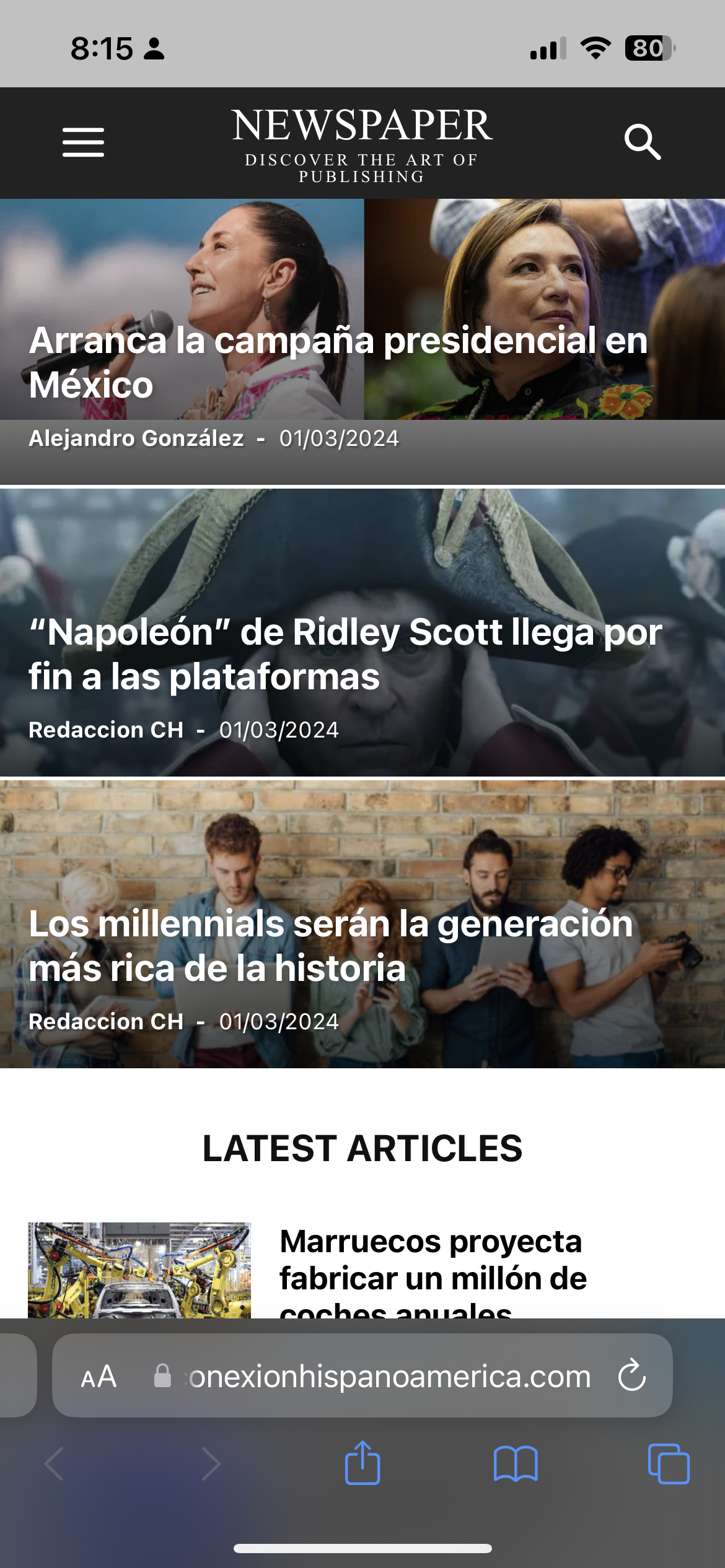
How can I do to fix it?https://conexionhispanoamerica.com
Ans Hi Bettina,
The main point of this request to add SET 2 for these 2 locations. (2nd ad in post loop or in an article)
Please double check and advise below, thanks.
Is it possible to add “LOOP AD2” and “ARTICLE INLINE AD2” locations & related settings (AFTER POST2, AFTER PARAGRAPH2) for Mobile theme ads?
Currently only one ad location for blog loop and article inline loop espectively, which is not enough for long list or long article.
Please consider, thank you.
 Renato Tbw
 Hello Betina, I am aware of these three alternatives. I’ve been using Newspaper for 5 years, and currently the site is configured with a “mobile” version. Yes, Mobile Theme and AMP are disabled. However, in the last few days, it’s been displaying the same page for all devices, which is impacting our performance. I appreciate the quick response, but the standard message isn’t helping me.
Bettina Hello!
We have 3 options for mobile versions that you can use:
1. Responsive version: A responsive version of your website looks similar to the desktop version. TagDiv Composer is used to edit the page.Click on the mobile viewport: https://www.screencast.com/t/XDQJedlggSB. There, you can see your mobile version and edit or adjust the elements to look better.
2. Mobile pages: https://tagdiv.com/newspaper-10-3-7-update-brings-customizable-and-fast-mobile-pages
3. Mobile theme plugin: The Mobile Theme is a performance-optimized theme included in the main Newspaper theme that only loads on mobile devices. It comes with its own templates and designs for pages, posts, categories, etc., so your current templates from the desktop theme will get converted to the mobile theme layout. Please see https://forum.tagdiv.com/the-mobile-theme/ and https://forum.tagdiv.com/mobile-theme-introduction/ for more information.
A full explanation is here: https://www.youtube.com/watch?v=SpGkOnJeNZY
If you need to use mobile version 1 or 2, then you need to uninstall the Mobile Theme plugin and AMP.
Thank you!
Anamaria Hi,
You need also to deactivate the tagdiv mobile theme plugin.
Thank you!
 Calin
Calin Hi,
If you want you can use the mobile theme plugin but disable it from pages, unfortunately for this you’ll need to go on each page and from Gutenberg editor to disable the mobile theme – https://i.imgur.com/2prHOcF.png then the responsive version will be used.
Another solution is to use the flex blocks elements instead of blocks, those can be configurate per view port – https://i.imgur.com/YE1xtfg.png – https://i.imgur.com/6sTDf3B.png each option with a solid border in front can be set per view port. Also when you have a flex block layout that you want to reuse it you can save it as an element – https://i.imgur.com/amjxWeA.png and use it latter from tagDiv Composer.
I hope this will help you!
Renato TbwI have a problem. I have my homepage in two versions (web and mobile), and for a few days, the mobile version is not working. Only the web version is opening on all devices. I’ve already disabled the cache, deactivated and reactivated the page, but nothing is fixing the issue.
Bettina Hello!
Check the settings in the Newspaper -> Theme panel -> Mobile theme -> Mobile ads.
Thank you!
 codekube
 Hello,
We have deactivated the amp plugin now the ad is showing but the contents are not showing in the mobile version: https://staging3.local.fo/home-mobile/
Bettina Hello @discorigido!
If you use the cloud templates, then edit the mobile page or the mobile viewport: https://www.screencast.com/t/XDQJedlggSB and adjust that element in the tagdiv composer. Check the CSS tab of that element and delete all the values from there.
Thank you!
 nieveslgil
 Hi
When I enable Mobile theme the content disappeard, as you have informed me in another post. How can I keep clear images on mobile now?
Calin Hi,
This is because you have installed the tagdiv mobile theme plugin, please disable the plugin and you’ll have the same content on mobile and desktop
Thank you!
AnsHi Support, is it possible to add “LOOP AD2” and “ARTICLE INLINE AD2” locations & related settings (AFTER POST2, AFTER PARAGRAPH2) for Mobile theme ads?
Currently only one ad location for blog loop and article inline loop espectively, which is not enough for long list or long article.
Please consider, thank you.
 discorigido
Hi, on mobile the news ticker title of post are cut. How I can adjust it?
Thanks
nieveslgilHello,
I have setup Newsmag on my site:https://costatropical.tv/
The mobile version of my site was showing correct but suddenly the blocks in the home page are dissapear. Now it is only showing Latest articles and Reccomended videos which are panels “Homepage Latest Articles”.. Mobile version does not show menus either.
Please advise
Thanks!
Bettina Hello @chaywood0896!
I’m not sure what is causing this issue, but if you force refresh the page on the mobile layout, then the issue is not there anymore.
Thank you!
Calin Hi birkasi, if you situation with the mobile menu is the same, then yes, please exclude the mentioned files.
Related to js for ads, are those from AdSense? If so, there are some AdSense codes that are auto ads and will be set in the place where they consider is the best place, if are regular ads, then just make sure that after you set back the unminify js all the cache and CDN are purge.
I hope this will help you!
 ersandrino
 Sure I tried but they don’t come out the same size. But even from the video you sent me they are not all the same and as mentioned previously you will be able to notice it from the screenshot. So it’s not right for you to ask me this question. Then, again video that you sent me previously, and from the screenshot I took from your video you can check it too. Furthermore, always following your instructions, if you try to do a test for “mobile” viewing you will notice that it is not displayed correctly. We are circling around my request without resolving it
Bettina Hello @eman!
Please clear your cache, as well as that of your browser. If you deactivate the mobile theme and AMP, then the responsive version should appear on your mobile layout. That can be customized in the tagdiv composer, as described above.
Make a test and deactivate ALL plugins except tagDiv ones, also if you are using a cache plugin, deactivate it, clear all cache and try again.
Let me know the results!
Thank you!
Anamaria Hello,
Now, you have the mobile theme plugin enabled.
For the Mobile Theme plugin, you can make changes from Newspaper -> Theme panel -> Mobile theme -> Header and for color and fonts from Newspaper -> Theme panel -> Mobile theme -> Theme colors/ theme fonts https://i.imgur.com/S8UQjVs.png
Also, to change the color for category please check here https://i.imgur.com/ivb0r38.png
This is a video about Responsive Newspaper Theme, AMP & Mobile Theme, Mobile Pages & Templates -> https://www.youtube.com/watch?v=SpGkOnJeNZY.
Thank you!
Bettina Hello @Ishola!
We have 3 options for mobile versions that you can use:
1. Responsive version: A responsive version of your website looks similar to the desktop version. TagDiv Composer is used to edit the page.Click on the mobile viewport: https://www.screencast.com/t/XDQJedlggSB. There, you can see your mobile version and edit or adjust the elements to look better.
2. Mobile pages: https://tagdiv.com/newspaper-10-3-7-update-brings-customizable-and-fast-mobile-pages
3. Mobile theme plugin: The Mobile Theme is a performance-optimized theme included in the main Newspaper theme that only loads on mobile devices. It comes with its own templates and designs for pages, posts, categories, etc., so your current templates from the desktop theme will get converted to the mobile theme layout. Please see https://forum.tagdiv.com/the-mobile-theme/ and https://forum.tagdiv.com/mobile-theme-introduction/ for more information.
A full explanation is here: https://www.youtube.com/watch?v=SpGkOnJeNZY
If you need to use mobile version 1 or 2, then you need to uninstall the Mobile Theme plugin and AMP.
Thank you!
Calin Hi RahulDasOp, yes, this can be done using the popup element instead of mobile menu, using the popup element you can create a page with all elements and layout you want to be display on it, and you can use tagDiv Composer to make that layout.
I hope this will help you!



