
- TutorialsFrom WPBakery to tagDiv Composer
- TutorialsWhat is Ajax preloading?
 Anamaria
 Hello Maciej,
If you use the element Header Login, this modal can be edited only in the theme files.
If you have created plans, and you have lockers, then you need to use the element Menu Login -> https://i.imgur.com/AkF4sjH.png
Also, please make sure you have set the pages in Opt-In Builder -> Subscription -> Pages -> https://i.imgur.com/IOdUWFG.png -> https://forum.tagdiv.com/shortcodes/ -> https://forum.tagdiv.com/subscriptions/
You can create a custom modal popup for login, you need to create a page and add in that page the element menu -> https://forum.tagdiv.com/modal-popup/ and after set the trigger for a button. Set the modal popup in the phone viewport in mobile menu -> https://i.imgur.com/cuBYIrq.png
Thank you!
 Bettina
 Hello!
Unfortunately, there is not an option for that. But we encounter this “issue” in those situations: https://forum.tagdiv.com/topic/mobile-site-displaying-on-desktop-site/
Thank you!
 JBH
JBHGood afternoon!
We have a question regarding using the Newspaper Mobile Theme as default theme on desktop.
Since the speed optimisations are so good on Newspaper mobile. We would like to force the mobile theme as ‘default’ for the desktop as well. Is there any way we can set this up?
Otherwise it would be a great feature request of us 🙂
Bettina Hello Carlos!
You can have a faster website with any version how I said above.
There are a lot of factors which can make your site slow. Make sure you use only some templates and fewer functionalities and options.
Some factors which you need to take into account are:
External factors: server speed, if you are using CDN or not, the external resources loaded by your website like ads, fonts, tracking scripts like Facebook Pixel, Google Analytics, Twitter analytics, Hotjar and so on.
Internal factors: the number of elements on the page, image size, image formats, if you are using mobile optimized layouts, console errors, if you are using the Standard Pack plugin or not, if you are using the PRO demo or a standard one.
Unfortunately, no. Because the Mobile theme plugin overwrites the cloud templates.
Thank you!
 kubick
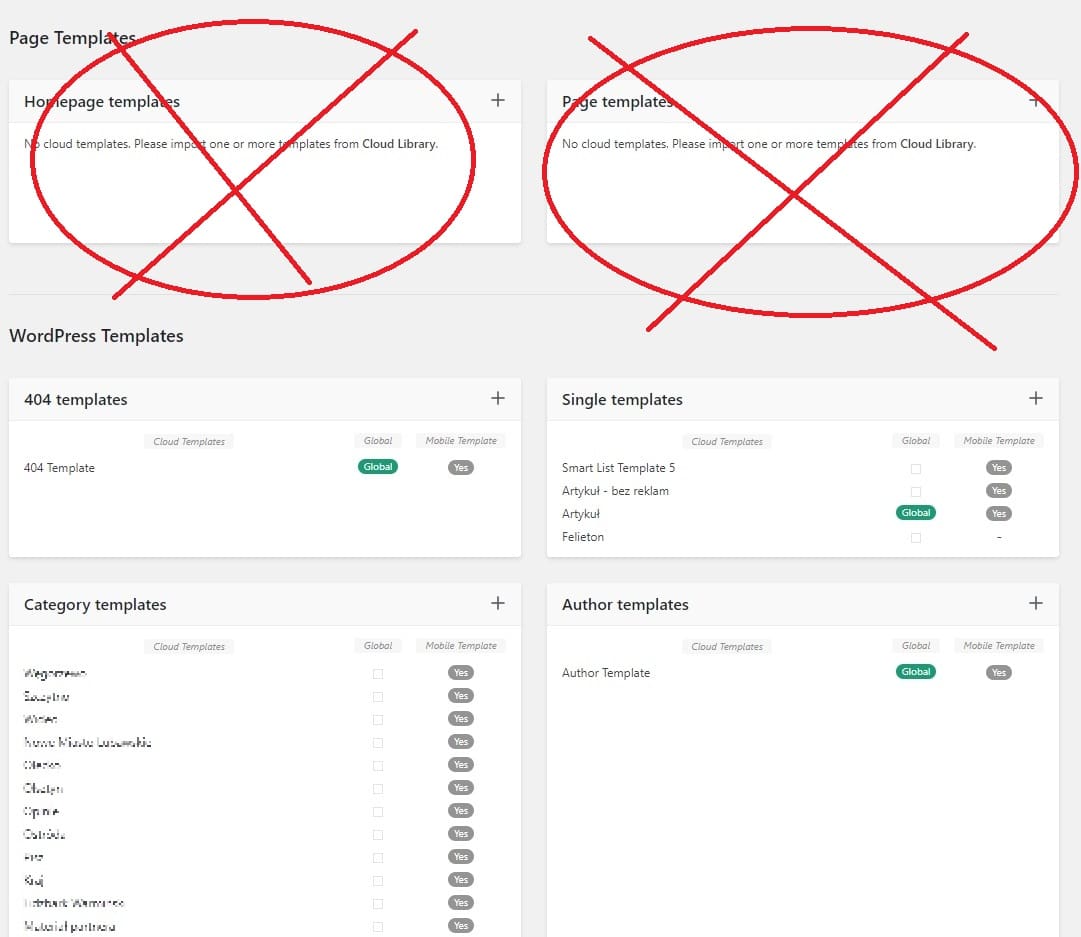
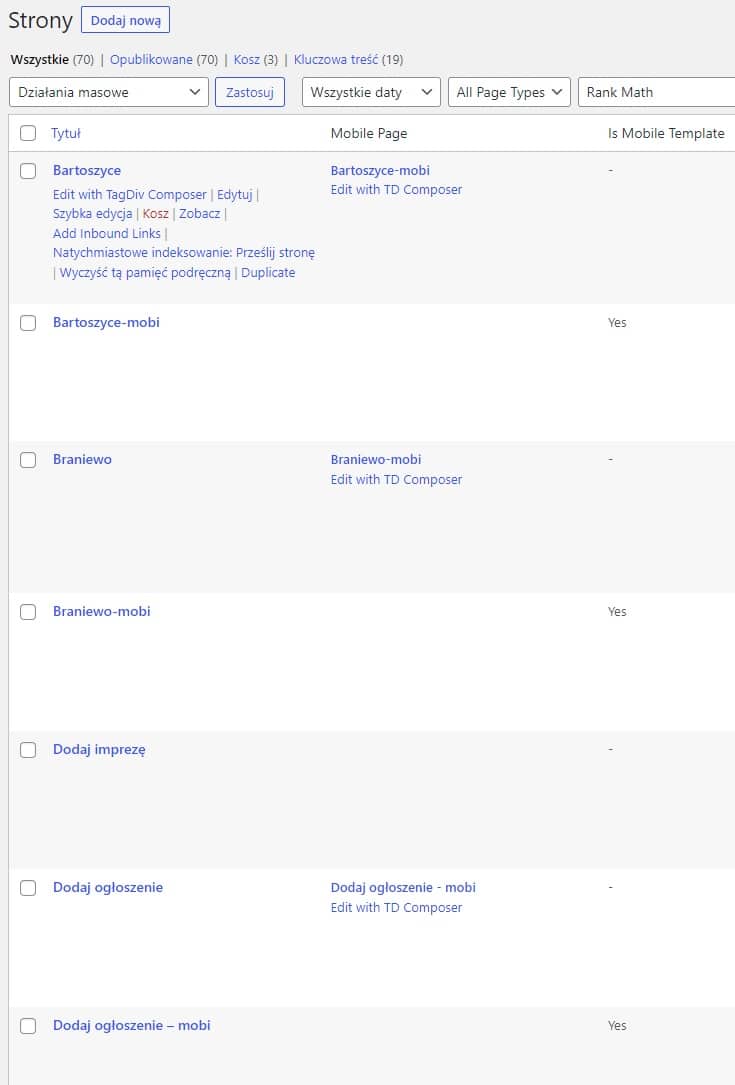
I have over 70 pages on my website. Each of them has its own layout and mobile version.
None of them show up in “Cloud templates”. Same home page. It is not visible in “Cloud templates” or in the admin bar.
I use 30 categories on the site. Each of them has its own layout.
Categories, however, show up in “Cloud templates” and in the admin bar on the front end of the page.
Shouldn’t pages be visible in “Cloud templates”?
 karlostipo
 Hello Bettina,
Thank you for your answer. So to have a faster website you advise me to use version 2 that you have told me? that is to say the mobile pages instead of option 3 the Mobile theme plugin + AMP?
And one last question … with the Mobile theme plugin can not customize the look of the WooCommerce store?
Thank you very much in advance!. Best regards,
Carlos
 malerlins
 …and I think the tabbed content shortcode is not mobile friendly. Is it possible to display the “pages buttons” one below the other on mobile?
Anamaria Hello,
The settings for the mobile theme are those from Theme Panel -> https://i.imgur.com/dyeN1mb.png
To alternate, you can disable the mobile theme for pages and posts https://forum.tagdiv.com/mobile-theme-introduction/
You can add extra code css in Theme Panel -> Mobile Theme -> Custom Code -> Custom CSS.
Thank you!
Anamaria Hello,
Please check the documentation. If you activated the mobile theme+amp to the homepage looks like this -> https://i.imgur.com/cDHrFsi.png if you disable you will see it like this https://i.imgur.com/F2UBsNX.png
Depending on what you want to use for mobile, please check the topic provide about each mobile version -> https://forum.tagdiv.com/topic/mobile-version-not-working-properly-2/
Thank you!
Anamaria Hello,
Please provide some more details, like if you have enabled the mobile sticky or used the row sticky option.
Thank you!
Anamaria Hello,
As I said, the mobile theme has its own template, not a desktop version or mobile responsive.
Please check the documentation.
Please deactivate the mobile theme and amp plugins and check the results.
Thank you!
Anamaria Hello,
Please provide more details about your issue; for example, if you add a new post, then on mobile is displayed the post which was displayed before.
Also, please provide the link to your website and let us know what cache plugin you use.
Thank you!
Bettina Hello Carlos!
Yes, it could be quite faster. However, I believe you can improve your page speed by using other mobile versions.
Thank you!
 jim-2
jim-2I don’t have a header on mobile unless I scroll and invoke the sticky header. How can i get the sticky header to be the header that shows all the time. I just want one header to stay put and stop diosapearing. Thanks
 dentisti.al
 Im not getting anywhere here. Is it possible to have a look at the setup your self as it is not working. I set it to mobile + amp or mobile and home page just shows no content. I set it to just AMP and the home page works but no other links show content.
This tutorialhttps://www.youtube.com/watch?v=SpGkOnJeNZY&ab_channel=tagDiv also i dont seem to figure out where this option to create mobile template is. Nothing in my admin bar
 FrasL
FrasL Could something like this be used in the mobile themes custom CSS?
https://www.freecodecamp.org/news/css-pseudo-elements-before-and-after-selectors-explained/
-
This reply was modified 3 years by
FrasL.
 roccomaglio
 I am using the TagDiv Mobile Plugin together with AMP option. I am not seeing content from the Post Loop which I add to the page (several pages) for different post type when I switch to viewing the site on my phone. I see it in the tagdiv mobile editor, but no content on my phone.
 rajendrahankare
I have purchased the Newspaper theme. But when posted on a website, they don’t appear immediately on mobile. Updates to the desktop only.
FrasL Hi Anamaria,
A question and a feature suggestion rolled into one, currently there is no solution to alter the default mobile theme which may not cause problems if later editing the main theme? Is the mobile theme dynamically generated, or is it editable somewhere?
Feature request: In the Mobile theme the “General ADS” include an option for an add position between the grids and latest articles sections. This would likely make the mobile theme more cosmetically pleasing for those wanting an ad near the top of the theme, rather than right at the very top or in the footer?
Thanks!
 Goldie84
Hello, I’m having this issue here where I do all the settings for my header in mobile and desktop editions, and for some reason I see the changes for like 10 minutes long and then they disappear and they appear with the default theme logos. Does anyone have any idea on how to solve this?
Thank you!
 DKF
DKF Thanks Bettina,
I switched on separate mobile cache in WP Rocket.
Solved!
karlostipo Hi Bettina,
Thank you very much for your answer. Now I am clearer on how it works.
But I have one last question please. For speed and optimization you advise to use the Mobile theme right?, so if I use Mobile theme for Mobile + AMP (which is advisable right?), it is no longer necessary for me to create the Mobile specific pages for the Cloud Templates and for the WordPress pages right? And I suppose that by removing all these mobile pages the website will be lighter and faster right?
Thank you very much in advance!. Best regards,
Carlos
Anamaria Hello,
I just checked, and now the website is displayed correctly-> https://i.imgur.com/d74zOUB.png
The mobile theme comes with its own templates for page, post, category, etc so your current templates from the desktop theme will get converted to the mobile theme layout, the page content is made without builders in mobile editor => https://www.screencast.com/t/xbgZG8kH also, the options that are provided to edit the mobile theme version are limited (this keeps the things simple)).Also, please check this topic where I explained each mobile version -> https://forum.tagdiv.com/topic/mobile-version-not-working-properly-2/ and choose what mobile version you want.
Thank you!
 WordDom
 I’d like the same result as :
https://www.freeiphone.fr/apple-watch-chez-free-mobile-avec-esim-quen-est-il/
Can’t find how
WordDom Please try to find it :
https://www.freeiphone.fr/apple-watch-chez-free-mobile-avec-esim-quen-est-il/



