
- TutorialsFrom WPBakery to tagDiv Composer
- TutorialsWhat is Ajax preloading?
 Mir
MirI am having a problem. I can edit the mobile page but when i go to my website through mobile it load the desktop version for mobile. I created mobile page but that mobile page is not loading in mobile
My website: https://europesia.com/
 giriraj
Hello Team,
I have been using NewsPaper latest, Cloudflare and WP Rocket. It’s working great and superfast.
I upgraded the PHP from 7.4 to 8 then the initial server response was too slow. The PageSpeed Insights and GTmetrix scores were also reduced.
I have been using Hostgator which is fine.
Because of the issue, I coordinated with Hostgator and downgraded to PHP 7.4. The performance is back to normal, which is 100% (Mobile and Desktop).
May I know what could be the problem? Newspaper theme fully supported PHP 8.0?
Thanks
Giri
 tajamal1
Greetings, I am Hasham Ali from THC Solution. We recently purchased the Newspaper theme for our Tech Blog. Everything was working great until now. The problem we are facing is that the mobile interface of our website is totally different from that of a desktop. We have tried everything, but we couldn’t solve the problem. The template we are currently using is Tech News Pro. And here is a link to our website. TechGadgetsPress
 dpernar
 You mean on mobile and on posts pages.
Can you please check this post on mobile phone:
https://curiousmatrix.com/will-we-end-up-in-computers/
Search button is on left and header is not floating. How can I make posts header the same as homepage header?
Thank you.
 menworldpl
 Hello! Thanks for your message. So, I use LiteSpeed Cache and I found options for mobile users. I hope that now everything will be ok. 🙂 About Schema – thanks a lot for suggestion. BTW, maybe you can view our website (menworld.pl) and check whether everything is ok about SEO options?
 Calin
Calin Hi menworldpl, normally when the mobile version is displayed on pc and vice versa, then it is a cache problem.
We recommend to use a cache plugin that offer mobile cache support. For example WP Super cache, also WP Rocket offer this option.
About the schema, if you are using the one from the RankMath then please disable the one from theme using this option -> https://i.imgur.com/mIXvPJU.png
Thank you!
 HOB
HOBHello
My website starts looking broken on incognito desktop and incognito desktop mode on mobile as well. I am not sure why is it so.
 menworldpl
Hi.
We already use a template but we have a problem. Can I ask you for help? It is about the MenWorld.pl portal.
We want to divide the website into the one with PC and mobile. I mean, we want the PC to show the normal version and the phones to show AMP. I think I’m setting up something wrong. Sometimes AMP shows up on the PC and the phone shows the PC version. I can’t change it. Can you help me?
Additionally, I have a question from our SEO expert.
“After the implementation of the new template, the structural tags for entries were duplicated, the problem is so significant that the latter points to addresses other than the default website address,
that is:
https://menworld.pl/final-ms-w-siatkowce-polska-vs-wlochy-gdzie-ogladac/template-id-63544
referring to page 404.
I recommend that you submit a template to the support asking if it automatically generates any structural schema data responsible for articles. If so, how can they be removed, because they duplicate those generated by the RankMath plugin. Additionally, one should ask why the template-id addresses are generated for entries next to the structural tags, because they started to generate after uploading their template, and on the demo versions presented on their website, I can see that all data is generated correctly. ”
 wicky37
hello,
is it possible to adjust the breakpoint for the switch to the mobile menu?
regards,
Sander Noorman
Calin Hi cashflow270,
First you need to understand exactly the difference between mobile theme plugin and mobile page template.
The mobile theme plugin will not display the responsive version, when this plugin is enabled the mobile page need to be set using the mobile editor, or you can disable the mobile page template on the page.
If you use a mobile page template, then you can import the responsive version content for page -> https://i.imgur.com/cQgPPTl.png -> https://i.imgur.com/BZa82GT.png, header -> https://i.imgur.com/Yd5eSRt.png, footer.
Our theme offer 3 possibilities for mobile version:
1. Responsive version, this is by default when you install the theme and you do not use mobile page or mobile theme plugin.
2. Mobile page/template this allows you to create with tagDiv Composer and cloud a different layout and set different elements for mobile and iPad/tablet and it will overwrite the responsive version.
3. Mobile theme plugin, this is a light theme version for mobile that will overwrite the mobile page and responsive version if enabled.
So when you have a mobile page/template this will be used instead of a responsive version, but if you also have the mobile theme enabled, this one will override both of them.
How to combine them? Yes, this can be possible, for example the mobile page/template will apply only on that page or cloud template that is assigned. But what to do if you want to use a mobile theme plugin too? If you use mobile theme, in Gutenberg editor it is an option to disable the mobile theme in current post/page, if you use the option, then it will be use the mobile page/template (if is assigned) or the responsive version.
So in your case you can disable the mobile theme on the homepage -> https://i.imgur.com/NX57q4t.png or if you do not want it at all, disable the plugin or use it only for amp -> https://i.imgur.com/Grlz5Ee.png.
Here is also a video that explains all those -> https://www.youtube.com/watch?v=SpGkOnJeNZY
Hope this will help you!
Thank you!
 Anamaria
 Hello,
The Mobile Theme is a performance optimized theme included in the Newspaper main theme and it loads only for mobile devices. It comes with its own templates for page, post, category, etc so your current templates from the desktop theme will get converted to the mobile theme layout. For more details, please take a look here: https://forum.tagdiv.com/the-mobile-theme/ https://forum.tagdiv.com/the-mobile-theme/
A full explanation you can find here: https://www.youtube.com/watch?v=SpGkOnJeNZY
Please note that if a page is made by Composer, then the content won’t be displayed on Mobile theme version. Check the case here: https://forum.tagdiv.com/topic/amp-pages-not-shown/
If you use the Mobile theme plugin, then you can not edit the pages with tagDiv Composer.
There are no settings to customize the pages.
You have only some settings for this layout, which you can find in the Theme Panel -> Mobile Theme
Also, please check this topic where I explained each mobile version -> https://forum.tagdiv.com/topic/mobile-version-not-working-properly-2/ and choose what mobile version you want.
Thank you!
 ziraf
zirafIs there any documentation to custom mobile theme?
Mobile theme is very nice to get nice page speed score. But i wonder if there’s some menu for customization? because I want to modify it for some page.
It would be nice if we have control module from tagdiv composer that we want to activate to mobile theme or any other custom.
Thank yous
 jsupple05
 Actually the mobile page has been replaced with the desktop page again and seems to keep reverting back that way automatically. I have also noticed that none of the mobile pages on my category page cloud templates display properly either. The only one that seems to work is the mobile page for Single page template.
dpernarHi,
I enabled mobile theme by using mobile plugin. Everything works great, however on posts pages, search button is positioned left and on top of my logo. How can I either place search button on right or place logo in the middle.
Site is: curiousmatrix.com
 tenacemente
Salve, sito tenacemente.com, utilizzo per la versione mobile il plugin Mobile Theme, vorrei sapere come e se posso rimuovere questi elementi che ritardano il caricamento su dispositivo mobile come segnalatomi da PageSpeed Insights:
mediaelementplayer-legacy.min.css
block-library/style.min.css
admin-bar.css
dashicons.min.css
jsupple05Hi, I have a strange problem that has occurred after updating to Newspaper version 11.5.1. Every time I edit my homepage with tagdiv composer on desktop version, it saves but also over-rides the mobile version so that it serves the desktop version on mobile as well. I can fix this by editing the mobile version of the homepage, but this then serves the mobile version on both mobile and desktop.
I think I have temporarily fixed this by going into the pages menu on wordpress wp-admin and editing the mobile page that is listed there in addition to the desktop homepage separately. But I am going to have to do this complicated workaround every time I edit the homepage now which is annoying.
The homepage and mobile homepage were created on an older version of the cloud templates system and they are only editable in the wp-admin through the regular Pages menu, they do not appear in the newer Cloud templates menu under Page templates > Homepage templates. Any idea how I can fix this? The website url is https://www.solidarity.net.au/
 sunlife989
The entire header is showing in the Tagdiv editor (for mobile) that it is on, but it is not showing on mobile when testing.
I feel there is a box checked somewhere or something that I don’t know about.
 santosh.thakur
 Hi!
Here i am sharing you a video for your reference.
https://www.screencast.com/t/BEi62GjN5vB
we just want to increase our related articles news on single post page in mobile view.
Thank you!
tenacementeSalve, il mio servizio di Hosting mi segnala ‘elevato utilizzo della CPU’. Sto cercando di rimuovere quante più richieste possibili, vorrei sapere se “js/mediaelement/mediaelementplayer-legacy.min.css
” è associato al tema, e vorrei sapere come eliminare le icone social dal menu della versione mobile: https://imgur.com/a/xHCQOG9
 cashflow270
 I need a step by step tutorial on creating a mobile page. I did the tutorial provided by https://tagdiv.com/newspaper-10-3-7-update-brings-customizable-and-fast-mobile-pages/
I created a blank mobile page with copied content, but when I go to the new mobile page via mobile, it says no mobile content.
Just need a better tutorial
 frontsidetv
Hi
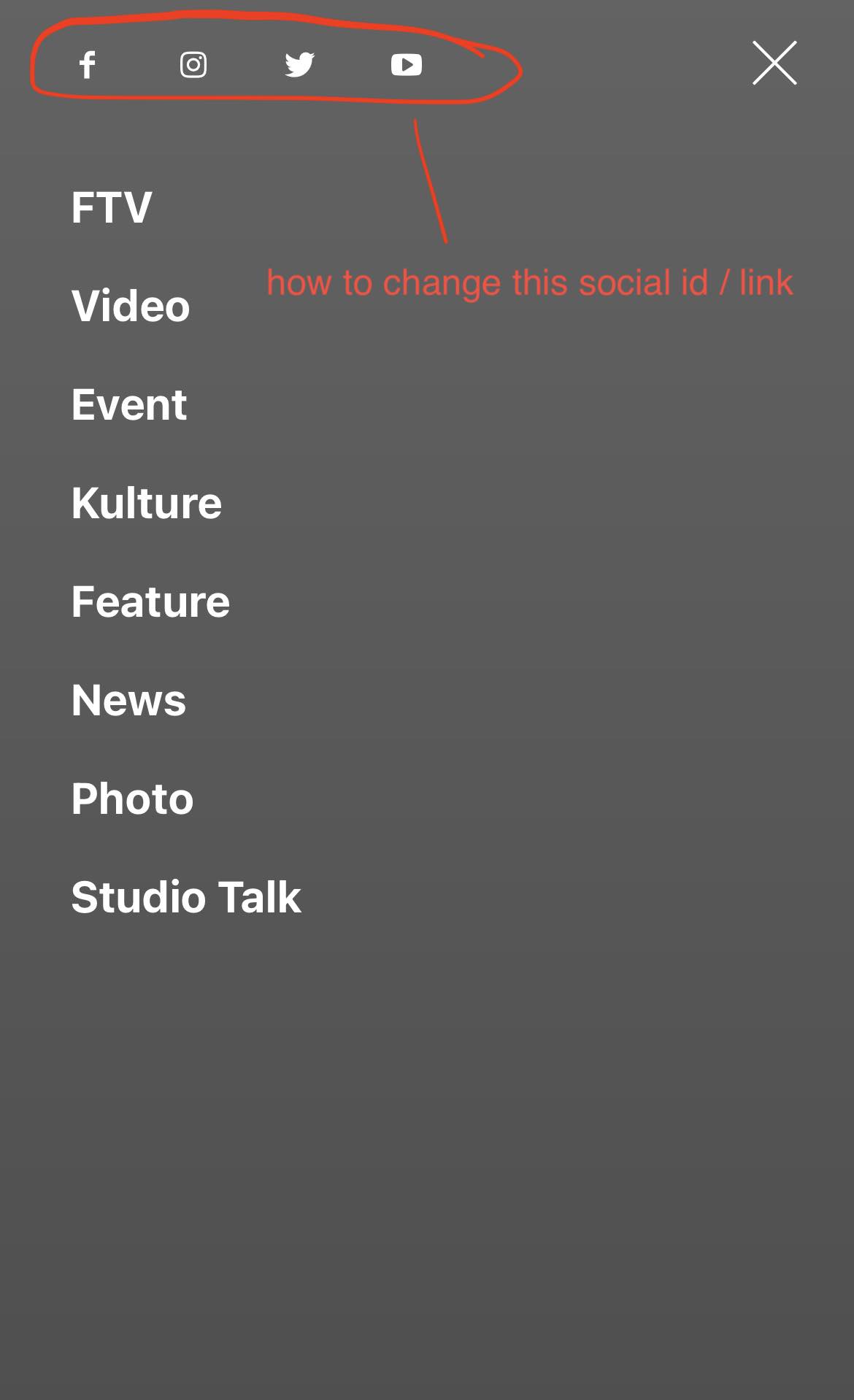
I have problem finding where i can change the social menu id / links on the mobile version. It still links to tagdiv social media platforms. Others are fine.
santosh.thakur  Bettina
 Hello @cashflow270!
Please note that you can edit only the cloud elements with the TagDiv Composer. This Mobile Editor does not recognize a page builder so the tagDiv Composer shortcodes cannot be rendered. So, if the page is made with the TagDiv Composer, then you can not have the Mobile Theme layout. Please see https://forum.tagdiv.com/the-mobile-theme/ and https://forum.tagdiv.com/mobile-theme-introduction/ for more information.
Thank you!
Bettina Hello Khalid!
We have 3 options for mobile versions that you can use:
1. Responsive version: A responsive version of your website looks similar to the desktop version. Edit the page with TagDiv Composer. Click on the mobile viewport: https://www.screencast.com/t/XDQJedlggSB; there you can see your mobile version and edit or adjust the elements to look better.
2. Mobile pages: https://tagdiv.com/newspaper-10-3-7-update-brings-customizable-and-fast-mobile-pages
3. Mobile theme plugin: The Mobile Theme is a performance-optimized theme included in the main Newspaper theme that only loads on mobile devices. It comes with its own templates and design for pages, posts, categories, etc., so your current templates from the desktop theme will get converted to the mobile theme layout. Please see https://forum.tagdiv.com/the-mobile-theme/ and https://forum.tagdiv.com/mobile-theme-introduction/ for more information.
A full explanation is here: https://www.youtube.com/watch?v=SpGkOnJeNZY
You can choose to use whichever one is more affordable and useful for you.
So, if the page is made with the TagDiv Composer, then you can not have the Mobile Theme layout.
For the option 1 and 2, you need to uninstall the Mobile Theme plugin.
The AMP works better only with the Mobile Theme plugin. From my point of view, if you don’t use the Mobile Theme plugin, then there is no reason or benefit to AMP.
Thank you!
Bettina Hello!
You need to inspect your website on desktop and mobile, so you can see what the problem is there. Also, it could be a plugin conflict or a cache issue because this code is working well on my end.
If you want to try different colors, then you need to replace the color in the code.
When I access your mobile version on my desktop, it is not loading at all, but on my phone it is loading perfectly. So, unfortunately, I can not inspect your mobile version.
I see that your mobile version resembles the desktop version on a mobile device.
Thank you!



