
- ApiPractical example – How to add a new Block and Module
- ApiAPI – Smart Lists – Introduction
- ApiAPI – Category top section style – Introduction
- ApiAPI – Category top section template – Introduction
- Apitd_api_module::update
- Apitd_api_module::add
- ApiAPI – Modules – Introduction
- ApiUsing the Theme API in plugins
 talesxp
My single post page is not aligned well, so not fit the full page on mobile.
 anthonyblfc
 Hello, its propunters.co.uk I have tried a few things but nothing happens when I click on Sign up or forgot password from the Login/Register page. The problem is only on mobile the desktop is fine thank you
 wellspc23
 There are not any optimization plug-ins running on the site. Only the pre-packaged plug-ins included with the theme. The desktop version works perfectly. This only is occurring with the mobile AMP version.
-
This reply was modified 4 years by
wellspc23.
 xiona
xiona Hello again,
thank you, but it does not work 🙁 I tried incognito and other mobiles, it’s still the same. I worked on both viewpoints that you mentioned. Inside the Tagdiv composer it looks good, but on devices horizontal view is still bad.
Also, other pages don`t have such problem, it looks good. only the front page has this problem.
Btw, but I didn’t create the front page from beginning (I made it on another account and then copied the code and transferred it to new account. maybe it is the problem?
 Calin
Calin Hi,
The mobile theme plugin is a special plugin that should be used only on normal blogs where the posts are not locked.
If you are using the opt-in builder you should use the responsive version.
Thank you!
 nabilah
Hello Dear TagDiv Team
I have some issues, I have activated the theme on my website https://wikisantri.id/ and it works in my browser. –> https://ibb.co/D1bPhyk
But when I use another browser like incognito or mobile version the theme disappears and looks like at this URL: https://ibb.co/LPR6B50
Any idea why it happens? please help
 ocandela
The mobile theme does not work correctly, it does not show me the lockers in the articles and the iol TAG DIV for the pages does not work … how can I solve?
 Jose
Jose No, I do not use any add-on for lazy load.
I have put the same logo on mobile, and on mobile it looks fine. But on PC it is not visible.
I have deactivated all plugins, except Newspaper, and the logo is not visible. I really don’t know what the problem is….
 Anamaria
 Hello,
These suggestions were added to our list, however since the mobile theme must continue to be a light version, I’m not sure if they will be implemented.
That option is available in Theme Panel – Mobile Theme -Excerpts as you can see here: https://www.screencast.com/t/eEWblGin
Thank you!
Calin Hello,
A, B) You can do this for responsive version only if a cloud templates it is used or the mobile theme plugin, unfortunately with the standard header templates it is not possible. For a cloud template, all you need to do is to edit the header (for this you can edit the homepage) select the mobile view port and set the menu that you want to be used on mobile -> https://i.imgur.com/TWLzEAr.png -> https://i.imgur.com/zkBWXfA.png
1) The menu on the standard header can be changed from the theme panel -> https://i.imgur.com/sJotuYE.png and from appearance > menu -> https://i.imgur.com/LaLCw4D.png
2) Indeed this can be done only with a cloud header and it can be edited/set like in above example.
I hope this will help you!
anthonyblfcOn my Login/Register page, I can’t click on sign up or forgot password nothing loads up when I press them. It works perfectly fine on desktop, but mobile won’t work. I hope there’s a simple solution to fix this thank you
wellspc23 The “critical error” has been corrected using these steps, but still no images showing up in WooCommerce on mobile devices.
Thank you!
Calin Hi,
1. Unfortunately using the mobile theme plugin there is no option to filter the “LATEST ARTICLES”, sorry!
2. You can use both. The mobile ads can be displayed or both mobile and amp, but the amp will be display only on the amp version.
3. The only way you can set in the mobile theme a newsletter subscription is in an ad filed. Unfortunately I’m not sure if this will work on amp (it will be displayed but I do not know if the request will be made, but this can be tested).
Thank you!
Thank you!
 c386
c386Hi,
We find the Mobile Theme plugin extremely useful. It does a lot of the basics very well, but I’m eager to know if any additional features are planned?
In particular, here are some features I’d like:
*Ability to modify 404 page (we use a custom cloud template for the desktop site, but this has no effect on the mobile theme)
*Ability to define multiple categories for the front-page grid
*Ability to exclude certain categories from latest posts
*Option to adjust maximum length of post titles
Some of these would be really handy if at all possible.
 mode8.jp
 Hi Anamaria,
Thank you for your tip.
I just noticed both with TDC.
Apology for asking you more questions, but please let me know…,
Our goal is to…,
A) To replace the menu from the Main menu to Mobile menu when visitors access the website with Mobiles.
B) We really do not use the cloud template, since we conclude that the basic template = standard pack is the most reliable and stable template and easy to customize. We are not sure how we can change the header template and apply it for ALL pages including pages which are NOT edited by TDC.
1) How can we change the menu for ALL pages?
2) How can we replace (change) the menu from Main menu to Mobile menu? It seems it has no setting of like “hidden” or “replace” selection.
To solve this matter, we assume that we need to use “cloud header template”, still though we are not sure the way to change it.
Again, thank you for your support in advance.
Calin Hello!
I’m sorry to hear about this. Please note that every page speed needs some improvement, and it is not enough to install the theme alone because there are many factors which can affect your page speed quality.
Some factors which you need to take into account are:
External factors: server speed, if you are using CDN or not, the external resources loaded by your website like ads, fonts, tracking scripts like Facebook Pixel, Google Analytics, Twitter analytics, Hotjar and so on.
Internal factors: the number of elements on the page, image size, image formats, if you are using mobile optimized layouts, console errors, if you are using the Standard Pack plugin or not, if you are using the PRO demo or a standard one.
https://forum.tagdiv.com/topic/optimize-script-to-improve-site-speed/
– https://forum.tagdiv.com/topic/a-few-tips-for-newspaper-x-speed-high-cpu-usage-issues/
– https://tagdiv.com/how-to-increase-page-loading-speed/
– https://forum.tagdiv.com/how-to-make-the-site-faster/
– https://forum.tagdiv.com/topic/score-100100-pagespeed-with-newspaper-wordpress-theme/
– https://www.infophilic.com/get-almost-100-pagespeed-newspaper-theme/
– https://developers.google.com/speed/docs/insights/v5/about
– https://www.youtube.com/watch?v=tnkVapqhIHc
Please check the tutorials from those platforms gt metrix and Google Pagespeed Insights and I’m sure you can increase the page speed.
Please note that page speed is not covered by the support team: https://forum.tagdiv.com/newspaper-theme-support/
Thank you for understanding!
 vivreausmic
 Calvin, you are the best, all works perfectly !! Thanks ??
I have 3 more questions :
1. In the amp/mobile version of the theme, below the posts, articles to read are proposed. How to limit the posts to the current category?
2. What is better to use in theme panel, the mobile ads or amp ads? What a difference? And especially which one is better for page loading speed?
3. Can I add a newsletter subscription form (in html) to an amp post ? If so where and how? Footer? Sidebard? For your information I don’t use tagdiv newsletter because sendinblue is not supported.
Thanks, your simply et direct answers help me save a lot of time !!
A.
Calin Hi,
1. To resolve this problem please be sure that the mobile theme and amp settings are like this:
-> https://i.imgur.com/8RWemCR.png -> https://i.imgur.com/mD7Gjgb.png -> https://i.imgur.com/KtdEgAg.png
2. To change the Exclusive text an color can be change for desktop version using the settings from the block -> https://i.imgur.com/ZF02usD.png now for amp it can be changed only with a custom css like this one:
https://i.imgur.com/g53emAn.png
.td-module-exclusive .td-module-title a:before {

    content: "Premium";

    color: #fff;

    background-color: #555;

    padding: 2px 8px ;

}
The css need to be set in this place -> https://i.imgur.com/5gmi8Gn.png
I hope this will help you!
Thank you!
Anamaria Hello,
Yes, you can use a mobile menu without mobile theme, so you can choose between mobile horizontal menu -> https://i.imgur.com/iaey0g9.png and mobile menu -> https://i.imgur.com/qv8yo8u.png
To change the font and colour for the mobile menu please go in Theme Panel -> Theme Colors -> Mobile menu/mobile search => https://www.screencast.com/t/0CvSgXp9H to set a background image go in Theme Panel -> Background -> Mobile menu/mobile search => https://www.screencast.com/t/uvDejzbX to change the font from Theme Fonts => https://www.screencast.com/t/ANBQe7hQhJd
Thank you!
mode8.jpHi Team,
I am now looking for the way to add a “mobile menu” WITHOUT using the plugin “Mobile theme”.
This plugin (= Mobile theme) is not suitable and does not display as we wish.
To adjust the website with default style + standard pack is the best way to customizing the design (= with CSS).
I do notice that we can change the mobile menu by installing the plugin.
Still, we do not wish to install this and do some more work on mobile. = the default style is the best.
Therefore, I would like to know if there is any way to change the menu ONLY mobile WITHOUT installing the mobile theme.
Creating the menu for Mobile + adding “mobile menu” on the menu list of WP (with Header Menu, Footer Menu and Top Header Menu). This will be a normal way to do it so.
Hooks, shortcode might work. I will check on that too.
Thank you for your support in advance.
 jasongavin
My ad network recommended I should add placeholder containers to my images to prevent layout shift. They said the Theme Developer should be able to help take care of that.
Tested page:
https://boraboraphotos.com/where-is-bora-bora/
As the image loads in, it pushes the content down. This single shift is causing 0.06 CLS. Just this one fix should be enough to get mobile CLS within the passing range of <0.1.
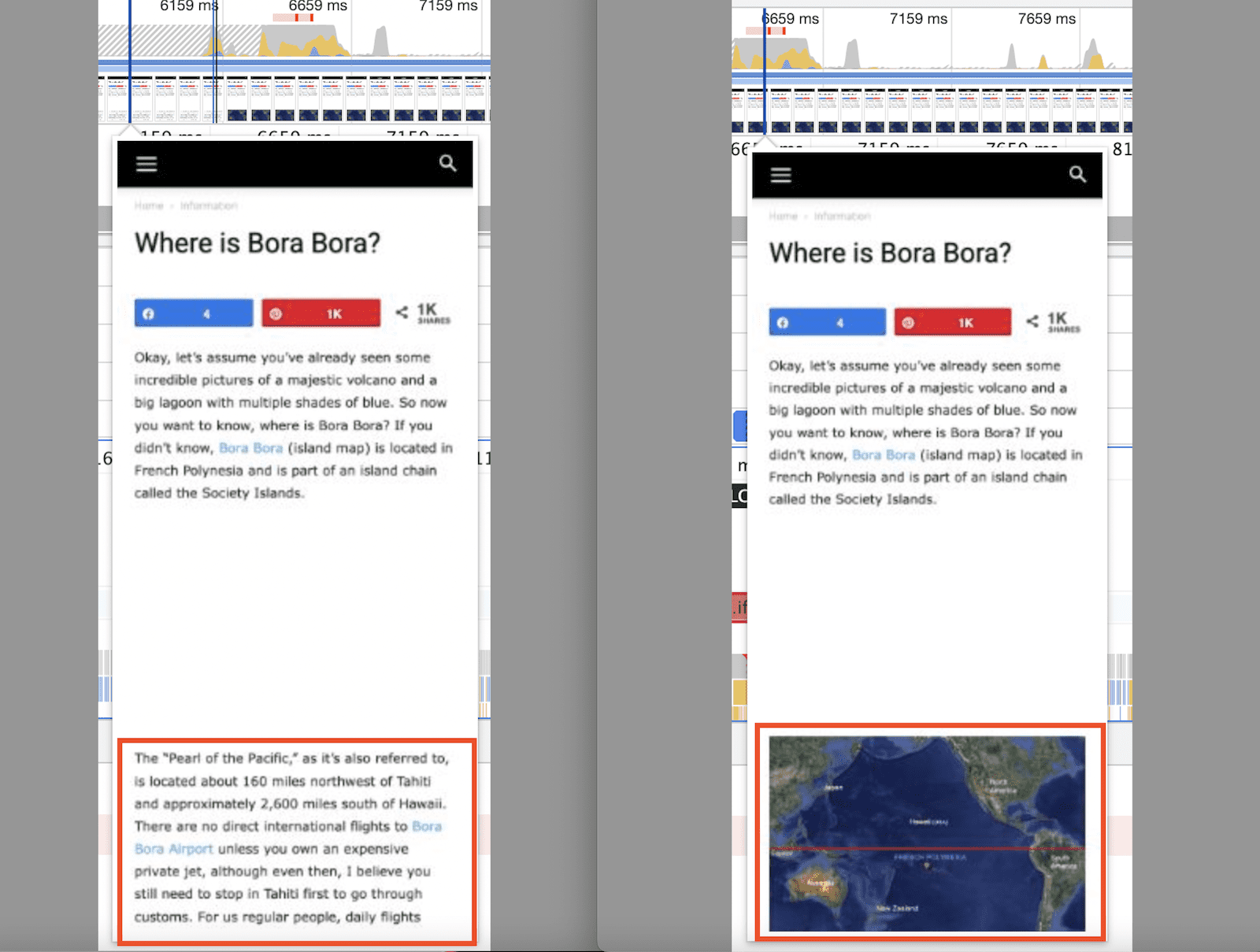
This shows the CLS measurement from the above image pushing the content down.
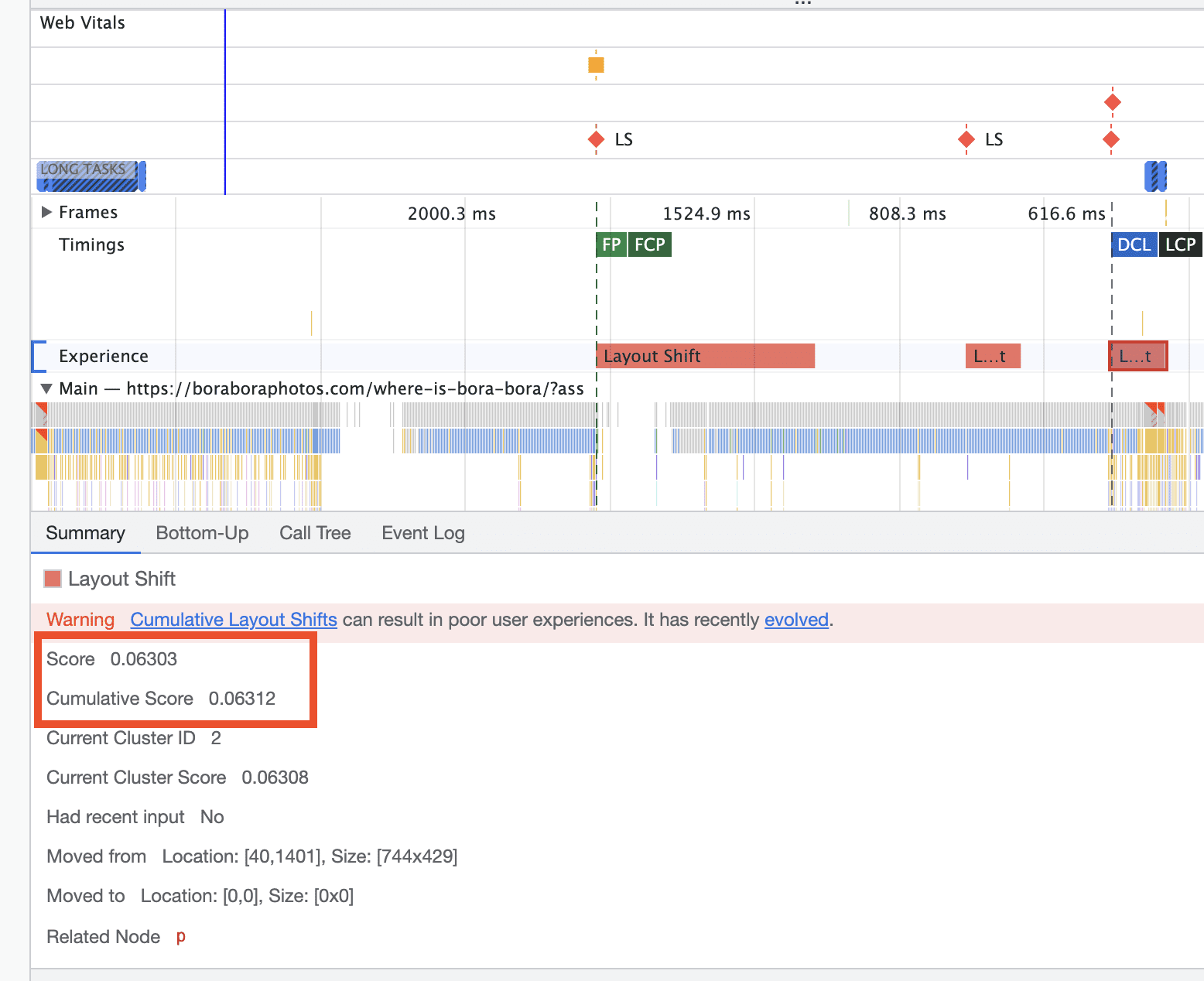
They said once I take care of that, I will be in a great position to get passing CLS scores. The question is, how do I go about doing this??
thanks
Jose Hello again,
I found the problem. The background image of the row is not saved in the mobile version.
When I insert an image, I save the changes. But when I update, the image is not there. Attached video: https://vimeo.com/736181967
Is it possible that it is a bug in the theme?
website: https://cutt.ly/0ZUSHQA
 salty
salty HI Calin,
Thanks for the reply, I would like to add this website is redirecting only the first time if the user opens it mobile in a day and the second on word it opens correctly.
vivreausmicHello,
I have several questions about the mobile and AMP version of the theme.
I would like AMP to be used automatically for mobile users, but only on the posts. I want the pages, the categories and all the rest of the website is in
So, in the AMP wordpress plugini choose tansitional and in advanced settings > compatible templates > Content type > I checked articles then in templates > singular
Then in Newspaper Theme Panel > Mobile theme > Use Mobile Theme for AMP
Problem 1: Visitors who click from a page to a post are not automatically redirected to the AMP version. The responsive version of the theme displays (just like on desktop).
If in the AMP wordpress plugin I choose in Other > redirect mobile visitors to AMP, the transition is done well, except that the category pages are also presented in a Mobile theme version. What I don’t want. I want all the pages except the articles to remain as on the computer version.
Problem 2: In the amp/mobile version of the theme, below the posts, articles to read are proposed. How to change the label Exclusive on a red background and write PREMIUM or something else with another color instead?
Thanks for your help.
A.
Anamaria Hello,
Seems on the mobile you don’t have set the background image, please check it https://i.imgur.com/PrUV0JH.png also, check the gradient.
Thank you!



