
- NewspaperWP Rocket and Newspaper Theme: Optimization Guide
- TutorialsFrom WPBakery to tagDiv Composer
- TutorialsWhat is Ajax preloading?
 slavamatador
 i install speed booster, tagdiv mobile theme, optimized pictures?
 Simion C.
 Hi,
That would not be a good solution, the ads themselves should be responsive and adapt to available width, not trying to adapt the whole website for and ad.
The sidebar like all containers on the page will be resized when needed, but it seems the ad remain the same size
– https://www.screencast.com/t/UQDbm3ge
Either have responsive ads that will be resized or have different ads if possible optimized for each device.
Thanks
Simion C. Hi,
You can use the Yoast SEO plugin to customize and optimize the Google search results. Please follow these guides for more information
– https://yoast.com/google-webmaster-tools-search-appearance/
– https://yoast.com/what-is-an-xml-sitemap-and-why-should-you-have-one/
– https://kb.yoast.com/kb/how-to-connect-your-website-to-google-webmaster-tools/
– https://kb.yoast.com/kb/submit-sitemap-search-engines/
– https://kb.yoast.com/kb/enable-xml-sitemaps-in-the-wordpress-seo-plugin/
Thanks
 jhfrench2000
 I’m having the same issue and I can’t for the life of me figure out
<head>
<title><?php wp_title(‘|’, true, ‘right’); ?></title>
<meta charset=”<?php bloginfo( ‘charset’ );?>” />
<meta name=”viewport” content=”width=device-width, initial-scale=1.0″>
<link rel=”pingback” href=”<?php bloginfo( ‘pingback_url’ ); ?>” />
<?php
wp_head(); /** we hook up in wp_booster @see td_wp_booster_functions::hook_wp_head */
?>
</head>
is all i see in the header.php file.
This is the view source: FB is pulling the first og:image rather than the yoast one
<meta name="viewport" content="width=device-width, initial-scale=1.0">

    <link rel="pingback" href="............/xmlrpc.php" />

    <meta property="og:image" content="......................" />

<!-- This site is optimized with the Yoast SEO plugin v6.0 - https://yoast.com/wordpress/plugins/seo/ -->

<!-- Admin only notice: this page doesn't show a meta description because it doesn't have one, either write it for this page specifically or go into the SEO -> Titles menu and set up a template. -->

<link rel="canonical" href="https://.................................." />

<meta property="og:locale" ........ />

<meta property="og:type" ........ />

<meta property="og:title" ............" />

<meta property="og:description" content="........................." />

<meta property="og:url" content="......................" />

<meta property="og:site_name" content="............" />

<meta property="article:section" content="................" />

<meta property="article:published_time" content="......................" />

<meta property="article:modified_time" content="..................." />

<meta property="og:updated_time" content="......................." />

<meta property="og:image" content=".........................." />

<meta property="og:image:secure_url" content="......................" />
-
This reply was modified 8 years by
jhfrench2000.
 EquipaRefrigeracao
Hello,
I hope you’re doing good.
I’m with a great problem on my website: the images are not being displayed in the posts, and others things like submenu, search field not too. Sometimes they show up, sometimes they do not.
I think it could be a problem with CSS or JavaScript on the Newsmag theme, since I tried everything: I optimized the images, solved SSL problems, optimized the database, try it on other browsers, flushed browser cache, but so far nothing solved my problem.
This is a post example: https://www.equiparrefrigeracao.com.br/camara-fria-peixe/
Could you help me? See the image attached, please.
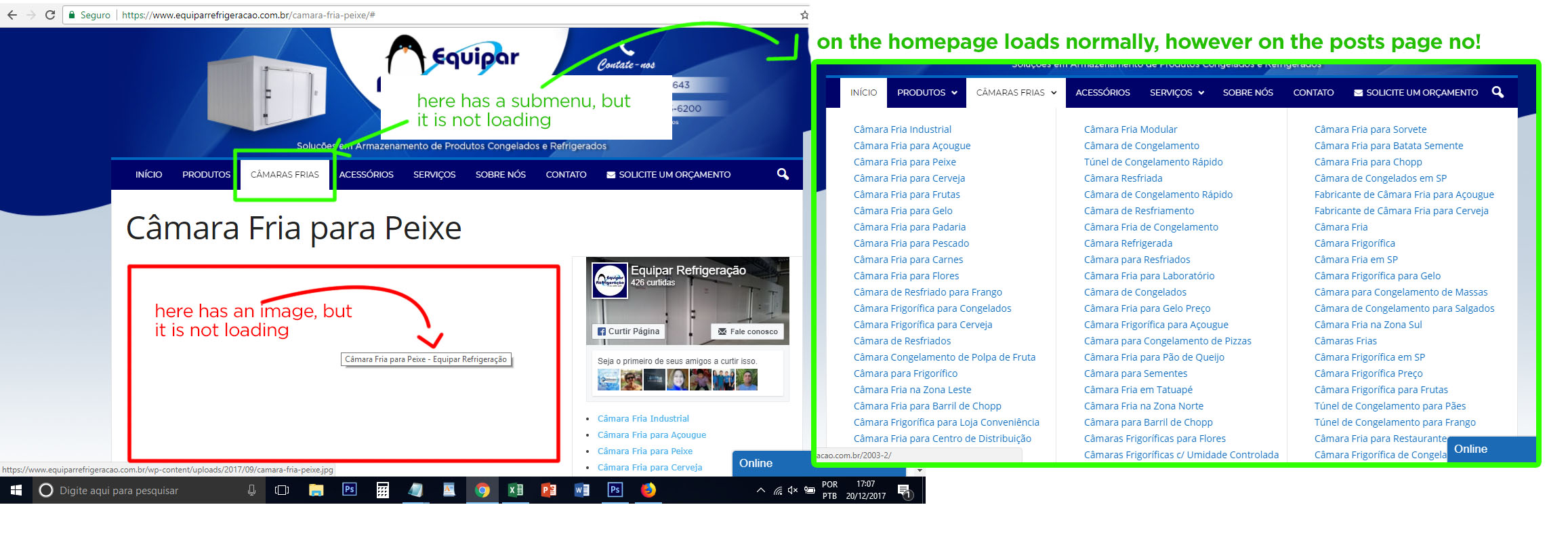
Thank you
 irfan.id
Hi… After some optimize, my blog is get good score on GTmetrix.. but I found still low score for YSlow Score, please take a look at this image https://s10.postimg.org/lj5ljtm2h/Screenshot-2017-12-20_GTmetrix_Performance_Report_A_95_B_80.png. How to optimize “Add Expires headers and Minify” “JavaScript and CSS”? both are in high and medium priority.
Thank you
 simchris
 Yes, you need to optimize your site. Theme can’t do it for you.
a) see the tutorials section in theme docs here (top menu) for some tips on optimizing site
b) use gtmetrix.com on one of your site posts, to see all the stuff you may need to tweak on your server, image optimization, etc.
( I don’t work here. )
 rdcubo
The theme documentation alert to do not edit content, but doesnt shows how I should to save Demo’s “all settings” and keep them even by switching Demo.
I cant find either an option like “save as template” as in Optimizepress and other themes.
I already buit sites with some themes, but Newspaper 8 made me feel like a newbie.
I miss more detailed manual and/or tutorials for each step.
 Edward
 Disable all untested plugins (for example “autoptimize”) and try again.
Please notice that tested plugins can be found here -> https://www.screencast.com/t/VRYWtPFYb (scroll down this page: https://forum.tagdiv.com/install-via-wordpress/)
Any other untested plugin can interact with the theme core files and might cause a lot of unknown issues.
Simion C. Hi,
There would not be enough container space to display the desktop ad on tablet, that is why the ad should be responsive and present a smaller ad depending on the available width, adapt depending on space. Or use different ads optimized for tablet.
Maybe these topics would be useful
– https://support.google.com/dfp_premium/answer/3423562?hl=en
– https://www.promisemedia.com/online-advertising/how-to-make-responsive-dfp-ad-units
– http://adtagmacros.com/how-to-make-responsive-ads-in-dfp/
Also this topic in the forum
– https://forum.tagdiv.com/topic/tutorial-responsive-ads-with-google-dfp/
Thanks
simchris Try testing with gtmetrix.com instead of that companys health meter. Number of plugins not directly related to health, as many plugins are simple functions, which as plugins survive theme updates as not in theme functions.php file.
You might also consider a wordpress optimized hostingco, also.
Health is not a specific indicator without more reference to what is being measured… speed? Resources used? Or what?
Obviously a bad plugin can impact a site more than number of plugins, specifically.
Not sure that helped or not.
-
This reply was modified 8 years by
simchris.
Simion C. Hi,
That would happen if the ad is not responsive and adapt depending on the available width. You could create ads optimized for tablet portrait or landscape, check this guide
– https://forum.tagdiv.com/using-other-ads-non-adsense-ads/
Thanks
simchris “Blurry” thumbnails can be caused by multiple things
a) optimization plugins like smush-it
b) external image plugins like Jetpack/photon
c) changing default compression too low number in your wp-config.php file
d) mod_pagespeed and similar which may rewrite image as webp format
e) optimized WP hosting service which uses image compression tools to serve content
might not be your issue, but these are super common
 Pradeep Augustine
Hello Tagdiv,
Almost 80% of my blog visits are from Mobile device. I’m planning to optimize the site for mobile. Which is the best option? Whether using the mobile plugin or Google AMP. Is this theme compatible with AMP? will AMP work when the mobile plugin is active?
Thanks.
 Sergey Smirnov
 This could be a plugin conflict
Bingo! Conflict with Autoptimize. FIXED
Thank you!
simchris Generally you delete the old folder, and upload new one; not merge them via FTP. Then you’d likely need to clear cache in web browser, and possibly clear transients in WP using something like WP-Optimize plugin.
You may have to manually install plugins from the /zip > allfiles/plugins
Works for me.
 Catalin
 Hello masterskg,
Please check the following topic here -> Notice that the speed booster is an optional plugin which can be activated in the same way as you install a new plugin.
The Speed Booster works only with the tested plugins. If you use other plugins, it will be automatically disabled, and I suggest to check this first in System Status. However there is a workaround to make it also work with other plugins, you can read more here – https://forum.tagdiv.com/topic/speed-booster-not-compatible-with-vaultpress/
Unfortunately, the time doesn’t allow us to provide any custom and optimization services. We provide support only for the theme related issues based on Envato support policy – https://themeforest.net/page/item_support_policy I suggest to get someone to help you if you want to optimize your site.
Thanks for your understanding!
 johnson96590
 Hi,creb,many thanks for your reply, i sure know that, i once use the auto-optimize and fastest cache plugin to gzip the css and js and html file, so i can compress the css file from 1.1M to less than 900K, but i think it may still too big for the site, and i install the demo [helth&fitness], i visited the demo page, saw the transfer size only 87k, and the url is : https://demo.tagdiv.com/newspaper_health/, and i download the demo css file, when i saved the code into a css file, the size was 800k+, but i use develop tools of chrome to see the css transfer size, yes, still only 87K, so i am crazy now, what can i do for that.
Please help me, i can give a account of my plesk panel and a account of my wordpress to see what happened there.
Hope your reply.
rdcubo Hi Simion,
When I disabled plugins from OptimizePress, all blocks of WPBakery Page Builder are showed.
Thanks for support \o/
Catalin Hello bepdocthan,
Unfortunately, the theme does not have any such an option for it and also, does not control the keywords. You should use a Seo Yoast plugin if you want to optimize your website for Seo. Strat reading about this case from here -> https://kb.yoast.com/kb/enable-meta-keywords-in-wordpress-seo/
Thank for the message!
Simion C. Hi,
The theme does not support RTL direction, it is not optimized for this and there are no options. There will most likely be issues that could only be solved with customization and modifications on your part.
These are some WordPress suggestion for RTL
– https://codex.wordpress.org/Right-to-Left_Language_Support
If you changed WordPress in a RTL language you should be able to write in the according direction.
Thanks
 Bogdan B.
 Hello,
The update has nothing to do with your server configuration and your page speed optimization. Please use the page speed guide and make each step carefuly testing with google after each implementation.
*Your images are not optimized
*Check server response time: https://developers.google.com/speed/docs/insights/Server
*Eliminate render-blocking JavaScript and CSS in above-the-fold content using the speedbooster plugin
Please also read this topic on the speedbooster plugin: https://forum.tagdiv.com/topic/tinymce-advanced-and-other-various-disabling-speed-boster/
*leverage browser caching: https://developers.google.com/speed/docs/insights/LeverageBrowserCaching
I doubt you had all these set up before the update. The theme has nothing to do with the server config you have.
 Jose
Jose Hello Simion C.
Thanks for reply 🙂
Sorry but I need help with this topic. How is it possible that the theme has generated this size? I do not use any other add-on for images / homepage.
I only use an image optimizer (compressión): https://imagify.io/
Is it possible that my theme has gone crazy? How can I force him to use the sizes that have been set in the “Block” section within the theme panel options?
Thanks
Simion C. Hi,
On mobile you can display a different logo, than on desktop. Therefore you could create a logo more optimized for mobile devices and upload that instead
– https://www.screencast.com/t/5oslMp1dAGIm
You should try using the recommended logo size for mobile for best results
– https://forum.tagdiv.com/logo-favicon/
Thanks
simchris Main thing is to limit number of modules; perhaps only use *one* on sidebar, not five; don’t use footer elements, just have copyright; do simpler home page; disable XMLRPC as possible attack vector that can overload site; disable comments site wide unless you must have them (don’t serve much purpose anymore other than trolls and spam); turn off ‘related posts’ and ‘more from author’ and disable ‘you might like.’
Those are all good starting points. Idea is to ‘start small’ then optimize by adding more; not turn every option on to start with.
I don’t work here; but food for thought anyway 🙂

