No search results were found in Documentation!
 Amit
Amit 1. As you find optimizing images manually tricky/time consuming, I would suggest using an image optimization plugin to optimize all images on your blog.
2. After you optimize all images, you can setup Cloudflare CDN or re-enable Jetpack Photon. Cloudflare/Jetpack photon will surely help your blog to serve images faster.
3. Make sure WP Super cache plugin settings are correct.
4. You don’t need Shareaholic as the theme comes with inbuilt share buttons.
5. Use plugins like Autoptimize or Fast Velocity Minify to optimize scripts on your blog.
I hope you will find this helpful.
 gumball44
 I found the solution, I activated “agregate js line ” on autoptimize. And it works now.
thank you
-
This reply was modified 6 years by
gumball44.
 Calin
Calin Hi jamiesharpe,
To optimize your images you can use some plugins, you can use the suggestion from mattsteve20
The speed of your website depends on how well your site is optimized, if you follow the steps which are presented in this tutorial here -> https://tagdiv.com/how-to-increase-page-loading-speed/ you’ll be able to increase the speed of your website.
Also you can check this similar topic for more solutions: -> https://forum.tagdiv.com/topic/optimize-script-to-improve-site-speed/
Thank you for your understanding!
 jamiesharpe
 Thanks all – couple questions:
Admins: on mattsteve20’s suggestion, I’m currently using WP SuperCache. Will WP-Optimize help me out here?
Adeba – which online service are you using?
And admins I’d appreciate any thoughts you had on my latest question as I’m using Photoshop to optimize but still not getting the results I need:
Hi Amit – thank you for getting back to me. You highlighted images that I spent a lot of time optimizing and replacing, but per your feedback above it looks like those images are still slowing down my site. If it’s OK with you I’d like to take one example and please let me know what I need to do?
From your list: croatia.gif
What I had originally: https://www.screencast.com/t/v3vyqA933j – PNG file, size 2 MB
What I optimized and replaced on my front page: https://www.screencast.com/t/dinVpk7Yg – JPEG file, size 40 kb
I really hope we can work off this one example and tell me what I’m doing wrong, so I can optimize it for all the other images. Please let me know and thank you for your help.
 Adeba
Adeba Just one tip.
I am using an online service which works on the fly.
No matter what I upload it’s optimized and there are even new modern formats possible.
You may even define cropping
So it’s converted from png to jpg automatic and also generates WebP Images.
 Mattsteve20
 For automatic optimization of your existing images and subsequent uploads, install and configure the ‘WP-Optimize plugin’. Make sure you disable caching on WP-Optimize if you are already using another caching plugin. Also, before you upload your pictures, you can compress them using photoshop or compressnow.com.
-
This reply was modified 6 years by
Mattsteve20.
Calin Hello,
The speed of your website depends on how well your site is optimized, if you follow the steps which are presented in this tutorial here -> https://tagdiv.com/how-to-increase-page-loading-speed/ you’ll be able to increase the speed of your website.
Also you can check this similar topic for more solutions: -> https://forum.tagdiv.com/topic/optimize-script-to-improve-site-speed/
Thank you for your understanding!
jamiesharpe Hi Amit – thank you for getting back to me. You highlighted images that I spent a lot of time optimizing and replacing, but per your feedback above it looks like those images are still slowing down my site. If it’s OK with you I’d like to take one example and please let me know what I need to do?
From your list: croatia.gif
What I had originally: https://www.screencast.com/t/v3vyqA933j – PNG file, size 2 MB
What I optimized and replaced on my front page: https://www.screencast.com/t/dinVpk7Yg – JPEG file, size 40 kb
I really hope we can work off this one example and tell me what I’m doing wrong, so I can optimize it for all the other images. Please let me know and thank you for your help.
 vv2005
 Hello boyztimes,
I also had the same problem. I was told that I did not have data source, that is why the images do not appear on social sharing. In order to fix that, yoast seo plugin was installed -> https://kb.yoast.com/kb/getting-open-graph-for-your-articles/
After installing yoast seo also, you need to set featured images of less than 300kb, for the image to show in the social sharing of Whatsapp. You could use Photoshop or any plugin to optimize images. Else, you could use this online website to optimize images -> http://www.resizeimage.4u2ges.com/ .
gumball44 Hi Maggo,
Can you post screenshots here of your autoptimize config please ?
Thank you !
Amit Hello,
Here is the list of some images that need to be optimized:
travel-background.png
travel-wanderlust.png
subscribe-bio-travel.jpg
list-of-quirky-bars-1.jpg
croatia.gif
maldives-ocean.gif
iceland2.gif
lagos-rocks.gif
check-point-charlie-berlin-jamie.jpg
Blonde-on-Blue-Train.jpeg
you can use Lazy Load by WP Rocket to improve the loading time of the page.
Also, some plugins are not required as those features already come with a Newspaper theme.
Here is a dedicated guide for Newspaper theme optimization. https://www.infophilic.com/get-almost-100-pagespeed-newspaper-theme/
I hope you will find this helpful.
 imkimc
 I had this same problem, and it pointed to the Composer, but it was actually a conflict with the Clearfy plugin when you choose to optimize HTML and turn off xml-rpc. I do not know why xml-rpc is needed for previewing URLs but that’s what I found out. Hope that helps.
 Vlad S
 Hello !
You will have to keep activated the Optimize JS and CSS but deactivate the Aggregate options.
I hope this will be helpful !
Thank you !
Calin Hello,
The speed of your website depends on how well your site is optimized too, not only on theme, also your page content is very big -> http://prntscr.com/q5017s, also all the plugins that you have install and activate can slow the page speed, if you follow the steps which are presented in this tutorial here -> https://tagdiv.com/how-to-increase-page-loading-speed/ you’ll be able to increase the speed of your website.
Also you can check this similar topic for more solutions: -> https://forum.tagdiv.com/topic/optimize-script-to-improve-site-speed/
Also we do offer page speed services over a fee, if you want us to increase your page speed you can check our custom services from here -> https://tagdiv.com/premium-customization-services/
Thank you for your understanding!
Calin Hi,
The speed of your website depends on how well your site is optimized, if you follow the steps which are presented in this tutorial here -> https://tagdiv.com/how-to-increase-page-loading-speed/ you’ll be able to increase the speed of your website.
You can try that or if you want we are able to offer you a refund if you make a request here: https://themeforest.net/refund_requests/new
Thank you!
gumball44 Hi,
Thank you for your help =), I just have installed Autoptimize, Is possible to get screenshots of your settings Autoptimize in order to fix this problem ?
Kind regards
 Maggo
Maggo See this thread: https://forum.tagdiv.com/topic/minify-javascript-and-css-errors/
I posted an answer there. Basically you need the plugin Autoptimize.
Adeba Translation in english:
I write it to you in Spanish, you have too many images not optimized on your website, in addition to that you have to optimize the js and the css, in case you can’t do it, I help you write me to the email therion250@gmail.com, I have a 92 in load.
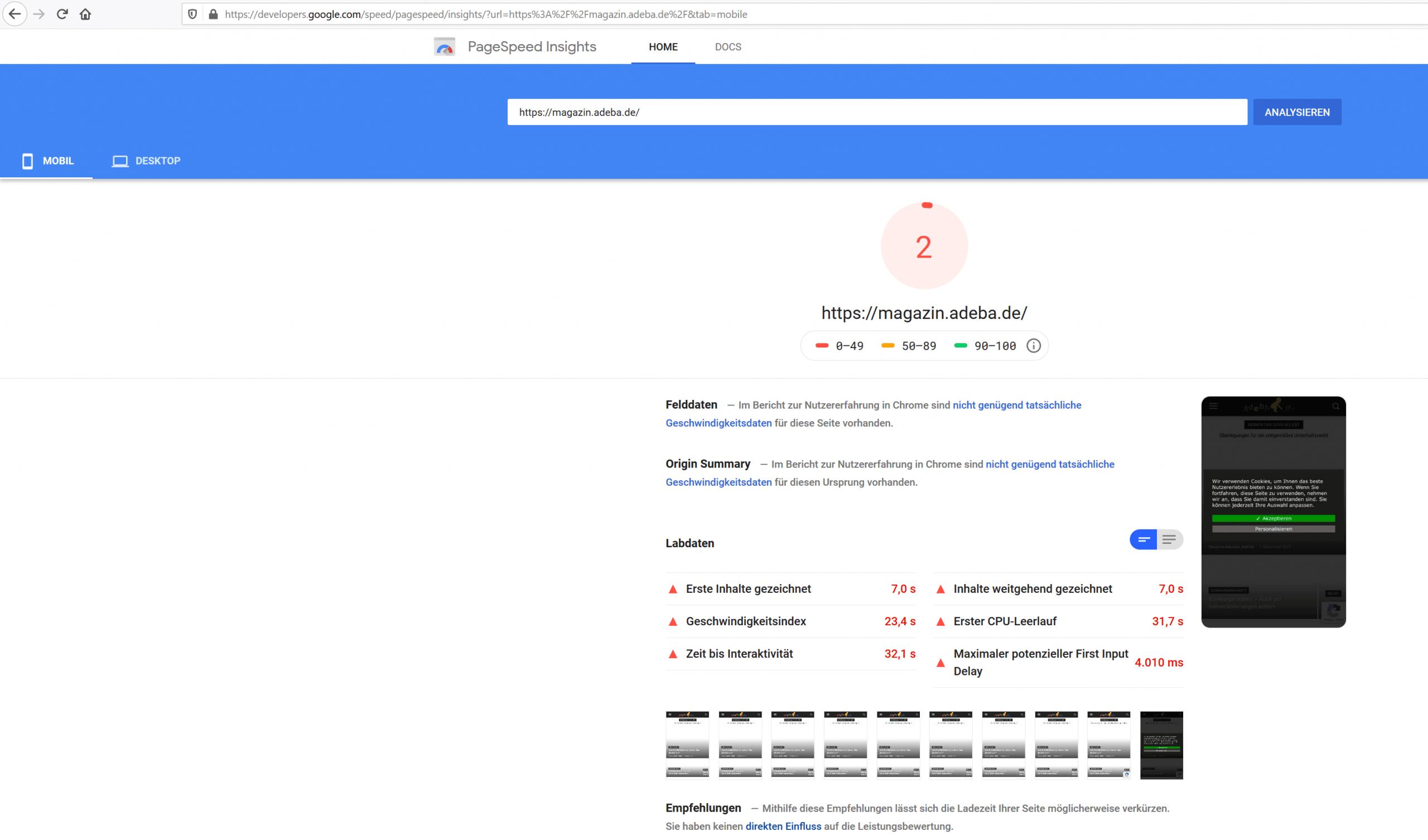
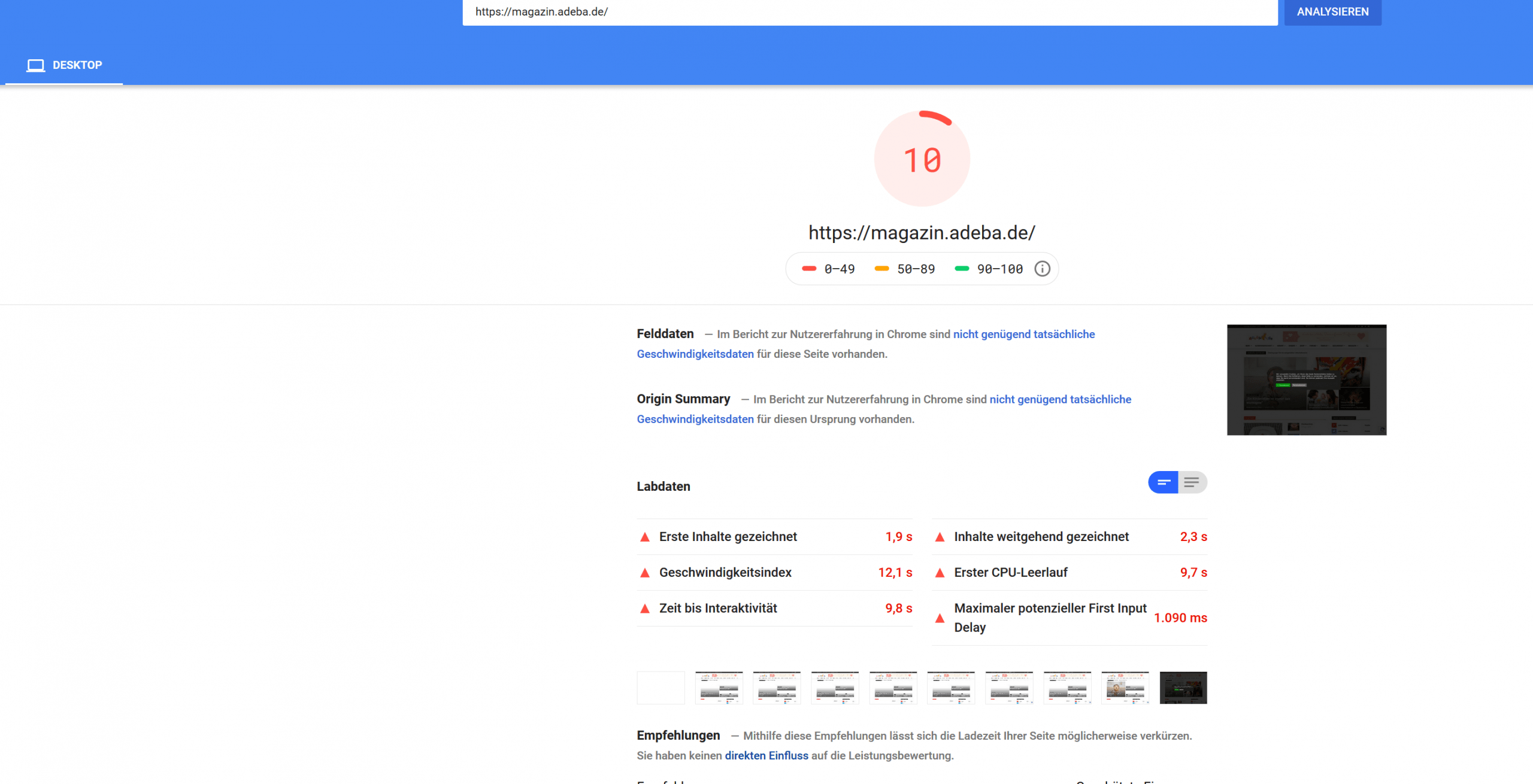
AdebaA new record on my website. After updating to the new design 10.2 and deinstalling Standad Pack I got a new negative speed record.
Sitespeed 2
https://developers.google.com/speed/pagespeed/insights/?url=https%3A%2F%2Fmagazin.adeba.de%2F&tab=mobile
https://magazin.adeba.de/wp-content/uploads/2019/12/2-scaled.png
Sitespeed 10
https://developers.google.com/speed/pagespeed/insights/?url=https%3A%2F%2Fmagazin.adeba.de%2F&tab=desktop
https://magazin.adeba.de/wp-content/uploads/2019/12/1adeba-scaled.png
Even an own server 🙁
So any help is welcome, because things are really getting interesting.
https://tagdiv.com/newspaper-10/
Blazing-Fast Websites
We’ve been working on the idea of making the Newspaper Theme light and fast for a long time. We’re now delighted to give you an excellent way to build a website that is optimized for fast loading speed out-of-the-box.
When you deactivate it, things are starting to get interesting, and your website tends to speed up by itself. ?
jamiesharpe Hi Amit – I’ve taken a lot of time and followed your instructions to optimize all the images on my website. On the homepage, I’m still getting low ratings from both Google PageSpeed (https://www.screencast.com/t/TmTeFaIpiJg) and GT Metrix (https://www.screencast.com/t/MrsO35TU). On those screenshots, it appears that both services are highlighting images that I’ve replaced with the Photoshop process that you suggested. What do I need to do to get rid of those old images so both Google and GT Metrix do not punish me for them?
I appreciate your help.Thank you.
Calin Hi ToniLaird,
Sorry for the inconvenience for the moment the Autoptimize plugin is not tested with our theme, therefore we can not recommend it, but to be sure that these problems will be avoid I’ll ad this plugin on our list for testing and I hope will be supported in coming updates.
Thank you for your understanding and sorry for the inconvenience!
 boogieboa
 As I said in a reply to someone else, I identified the problem. It is a conflict between your theme, Autoptimize, and Hide My WP, both of which were blocking various icons and images on the page. I’ve disabled both plugins until I find a proper solution.
Maggo Ok, I solved the problem. The links didn’t help at all for that. But I thought: Hey, when there is stuff to minify, why not use a plugin? I already used the plugin Merge + Minify + Refresh, but that doesn’t minify html. So I switched to Autoptimize. It minifies these inline style tags. Problem solved.
Calin Hi,
The WP-Optimize need to be set specific for our theme, we have customers that are using this plugin and everything is working normal, unfortunately we do not have a guide for this, but I think that is possible to make one in the future.
Thank you for your understanding!
Calin Hi,
Please try this tutorials for speed optimization, is possible that some of them to have can minifie that code and this problem will be solved.
– https://tagdiv.com/how-to-increase-page-loading-speed/
– https://forum.tagdiv.com/cache-plugin-install-and-configure/
– https://forum.tagdiv.com/how-to-make-the-site-faster/
– https://www.infophilic.com/get-almost-100-pagespeed-newspaper-theme/
– https://forum.tagdiv.com/topic/score-100100-pagespeed-with-newspaper-wordpress-theme/
– https://forum.tagdiv.com/topic/newspaper-theme-speedify-your-website/
– https://forum.tagdiv.com/topic/tutorial-chriss-custom-optimizations-for-functions-php-etc/
– https://forum.tagdiv.com/cloudflare-cdn/
– https://forum.tagdiv.com/topic/theme-causing-high-cpu-usage-2/
– https://forum.tagdiv.com/topic/sql-querys-high-cpu/
– https://forum.tagdiv.com/topic/newspaper-theme-slow-to-respond/
– https://premium.wpmudev.org/blog/optimizing-your-wordpress-database-a-complete-guide/
– https://underconstructionpage.com/optimize-wordpress-database/
– https://crunchify.com/better-optimize-wordpress-database-all-in-one-guide/
Hope this will help you!
Thank you!