- ApiAPI – Top Bar Template – Introduction
- ApiAPI – Single Template – Introduction
- ApiAPI – Footer Template – Introduction
- ApiAPI – Smart Lists – Introduction
- ApiAPI – Thumbnail – Introduction
- ApiAPI – Category top section style – Introduction
- ApiAPI – Category top section template – Introduction
- ApiAPI – Modules – Introduction
- ApiAPI – Blocks – Introduction
- ApiAPI – Header style – Introduction
- ApiUsing the Theme API in plugins
 Bogdan B.
 Hello,
Yes you will need another version of the social counter. Please download it from this link:
http://cdn.tagdiv.com/wp-content/uploads/2017/03/td-social-counter.zip
Thank you!
 SRK
SRK Thank you for the reply.
Would be great if you could look towards adding the option to have on categories,tags and attachment pages in future. This would help placing ads in between the contn specially since having only on the sidebar pushes it towards the bottom when viewed in mobile phones.
Another thing I would like to know is – Would it be possible to have more than one In-Article ad in posts?
Thanks!
 Simion C.
 Hi,
Thank you for your appreciation. The only available ad spots at the moment are in the ones in Theme panel->Ads.
There are no options to use ads in the category page and tag page except for the ones that you can use in the sidebars. You can have a sidebar for each of the categories – https://www.screencast.com/t/cWi36ghUN one for the tag page – https://www.screencast.com/t/zToAyGogVY and also one for the attachment page
– https://www.screencast.com/t/XOe2x8jil
In these sidebars you can use ad box elements with custom ads for example
– https://www.screencast.com/t/TwErpn5a9IbE
These templates for the categories and tags are predefined, and do not have any other ad related options by default. If you want like to implement different ads in these templates it would require to modify the theme files.
Thanks
Simion C. Hi,
From what I can see some of your ads are not displaying on both of the sites you provided on desktop and non mobile
– https://www.screencast.com/t/kjihczq2Wy
– https://www.screencast.com/t/hpteqV632mB
If you are not using adsense for your ads, you just have to enter the ad code in the respective section in the theme panel, and the theme will detect this and render it unmodified – https://forum.tagdiv.com/using-other-ads-non-adsense-ads/
For the mobile theme the ad codes must be entered in the mobile theme section in theme panel
– https://forum.tagdiv.com/the-mobile-theme/
Maybe the codes you are entering are not valid, or require additional implementation. If you are using a plugin for the ads maybe it is not compatible with the theme or not configured properly. Or another plugin is conflicting with the ads, so you can try disabling them all, except Visual composer, clear any caching installed, purge CDN files and check again.
Thanks
 Michael
 I use AdRotate plugin and it does that. You can also weight some ads more than others.
 harmario
 Hi Catlin! Thanks for the reply!
That´s what I saying https://www.recomendacionesytendencias.com/wp-content/uploads/2017/04/two-menus.png
There are two menus when I´m looking the cache and it is not only my website, I analice another sites with newsmag and the have the same problem.
What about the other question about .css files and jquery.js?
Thanks a lot!
 eivindert
 Hi Simion,
Like this right?

Its not working and the company tells me it looks just like it should, and that this method is working for theyre other customers.
Simion C. Hi,
These are the only available background ad options at the moment, in the theme – https://forum.tagdiv.com/background-ads/
If you would like something else, please try to search for a plugin with the capabilities you mention. You can also search the forum for similar ad implementations that other users have made, maybe you can find valuable information.
Thanks
 Catalin
 Hello dhvanesh,
Notice that if you are using the Google Adsense, you cannot add custom size for this. The size should have to be delivered by Google Adsense. Also, if you are using other ads, you can add the size in HTML structure -> https://www.screencast.com/t/YMkPa4Ai3j5 which has to be added to Custom Ad Box, like this -> https://forum.tagdiv.com/using-other-ads-non-adsense-ads/
Thanks for your understanding!
Catalin Hello komsak,
Please keep in mind that our theme has been designed to use only the Google Adsense code. This type of Ad which you have referred above was not tested with our theme, and we cannot say for sure if it will work or not with the theme, sorry! For more information about our Ads, please consult our documentation here -> https://forum.tagdiv.com/header-ads-adsense/ Notice that if you want to bring best results in our theme, you should setup your Ads according to our guide. Otherwise, you might get some errors, sorry! Most likely, for this type of Ads, is needed to make some adjustments that theme to recognize the source code and we cannot provide the additional implementation for this, sorry!
Thanks for your understanding!
Catalin Hello hmosteiro,
The DoubleClick ads aren’t recognized by theme’s ad system and the code is rendered as it is. The theme only works using google Adsense ad codes: https://forum.tagdiv.com/ads/ … for another type of ads you can either use wp text widget or a plugin like Simple Ads Manager or AdRotate to render the code then use theme’s ad spots. For more references about this regard, you can consult this topic -> https://forum.tagdiv.com/topic/tutorial-responsive-ads-with-google-dfp/
Thank you for your understanding!
 Gen Fujiwara
 Thanks for the advice.
I have changed the settings of this document, everything.
I also stopped using Adsense Manager.
Unfortunately the situation will not change.
I have a question.
I am using a shared server. Is this the cause?
If so. I have another VPS server.
Is there a possibility of solving by migrating to a VPS server?
Gen
Simion C. Hi,
The article bottom ad appears by default just after the post content – https://www.screencast.com/t/sZKkakx4H In your case it is being pushed down by the plugin content inserted in the content – https://www.screencast.com/t/AzPbGVVCV0v
You could use a do shortcode containing a custom ad – https://www.screencast.com/t/qallJwKXn7cu and insert it in the loop file corresponding to your post template style, below the related articles section. The ad will be displayed like this – https://www.screencast.com/t/bjEXpzQZQqJH
Here are some other topics related to this, that may provide useful information
– https://forum.tagdiv.com/topic/ads-shortcode/
– https://forum.tagdiv.com/topic/sourcevia-above-add/
– https://forum.tagdiv.com/topic/banner-below-navigation-and-remove-white-section-on-category-pages/
Thanks
Gen FujiwaraHello,
I purchased NewsPaper 7 three times. I like this template very much
I have encountered trouble now.
This is the new NewsPaper 7 issue, which is creating a post.
Insert a line in the text in a certain part, or insert a line feed.
Next, make corrections to other parts and check the preview screen.
Then, for some reason, the place that changed first is returned to original.
This is not only a text phenomenon.
For example:
I used Visual Composer and created several text blocks.
Next, fix or add another part.
Then preview or save.
Next, check the update screen.
Then, for some reason, the final corrected part will be reflected normally, but the part that was modified first will either return to its original state or will disappear completely.
– –
I have experienced this phenomenon for the first time in NewsPaper 7’s third use. That was not the second template.
Is there such a change in specification in the latest update?
My guess is, apparently, one of the causes of this problem.
It looks as though Adsense Manager is causing it.
Because Adsense Manager tag. (Simple tag)
Once it is deleted, it will be recovered.
I am very embarrassed by this mysterious phenomenon.
Advice please.
Gen
 salocharly
 well that would have been smart at the beginning of the project. My excuse Is that my programming skills are limited, didn’t even thought about that, I am not so sure i will look and work the same. But it presents the same problem as I will have to go over all posts and delete manually the codes that were added manually, so I don’t get duplicated ads. As I explained before, there are a ton of posts in the site. any other ideas?
 hmosteiro
Hi,
I would like to deliver ‘brand day’ ads. (full background coverage plus a big banner in between at the top).
I´m building the site, so it is under maintenance, sorry for can not show (can I send you an image by email?)
Having the the background image is more than half of the way so it is a great feature.
The other things I need to display it are:
– A gap (1024×250 in this case, but doesn´t matter) between the main menu and the first block of a page (or the title of any article in a post).
-Then I would like to be able to place a link in the image to click on it.
Hope this is possible, but thanks for your atention in any case,
Best regards
 rothweller
 The category is also home page hidden; Ie your news, fashion ws .. how you like your layout.
Adding sliders, adding short code, adding ads, adding text from other categories, etc .. how do I do it?
—–I am turkish, sorry, google translate——— I do not know english 🙂
Bogdan B. Optimization was made overall but it depends on your install and speed optimization as well as the image you add to your mobile menu (larger images result in slower loading). Another known issue on the menu is firefox. It loads slow over firefox. It is the way firefox handles this type of animations that makes it slower loading.
Try to test it against our demo: https://demo.tagdiv.com/newspaper/ as in the demo we have not yet updated the theme version.
Thank you!
 Arianna
 The same problem in the page… I tried many times to insert another box images + box text (obviously I tried to create a new page, several times) but it looks like there is an upper limit in length!
After I click the save button that’s what happens.

-
This reply was modified 9 years by
Arianna.
 jbeaul
 Adrotate’s ad rotating capability on a cached website requires fragmented caching which is not available when with WP Super Cache. Fragmented caching is available under W3 Total Cache but that is not supported/recommended with TagDiv themes.
In short, it appears Adrotate’s rotating ads functionality cannot be accomplished when using TagDiv’s Newspaper theme due to this opposing caching support.
Other than that, Adrotate works wonderfully with WP Super Cache and TagDiv’s Newspaper theme.
 jciview
 I agree that offering some sort of PHP enabling would be beneficial. In our case, we’ve used several services like OPenX, SmartAdServer, DFP, etc. combined with PHP for ad targeting specific states, regions, categories, tags, page ID’s, etc. Newspaper’s ad system works great for certain kinds of ad setups but not for others.
Arianna 
 eurodream
 Good afternoon!
Everything was done, the place with the icon and the link appeared (https://yadi.sk/i/E8TRKcSZ3GEkKA), but the icon does not appear.
And in the footer it shifted compared to other icons(https://yadi.sk/i/3m-BL5Vw3GEkQB).
What am I doing wrong?
I am use in CSS
.td-icon-odnoklassniki{
background-image:url(“http://portal.ksors-spain.org/wp-content/uploads/2017/03/odnoklassniki_new.png”);
width: 30px;
height: 20px;
background-size: 30px 20px;
background-repeat: no-repeat;
}
Thank you!
 Blankito
Hello TagDiv Support,
first of all I want to let you know that you are doing an amazing job. I also know that this kind of thread has been published a lot of times but I had to create another one.
I’m not new to WordPress and I’m not new to Adsense and my adsense just won’t work. Our Adsense is approved and verified and Ads just don’t show up.
When checking the source code the Adsense code looks very strange to me. Could you please help me or take a look at my adsense code because I really don’t know what to do anymore.
Thanks in advance for your efforts and help.
Best
 Meranda Devan
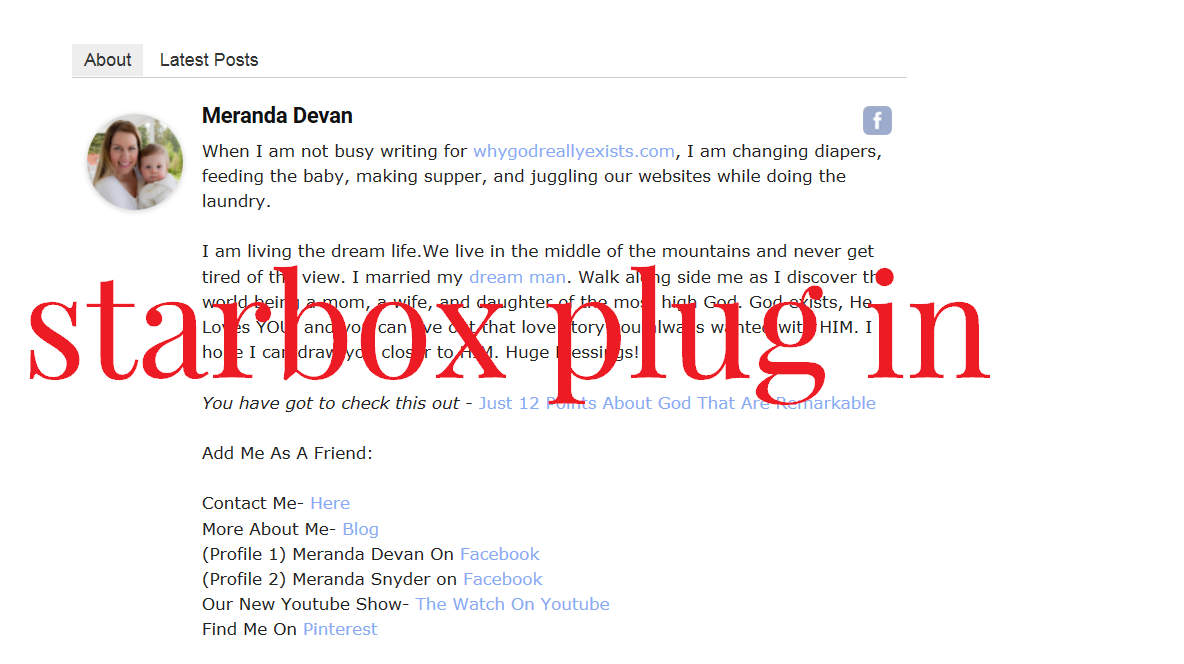
On my website I often feature guest writers who have lengthy BIOS. I have used the Star Box plug in because it allows me to copy in Html where I can space out the bio.
Here is an example.
http://whygodreallyexists.com/wp-content/uploads/2017/03/Star-Box.png
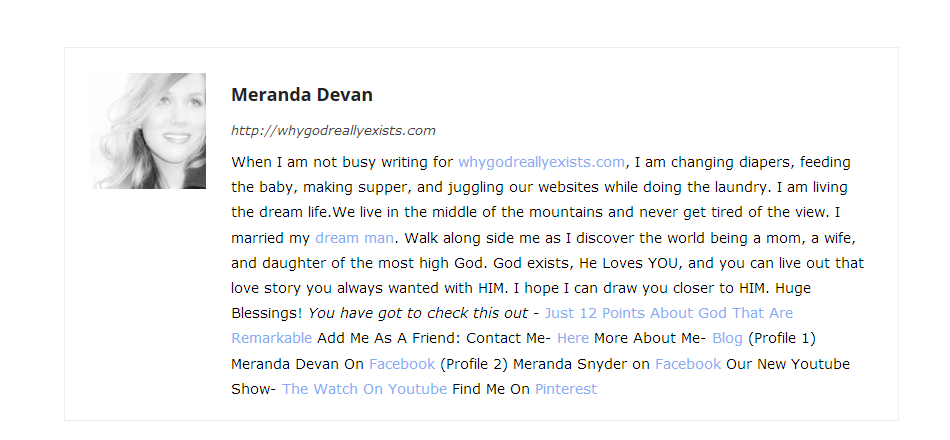
Here is how the themes bio shows up.
http://whygodreallyexists.com/wp-content/uploads/2017/03/Others.png
While this may look good for my profile…when I have very lengthy bio’s….the text runs together badly. How can I fix this? Right now I am seeing duplicate bios on my site. Perhaps removing the themes bio from the page? What do you suggest?