- TutorialsFrom WPBakery to tagDiv Composer
- TutorialsDefault Block Settings Guide
- TutorialsOffset Feature
- TutorialsSystem status parameters guide
- TutorialsWhat is Ajax preloading?
- TutorialsHow to Update the WPBakery Page Builder plugin
- TutorialsHow to Install bbPress forum
 Michael Wong
Hi team,
I’m using the “Advanced Ads” plugin to handle ads. My ads are javascript ads provided by the client. After setting the ad code in “Advanced Ads”, I insert the ads into the website using short codes. The ads display normally on the website’s frontend. However, when I place more than one ad on a page, only the first ad is visible, and the others are not. I can’t solve this problem and would like to see if you know what the problem is and if you can solve it. Thank you to the technical team.
 Calin
Calin Hi,
If you want the same banner on all video popups the just set it in the theme panel > block settings > modal video popup – https://prnt.sc/MAPzgYe2os2a should be set using html tags as in the image I provided (similar to banner for ads – https://forum.tagdiv.com/newsmag-using-other-ads/)
 simchris
Just a heads up; Google has become even more aggressive in their effort to stop barrage of junk news networks doing nothing but parroting other news sites, press release newswires, etc. Over 10,000 popped up starting in 2023-2025. In Q4/25 Google started removing low quality sites from Google News, then moved on to the main search (!).
Sites with too much “non origin” content, may be hidden, even using “show duplicate” quoted search for “headline” and/or site:yoursite.ooo.
This means it’s now critical to be a “first origin” content creator, and not repost other site content, even if linking to them; avoid AI junk content farms and remove stuff like tags with only one item attached to it, redundant content (e.g., black friday deals from 2023 not relevant in 2026).
Couple of my sites that pre-date Google News got caught in this. Two have recovered. The two that got whacked rank highly in the Bing/Yahoo/DuckDuckGo streams, luckily.
One of my blogs (all original content), had 1200 pages deindexed last year, and just got email from Google saying “eror has bee fixed- error 1200 pages scraped but not indexed” (or something like that). On my music blog, I deleted a rogue redirect plugin, removed old tags from decade ago, and cleaned things up.
This is a real issue with Google now “censoring” the internet if they don’t like how you roll, which is part of their new focus on being an ad platform and answer engine, and *NOT* a search engine.
Also, make sure you add the IndexNow plugin and configure it. Better to use the plugin directly than use something like Yoast.
Just food for thought. On our big site, I have deleted about 6,000 stories which were old, stale, and sourced from other sources as part of the site news “syndication” for national news.
As the old TV show* used to say, “Be careful out there.”
(*Hill Street Blues) 🙂
 thebeatwriter
Hey everyone,
I hope you are doing well.
I’m reaching out with a quick question regarding my website, and I hope you can help me.
I run a very successful baseball website called Elemergente.com. It’s mostly in Spanish, but we are looking to launch an English version. My question is: can I add a block in the Newspaper theme that displays the most recent news from another website?
I mean… is it possible to add a block like this, but instead of the news coming from the Spanish website, have it come from the English one?

Is it possible to do that?
Thank you,
Marcos
 m
m Thank you for your reply!
Yes, I have and infinite scroll on the homepage, but it’s only 3 loads deep.
However, the home page is NOT the most visited page because we receive most visits through Discover to content pages like this one:
https://www.tocnoto.si/jani-pavec-povedal-kaj-imajo-skupnega-luka-doncic-anze-kopitar-in-njegova-starejsa-hci-sara/
But on this page I can’t find any infinite loads or pagination, so I’m not sure what the cause could be. Do you have any other ideas?
 jects
jects Other companies are private, not public, meaning they do not have a stock symbol or headquarters listed. Is it possible to hide this [Traded as and Headquarters]?
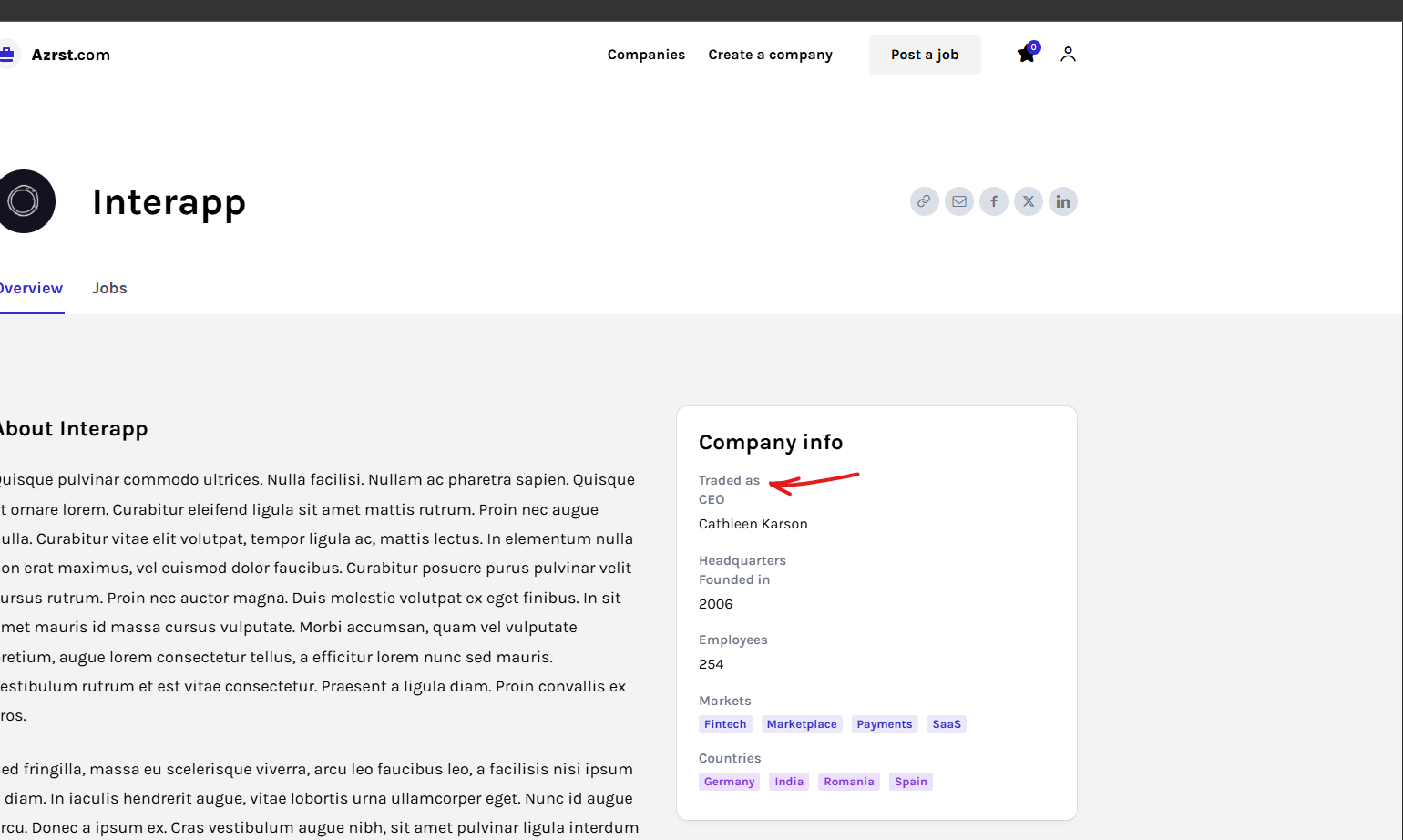
Thanks
 opinandosinanestesia
 Good morning.
I’ve already implemented a page within a page, but there’s an additional problem: in the settings, as you can see here https://opinandosinanestesia.es/wp-content/uploads/2026/03/ea3ee5c1-9d3b-408e-9329-33b230e1ceec-scaled.jpg, although I previously added a link so that clicking on the image would take us to another page, after doing so and saving, the link disappears and I can’t click on it because it’s gone.
And a similar situation occurs on this website, which is the page we want to link to the “Contact Us” section.https://opinandosinanestesia.es/wp-content/uploads/2026/03/a0af5d59-65c3-4492-9446-b0725642907b-scaled.jpg
I don’t know where the problem lies, but I see that it’s a common issue.
How do I resolve these conflicts?
Thank you!
 superchio
When i try to edit the single post page with tagdiv composer, it going for loading but it doesn’t works, only load.
I tried removing the template from the template list, but it hadn’t been modified. I reloaded it from the template cloud, but it still won’t let me edit it, nor the posts with this template, nor the template itself. I can only edit the code, which in a version of the page I discarded worked after removing a piece of code related to the post space.
However, since I hadn’t programmed it properly, I retrieved the original version of the template from the template cloud, but unfortunately it’s never editable. All the other versions work fine: the home page works, the pages work, and the contacts, but the single post just doesn’t work.
I’m attaching a link to the image of the pages with the single post theme and the single post template in editing mode, and a txt file with the template code.
http://www.superchio.it/wp-content/uploads/2026/02/Error-1-NEWSPAPER.jpg
http://www.superchio.it/wp-content/uploads/2026/02/Single-Post-template-center-magazine-pro.txt
My site is Superchio.it
Wait for support.
Regards
Daniele
 degelcreatives
 watch this video recorded by phone i see load that saw you orignal desing idont needed and the post isnot paralel the behnid of news thicker like other i need to resise post headlines frenidly with the smart phones like desktop
[video src="https://www.maslaxcabletv.com/wp-content/uploads/2026/02/Screen_Recording_20260202_140812_Chrome.mp4" /]
-
This reply was modified 7 months by
degelcreatives.
-
This reply was modified 7 months by
-
This reply was modified 7 months by
-
This reply was modified 7 months by
degelcreatives 
the other isues of portiat tablet is this load wasted my layout design for website
-
This reply was modified 7 months by
 cyberhrc
 Update:
Another thing ive noticed
If i use your theme with Google ADs, on div that is 1400 width [ ads are set to responsive ] – i get smallest add
If i use same code, as custom add – i get full width ?
Why is that ?
ANd yeah i did refresh gazilion times 😉
 vic-2
vic-2Hello,
we need migrate changes from stage to live site.
Our status is:
1. We cloned live site to stage with Duplicator Pro (without wp-uploads and firewall, etc.), then re-linked wp-uploads content to stage (because huge files etc.), not symlinks but .htaccess forward
2. On stage we applied anothe template layout as is on live.
3. We customised some on frontpage and another (customisation still in progress) via builder
4. We need do some changes on Post/Blog page and some another changes
5. After all changes we need apply all to live site, without modifying content on live
How we can do this? Was not possible via theme settings export/import only, I think. We need clone some code from stage to live (modified via builder)
Pls give us best way for solve this issue, step by step …
Thanks
 wesicily
 Good morning,
as you can see from the screenshots I attached, even after following exactly the procedure described in your guide and in the forum thread, the Cloud Templates with WPML are still not working correctly.
I have been trying to solve this issue for several days now without success, and I am honestly struggling to make it work.
I have:
– duplicated the Cloud Templates for the other languages
– tried assigning them correctly
– followed your documentation step by step
– checked both WPML and theme settings
Despite this, the templates are not being properly linked to the correct language, or duplicated items are created but remain in the original language.
At this point, I strongly suspect there may be a bug in the theme or a real compatibility issue with WPML in my installation.
I kindly ask you to help me identify the exact cause of this problem, because right now I do not know how to proceed further.
I look forward to your technical feedback.
Thank you for your support.
Best regards


Calin Hi,
I have a suggestion regarding the header AdSense code. Please add it in Theme Panel → Ads → Header.
Make sure the AdSense code is not restricted to a fixed size, so it can use the auto option and adapt to different device sizes: https://i.imgur.com/hfDjxO4.png
Then, in the ad box settings, select “Source code from the theme panel”:
Also, please make sure that no other code is selected for that ad (Image Ad or Custom Ad).
 SBC
SBC Another small change in the text of the menus for vertical tablets.
I inserted the script of this type to prevent the menu at the bottom and the appropriate lines.. the model fails to shrink and align the menu
/* Sottomenu a piè di pagina – Tablet verticale (Newsmag) */ @media (larghezza minima: 768px) e (larghezza massima: 1024px) { .td-sub-footer-container .menu-item > a { dimensione del carattere: 10px; imbottitura: 0 5px; altezza della linea: 1.4; } }
FOR ADSENSE it seems difficult to solve.
Even entering this doesn’t work
/* FIX AdSense overflow – Sub Footer Newsmag */
.td-sub-footer-container,
.td-sub-footer-container .td-pb-row,
.td-sub-footer-container .td-pb-span4,
.td-sub-footer-container .td-pb-span8,
.td-sub-footer-container .widget {
max-width: 100%;
overflow: hidden;
}
.td-sub-footer-container ins,
.td-sub-footer-container ins.adsbygoogle {
display: block !important;
max-width: 100% !important;
width: auto !important;
}
-
This reply was modified 8 months by
SBC.
 jjgoi
jjgoiHi, I noticed even on very fast Internet speeds (1gbps+), my site will have a flash of unstyled text from Times New Romans to my Google Fonts, even when optimisation (e.g. LiteSpeed, etc etc) is enabled.
On some other Newspaper sites, I noted that this issue is fine and not very obvious. Can I check which exactly are the settings to optimise for font loads?
SBC Putting responsive Adsense ad sometimes becomes 300×600 or other and it’s not good.
The problem is also there with fixed size img banners not Adsense.
Same configuration on site with “newspaper” has no problems instead…
http://www.economiaeterritorio.it
is ok
degelcreatives other issue i have is this situation i installed plugn to use facebook feed but it sucs and i deleted i saw facebook feed title when i open blank page how to remove look at this image becouse my language is so broken i hope to undrestand
 robinspaul
 We disabled tagDiv Mobile Theme and AMP plugins. It is loading on the mobile phone.
When the Blockchain Demo loads on the Mobile View first time, there is a gap between the header bar and the below text: “Invest in crypto the smart way! Making Blockchain & Crypto accessible and usable for everyone”
This happens only First Time it loads and if we refresh after that, it goes back to normal position. Could you please help us to fix this?
Also, the Blockchain Logo does not appear on the Mobile View. Could you please let us know how to fix it?
The other issue is with the Menu on the Mobile View: when we click on the 3 lines for menu on top on the mobile view it does not show the Menu, instead it is showing “Click here – to use the wp menu builder”. Could you please let us know how we can make the Menu visible on the mobile view?
Thanks,
 ecolivable
I have this issue that I cannot seam to fix. On mobile my Home Page loads fine but when I jump to another post the page it hijacked by the menu. Wont let me click out or bypass.
Any HELP would be greatly appreciated. Thanks!
disasterprepkit.com
Adding images.
https://disasterprepkit.com/wp-content/uploads/2026/01/Home-disasterprepkit.com_-1-scaled.png
 hrhq2020
Hi,
I am having a problem with the mobile hamburger not being available on first page load.
It is not selectable when the homepage loads but will become available when the page is refreshed or by navigating to another page.
Website: https://hrheadquarters.ie
Affects iPhone Chrome and Safari.
Wordpress 6.8.3
Newspaper Theme 12.7.3
AMP is enabled for the site.
Caching: WPMUDev Hummingbird and Super Page Cache. Cloudflare is integrated
Thanks,
Mick
 SP1
SP1 Yes, same problem can be seen on other friends websites. Many have moved away from Newspaper theme. Not enough updates are coming out from NewsPaper makers TagDiv, 2-3 years ago they used to quickly solve issues and bug fixes and push out new updates for the themes, which were modern and new features were brought. They are not keeping up with the times and a lot of features like infinite loading with ads are not working. “Read more” feature on the article page was also to be brought, but never came.
Now the LCP, FCP and CLS of the theme are also going high, resulting in revenue and viewer loss.
Even after using top-end cache paid cache plugins, the newspaper theme is very, very outdated and heavy. Hope they fix things and make the theme lighter in regulations with Google Pagespeeds insights.
-
This reply was modified 9 months by
SP1.
 brockpod
When I activate the AMP plugin is lists nearly all my activated plugins as incompatible. It includes some very popular plugins, like AIOSEO, Advanced Ads Pro, Smush Pro, Jetpack, tagDIV, Wordfence, Woo Commerce.
Even Bluehost’s simple plug-in is listed as incompatible. What do I do? These other plugins are needed. List is below,
tagDiv Composer
by tagDiv
Version 5.4.2 | built on 22.10.2025 10:59
Advanced Ads
by Advanced Ads
Version 2.0.14
tagDiv Cloud Library
by tagDiv
Version 3.9.2 | built on 22.10.2025 10:59
Jetpack
by Automattic
Version 15.2
Real Media Library
by devowl.io
Version 4.22.57
tagDiv Opt-In Builder
by tagDiv
Version 1.7.3 | built on 22.10.2025 10:59
Advanced Ads – Slider
by Advanced Ads
Version 2.0.2
Wordfence Security
by Wordfence
Version 8.1.2
WooCommerce
by Automattic
Version 10.3.5
Advanced Ads – PopUp and Layer Ads
by Advanced Ads
Version 2.0.2
WPMU DEV Dashboard
by WPMU DEV
Version 4.11.29
All in One SEO Pro
by All in One SEO Team
Version 4.9.0
Smush Pro
by WPMU DEV
Version 3.22.1
The Bluehost Plugin
by Bluehost
Version 4.7.2
Broken Link Checker by AIOSEO
by All in One SEO Team
Version 1.2.6
Advanced Ads Pro
by Advanced Ads
Version 3.0.8
 janamtrup
Hello
I cannot get my ADS top banner for artickle to show. Used TagDiv 10 years, never used this before with Top Banner.
The code I use for Custom Ad 1-5 have no problems. SO I reuse same form of code for the top Ad.
One of my template the space is accupied when settig coe in Theme Panelm but hide the image it self. In another template there is now reaction. Cloud based templated both.
Wehere can I see a correct code for the Top Article Ad ?
Thanks
Jan
 developer@idees-digital.gr
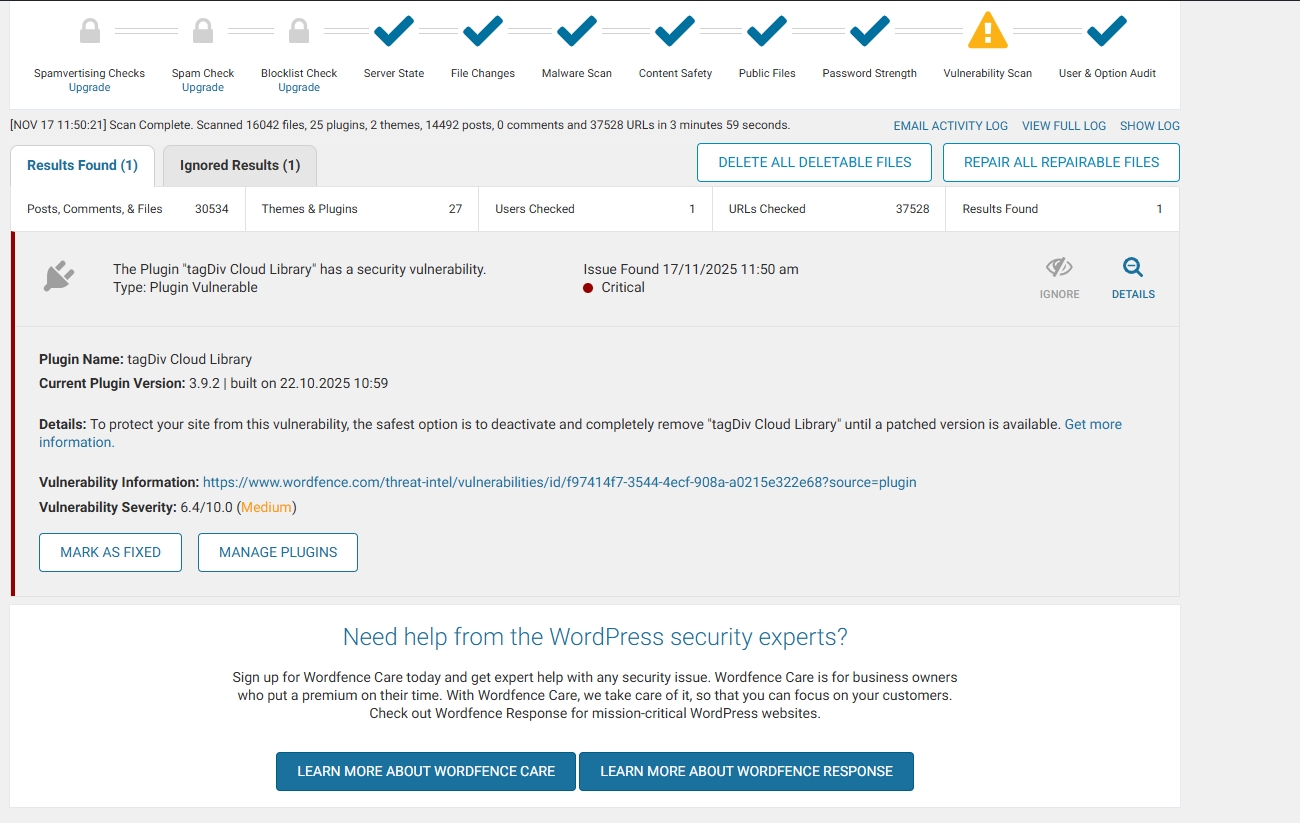
Since yesterday, 16/11/2025, my site has been hacked.
My site is a blog with 14,482 articles and 14 page.
With the help of Wordfence, I have managed to locate all the malicious files and delete or replace them with new ones. The only thing I still cannot address is the tagDiv Cloud Library plugin. Can you help me with this? I have deleted all the files of the Newspaper theme and reinstalled them from scratch, as well as all the WordPress files and the other plugins.
It is very important for me to solve this problem quickly, because the site has very high traffic.
link: https://exostis.gr/wp-content/uploads/2025/11/tagDiv-Cloud-Library.jpg
After scab with Wordfence and the same from malcare
Plugin Name: tagDiv Cloud Library
Current Plugin Version: 3.9.2 | built on 22.10.2025 10:59
Details: To protect your site from this vulnerability, the safest option is to deactivate and completely remove “tagDiv Cloud Library” until a patched version is available. Get more information.(opens in new tab)
Vulnerability Information: https://www.wordfence.com/threat-intel/vulnerabilities/id/f97414f7-3544-4ecf-908a-a0215e322e68?source=plugin(opens in new tab)
Vulnerability Severity: 6.4/10.0 (Medium)