
No search results were found in Documentation!
 Bettina
 Hello @jkakade!
To increase the page speed you can check these similar topics for more solutions:
– https://www.infophilic.com/get-almost-100-pagespeed-newspaper-theme/
– https://forum.tagdiv.com/topic/score-100100-pagespeed-with-newspaper-wordpress-theme/
– https://developers.google.com/speed/docs/insights/v5/about
– https://www.youtube.com/watch?v=tnkVapqhIHc
– https://www.xtechkr.com/optimize-newspaper-theme/
– Check those guides : https://web.dev/lcp/ – > https://www.sqlpac.com/en/documents/google-pagespeeds-lighthouse-6-new-features-lcp-cls.html -> > https://wp-rocket.me/google-core-web-vitals-wordpress/improve-cumulative-layout-shift
– https://forum.tagdiv.com/topic/to-high-cumulative-layout-shift-in-mobile-theme/
Please check the tutorials from those platforms gt metrix and Google Pagespeed Insights and I’m sure you can increase the page speed.
Please note that page speed is not covered by the support team: https://forum.tagdiv.com/newspaper-theme-support/
Thank you for understanding!
 jkakade
Hello,
I recently started using a Newspaper theme with an InsightAI prebuilt template. But Core Web Vitals are failing for mobile
https://pagespeed.web.dev/analysis/https-www-gamerstones-com-2024-01-anime-champions-simulator-dungeons-update-11-all-codes/vemoom4kv6?form_factor=mobile
In addition, I have noticed a little speed delay on the admin panel.
How to fix it
 Anamaria
 Hello,
You have many scripts for ads that decrease the page speed score; please try to use WP Rocket to minimize the resources.
There are many optimization guides provided by our users here in the forum, some made by us; you could check some of them
– https://www.infophilic.com/get-almost-100-pagespeed-newspaper-theme/
– https://forum.tagdiv.com/cache-plugin-install-and-configure/
– https://forum.tagdiv.com/how-to-make-the-site-faster/
– https://forum.tagdiv.com/topic/high-number-of-ajax-request/
– https://forum.tagdiv.com/topic/score-100100-pagespeed-with-newspaper-wordpress-theme/
– https://www.andraware.com/wp-rocket-for-newspaper-theme/
– https://forum.tagdiv.com/topic/page-speed-guide-for-2023-beginners-and-advanced/
– https://forum.tagdiv.com/topic/newspaper-theme-speedify-your-website/
– https://forum.tagdiv.com/topic/tutorial-chriss-custom-optimizations-for-functions-php-etc/
– https://forum.tagdiv.com/cloudflare-cdn/
– https://forum.tagdiv.com/topic/theme-causing-high-cpu-usage-2/
– https://forum.tagdiv.com/topic/sql-querys-high-cpu/
– https://forum.tagdiv.com/topic/newspaper-theme-slow-to-respond/
– https://premium.wpmudev.org/blog/optimizing-your-wordpress-database-a-complete-guide/
– https://underconstructionpage.com/optimize-wordpress-database/
– https://crunchify.com/better-optimize-wordpress-database-all-in-one-guide/
Also, pagespeed is not covered by support -> https://forum.tagdiv.com/newspaper-theme-support/
To be able to optimize and to remove CLS and LCP please check these guide => https://developers.google.com/web/tools/lighthouse/ -> https://www.sqlpac.com/en/documents/google-pagespeeds-lighthouse-6-new-features-lcp-cls.html -> https://web.dev/lighthouse-whats-new-6.0/ -> https://web.dev/lcp/ -> https://web.dev/cls/
Thank you!
Anamaria Hello,
There are many optimization guides provided by our users here in the forum, some made by us; you could check some of them
– https://www.infophilic.com/get-almost-100-pagespeed-newspaper-theme/
– https://forum.tagdiv.com/cache-plugin-install-and-configure/
– https://forum.tagdiv.com/how-to-make-the-site-faster/
– https://forum.tagdiv.com/topic/high-number-of-ajax-request/
– https://forum.tagdiv.com/topic/score-100100-pagespeed-with-newspaper-wordpress-theme/
– https://www.andraware.com/wp-rocket-for-newspaper-theme/
– https://forum.tagdiv.com/topic/page-speed-guide-for-2023-beginners-and-advanced/
– https://forum.tagdiv.com/topic/newspaper-theme-speedify-your-website/
– https://forum.tagdiv.com/topic/tutorial-chriss-custom-optimizations-for-functions-php-etc/
– https://forum.tagdiv.com/cloudflare-cdn/
– https://forum.tagdiv.com/topic/theme-causing-high-cpu-usage-2/
– https://forum.tagdiv.com/topic/sql-querys-high-cpu/
– https://forum.tagdiv.com/topic/newspaper-theme-slow-to-respond/
– https://premium.wpmudev.org/blog/optimizing-your-wordpress-database-a-complete-guide/
– https://underconstructionpage.com/optimize-wordpress-database/
– https://crunchify.com/better-optimize-wordpress-database-all-in-one-guide/
Also, pagespeed is not covered by support -> https://forum.tagdiv.com/newspaper-theme-support/
To be able to optimize and to remove CLS and LCP please check these guide => https://developers.google.com/web/tools/lighthouse/ -> https://www.sqlpac.com/en/documents/google-pagespeeds-lighthouse-6-new-features-lcp-cls.html -> https://web.dev/lighthouse-whats-new-6.0/ -> https://web.dev/lcp/ -> https://web.dev/cls/
Thank you!
 Calin
Calin Hi,
You can use the EWWW Image Optimizer
The Newspaper theme has more options then Newsmag theme, but if you prefer a simple theme to use, then the Newsmag theme is the one.
Here is an old article about those – Newspaper vs Newsmag: How to choose the perfect WordPress theme.
The pagespeed depends on what you have on your website, external resources that you are loading on the website. Also is recommended to use a cloudflare (CDN) and cache plugin.
The amp version is optional, so is no need to use it, if you want you can use only the theme or the theme with the mobile theme plugin.
Normally to update the mobile menu should not take more then a few seconds, also if is a cache used, it is ok to clear the cache.
Thank you!
 DiarioCerdanyola
I have several questions:
What plugin works to convert images from jpeg to WebP. I have tried several and they don’t work in Newsmag.
I see that many more people use the Newspaper template instead of Newsmag, is it an aesthetic issue or does it really have better results?
I see that the sample sites don’t really load too fast when parsed with https://pagespeed.web.dev/. Is Newsmag doomed to be a slow template?
I’m having trouble customising the mobile version. I can’t get the site not to disassemble when installing AMP plugins. Is AMP really worth it?
Changes to the menus on mobile take a long time to update, is this normal?
Thanks
Bettina Hello!
To increase the page speed you can check these similar topics for more solutions:
– https://www.infophilic.com/get-almost-100-pagespeed-newspaper-theme/
– https://forum.tagdiv.com/topic/score-100100-pagespeed-with-newspaper-wordpress-theme/
– https://developers.google.com/speed/docs/insights/v5/about
– https://www.youtube.com/watch?v=tnkVapqhIHc
– https://www.xtechkr.com/optimize-newspaper-theme/
– Check those guides : https://web.dev/lcp/ – > https://www.sqlpac.com/en/documents/google-pagespeeds-lighthouse-6-new-features-lcp-cls.html -> > https://wp-rocket.me/google-core-web-vitals-wordpress/improve-cumulative-layout-shift
– https://forum.tagdiv.com/topic/to-high-cumulative-layout-shift-in-mobile-theme/
Please check the tutorials from those platforms gt metrix and Google Pagespeed Insights and I’m sure you can increase the page speed.
Please note that page speed is not covered by the support team: https://forum.tagdiv.com/newspaper-theme-support/
Thank you for understanding!
 wowa1986
Already for over 1.5 months, our website has been showing a CLS error in https://search.google.com/search-console. We are using the TagDiv Mobile plugin. This is despite the fact that https://pagespeed.web.dev/ shows CLS results = 0. Why is this happening and how can it be fixed?
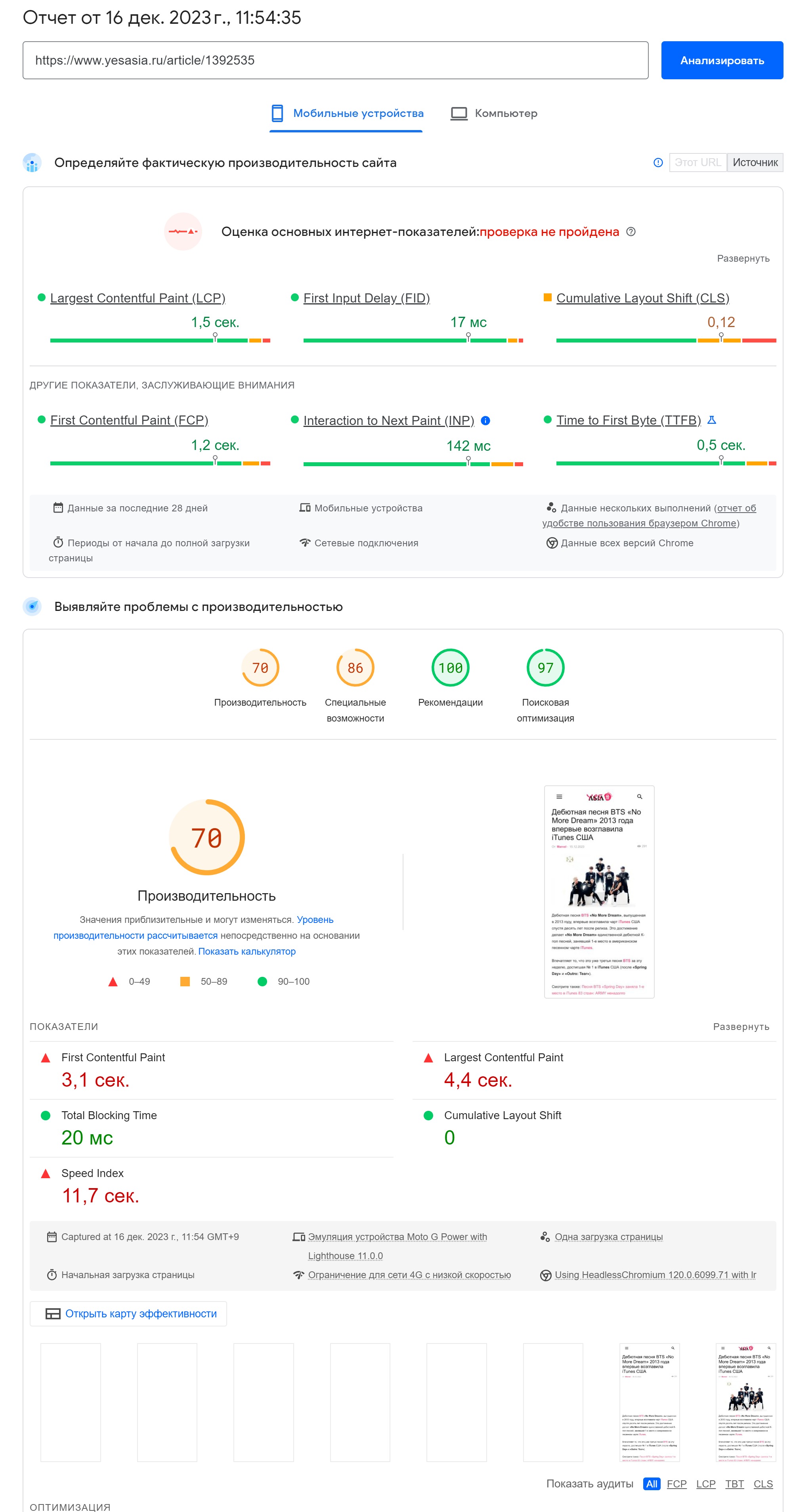

 Beldar
 Hello, I have the same problem:
The mobile version (with the Mobile Plugin) is detected by Google Pagespeed as showing images at a much larger size than they should be. screenshot
I have thumbnails enabled at 265×198 and 741×486, in the WordPress Media settings I have the large size set to 741 max, but they are still displayed at a larger size than they should be.
Any solution?
 Raj Kumari
 Please check my link:
https://prnt.sc/j3CDek8JfAho
For mobile “Tap targets are not sized appropriately 75% appropriately sized tap targets”
I have highlight this link on above link so please check it.
I checked this issue by this link:
https://pagespeed.web.dev/analysis/https-www-iacquireexpert-com/fhqk73yw6n?form_factor=mobile
Raj Kumari I checked the website on this tool: https://pagespeed.web.dev/analysis/https-www-iacquireexpert-com/02ez25zyu6?form_factor=mobile
and found that mobile showing two logo.
I want to remove this logo which I have highlight in screenshot so please check this link:
https://prnt.sc/TfUwgGWr8FsE
Calin Hello,
Can you please provide a link to the website to check it on google pagespeed?
Thank you!
 byothe
Hello
I think last update (or previous one) did a bad job at optimisation…
My site has now a very bad CLS on mobile which is affecting my mobile traffic.
Since I didn’t make any major change on my site other than theme update I guess it comes from last version… Is it something you are trying to repair for next version ?
https://pagespeed.web.dev/analysis/https-byothe-fr/dsuxwegn8x?form_factor=mobile
Regards
Calin Hi vivekc,
Please check our guide for pagespeed: How to Make the Site Faster, if you want a free cache plugin you can try WP Super Cache, also use Cloudflare (CDN).
I hope this will help you!
Thank you!
Anamaria There are many optimization guides provided by our users here in the forum, some made by us; you could check some of them
– https://www.infophilic.com/get-almost-100-pagespeed-newspaper-theme/
– https://forum.tagdiv.com/cache-plugin-install-and-configure/
– https://forum.tagdiv.com/how-to-make-the-site-faster/
– https://forum.tagdiv.com/topic/high-number-of-ajax-request/
– https://forum.tagdiv.com/topic/score-100100-pagespeed-with-newspaper-wordpress-theme/
– https://www.andraware.com/wp-rocket-for-newspaper-theme/
– https://forum.tagdiv.com/topic/page-speed-guide-for-2023-beginners-and-advanced/
– https://forum.tagdiv.com/topic/newspaper-theme-speedify-your-website/
– https://forum.tagdiv.com/topic/tutorial-chriss-custom-optimizations-for-functions-php-etc/
– https://forum.tagdiv.com/cloudflare-cdn/
– https://forum.tagdiv.com/topic/theme-causing-high-cpu-usage-2/
– https://forum.tagdiv.com/topic/sql-querys-high-cpu/
– https://forum.tagdiv.com/topic/newspaper-theme-slow-to-respond/
– https://premium.wpmudev.org/blog/optimizing-your-wordpress-database-a-complete-guide/
– https://underconstructionpage.com/optimize-wordpress-database/
– https://crunchify.com/better-optimize-wordpress-database-all-in-one-guide/
Also, pagespeed is not covered by support -> https://forum.tagdiv.com/newspaper-theme-support/
To be able to optimize and to remove CLS and LCP please check these guide => https://developers.google.com/web/tools/lighthouse/ -> https://www.sqlpac.com/en/documents/google-pagespeeds-lighthouse-6-new-features-lcp-cls.html -> https://web.dev/lighthouse-whats-new-6.0/ -> https://web.dev/lcp/ -> https://web.dev/cls/
Thank you!
 Adi
Adi Hi,
I have one another site. (with one another licence key)
On PageSpeed Insights there is an error are showing in SEO section for Descriptive link text. check: https://prnt.sc/R99popOR1i21
Here is the blog post url.
Kindly provide the solution for this issue. this issue are only showing in the template.
Anamaria Hi,
I suggest using WP Rocket plugin.
There are many optimization guides provided by our users here in the forum, some made by us; you could check some of them
– https://www.infophilic.com/get-almost-100-pagespeed-newspaper-theme/
– https://forum.tagdiv.com/cache-plugin-install-and-configure/
– https://forum.tagdiv.com/how-to-make-the-site-faster/
– https://forum.tagdiv.com/topic/high-number-of-ajax-request/
– https://forum.tagdiv.com/topic/score-100100-pagespeed-with-newspaper-wordpress-theme/
– https://www.andraware.com/wp-rocket-for-newspaper-theme/
– https://forum.tagdiv.com/topic/page-speed-guide-for-2023-beginners-and-advanced/
– https://forum.tagdiv.com/topic/newspaper-theme-speedify-your-website/
– https://forum.tagdiv.com/topic/tutorial-chriss-custom-optimizations-for-functions-php-etc/
– https://forum.tagdiv.com/cloudflare-cdn/
– https://forum.tagdiv.com/topic/theme-causing-high-cpu-usage-2/
– https://forum.tagdiv.com/topic/sql-querys-high-cpu/
– https://forum.tagdiv.com/topic/newspaper-theme-slow-to-respond/
– https://premium.wpmudev.org/blog/optimizing-your-wordpress-database-a-complete-guide/
– https://underconstructionpage.com/optimize-wordpress-database/
– https://crunchify.com/better-optimize-wordpress-database-all-in-one-guide/
Also, pagespeed is not covered by support -> https://forum.tagdiv.com/newspaper-theme-support/
To be able to optimize and to remove CLS and LCP please check these guide => https://developers.google.com/web/tools/lighthouse/ -> https://www.sqlpac.com/en/documents/google-pagespeeds-lighthouse-6-new-features-lcp-cls.html -> https://web.dev/lighthouse-whats-new-6.0/ -> https://web.dev/lcp/ -> https://web.dev/cls/
Thank you!
Bettina Hello @biuroinfin !
However, page loading speed can depend on many factors, and each website is unique from this point of view. Let me explain some of these factors and maybe they give you some starting points for optimizing your website. A good choice for the page speed, it could be the mobile layout which contains less elements because it can improve a bit your page speed.
There is all about the DOM. Which means you need to have less elements into that container or row, as such on that page. I can suggest you only to take care of how many elements you use on that page. You can try to use a cache plugin or a plugin which can minify the page or combine some elements in order to reduce its size.
To increase the page speed you can check these similar topics for more solutions:
– https://www.infophilic.com/get-almost-100-pagespeed-newspaper-theme/
– https://forum.tagdiv.com/topic/score-100100-pagespeed-with-newspaper-wordpress-theme/
– https://developers.google.com/speed/docs/insights/v5/about
– https://www.youtube.com/watch?v=tnkVapqhIHc
– https://www.xtechkr.com/optimize-newspaper-theme/
– Check those guides : https://web.dev/lcp/ – > https://www.sqlpac.com/en/documents/google-pagespeeds-lighthouse-6-new-features-lcp-cls.html -> > https://wp-rocket.me/google-core-web-vitals-wordpress/improve-cumulative-layout-shift
– https://forum.tagdiv.com/topic/to-high-cumulative-layout-shift-in-mobile-theme/
Please check the tutorials from those platforms gt metrix and Google Pagespeed Insights and I’m sure you can increase the page speed.
Please note that page speed is not covered by the support team: https://forum.tagdiv.com/newspaper-theme-support/
Thank you for understanding!
 biuroinfin
Good morning,
After updating the Newspaper template, we noticed a significant drop in website performance. https://pagespeed.web.dev/ gives very poor results. What steps can we take to speed up the website’s performance? Our website is gu.com.pl
 giriraj
Hello Team,
I’m trying to change the Date and Reply font colour to dark, since Google PageSpeed Insights is saying the colour ratio is not enough to read.
I tried but it’s not changing, so am not sure which option I have to modify.
Can you Pls check the below screenshot and let me know the solution?
https://www.screencast.com/t/m5baIcO4f4j
https://www.screencast.com/t/25hXutsxuP
Thank You
Giri
Bettina Hello Narendra!
To increase the page speed you can check these similar topics for more solutions:
– https://www.infophilic.com/get-almost-100-pagespeed-newspaper-theme/
– https://forum.tagdiv.com/topic/score-100100-pagespeed-with-newspaper-wordpress-theme/
– https://developers.google.com/speed/docs/insights/v5/about
– https://www.youtube.com/watch?v=tnkVapqhIHc
– https://www.xtechkr.com/optimize-newspaper-theme/
– Check those guides : https://web.dev/lcp/ – > https://www.sqlpac.com/en/documents/google-pagespeeds-lighthouse-6-new-features-lcp-cls.html -> > https://wp-rocket.me/google-core-web-vitals-wordpress/improve-cumulative-layout-shift
– https://forum.tagdiv.com/topic/to-high-cumulative-layout-shift-in-mobile-theme/
Please check the tutorials from those platforms gt metrix and Google Pagespeed Insights and I’m sure you can increase the page speed.
Please note that page speed or optimization is not covered by the support team: https://forum.tagdiv.com/newspaper-theme-support/
Thank you for understanding!
Bettina Hello @designrepublik !
Unfortunately, we do not fix the page speed issues on our demos.
Our developers are aware of this issue and try to synthesize the composer, which is big, and fix the major problems of the theme and speed.
A cache plugin doesn’t help much with page speed.
To increase the page speed you can check these similar topics for more solutions:
– https://www.infophilic.com/get-almost-100-pagespeed-newspaper-theme/
– https://forum.tagdiv.com/topic/score-100100-pagespeed-with-newspaper-wordpress-theme/
– https://developers.google.com/speed/docs/insights/v5/about
– https://www.youtube.com/watch?v=tnkVapqhIHc
– https://www.xtechkr.com/optimize-newspaper-theme/
– Check those guides : https://web.dev/lcp/ – > https://www.sqlpac.com/en/documents/google-pagespeeds-lighthouse-6-new-features-lcp-cls.html -> > https://wp-rocket.me/google-core-web-vitals-wordpress/improve-cumulative-layout-shift
– https://forum.tagdiv.com/topic/to-high-cumulative-layout-shift-in-mobile-theme/
Please check the tutorials from those platforms gt metrix and Google Pagespeed Insights and I’m sure you can increase the page speed.
Please note that page speed or optimization is not covered by the support team: https://forum.tagdiv.com/newspaper-theme-support/
Thank you for understanding!
 Renato Tbw
I am facing a problem on my website. Before he was normal, he has a conventional home and a mobile home, using newspapers. Turns out I had a problem and several functions reset.
I remain with two home pages (conventional and mobile). They appear normally to visitors. However, when I use pagespeed insights the same (conventional) page appears for evaluation. The same page appears on the pagespeed mobile screen for both assessments. How can I resolve this? Before it was normal.
 PFN365
With the mobile LOAD MORE pagination button, Google PageSpeed Insights says it fails the accessibility test.
The error that Google returns is: Elements with visible text labels do not have matching accessible names.Visible text labels that do not match the accessible name can result in a confusing experience for screen reader users.
The text in the button says Load More, but I suspect the icon in the button is causing it to fail. How do we remove the default icon that is in the Load More pagination?
Anamaria Hi,
I suggest using WP Rocket plugin.
There are many optimization guides provided by our users here in the forum, some made by us; you could check some of them
– https://www.infophilic.com/get-almost-100-pagespeed-newspaper-theme/
– https://forum.tagdiv.com/cache-plugin-install-and-configure/
– https://forum.tagdiv.com/how-to-make-the-site-faster/
– https://forum.tagdiv.com/topic/high-number-of-ajax-request/
– https://forum.tagdiv.com/topic/score-100100-pagespeed-with-newspaper-wordpress-theme/
– https://www.andraware.com/wp-rocket-for-newspaper-theme/
– https://forum.tagdiv.com/topic/page-speed-guide-for-2023-beginners-and-advanced/
– https://forum.tagdiv.com/topic/newspaper-theme-speedify-your-website/
– https://forum.tagdiv.com/topic/tutorial-chriss-custom-optimizations-for-functions-php-etc/
– https://forum.tagdiv.com/cloudflare-cdn/
– https://forum.tagdiv.com/topic/theme-causing-high-cpu-usage-2/
– https://forum.tagdiv.com/topic/sql-querys-high-cpu/
– https://forum.tagdiv.com/topic/newspaper-theme-slow-to-respond/
– https://premium.wpmudev.org/blog/optimizing-your-wordpress-database-a-complete-guide/
– https://underconstructionpage.com/optimize-wordpress-database/
– https://crunchify.com/better-optimize-wordpress-database-all-in-one-guide/
Also, pagespeed is not covered by support -> https://forum.tagdiv.com/newspaper-theme-support/
If you use Wp Rocket, you can try to exclude the following files
/jquery-?[0-9.](.*)(.min|.slim|.slim.min)?.js
/jquery-migrate(.min)?.js
/wp-content/plugins/td-composer/legacy/Newspaper/js/tagdiv_theme.min.js
tdBlocksArray
To be able to optimize and to remove CLS and LCP please check these guide => https://developers.google.com/web/tools/lighthouse/ -> https://www.sqlpac.com/en/documents/google-pagespeeds-lighthouse-6-new-features-lcp-cls.html -> https://web.dev/lighthouse-whats-new-6.0/ -> https://web.dev/lcp/ -> https://web.dev/cls/
Thank you!
