
No search results were found in Documentation!
 Calin
Calin Hi,
I just checked your website and this is displaying like this for me -> https://i.imgur.com/CbuMciH.png
Make sure that all the settings are like in our requirements, please follow the guide carefully
– https://forum.tagdiv.com/requirements-for-newspaper/
If there is still a problem, please provide some more details and screenshots.
Thank you!
 Vlad S
 Hello !
Please make sure that you have accomplished all the system requirements as in our documentation here: https://forum.tagdiv.com/requirements-for-newspaper/
Please make sure that you do not have a plugin conflict, please deactivate ALL plugins except tagDiv ones, also if you are using child theme or cache plugin, deactivate them, clear all cache and try again.
Thank you !
Calin Hi,
So this problem is only for pages or for posts too?
Make sure that all the settings are like in our requirements, please follow the guide carefully
– https://forum.tagdiv.com/requirements-for-newspaper/
If there is still a problem, you can send us an email at contact@tagdiv.com and provide admin login and cPanel. We will take a look. Include a link to this topic in the email.
Thank you!
Calin Hi,
Indeed the requirements seems to be ok, if you checked the plugin and the problem persists, please make a full backup and send us an email at contact@tagdiv.com and provide admin login and cPanel. We will take a look. Include a link to this topic in the email.
Thank you for your understanding!
Calin Hi, usually the “Invalid reply from server endpoint error” is caused by insufficient WP_Memory_limit, if you’ll set it to 256M, and is still not working, please check the rest of settings from our guide -> https://forum.tagdiv.com/requirements-for-newspaper/
and please increase all requirements that are lower, and follow all steps.
Let me know the results!
Vlad S Hello !
Please make sure that you have accomplished all the system requirements as in our documentation here: https://forum.tagdiv.com/requirements-for-newspaper/
Please make sure that you do not have a plugin conflict, please deactivate ALL plugins except tagDiv ones, also if you are using child theme or cache plugin, deactivate them, clear all cache and try again.
Thank you !
 moss8007
 I have fulfilled all requirements but still its shows the same…
Vlad S Hello !
Please make sure that you have accomplished all the system requirements as in our documentation here: https://forum.tagdiv.com/requirements-for-newspaper/
Please make sure that you do not have a plugin conflict, please deactivate ALL plugins except tagDiv ones, also if you are using child theme or cache plugin, deactivate them, clear all cache and try again.
Thank you !
Vlad S Hello !
Please make sure that you have accomplished all the system requirements as in our documentation here: https://forum.tagdiv.com/requirements-for-newspaper/
Please make sure that you do not have a plugin conflict, please deactivate ALL plugins except tagDiv ones, also if you are using child theme or cache plugin, deactivate them, clear all cache and try again.
Thank you !
Vlad S Hello !
Please make sure that you have accomplished all the system requirements as in our documentation here: https://forum.tagdiv.com/requirements-for-newspaper/
Please make sure that you do not have a plugin conflict, please deactivate ALL plugins except tagDiv ones, also if you are using child theme or cache plugin, deactivate them, clear all cache and try again.
Thank you !
Vlad S Hello !
Please make sure that you have accomplished all the system requirements as in our documentation here: https://forum.tagdiv.com/requirements-for-newspaper/
Please make sure that you do not have a plugin conflict, please deactivate ALL plugins except tagDiv ones, also if you are using child theme or cache plugin, deactivate them, clear all cache and try again.
Thank you !
Calin Hi,
This is the error that I see -> https://i.imgur.com/8QUo8dn.png
Please make sure that you are using last version of theme, Newspaper v10.3.6.1 and you have all theme requirements set as in our guide -> https://forum.tagdiv.com/requirements-for-newspaper/
Also please make sure that you do not have a plugin conflict, please deactivate ALL plugins except tagDiv plugins (theme plugins), also if you are using child theme or cache plugin, deactivate them, clear all cache and try again.
Let me know the results!
Thank you!
Thank you!
Vlad S Hello !
Please make sure that you have accomplished all the system requirements as in our documentation here: https://forum.tagdiv.com/requirements-for-newspaper/
Please make sure that you do not have a plugin conflict, please deactivate ALL plugins except tagDiv ones, also if you are using child theme or cache plugin, deactivate them, clear all cache and try again.
Thank you !
 Dabang
 You can increase this in your php.in or htaccess file located in cpanel-public html-your file- php.in or htaccess file, here you can increase your limit with edit file option.
your theme documentation has all these requirements with solution check it once.
 jgjh151
 I’ve done the requirements and disabled all plugins. Then enabled tagdiv and wpbakery. It used to work with both enabled, now it doesn’t. We can’t edit pages built with tagdiv without disabling wp bakery. We need them both enabled.
Calin Hi moss8007,
Please make sure that you are using last version of theme, Newspaper v10.3.6.1 and you have all theme requirements set as in our guide -> https://forum.tagdiv.com/requirements-for-newspaper/
Also please make sure that you do not have a plugin conflict, please deactivate ALL plugins except tagDiv plugins (theme plugins), also if you are using child theme or cache plugin, deactivate them, clear all cache and try again.
Let me know the results!
Thank you!
Vlad S Hello !
Please make sure that you have accomplished all the system requirements as in our documentation here: https://forum.tagdiv.com/requirements-for-newspaper/
Also please contact your host, this might be an issue from their side.
Thank you !
Calin Hi,
Make sure that all the settings are like in our requirements, please follow the guide carefully
– https://forum.tagdiv.com/requirements-for-newspaper/
and please increase all requirements that are lower, and follow all steps. As for php version, make sure that you are using at list php v7.2
Also check to see if your host do not use some plugins/modules for security or other types that can interfere with the theme.
If there is still a problem after you checked all above suggestions, you can send us an email at contact@tagdiv.com and provide admin login and FTP. We will take a look. Include a link to this topic in the email.
Thank you!
Vlad S Hello !
Please make sure that you have accomplished all the system requirements as in our documentation here: https://forum.tagdiv.com/requirements-for-newspaper/
Please make sure that you do not have a plugin conflict, please deactivate ALL plugins except tagDiv ones, also if you are using child theme or cache plugin, deactivate them, clear all cache and try again.
Thank you !
Calin Hi,
This is very strange, also is the first time for me when I heard about this kind of problem.
Let’s try to figured out what can be the problem:
1. Make sure that all the settings are like in our requirements, please follow the guide carefully
– https://forum.tagdiv.com/requirements-for-newspaper/
and please increase all requirements that are lower, and follow all steps.
2. Please make sure that you do not have a plugin conflict, please deactivate ALL plugins except tagDiv plugins (theme plugins), also if you are using child theme or cache plugin, deactivate them, clear all cache and try again.
Let me know the results!
Thank you!
Vlad S Hello !
Please make sure that you have accomplished all the system requirements as in our documentation here: https://forum.tagdiv.com/requirements-for-newspaper/
Please make sure that you do not have a plugin conflict, please deactivate ALL plugins except tagDiv ones, also if you are using child theme or cache plugin, deactivate them, clear all cache and try again.
Thank you !
Vlad S Hello !
Please make sure that you have accomplished all the system requirements as in our documentation here: https://forum.tagdiv.com/requirements-for-newspaper/
Please make sure that you do not have a plugin conflict, please deactivate ALL plugins except tagDiv ones, also if you are using child theme or cache plugin, deactivate them, clear all cache and try again.
Thank you !
 voicebot
I keep getting the same error message every time I save in the TagDiv composer. My changes do save however. I deleted all plugins except the ones provided with the theme, cleared my cache and am still getting an error. My site also meets the PHP and WP version requirements. Let me know what I should do next.
 boss4all
Overview
I have installed the AMP WordPress plugin per your requirements. However, my reference pages and AMP pages are failing Google’s AMP testing framework. I am consistently getting the error “Referenced AMP URL is not an AMP”. The template is generating a correct AMP version of my post. However, it fails every time I try to test it. This error is preventing my AMP articles from ranking within Google’s index.
I have tried every version of the AMP settings and disabled all my plugins (but TagDiv) and it still fails. I use both Google Search Console and Google’s AMP test to verify results for every scenario. Below you will find additional details about what I have done.
I can provide you with login details to my hosting or WordPress installation if you would like to test it.
Current set up
The latest version of WordPress
Newspaper theme V 10.1
Example URL of the post that references AMP URL failing – https://sportsblogit.com/cfb/its-official-pac-12-football-is-coming-back-november-7th/
Example URL of AMP post that is failing – https://sportsblogit.com/cfb/its-official-pac-12-football-is-coming-back-november-7th/?amp
AMP Setting tested
1) I have tested AMP “transitional” out of the box and it failed.
– Transitional out of the box did generate a working AMP URL. However, it would NOT pass Google’s testing.
1a) I tested AMP “transitional” with Mobile + AMP-enabled
– My posts did generate a working AMP URL. However, it would NOT pass Google’s testing.
1b) I tested AMP “transitional” with Mobile + AMP-enabled with ALL plugins disabled (but TagDiv)
– My posts did generate a working AMP URL. However, it would NOT pass Google’s testing.
2) I have tested AMP “Standard” out of the box and it failed.
– Transitional out of the box did generate a working AMP URL. However, it would NOT pass Google’s testing.
2a) I tested AMP “Standard” with Mobile + AMP-enabled
– My posts did generate a working AMP URL. However, it would NOT pass Google’s testing.
2b) I tested AMP “Standard” with Mobile + AMP-enabled with ALL plugins disabled (but TagDiv)
– My posts did generate a working AMP URL. However, it would NOT pass Google’s testing.
 Eficiencia-Laboral
 I have deactivated the plugins (only leave the obligatory ones of Newsper) and also I confirm myself that the requirements are fulfilled so that it works newspapaer, but the problem continues happening, I attach the captures:
https://i.ibb.co/F8QmScT/plugins.png
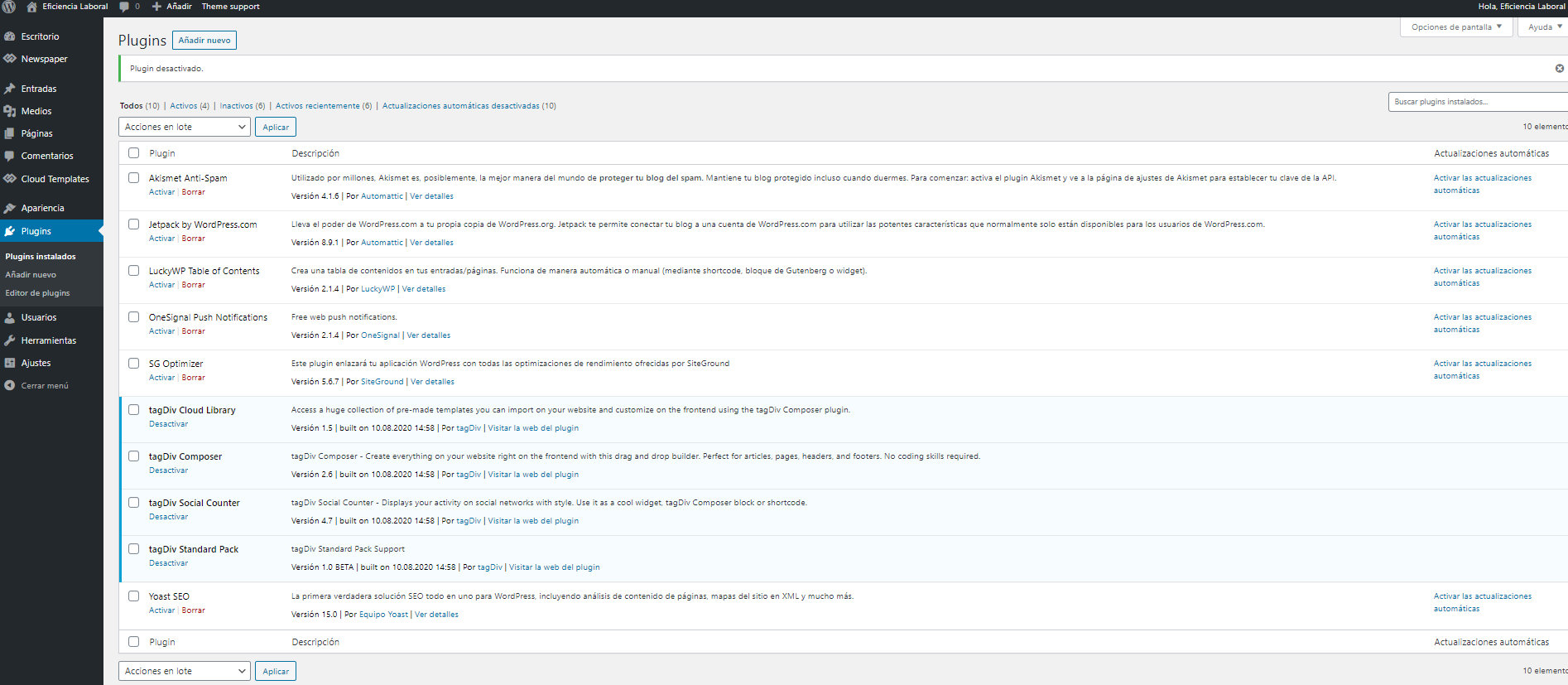
https://i.ibb.co/59NbKs8/Captura-de-pantalla-2020-09-30-103641.png

https://i.ibb.co/PGkMCzG/Captura-de-pantalla-2020-09-30-104037.png



