
No search results were found in Documentation!
 Vlad S
 Hello !
Sorry for missunderstanding your issue !
https://test.vamely.com/quand-disney-sinspire-de-personnes-reelles-pour-creer-ses-dessins-animes/ Here it shows ok. Have you checked to have the same smartlist all over ?
Unfortunately the option to have a Next post button at the end of a smartlist is currently unavailable.
We are sorry for the inconvenience !
Thank you !
Vlad S Hello !
This is the path to the smartlists: wp-content/plugins/td-cloud-library/smart_lists
Thank you !
 Calin
Calin Hi,
Sorry for the inconvenience, this would be the better solution, to request a refund and pick a theme with RTL support out of the box. It would be quite difficult to modify this theme for RTL.
You can request a refund here – https://themeforest.net/refund_requests/new and we wll approve it as soon as possible.
Thanks
Calin Hello,
Sorry but our themes are not compatible with the RTL direction. IF you need a RTL theme, you will have to choose a different theme that can provide this functionality. We will be able to provide a refund if you make a request here:https://themeforest.net/refund_requests/new
Thank you for your understanding!
 hdya
hdya Voila mon lien http://www.forsihati.com,probleme RTL, LFT plus fonctionnement sur version mobile merci.
hdya j’ai un problème au niveau du theme newspaper 9 LFT to RTL , mon site web qui est un concept arabe droite a gauche
hdyaj’ai un problème au niveau du theme newspaper 9 LFT to RTL , mon site web qui est un concept arabe droite a gauche
 mrozangir
 Hello,
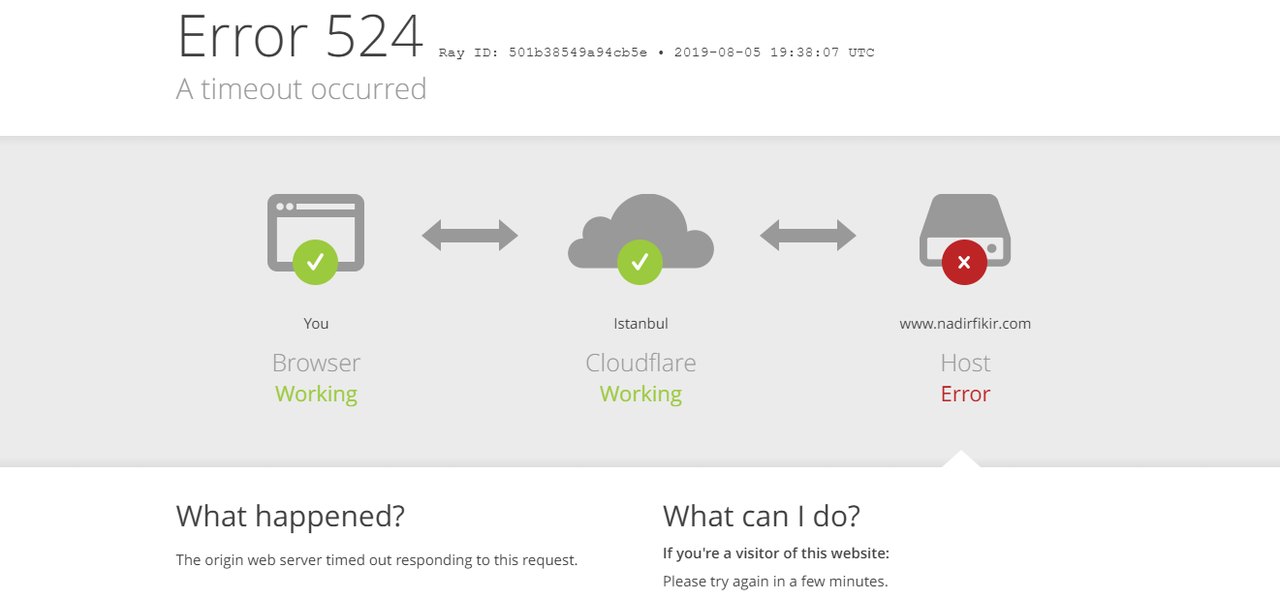
Theme requirements have been adjusted according to the requirement guide. However, the site crashes shortly after the search.
After searching, the status of the site can be seen in the following screenshot:
Note:
Site crashes when you search with a live search box
However, there is no problem when searching with the other search box

Both search boxes are currently active on the site. You can try it.
 Vlad S
 Hello !
Sorry for missundertanding your issue !
What you are trying to achieve is called a Smart List as you can see here: https://www.screencast.com/t/9HC7WZJZAwf
Find out here how to implement a smartlist: https://forum.tagdiv.com/smart-lists/
And after you set your smartlist you will have to choose SM4 design and it will be what you are looking for.
Also please delete the css code then and also make sure to re-upload a clean td_module_single_base.php.
I hope this was more helpfull !
Thank you !
 mattsayle
Hello,
I’m trying to create a smart list, and I believe I followed all of the necessary steps from the video. However, only the first list option is perfectly responsive. The 2nd and so on are cut off on mobile devices.
I am using Smart List 4 and Style 5.
I will email login information shortly.
 heidese
 Hello,
the images are attached to the post. I don´t use Yoast and that is why your solution don´t help me.
Some examples:
This is the post:
https://www.starsontv.com/team-ninja-warrior-die-fuenf-teams-heute-abend-bei-rtl-06-07/
And this is the attachment page of the images:
But when i´m in the original post and click on the thumbnail, the picture viewer starts but i am not directed to the attachment page, who exist.
What is the problem here? I don´t know.
Do you know? Can you help me?
Thanks and greetings from germany.
Sebi
Calin Hi,
For what I can see you are using a RTL language, please notice that our theme is not full compatible with RTL; also please provide me a link where I can inspect this problem, in this way I will be able pro provide you an working css.
Thank you for your understanding!
heidese Hello,
it seems i have the same problem.
I choose the attachment template 2 and change that in the theme panel, but the attachment page doesn´t show.
You can see it here:
https://www.starsontv.com/team-ninja-warrior-die-fuenf-teams-heute-abend-bei-rtl-06-07/
How can i use the attachment page. I want it so much, because i like this better.
Can you help me?
That would be very nice.
Greetings from Germany
Sebi 🙂
 reddisl
Hello Tagdiv support,
I have 2 issues:
1. I would like to move the Above Post ADS (YOUR ARTICLE TOP AD )to Left a little bit because as you can see my website is RTL
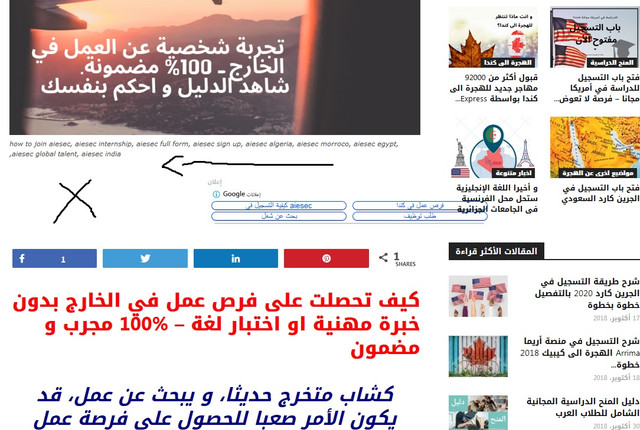
However in MOBILE, they are 1000% responsive , just in DESKTOP there is this issue.
2. Since I bought the theme, the ( YOUR ARTICLE INLINE AD ) never appears even though I set them after 2 paragraphs, In mobile AMP they appears after 2 paragraphs, but in desktop or when I visit my website via mobile they don’t appears , how can I fix this?
3. If you visit my website via mobile, you will see that the Search button is on the menu button like an error, I want to disable the button of search for mobile.
I used this CUSTOM CSS under Mobile theme in THEME PANEL but it didn’t work
#td-header-search-button-mob {
display: none;
}
.header-search-wrap {
display: none;
}
Vlad S Hello !
The easiest way is to add a Paragraph style to your smartlist in gutenberg but you will have to add this in HTML view like this: https://www.screencast.com/t/wyXMrLH1sWK And the result should be like this: https://www.screencast.com/t/NkJ4aOvVR.
Find out more about it here: https://www.w3schools.com/html/html_styles.asp
I hope this was helpfull !
Thank you !
Calin Hello,
Sorry but our themes are not compatible with the RTL direction. IF you need a RTL theme, you will have to choose a different theme that can provide this functionality. We will be able to provide a refund if you make a request here:https://themeforest.net/refund_requests/new
Thank you!
 isagachie
 Hi Vlad. I partly resolved the problem by using top bar as a first menu and main bar as a second menu. But I still have a problem of alignement.
Is this possible to have the menus strictly aligned (have a look at https://www.gogin.eu/gogin_new/).
Best regards
Calin Hello,
Sorry but our themes are not full compatible with the RTL direction. If you need a RTL theme, you will have to choose a different theme that can provide this functionality. We will be able to provide a refund if you make a request here:https://themeforest.net/refund_requests/new
For the problem with the header menu, in order to be set the logo where you need will be better if you’ll use the header manager and you build/edit a header template from tagDiv Cloud Library you can check a similar topic -> https://forum.tagdiv.com/topic/header-menu-becomes-sticky-anyway/
For social media icons please check this similar topic and try the suggestions from there -> https://forum.tagdiv.com/topic/fonts-and-icons-not-working-properly/
If you have the last version ( v9.7.x ) of the Newspaper theme you can not longer build template according to our documentation https://forum.tagdiv.com/custom-post-type-support/ , if you have a prev version ( for example v9.6.x ) these implementation will still work.
Unfortunately, we did not tested CPT UI plugin with our theme and therefore, we cannot say for sure if it will work or not as expected with the theme, sorry! Also, we cannot provide support for untested plugins.
This is our list with tested plugins with our theme -> https://www.screencast.com/t/cmPkh9jba4sZ
Thank you for your understanding!
 Tasaduq Hussain
Hi,
I’m using Newspaper 9 on http://www.alamarrajol.com/ It’s an arabic site.
After purchasing I came to know, this theme is not fully compatible with RTL. However, with a few CSS tweaks, I made it compatible for my use.
Now I need help for this item. I want the logo to be aligned right(logo in the sticky header should be aligned right). with CSS I’m not able to do that. I hope you can guys can help!
Also, social media icons are looking as square boxes. I’ve cleared cache and everything, still, I’m facing this issue. could you please help me with that as well?
and Finally, i’ve a custom post type (magazines) These are generated by a plugin named CPT UI. That plugin is given a piece of code and asking to add in Functions.php. I’ve added still the page looks blank. Can you guide me, where exactly should I add that code, in theme to display Custom Post Types on that page?
 Simion C.
 Hi,
1. I have checked your website – https://clipaxis.info/ seems there is no amphtml link in the page source, so there is no AMP currently. Please check if one of these settings is selected
– https://www.screencast.com/t/Tu3TnZqOI
More about it here – https://tagdiv.com/amp-newspaper-theme/
Then check if AMP is enabled for the content types you want, for example
– https://www.screencast.com/t/VlB1n4zzzwH
After doing this, clear the cache, then test a post page by adding /?amp at the end of the URL.
2. I see two links to xmlrpc pages in the source – https://clipaxis.info/xmlrpc.php
– https://clipaxis.info/xmlrpc.php?rsd
Regarding the first one (with the message), from what I can find that is what it is supposed to display
– https://www.rosehosting.com/blog/what-is-wordpress-xml-rpc-and-how-to-stop-an-attack/
3. The theme provides 3 article ad spots, top, inline after a specified number of paragraphs, and bottom. More ads could be inserted with plugins if needed, you could try some. I have seen users that use the Adrotate plugin, as it provides shortcodes
– https://www.wpbeginner.com/plugins/how-to-manage-ads-in-wordpress-with-adrotate-plugin/
4. Polylang should work just fine, WPML is officially supported. You could make some tests with the free version of polylang, to see if it has the capabilities you require.
5. From what I can see the post content is RTL – https://www.screencast.com/t/OMegiXmN
If you want specific sections from it in LTR you could wrap the text in a div or span maybe with a class, or set a class to specific paragraphs for example
– https://www.screencast.com/t/h09R1oea
Or even set it inline – https://www.screencast.com/t/1D9koi3e
Thanks
reddislHello, After updating newspaper & wordpress to the latest version, I have some issues:
1. Problem ONE !
All my posts has turned to AMP: Disabled and when I click on edit this message appears: There are no supported templates to display this in AMP.
PS: I installed AMP plugin + Newspaper mobile theme. & I had set Website Mode Transitional in AMP settings.
(( before update, when I search posts in google from my website via, it always redirect me to AMP version, however, after update this is not happening anymore. ))
2. Problem TWO !
After updating, the xml rpc is not working anymore. I contacted WordPress APP support, and after conducting their test, I had errors in the following:
wp.getTags
wp.getPostStatusList
wp.getComments
wp.getPageList
metaweblog.newMediaObject
And they told that either the Theme or plugins are making conflicts.
3. Problem THREE !
Is there any Shortcode to use to add ADVERTISEMENTS in middle of posts ( like for instance between paragraphs ) ? or should I use 3rd party adsense plugins
4. IS NEWSPAPER compatible with Polylang ? or we should only use WPML paid version. ?
5. Is there a way to show an LTR TEXT in RTL POST ( my Newspaper theme is set to Arabic )
Thank you in advance.
Simion C. Hi,
Maybe that widget is not compatible with AMP, you could check in the widget provider documentation if it supports AMP.
The icons display like that because of RTL, the design isn’t created for RTL unfortunately, so there will various issues. Try using a CSS code like this one to position the search icon to the left – http://prntscr.com/o3pf2c
.td-search-icon {

left:0;

right: auto;

}
Or you could remove it – http://prntscr.com/o3pfpl The code can be entered the code in the mobile theme custom CSS section.
Thanks
Calin Hello,
Sorry but our themes are not compatible with the RTL direction. IF you need a RTL theme, you will have to choose a different theme that can provide this functionality. We will be able to provide a refund if you make a request here:https://themeforest.net/refund_requests/new
Thank you!
 ramlimohamed
does newspaper theme support RTL (right to left) or no
 yomyom
 Hi,
That worked great. Thank you!
And I believe I have managed to fix most of the rtl issues.
Just one more thing – The homepage that is displaying on mobile is missing some of the elements which are displaying on desktop.
The issue occurs only on the homepage, and not on posts/pages/category pages. What can cause this issue?
Best,
Rani
