No search results were found in Documentation!
 meihaoing
Merry Christmas!
In post, Why can not see social sharing selections Viber, Line on PC Website, but can see in phone browser?
Please open a my post to compare it on PC website and phone browser, you will find that problem.
Earliest response will be grateful!
 Calin
Calin Hi,
Usually that should fix the problem, also I see that you have another problem https://i.imgur.com/tm1S9eT.png this problem can be solved using those guides:
– https://forum.tagdiv.com/topic/font-blocked-from-loading-by-cross-origin-resource-sharing-policy-no-access-co/
– https://stackoverflow.com/questions/25577981/font-from-origin-has-been-blocked-from-loading-by-cross-origin-resource-sharing
– https://webmasters.stackexchange.com/questions/71630/font-blocked-from-loading-by-cross-origin-resource-sharing-policy-no-access-co
Also for the problem with the thumbs size, please make a test only with theme plugins, clear all cache and try to regenerate them again.
Let me know the results!
 raghunadh
 Hi,
Even i’m facing this issue. i looked over into the Sharing, I can see only “Naver”. I dont see any other social icons.
 Anamaria
 Hello,
You can add another social share links in Theme Panel->Post Settings->Sharing => https://www.screencast.com/t/Tsj3uoBiKbeb, will appear like this =>https://www.screencast.com/t/E8O7Blz4fQ.
Hope this helps you!
Thank you!
 Vlad S
 Hello !
In order to activate the featured image option when sharing a post you will have to use SEO Yoast plugin. Simply activate it and clear your cache.
Let us know the result !
Thank you !
Calin Hi, I’m glad that the problem was solve!
Also thank you for sharing with us the code that you use!
Have a nice week!
 rcemigrationproject
 You probably couldn’t visit our site because at our request for assistance, the hoster rebooted nginx just at that moment. Plus we made changes on the page head.php and we added the og-image tag to <head> and <body>, added 2 plugins for working with og-images, so the problem is solved and reposting works in all social networks. Using the exception method, we will disable outdated plugins. Taking this opportunity, I leave here the code that may be useful to other users, as well as ask the developers to place a separate expanded topic with the solution of such problems.
thank you for support
-
This reply was modified 5 years by
rcemigrationproject.
 AdValueMk
Hi,
We are using this theme on pari.com.mk, and we have a problem with sharing on LinkedIn, the featured image is not displayed: https://www.dropbox.com/s/syu30ua8r37jzbs/linkedin%20share.png?dl=0
We found out that upon disabling the following plugin, the featured image works properly:
https://www.dropbox.com/s/ge6380a4br9rq7e/cloud.png?dl=0
The latest theme version is installed.
Looking forward for your support,
Best regards,
Calin Hi,
I already note it on our suggestion list for improvements.
Thank you for sharing with us!
Have a nice day!
Anamaria Hello polluck7,
If you have Standard Post Template, you can change the style in Theme Panel -> Post Settings -> Sharing => https://www.screencast.com/t/6sL8Fl6lAQIy. These styles are predefined, and you can do the change only with Custome CSS, I can help if you providing a link for your post.
If you have Single Post Template from Cloud Library, you can change the color with tagDiv Composer =>https://www.screencast.com/t/UnD2fzasf, on the Single Post Share, click on the Element and select Buttons background color, like this =>https://www.screencast.com/t/MD6uRsbXrAgI .
Hope this helps you!
Thank you!
 Bettina
 Hello!
You will have to first start looking for a plugin conflict.
Please deactivate ALL plugins except tagDiv ones, also if you are using child theme or cache plugin, deactivate them, clear all cache and try again.
If this problem is not solved after that, then you can use this custom css code:
.td-post-sharing {

    opacity: 1!important;

}
Hope that helps you!
Thank you!
 polluck7
Hi,
How can I change the default global color for this item ? I know I can change it seperatly from the options, but each time I have to do it, how to change it globally?
 PopoffQ
Hi, when I try to enter text in the “Text with title” block the pop-up opens, but the editor doesn’t appear. I checked on the developer console and it returns errors. Until a few days ago it worked without problems, I deactivated and uninstalled the few plug-ins installed in the meantime, but it still does not work. How can I solve the problem?
Thanks
Here the screenshot of the editor and the console
Vlad S Hello !
I’m not sure I understand, You cannot see the featured image when sharing posts to facebook ?
Thank you !
 vivreausmic
  togoo
togooHow to enable social sharing buttons. In my theme panel setting i does not look except Naver. Please help me i wanne enable facebook and twitter.
 Poonam22
Hi, I’m unable to get sharing buttons on my post. I’m using Single Post Template 51 – Tech News PRO. Pl see this post: http://vitall.in/markets/commodities/cabinet-approves-rs-3500-crore-subsidy-for-sugar-export/
Please help me edit the template and get share buttons as it’s very important to me.
Best
Poonam
 meeshymee
 https://grandbendbulletin.ca/
some days it’s normal and some days my logo/image /header is gone and it’s a grey row with generic text. as i said, i made the header from a blank template so i don’t understand. please let me know what settings i should have because i’ve tried them all. i’ve tried uploading the logo in the ‘logo’ section of the theme panel and i’ve tried not uploading it there but either way it eventually it disappears and i’m left with the grey demo text header. also, when the header goes to the generic logo it also makes my menu white and next to the menu are social media buttons – this is not how my menu looks normally.
my normal menu/header:
https://drive.google.com/file/d/1dVGSltK2knDLnOJX-Szx6T7OZiPj8E9G/view?usp=sharing
thank you.

 Robert Turner
 Hi Vlad
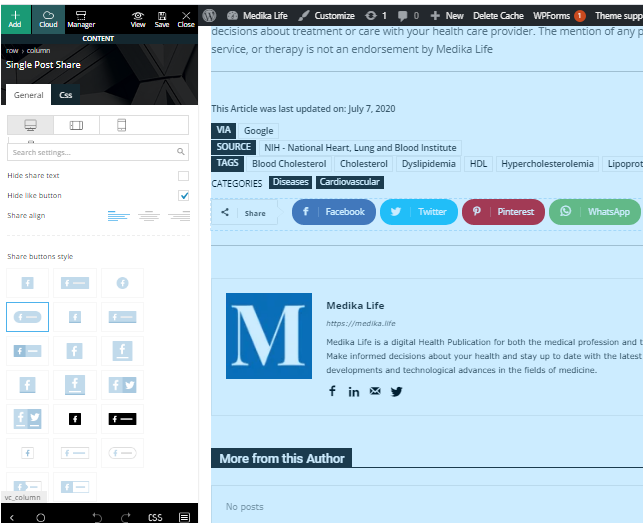
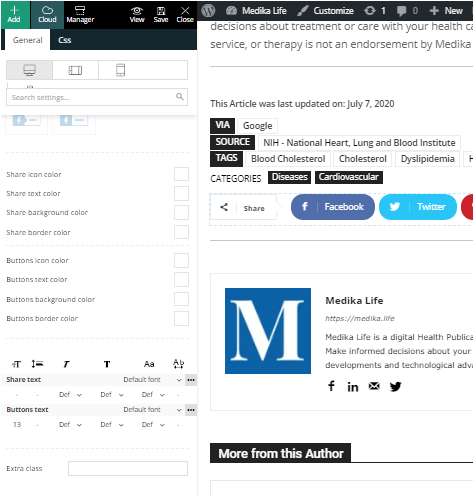
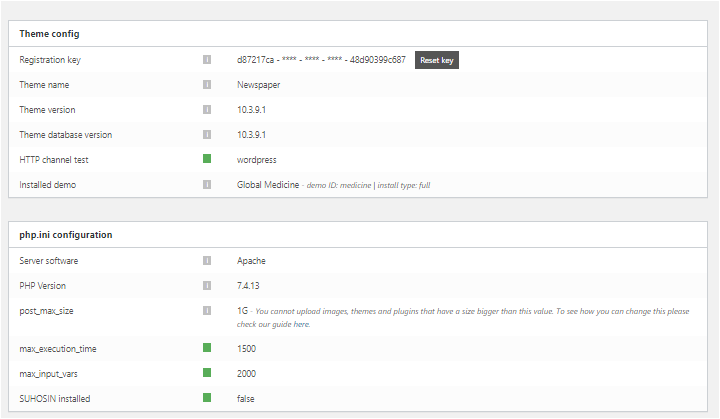
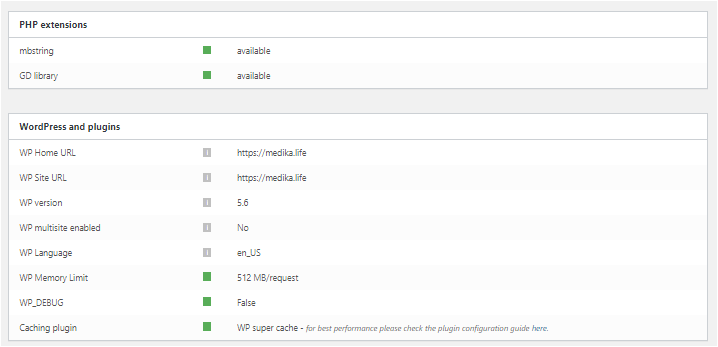
As you can see from the post above we have ALREADY tried all those solutions before contacting you. Here are the screenshots you requested, also included are the options the SocialPost share buttons now offer us on Composer. Perhaps that may offer a little more insight. You’ll notice how the section to add social media accounts has now evaporated from the options box. We are stuck with the four SM icons it defaults to,
These are in four separate files, sorry no other way of sharing them.
https://medika.life/wp-content/uploads/2020/12/SinglePostShare1.png
https://medika.life/wp-content/uploads/2020/12/SinglePostShare2.png
https://medika.life/wp-content/uploads/2020/12/Status-1.png
https://medika.life/wp-content/uploads/2020/12/Status-2.png
 crmconsultants
Linkedin Social Sharing Bug! Doesnt share the Article title etc?? The Other social sharing buttons work fine but My Audience primarily use Linkedin Social. I have seen other users also report this issue but there has not been a resolution, When will this be fixed???
 Ali147
I want other news coming out at the end of the article page to be the only news. Sometimes the content sharing keys appear two on the bottom and look bad
 Redlemon
Hi TagDiv team,
Please review the attached image (open in new window if it does not load in here).
There is a big difference between what the TagDiv’s preview promises the page will look like, and what the actual page looks like, on actual tablet devices. The tablet covering the laptop’s keyboard is a Sony Xperia, but the same issue has also been reported on iPads. In a nutshell, TagDiv’s preview appears to be nice, while the actual end result is a broken page. If we can’t see what we are really getting, then it is extremely difficult for us to troubleshoot and fix the issues.
Please review and advise.
Kind regards.
 hewmedia
How do I remove the comment count on author cards? I have disabled all comments to my site and so this counter is not useful for me.
Image: Google Drive
 prakharjeevan
 Hi Calin
Thanks for your revert, but as we are using this theme since last 2 years and for our different websites, we are following the exact process which you have shared with us. However the problem statement is a bit different.
As we are heading towards ‘Theme Panel >> Post Setting >> Sharing >> Social Networks’, here we should get all social media networks, but getting only one ‘NAVER’ (Refer the screenshot attached).
This looks like a bug from the theme itself, so please help get this resolved and update further.
Thanks a lot!
Prakhar Jeevan Team
 kibiribi
A new empty page.
When I opened and tried to import new selected template – it didn’t import.
No errors in console, no messages.
Watch video – https://drive.google.com/file/d/1-H9gjh4HSfGy1ejrFjochojWCut6OWIC/view?usp=sharing
I guess it’s not new version problem
Before new Template ver.10.3.9 I tried to do the same with ver. 10.3.8 – result the same.
Template update didn’t help me.
I tried to clear all time cache – didn’t help.
PC, browser was rebooted.
It’s very strange, there are no errors after button click.
Credentials were sent to support email.