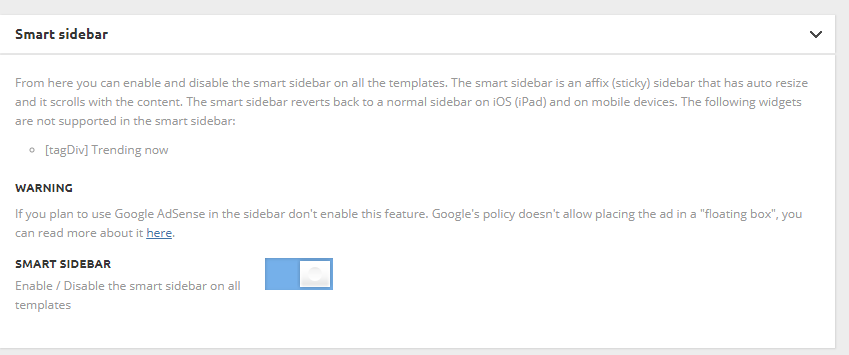
- NewsmagSmart sidebar
 irfan.id
 That’s right.. I change my homepage setting. I just realized that Google Adsense not allowed to put ad on something like smart sidebar. Thanks for advise.
 Henkdo
 this link https://forum.tagdiv.com/smart-sidebar-2/ is not working.
can you please give a working link?
thnx
Henk
 Bogdan B.
 Hello,
@irfan.id you do not have a sidebar at all on your homepage.
@ ScubaDiverMag did you add the td-ss-row class to the row containing the sidebar? Please read this gudie on how to activate the smart sidebar for pages: https://forum.tagdiv.com/smart-sidebar-2/
Thanks
irfan.id I’m facing the same problem.. smart sidebar work fine on post but not on page (homepage). here is my blog: https://irfan.id/
looking forward for the answer
 ScubaDiverMag
Hi,
I’ve setup a smart sidebar on my website http://www.scubadivermag.com which works fine on post pages, but for some reason doesn’t work on the home page. It was working find on the localhost, but can’t see what is causing it to not work on the live site.
Any help greatly appreciated
 Catalin
 Hello generah,
1)Please make sure that your sidebar has been correctly set up according to our documentation here -> https://forum.tagdiv.com/newsmag-smart-sidebar/ -> https://forum.tagdiv.com/sidebars-tutorial/
2)Unfortunately, the theme does not have any type of option that allows you to add share counter functionality, but only like counter. Also, I cannot access your screenshots.
Thanks for the message!
 theoutj3
As you can see here: https://imgur.com/gygWMoo , The Global Header I have in my smart side bar does not match the header that says “Blog” I want each header in the side bar to be the same and I simply cannot figure out how to change it. I have already tried to change it in places such as this: https://imgur.com/PL0RQXZ, and still cannot find a solution.
 hoo
hooHi, thank you for your time,, could you mind helping me:
1.- how can I attach screenshots to topic to explain my doubts better?
2.- Where is the option to reduce space between post featured image and post text(only in pc, with tag divi mobile, works fine)
3.-How activate “most recent bar” on mobile
4.-When I´m reading a post a float sidebar appears at right side. How can I disable it? it is smart sidebar? because it is disabled and still appears.
5.-I want to add tags on post related with the post, I mean how can I chose tags for each post.
Thank you
theoutj3 As you can see in this image, https://imgur.com/EIBAkvz , I have a section with blog posts, and on the side I have a smart sidebar. The part that says “Popular Blog Posts” has the type of Header that I want. I cannot find any setting that allows me to change the header for the Archives widget I have put into my smart side bar.
 theoutj3
I have an Archive section and the title doesn’t match the rest of my website.
Catalin Hello nata0292,
You should enable the sidebar from theme panel and from post pages. For like this -> https://forum.tagdiv.com/sidebars-tutorial/ -> https://forum.tagdiv.com/newsmag-smart-sidebar/
Thanks for your message!
Catalin Hello aqemcom,
Unfortunately, please notice that we cannot offer at the moment this type of customizations, sorry! All the information regarding on sidebar can be read here -> https://forum.tagdiv.com/sidebars-tutorial/ -> https://forum.tagdiv.com/smart-sidebar-2/
Hope this helps!
Thanks for the message!
 Simion C.
 Hi,
On pages the smart sidebar can be implemented like this
– https://forum.tagdiv.com/smart-sidebar-2/
Add the necessary class to the row when using the mentioned layout, and it will surely work properly.
Thanks
 meri
meriHi, is t normal that the smart sidebar option doesn’t work on my homepage?
It’s enabled and works well on other pages but it doesn’t move at all on the homepage…
Thanks for your help.
Catalin Hello tonitarres,
First of all, please make sure that you have read all of the needed settings which have to be made in order to achieve a Sidebar. Please check here -> https://forum.tagdiv.com/smart-sidebar-2/ -> https://forum.tagdiv.com/sidebars-tutorial/ If the problem is still there, you should make a new clean install from scratch via FTP way, clear all the caches and check the results. Also, if you need more assistance in this case, please send us an email at contact@tagdiv.com with your log-in information (wp-admin) so we can further inspect it closer your setup page.
Thanks for your understanding!
Catalin Hello alerazak,
Here is talking about Smart Sidebar functionality. For more information about this, please check here -> https://forum.tagdiv.com/smart-sidebar-2/
Thanks for the message!
meri Smart Sidebar. Ok. Found it 🙂
 lisek
lisekHi,
I have searched a forum but without success. My problem is I have this kind of error at Chrome console. It appears ONLY at main page and only when I want to scroll page. At other categories there is no problem. I have spent few hour cleaning my cache etc. Please, let me know what should I do?
tagdiv_theme.min.js?ver=8.1.2:284 Uncaught TypeError: Cannot read property ‘top’ of undefined
at tagdiv_theme.min.js?ver=8.1.2:284
(anonymous) @ tagdiv_theme.min.js?ver=8.1.2:284
requestAnimationFrame (async)
td_events_scroll @ tagdiv_theme.min.js?ver=8.1.2:283
compute @ tagdiv_theme.min.js?ver=8.1.2:294
td_events_resize @ tagdiv_theme.min.js?ver=8.1.2:297
(anonymous) @ tagdiv_theme.min.js?ver=8.1.2:383
dispatch @ jquery.js?ver=1.12.4:3
r.handle @ jquery.js?ver=1.12.4:3
it seems that this is a problem..
var g=tdSmartSidebar.items[l];g.content_top=g.content_jquery_obj.offset().top;g.content_height=g.content_jquery_obj.height();
Simion C. Hi,
It is considerably faster because for example it does not display page builder content. Mobile pages have to be created through the mobile editor. There are predefined templates for the front page, post pages, category pages, smart lists etc. It has also predefined fonts. These cannot be changed. Settings are kept to a minimum
– https://forum.tagdiv.com/the-mobile-theme/
The mobile theme is not a required plugin however. You can choose not to use, and display the same content from desktop.
There is no option to remove the sidebars for mobile at the moment, this will work only for the mobile theme. Something like this could be available in the coming updates.
Thanks
 Gvadalahara
Hi, I have a strange issue with Newspaper theme – when I use WPBakery page builder on blog posts, the layout breaks and the part of the post built with the builder looks like ‘full width’ even with sidebar layouts. It looks like that:

http://geckopress.codingmom.com/list-standalone-mysteries-cait-time-bookstore/
In this case, smart list post layout was used.
This one here – just a row and a text block in it:
http://geckopress.codingmom.com/halloween-gecko-press-whos-afraid-big-bad-wolf/
This one here: just a try to use the two-column layout in the builder, which is a disaster:
http://geckopress.codingmom.com/curiously-good-contests/
On this full-width page I have another issue – when I try to use the 4-column layout in the builder, the page breaks and each block becomes 100% width, so I end up with one long column of images.

Currently, 3 column layout used and it works:
http://geckopress.codingmom.com/play/
I have used WPBakery builder with other themes on many occasions and have never had issues like that – it usually is quite good at fitting things into any page and responsive. So I am at a complete loss.
I tried to deactivate all 3rd party plugins, but it didn’t help, so it’s definitely not a plugin conflict story.
I have the latest versions of WordPress and Newspaper installed.
And finally, I bought the license for Newspaper for my work project in October this year, but can not either register on the forum with the purchase code or add the code to my account – the system says the code is used with some other account.
So I am writing using my personal account that says that support for my item expired. However, I do have a valid for support theme and the purchase code for the site with issues described above.
Any help would be priceless!
 news.zapoved.ru
Hi,
I turned on ‘Smart Sidebar’ option in template setting (screenshot: http://c2n.me/3Po2uhK.png), made sidebar and inserted it on the home page by the means of TD Composer (screenshot: http://c2n.me/3Po2BaR.png). But sidebar is not scrolling with content as intended. What I did wrong?
The page address is http://ecomag.zzkk.ru/
 jakobe75
when enabling Jetpack mosaic galleries on a page, the sidebar are still shows, but show blank. Selecting no sidebar in the page creation or even turning smart sidebar off does work. Have tried using composer to put an achor at the top of the page to let the gallery know the page is full width…doesnt work.
other internal galleries will work and produce content full width on the page, but not Jetpack mosaic feature.
please advise
Catalin Hello sunnydream,
Please check the following documentation here -> https://forum.tagdiv.com/smart-sidebar-2/
Thanks for your understanding!
Catalin Hello kaibehrmann,
Please ensure that you correctly place the td-ss-row extra class to your sidebar in order to achieve best results. please check our documentation here -> https://forum.tagdiv.com/newsmag-smart-sidebar/
Thanks for your understanding!