
- NewspaperSingle Post Shortcodes
- NewspaperThe Mobile Theme
- NewspaperSmart Lists
 martijncsmit
hi,
With previous versions of the smartlists I was able to change some code and move the ad box position to just above the previous and next buttons, but since the update the ad box is between the picture and the description test. How can I change this?
Thank you
Martijn
 Vlad S
 Hello !
Please check your posts or if you have custom html tag in it. Usually this is error appears due to unclosed html tag or tags inserted in smartlists. Please also check your article ads spots.
Thank you !
 therion250
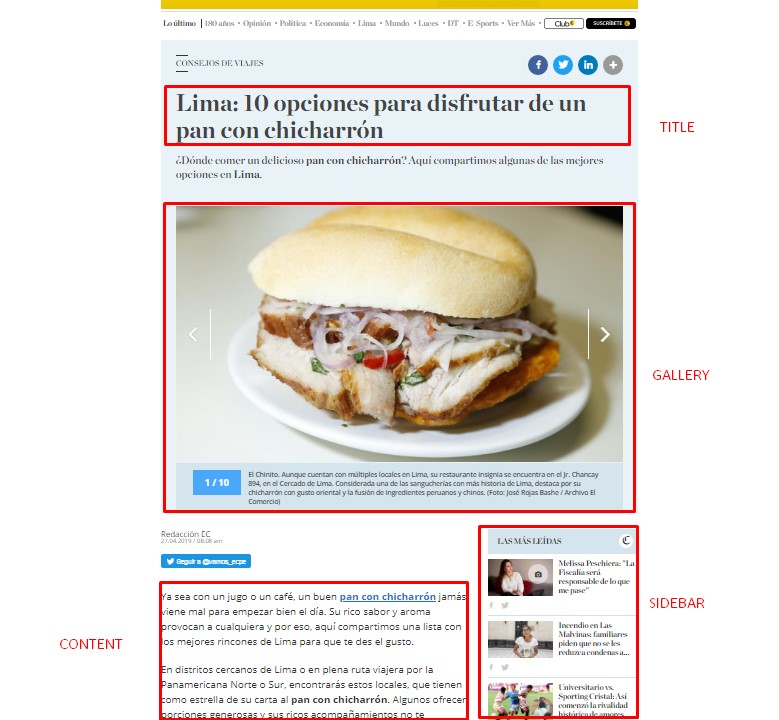
I’m looking for a way to make a slider as shown in the following image, since in the options shown in the theme does not appear an option similar to the one I show, it would be perfect to do something similar
 Catalin
 Hi,
I have made some texts on my website and the SmartList seems to works as expected. Also, the Smart List templates are working good. I have added the [td_smart_list_end] shortcode and it seems to return good results. The functionality of it is to interrupt the smart list functionality after their position. Also, if you have created another Smart List template, all of these will be displayed at the post template section and not on the Smart list, as you can see here -> https://www.screencast.com/t/6HByj7b8 Please check your theme and WordPress version to be the latest version of theme, remove all of untested plugins, clear all the caches, purge CDN files and check the results. If the problem is still there, please provide more details and some useful screenshots with the problem so we can identify.
Thank you!
 enessolh
Hello,
1 – Firstly, I want to ask that when I use SmartList “1” there will be no ad in the article. So I want to ad my adsense ads inside. I searched a lot and I found an article in this forum. Can I use this method(https://forum.tagdiv.com/topic/show-inline-ad-in-smartlists/) to apply for my website?
2 – I want to add my ad like this. I found this ad in different website but I want to ad this ad type in my website : http://www.screencast.com/t/0EJwVxcU7q . You can see the ad in the bottom.
3 – I want to try change the my heard, one the top of header and footer color from black to little bit grey but I cannot change it. Can you show me the what should I change?
4 – I change the my wordpress theme to my language but when I add tags in my articles, I see that “tags” language is in different language. Can I change it? Thank you : https://www.screencast.com/t/dxJICLPlQl
My website : teknovv.com
 howardlee
 Hi, Catalin
I think I did not explain well.
The article has been set as the correct format as style 7 required, but I have to click each article to select style7 as smartlist.
Is there any SQL query I can set so it will automatically set to style 7
Thanks!
 Calin
Calin Hi,
If the smart template is different you can duplicate the single smart post template and change only the ascendant/descendant.
Unfortunately the smart post template are different from the smartlist from post settings, this functionality will be different.
Thank you for your understanding!
 aditya58singh
 @ncalex I think you are not understanding what I am asking you…
I not talking about the post Feature image. I am saying the Single Post Smartlist feature Images which come under the Heading https://prnt.sc/n9monz
I have set the image here https://prnt.sc/n9mqfg below the heading When will it be released?
I hope this time you got my problem. I want to remove Featured image of smart list sm1
-
This reply was modified 7 years by
aditya58singh.
-
This reply was modified 7 years by
 hallmandigital
 Wow, so if I used 3 different styles of Smartlists with the old template – sometimes ascending, sometime descending – I’d have to create 6 individual Cloud Library Smart List templates to replace that functionality?
What about the smooth-scrolling action from Smartlists 1 (and 3):
https://www.gravedecay.com/movies/popcorn-frights-film-festival-2018-lineup/
Is this replicated in the Cloud Library Smart List templates?
hallmandigital Okay, so I clicked “Edit Template” on that post and changed the “Single Post Content” box to a “Single Post Smartlist” box:
https://www.gravedecay.com/movies/popcorn-frights-film-festival-announces-second-wave-lineup/
While that worked to change the post from a regular article into a smart list, it also made every other post with H3 tags into a smart list:
https://www.gravedecay.com/games/dead-daylight-chapter11-dlc-demise-faithful/
I think I’m going to need a separate Cloud Library Template, not only for Smart Lists, but one for each style of Smart List that I use – is this correct?
Also, the Cloud Library “Single Post Smartlist” box doesn’t seem to have a smooth scrolling action for the list items like the regular templates do:
https://www.gravedecay.com/movies/popcorn-frights-film-festival-2018-lineup/
Is there a trick to enabling that?
aditya58singh I don’t want to set the full image size.. I want to remove that feature image. from single post smartlist.
@xcalex
Calin Hi,
Unfortunately there is no option in single post smartlist to set the full size of image, you need to chose a one of the feature image size.
-> https://www.screencast.com/t/9quWhBtF
-> https://www.screencast.com/t/rp3QM6K14EAB
Thank you for your understanding!
Calin Hi,
If you are using a single post template from tagDiv Cloud Library the smart list from post will not longer apply to the cloud template, that’s way in that single post template you need have Single Post Smartlist ( this will search for the smart list structure ) not Single Post Content ( is no need to use a separate template just replace the post content with post smart ).
Thank you!
 jaume
jaume Hello Calin, its not the footer, its the content under the post content section .. that only appears on the last page of the smartlist:
See this page, its the last page where works good, then see the other 3 previous pages that nothing appears under the post content:
https://www.ocio.net/estilo-de-vida/meghan-markle-romper-tradicion-hijo/4/
hallmandigital I don’t understand. This is how Smart Lists worked prior to the new Cloud Library plugin: https://forum.tagdiv.com/smart-lists/. Does this no longer work?
Also, if I modify my Cloud Library template from Single Post Content to Single Post Smartlist like you suggest in the bottom two screenshots, won’t it change all of my articles to Smart Lists?
Calin Hi,
Please make sure that you have set the smart list template 1 on that post -> https://www.screencast.com/t/oCRKAhZrU , now you are using a single post template but not for smart list or you can edit your single post template and replace the single post content https://www.screencast.com/t/eirUjpv5oMnV with single post smartlist -> https://www.screencast.com/t/06iWD8jQPGPw
Thank you!
 Modo
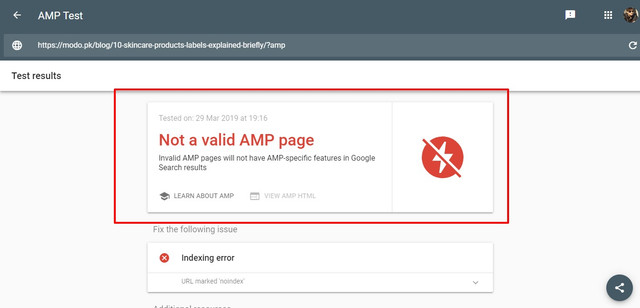
Modo 1. AMP
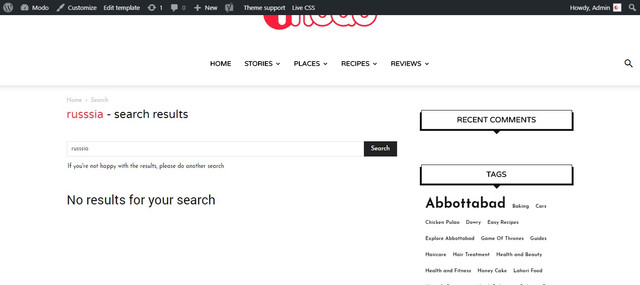
2. Search Template Default VS Custom
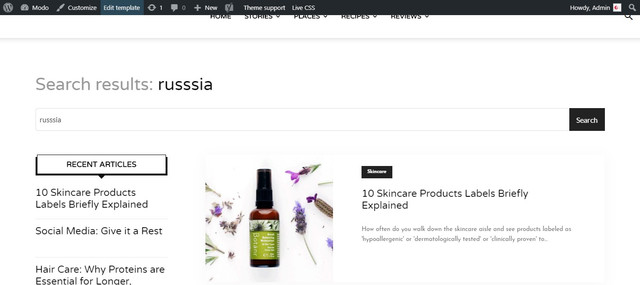
3. Composer layout for search template maybe this is an issue

4. Comments it was an additional feature request A dropdown/actual stars would be a cool addition in order to allow users to rate recipes
I have seen many themes that allow to leave rating with comments.
5. Safari Issue

6. Smart List Template

7. Print
Here is how it looks.
https://modo.pk/wp-content/uploads/2019/03/War-of-the-Words-Game-of-Thrones-Best-Dialogues-%E2%80%93-Modo.pdf
 wltrpnm
 Hello, thanks so much for your reply.
There’s indeed text description in place of each list, as you can see on the text editor: https://prnt.sc/n31q34
Only on this post it’s not working.
I have similar configuration on another post: https://www.seniberpikir.com/theme-wordpress-terbaik-untuk-personal-blogger/ and it works perfectly fine as it should.
When it worked out fine, another problem showed up when the images aligned to the left and converted into small-sized images (their sizes are actually above the content width). So I modified the smart list CSS to make the images 100% width.
After some time, the issue showed up and I’ve removed the CSS modification, cleared every cache there is, and the problem persists.
I’ve also deactivated all my plugins, used another theme and switched back to newspaper, view the result in incognito mode, and nothing’s changed.
Also, I’ve tried using other smartlists, still nothing works.
What could be wrong?
wltrpnmHello, I’m using smart list 2 to build my listicle.
But the problem is, it doesn’t show the content of each list on the frontend.
Here’s the screenshot:
https://prnt.sc/n2pegj
And sometimes, the content is shown, but the list image shrunk (though it’s been set full widht).
In the meantime, please take a look on the live article:
https://www.seniberpikir.com/theme-wordpress-untuk-toko-online/
jaumeHello,
I have latest theme version 9.6 and on Smartlists the footer content doesn’t work, it only works on the last page.
See example:
https://www.ocio.net/redes/jennifer-lopez-fotos-biquini-natural/
Here in the last page of the smartlist where it works .. see my code is appearing and the facebook comments also:
https://www.ocio.net/redes/jennifer-lopez-fotos-biquini-natural/5/
Here a regular post (no smartlist) where works correctly:
https://www.ocio.net/tecnologia/chris-cox-abandona/
 zeroc00l
 Hi, I don’t understand something…
I made a new layout template with CLoud Library for my posts.
In some posts I have the content that is suitable for a Smart List, but when I use the settings for Smartlist in “Post Settings” I obtain nothing, my post is in plain mode without a Smartlist.
If I insert from CLoud Library inside the template the element called “Single Post Smartlist” and save, when I reload the post I have the post duplicated and no Smartlist.
Where is the error?
Thank you
 qzconsulting
 I’ve sent you a detailed email with the problems and site access to troubleshoot this issue. Started when i started using adsense ads within my posts yesterday and smartlists went wild!
qzconsulting Hi,
Thanks for looking into this. I checked right now again and set the smartlist again and its working. I disabled and then removed a couple of plugins from the site after i opened the ticket. My guess is that one or both were causing problems.
One was Smart List Pro (by Better Studio) – i disabled and removed this since i was migrating all previous posts to yours (Last theme I had was Publisher)
The other was Custom Sidebars – i removed this at the end and didnt think to go back and check the site again.
qzconsultingAfter the recent update to Newspaper i’ve discovered that smartlists no longer work.
For instance if i choose Smartlist 4 only the images appear on the left and the sidebar either loads below the post or on the left hand side (overlapping the content area on left)
If i remove the images, then the same smartlist appears properly. Case in point https://www.techvise.pk/best-parcel-forwarding-services/
Another e.g. which is active and you can try and solve this is here: https://www.techvise.pk/mobile-banking-apps-in-pakistan/6/
The article is very long so it is set as Smartlist 3.
Please check the problem, this is quite alarming for us and we need a fix asap
 jesse@blackaircollective.com
It there a way to put multiple smartlists in a post? Like after you put the smartlist end tag can you start a new one?
If not, this would be a very useful feature since people often want to breakup product lists by Type.
