
- NewsmagCustom Post Type Support
 VoZz
VoZz Hi Calin,
I will definitely walk through it. But isn’t it strange it was working fine before and the desktop site is at 70 while the mobile site at 22?
 Catalin
 Hi,
It seems to be strange! Please provide your website URL so I can take a closer look at it. Ensure that you have correctly installed and updated the theme with our documentation. -> https://forum.tagdiv.com/install-via-ftp/
Let us know how it goes!
Thank you!
 Vlad S
 Hello !
Please take a look at this topic to see the fix for your issue: https://forum.tagdiv.com/thumbnails-fix-strange-looking-images-on-blocks/
Hope this helps !
Thank you !
 HPoelert
 3- somehow MegaMenu is working again. Maybe by deactivating the slider plugins. But I did not change anything else. Strange…
So, remains the question concerning the 9.7.3 – Update. Can I retry an Update or shall I wait for a new version that does not affect the WordPress-Installation as it did some days ago? Right now I have deactivated Envato Market in order to prevent the theme from updating automatically…
 Calin
Calin Hi,
Please check this documentation for Thumbnails – Fix strange looking images on blocks -> https://forum.tagdiv.com/thumbnails-fix-strange-looking-images-on-blocks/
If the problem is still there, please provide me a link were I can take a closer look to this problem.
Thank you!
 webforu
 Buna Vlad,
Thank you for your reply. It is NOT an issue with the Page Loading time. It seems that the page is stuck loading/ rendering something. Very strange … Is there any chance you can check if I provide the URL? Need a U and P as it’s still in development. Please let me know what is the best way to share these details securely.
Any questions, please let me know.
Regards,
Z
 pknguyen
Hi,
I’m using a custom header. For some strange reason, my header looks different on the homepage vs an article or category page.
See here:
https://www.pharmacytimes.com.au/
https://www.pharmacytimes.com.au/integrated-pharmacies-standing-out-from-the-competition/
On the homepage the date, subhead and logo line-up correctly. However, on the other pages it no longer lines up in a single line.
Any ideas what might be wrong?
Catalin Hi paologalli,
It seems to be strange! Please send us an email at contact@tagdiv.com with your log-in information (wp-admin) so I can take a closer look at it. Also, you need to have installed the latest version of the theme so I can investigate this case. As a hint, you can make a sub-domain for testing where you can add the latest version of the theme.
Thank you!
 PacificTrek
 The new update broke my blog so images are not showing on older posts and the layout is acting strange – almost like it thinks its tablet size:
See here:
https://pacifictrek.com/disney-avatar-flight-of-passage-pandora/
Please help me to fix this ASAP.
 Acsac
AcsacHi. I like very newspaper it is a user friendly theme, user friendly, and I really appreciate and respect your work. You are well done and real talents. But there are some unclear moments.
tag div composer is certainly cool. But what about the pages of the store, forum and others? I read a lot of topics offered some complex schemes with page builder to others, but I would like to still at least these pages can be added row and column with the size and insert shortcode. I couldn’t find, and judging by the responses in the topics it not: creating row and column, and paste there the shortcode of any plugin content. Now the site is set up, and the store looks excuse me how very strange it if to put it mildly.
2 an important point is the mobile theme and the problems with it. I tried to set up on the site and what I saw. 1. It’s not customizable. In fact, the settings are displayed in the mobile field, but why if I can configure the display of blocks in the “mobile resolution” icon with the tag div composer, it actually loses its meaning. Need or setup what to show in mobile more convenient, or even what is it then? Another point is the display of blocks at mobile resolution, some blocks especially promo Big grid simply does not respond to mobile permissions, leaving part of the screen view. Why?
3 is a detail of Woocommerce support – in fact she barely made. There are no particular styles, although it would be possible to make them much better. The same as for the Bbpress forum – it is also barely made when it is a long time and it would be worth as a store for a long time to take note.
4 important question – SEO parameters. Are everywhere important in H3 tags and similar others, should be given an opportunity like that in General to manage and edit on a simple span example no H tag at all. But not poking in each block, namely in General to make the setting.
Thank you in advance for your answers.
 bombagiu
 Hello
In reality this part does not exist at all in my functions.php
Do I have to add manually at the end? Quite strange
Vlad S Hello !
We are sorry for the inconvenience !
Please take a look at this fix on how to resolve your issue: https://forum.tagdiv.com/thumbnails-fix-strange-looking-images-on-blocks/
Thank you !
 Anonymous
 I always think it’s a bit stupid that everything is shifted to the user right away, even though one has already written that everything was great before and since update these errors exist, so it can’t really be due to a plugin error. I don’t want to sound ungrateful now, but there seem to be other customers who have reported the same problem. So is it possible to do more research about this and not unpack the “You’re to blame, we’re not” club right away? So far the updates have been quite problem-free, except for a few little things here and there, but lately the problems increase when I install an update. Maybe it’s me, but I just can’t find a problem. As a developer you can even be glad that people report bugs as actively as possible.
As I wrote before, the gallery (WordPress gallery (normal), tested in the Gutenberg editor with the Classic block and the normal Gutenberg gallery, tagdiv gallery works fine) works neither in the main theme (so not child) nor in the child, so I don’t know another solution, the media file is linked. The default Post Template in the settings can be set, but is also displayed correctly in the main theme (not Child), but as soon as you switch to the Child theme, the default template is always displayed. The sidebar is displayed properly, but before that the update reset or removed my widgets, so I had to redefine them. The rest of the page actually works fine, except for the problems, there is none left, until the auto-optimization may load the page a bit strange when script merge is activated. I disabled this option for the time being. And yes already tested whether it is also related to the other problems, unfortunately no change, sorry.
I’d like to switch back to 9.7.2, because I’m a little tired of testing, wasting my time and not finding a solution. Stupid that I don’t have the version anymore, I make really meticulous backups now before I decide to install a newspaper update.
Thanks for your efforts and I hope the matter clears up as soon as possible.
Catalin Hi,
It seems to be strange! Please note that tagDiv Composer is our main page builder which should works as expected with the theme. Please remove all of the untested plugins, clear all the caches, purge CDN files and check the results. It does not work, please send us an email at contact@tagdiv.com with your log-in information (wp-admin) and CPanel access so we can further investigate it closer the cause of this error.
Thank you!
Catalin Hi,
Please try to a default theme and check if that behavior is the same. Also, if the problem is still there, you need to contact your hosting provider, tell this problem because it is possible to have some restriction for that language or something else. You can check the following topic from here -> https://forum.tagdiv.com/topic/not-able-to-change-permalink-strange-issues-after-installing-yoast-seo/ because there was discussed that topic.
Hope this helps!
Thank you!
 dragonstreet
 Thanks for your reply !
Mobile + AMP in theme is set !
But in post or page I don’t have the toggle button. (enable amp).
The strange thing is I don’t have neither the amp tab in the admin. I think amp plugin is not properly installed even if wordpress said it was right.
Thanks
Calin Hi,
Please make sure that you do not have a plugin conflict, please deactivate all non theme plugins, also if you are using child theme or cache plugin, please deactivate them, clear all cache and try again.
Also please try to use the child from the package, ( child theme from v9.6.1)
Theme Install Guide -> https://tagdiv.com/how-to-install-newspaper-theme/
How to Update the Newspaper Theme for WordPress -> https://tagdiv.com/update-newspaper-theme/
If you are using single image from WPBakery, please check this topic -> https://forum.tagdiv.com/topic/layout-issues-with-latest-version/
Thumbnails – Fix strange looking images on blocks -> https://forum.tagdiv.com/thumbnails-fix-strange-looking-images-on-blocks/
If the problem is still there, please delete( delete the theme plugins too, do not override ) the current version of Newspaper that you have and download again from themefores the newspaper and reinstall it.
Let me know how it goes!
Thanks.
 Simion C.
 So flex blocks are not an option? They have settings for the images, you could load a bigger thumbnail and use the width/height and position settings
– http://prntscr.com/nrc77u
Modifying the cropping method would require that you edit the tagDiv composer files (after update 9.7)
The thumbnails are defined here – http://prntscr.com/nrc4yp
Then the future thumbnails will use the new cropping. The existing thumbnails will have to be regenerated, you can use the plugin mentioned here for example
– https://forum.tagdiv.com/thumbnails-fix-strange-looking-images-on-blocks/
But I should note that modifications to the plugins will be lost after the theme and plugins are updated.
 andreabarbieri
IT LOOK AS WP BAKERY DO NOT WORK WITH THE AMP PLUGIN
I use Newspaper theme version 9.7.2.
The theme has installed some plugins from TagDiv such as: 1. “tagDiv Composer”, 2.”tagDiv Mobile Theme”, 3. “tagDiv Speed Booster”, 4. “WPBakery Page Builder”. The last one I think is the one that create that strange sytle, so I deactivated it.
Consider that Google says it will take several days to check. So if you think this could be the problem I can ask google to validate.
Here you can find exact Google error:
for the page
https://petadvisor.it/cucce-cani-interno/?amp
1) “The tag ‘noscript enclosure for boilerplate’ appears more than once in the document”
and the error highlighted by the google search console is:
><noscript><style amp-boilerplate>body{-webkit-animation:none;-moz-animation:none;-ms-animation:none;animation:none}</style></noscript></head><body class=”post-template-default single single-post postid-402 single-format-standard wpb-js-composer js-comp-ver-5.7 vc_responsive” itemscope=”itemscope” itemtype=”https://schema.org/WebPage”>
2) “Only amp-boilerplate and amp-custom ‘style’ tags are allowed, and only in the document head.”
and the error in the search console is
><style type=”text/css”> .wpb_animate_when_almost_visible { opacity: 1; }</style></noscript><style amp-boilerplate>body{-webkit-animation:-amp-start 8s steps(1,end) 0s 1 normal both;-moz-animation:-amp-start 8s steps(1,end) 0s 1 normal both;-ms-animation:-amp-start 8s steps(1,end) 0s 1 normal both;animation:-amp-start 8s steps(1,end) 0s 1 normal both}@-webkit-keyframes -amp-start{from{visibility:hidden}to{visibility:visible}}@-moz-keyframes -amp-start{from{visibility:hidden}to{visibility:visible}}@-ms-keyframes -amp-start{from{visibility:hidden}to{visibility:visible}}@-o-keyframes -amp-start{from{visibility:hidden}to{visibility:visible}}@keyframes -amp-start{from{visibility:hidden}to{visibility:visible}}</style><noscript><style amp-boilerplate>body{-webkit-animation:none;-moz-animation:none;-ms-animation:none;animation:none}</style></noscript></head><body class=”post-template-default single single-post postid-402 single-format-standard wpb-js-composer js-comp-ver-5.7 vc_responsive” itemscope=”itemscope” itemtype=”https://schema.org/WebPage”>
Please give me any advice. I have 5 website with this error!
andreabarbieri this is actually important.
IT LOOK AS WP BAKERY DO NOT WORK WITH THE AMP PLUGIN
I use Newspaper theme version 9.7.2.
The theme has installed some plugins from TagDiv such as: 1. “tagDiv Composer”, 2.”tagDiv Mobile Theme”, 3. “tagDiv Speed Booster”, 4. “WPBakery Page Builder”. The last one I think is the one that create that strange sytle, so I deactivated it.
Consider that Google says it will take several days to check. So if you think this could be the problem I can ask google to validate.
Here you can find exact Google error:
for the page
https://petadvisor.it/cucce-cani-interno/?amp
1) “The tag ‘noscript enclosure for boilerplate’ appears more than once in the document”
and the error highlighted by the google search console is:
><noscript><style amp-boilerplate>body{-webkit-animation:none;-moz-animation:none;-ms-animation:none;animation:none}</style></noscript></head><body class=”post-template-default single single-post postid-402 single-format-standard wpb-js-composer js-comp-ver-5.7 vc_responsive” itemscope=”itemscope” itemtype=”https://schema.org/WebPage”>
2) “Only amp-boilerplate and amp-custom ‘style’ tags are allowed, and only in the document head.”
and the error in the search console is
><style type=”text/css”> .wpb_animate_when_almost_visible { opacity: 1; }</style></noscript><style amp-boilerplate>body{-webkit-animation:-amp-start 8s steps(1,end) 0s 1 normal both;-moz-animation:-amp-start 8s steps(1,end) 0s 1 normal both;-ms-animation:-amp-start 8s steps(1,end) 0s 1 normal both;animation:-amp-start 8s steps(1,end) 0s 1 normal both}@-webkit-keyframes -amp-start{from{visibility:hidden}to{visibility:visible}}@-moz-keyframes -amp-start{from{visibility:hidden}to{visibility:visible}}@-ms-keyframes -amp-start{from{visibility:hidden}to{visibility:visible}}@-o-keyframes -amp-start{from{visibility:hidden}to{visibility:visible}}@keyframes -amp-start{from{visibility:hidden}to{visibility:visible}}</style><noscript><style amp-boilerplate>body{-webkit-animation:none;-moz-animation:none;-ms-animation:none;animation:none}</style></noscript></head><body class=”post-template-default single single-post postid-402 single-format-standard wpb-js-composer js-comp-ver-5.7 vc_responsive” itemscope=”itemscope” itemtype=”https://schema.org/WebPage”>
Please give me any advice. I have 5 website with this error!
Calin Hi,
Please make sure that you do not have a plugin conflict, please deactivate all non theme plugins, also if you are using child theme or cache plugin, please deactivate them, clear all cache and try again.
If the problem is still there, please delete( delete the theme plugins too, do not override ) the current version of Newspaper that you have and download again from themefores the newspaper and reinstall it.
Theme Install Guide -> https://tagdiv.com/how-to-install-newspaper-theme/
How to Update the Newspaper Theme for WordPress -> https://tagdiv.com/update-newspaper-theme/
If you are using single image from WPBakery, please check this topic -> https://forum.tagdiv.com/topic/layout-issues-with-latest-version/
Thumbnails – Fix strange looking images on blocks -> https://forum.tagdiv.com/thumbnails-fix-strange-looking-images-on-blocks/
Also please check this topic about the Newspaper V9.7 -> https://forum.tagdiv.com/topic/important-new-update-newspaper-9-7/
Let me know how it goes!
Thanks.
 SPAREGmbH
Hy together,
I have a Child Theme with a modified top-menu.php with a login redirect.
With the Old Version everything works finde. After i updatet to the new Version 9.7.2 i saw that the top-menu.php is missing. Did you removed or renamed these File in the New Version?
On the Mobile Version it works as i expected. Only i the Web Version Desktop i have these strange behaviour.
Thanks for helping
Fredi
Calin Hi,
Please make sure that you do not have a plugin conflict, please deactivate all non theme plugins, also if you are using child theme or cache plugin, please deactivate them, clear all cache and try again.
Also you can regenerate all your Thumbnails – Fix strange looking images on blocks -> https://forum.tagdiv.com/thumbnails-fix-strange-looking-images-on-blocks/
If there is still a problem, please provide me a link were I can take a closer look to this problem.
Thank you!
 julian4239
 Thanks!
I got the newsletter plugin set up. For some strange reason, only the Email field shows up. There’s no first name. When I look at the embedded form in MailChimp, the code and form builder has the First Name field.
Any ideas why I can’t get the first name in there? Should post the code?
Thanks
 marclaude
 Dear Calin,
I applied your suggestion, and it happens something strange: “Views” label disappeared, but the views count numbers are still there in their column, even if now it is an untitled column.
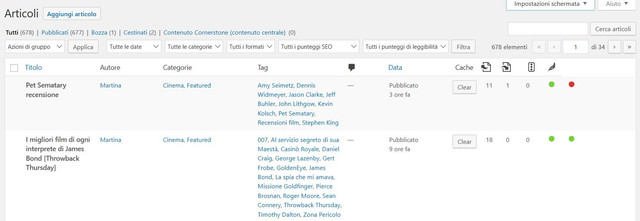
Something wrong from my side?
Let me know,
Thank you and best regards,
Marco
