
- NewsmagRequirements for Newsmag
 Bettina
 Hello!
I’m sorry to hear about this.
We can check the issues and help you. Contact us via email at contact@tagdiv.com and provide the following:
– admin URL and credentials
– cpanel URL and credentials
– a link to this topic in order to identify you
You can disable the ads from Newspaper -> System status -> https://i.imgur.com/N5Iq4j6.png
Thank you!
 Anamaria
 Hello,
If you get a message like this“Sorry, you are not allowed to access this page.” ,then you can solved this problem in this way:
go in Newspaper> System status and replace the url from: -> https://i.imgur.com/WlRnszw.png
admin.php?page=td_system_status
in
admin.php?page=td_system_status&reset_registration=1
And try after that to activate the theme.
If there is still a problem, you can send us an email at contact@tagdiv.com and provide wp-admin login (to can login in WordPress admin zone) and the license. We will take a look at the problem and we’ll fix it. Include a link to this topic in the email.
Let me know the results!
Thank you!
Anamaria Hello,
The option to turn them off can be found in Newspaper -> System status -> https://i.imgur.com/N5Iq4j6.png
Thank you!
Anamaria Hello,
The option to turn them off can be found in Newspaper -> System status -> https://i.imgur.com/N5Iq4j6.png
Thank you!
Anamaria Hi,
You can disable them from Newspaper -> System status -> https://i.imgur.com/N5Iq4j6.png
Please make sure that you have 12.3.1 version of the theme.
Thank you!
 Do
Do Hello,
I go to Newspaper -> System status but hav’t and can’t turn off
———
– update: after upgrading to 12.3.1 i was able to disable it.
Thanks
-
This reply was modified 3 years by
Do.
Anamaria Hello,
The option to turn them off can be found in Newspaper -> System status -> https://i.imgur.com/N5Iq4j6.png
Thank you!
 ezioboy
 I went back to yesterday
According to you, Betina <https://ibb.co/G91M5Zb> Is it because of the yellow pencil plugin that the theme thumbnails are not adjustable like this?
Newspaper and yellow pencil not working?
Will it normalize if I delete the yellow pencil to solve this problem?
I ran a backup yesterday, so everything is fine.
So some re-troubleshooting is necessary.
1. Need to adjust System Status
Please reset the settings.
2, review setting problem
Yesterday, Bettina set it up properly. But it was gone because I ran a backup. Help me setup in Tagdiv Composer
 coinedition
 Hi @anamaria,
We have checked the system status and all the options are fine and only thing that is different is the cache plugin that we are using(WP Rocket).
Please see the screenshot:- https://imgur.com/a/CApYOfL
We are using WP Engine as a server, and it is good. When we checked with the server team first, they mentioned the error from the “td-composer” plugin and also suggested we contact the theme developer.
Please check and let us know your feedback.
Thank you
ezioboy System Status → WP Memory Limit 40MB
Is it to change the current WP Memory Limit 40MB → 256MB?
How do I do this?
I can’t touch the code
maria please help
Anamaria Hi,
We will add an option for disabling the advertisements in the next theme update. There will be a setting added in the theme system status panel. The update will be released soon. Please let me know if that is alright with you.
Thank you!
Anamaria Hello,
1. Please activated the tagDiv Cloud Library plugin.
2. We will add an option for disabling the advertisements in the next theme update. There will be a setting added in the theme system status panel. The update will be released soon.
3. This can be done only with custom work -> https://tagdiv.com/web-development-services/
Thank you!
 mcdv01
 The console log when adding New cloud template is
Cannot read properties of undefined (reading \’length\’)
My System Status is
PHP Version
8.1.2-1ubuntu2.11
WP Memory Limit
256 MB
PHP Execution Time
86400
PHP Max Input Vars
2000
THEME VERSION is 12.3
 jamesrobb
 Everything is set correctly as per below. I also tried multiple demo data pages but nothing works. when I click ‘edit with tagDev’ the error comes up.
System Status
PHP Version
8.1.13
WP Memory Limit
1 GB
PHP Execution Time
320
PHP Max Input Vars
3000
 ngotuannghia
 Dear Anamaria,
I try many solutions but cannot fix this.
So tired many days.
I made a test site (localhost) with deactive all plugins, only keep TagDiv Composer.
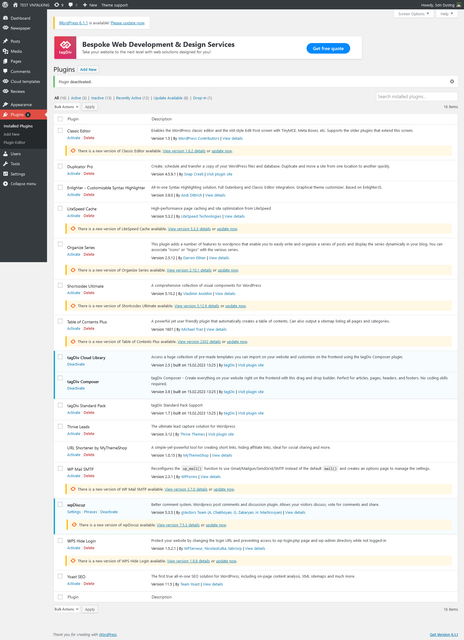

But the issue still occurs.
Please kindly help me
Anamaria Hi,
We will add an option for disabling the advertisements in the next theme update. There will be a setting added in the theme system status panel. The update will be released soon. Please let me know if that is alright with you.
Thank you!
Anamaria Hi,
We will add an option for disabling the advertisements in the next theme update. There will be a setting added in the theme system status panel. The update will be released soon. Please let me know if that is alright with you.
Thank you!
Anamaria Hello,
Please make sure the system status parameters are correctly increased according to our documentation from here -> https://forum.tagdiv.com/requirements-for-newspaper/ in config is WP_MEMORY_LIMIT not PHP Memory Limit (there is a typo, sorry) => https://www.screencast.com/t/88pK5QXpC
Also, please make sure that you do not have a plugin conflict, please deactivate ALL plugins except tagDiv ones, also if you are using a child theme or cache plugin, deactivate them, clear all cache and try again.
Thank you!
 Satwik
 They have introduced a new On/Off toggle in the System Status tab. I tried it in RC 12.4, and it works perfectly. It will be available in the upcoming 12.4 update.
Satwik They have introduced a new On/Off toggle in the System Status tab. I tried it in RC 12.4, and it works perfectly. It will be available in the upcoming 12.4 update.
Satwik They have introduced a new On/Off toggle in the System Status tab. I tried it in RC 12.4, and it works perfectly. It will be available in the upcoming 12.4 update.
 christopherkevil8838
Hi again,
I would like to update my Newspaper theme 12.1.1 but my license key is missing. The error message say to reset the key through system status. Do I just click on the “reset key” button and hope it works?
Anamaria Hi,
We will add an option for disabling the advertisements in the next theme update. There will be a setting added in the theme system status panel. The update will be released soon. Please let me know if that is alright with you.
Thank you!
Anamaria Hello,
If you get a message like this“Sorry, you are not allowed to access this page.” ,then you can solved this problem in this way:
go in Newspaper> System status and replace the url from: -> https://i.imgur.com/WlRnszw.png
admin.php?page=td_system_status
in
admin.php?page=td_system_status&reset_registration=1
And try after that to activate the theme.
If there is still a problem, you can send us an email at contact@tagdiv.com and provide wp-admin login (to can login in WordPress admin zone) and the license. We will take a look at the problem and we’ll fix it. Include a link to this topic in the email.
Let me know the results!
Thank you!
 rezaul0234
 An issue has been encountered while trying to validate your license key
Please reset the key from the System status tab and try to activate it again, or contact our customer support team at contact@tagdiv.com.
If you don’t have a valid license key, you can get one now and continue to enjoy the full benefits of this great product.


