
 Nuredin
 I think i have found the issue, after reinstalling multiple times, changing php versions, i discovered that CpGuard is deleting this file, see the details below:
common.php Virus File {HEX}Malware.Expert.php.base64.decode QUARANTINED
VIRUS DETAIL
#ID170583
File Name common.php
Original Path /home/euromedi/public_html/pirok.mk/wp-content/plugins/td-composer/legacy/common/common.php
Reason
Definition
Time 2025-09-16 00:41:45
Quarantine Path/etc/cpguard/quarantine/1605452187-common.php
File Size14008 bytes
Status Quarantined
 TeraBoy
 Hello!
I have same error and uploading the new td-composer.zip was fixed, but the td-cloud-libraryfix.zip file says “not plugins found” inside the compressed file so I dont know what to do now about that plugin (I removed it from the panel, before tried to re-install, so is not present on the website now)
 Calin
Calin Hello,
Please make a test and replace the plugins tagDiv Composer and tagDiv Cloud Library with the versions from here:
– https://cdn.tagdiv.com/wp-content/uploads/2025/05/td-composer.zip
– https://cdn.tagdiv.com/wp-content/uploads/2025/06/td-cloud-libraryfix.zip
Thank you!
 alejalme
Since yesterday, the site is throwing the following critical error.
No updates were made in the last 7 days, it was working fine until yesterday
[15-Sep-2025 03:52:27 UTC] PHP Warning: require_once(legacy/common/common.php): Failed to open stream: No such file or directory in /home/lacuarta/public_html/wp-content/plugins/td-composer/td-composer.php on line 146
[15-Sep-2025 03:52:27 UTC] PHP Fatal error: Uncaught Error: Failed opening required ‘legacy/common/common.php’ (include_path=’.:/opt/alt/php81/usr/share/pear:/opt/alt/php81/usr/share/php:/usr/share/pear:/usr/share/php’) in /home/lacuarta/public_html/wp-content/plugins/td-composer/td-composer.php:146
Worpress Version: 6.8.2
PHP Version: 8.1.33
Newspaper Version: 12.7.1
Site: https://lacuartaonline.com/
 brianjcameron
 It’s TagDiv code within the TD Composer plugin in the legacy/common.php file.
So i can’t advise how it is used as it is a TagDiv creation…
Can the file be updated to remove it, to satisfy my host ?
 Seoweblocal
When I try to log in in my wordpress it appears an error because of tagdiv composer plugin. This is the error: Fatal error: Uncaught Error: Object of class WP_Error could not be converted to string in /wp-content/plugins/td-composer/includes/tdc_check_domain.php:151 Stack trace: #0 /wp-content/plugins/td-composer/includes/tdc_check_domain.php(108): tdc_check_domain->check_domain() #1 /wp-content/plugins/td-composer/includes/tdc_check_domain.php(41): tdc_check_domain->set_is_domain_active() #2 /wp-content/plugins/td-composer/includes/tdc_check_domain.php(56): tdc_check_domain->__construct() #3 /wp-content/plugins/td-composer/legacy/common/wp_booster/td_js.php(62): tdc_check_domain::init() #4 /wp-content/plugins/td-composer/legacy/common/wp_booster/td_js.php(17): td_js->__construct() #5 /wp-content/plugins/td-composer/legacy/common/wp_booster/td_js.php(657): td_js::get_instance() #6 /wp-content/plugins/td-composer/legacy/common/wp_booster/td_wp_booster_functions.php(2758): require_once(‘/var/www/vhosts…’) #7 /wp-content/plugins/td-composer/legacy/Newspaper/functions.php(21): require_once(‘/var/www/vhosts…’) #8 /wp-content/plugins/td-composer/td-composer.php(191): require_once(‘/var/www/vhosts…’) #9 /wp-includes/class-wp-hook.php(324): {closure}(”) #10 /wp-includes/class-wp-hook.php(348): WP_Hook->apply_filters(NULL, Array) #11 /wp-includes/plugin.php(517): WP_Hook->do_action(Array) #12 /wp-content/themes/Newspaper/includes/wp-booster/tagdiv-wp-booster-functions.php(3): do_action(‘td_wp_booster_l…’) #13 /wp-content/themes/Newspaper/functions.php(19): require_once(‘/var/www/vhosts…’) #14 /wp-settings.php(695): include(‘/var/www/vhosts…’) #15 /wp-config.php(92): require_once(‘/var/www/vhosts…’) #16 /wp-load.php(50): require_once(‘/var/www/vhosts…’) #17 /wp-admin/admin.php(35): require_once(‘/var/www/vhosts…’) #18 /wp-admin/index.php(10): require_once(‘/var/www/vhosts…’) #19 {main} thrown in /wp-content/plugins/td-composer/includes/tdc_check_domain.php on line 151. For the correct operation of the website i have to deactivate the plugin.
Calin Hi,
Please try like this, open the homepage in td Composer and click on module, after that click on edit link in the right of “Page ID” – https://i.imgur.com/orpMDZP.png, then a new tab with the modal page will be open in wordpress, like this https://i.imgur.com/fTNXtB4.png then just click on TagDiv Composer to edit the page.
Thank you!
brianjcameronMy host is reporting that there is malware on my site at public_html/wp-content/plugins/td-composer/legacy/common/common.php, and the malware is php.base64.decode
I have looked at the code in a fresh download of td_composer and it has the following:
/**
* return the decoded demo file settings
*/
add_filter( ‘td_demo_installer’, function( $file_path ) {
//read the settings file
return unserialize(base64_decode(file_get_contents($file_path, true)));
});
function tdc_b64_decode( $val ) {
return base64_decode( $val );
}
function tdc_b64_encode( $val ) {
return base64_encode( $val );
}
In it. Is this problematic, can I remove it ?
 The Villager
Getting this error when I click on a post logged in as admin. On the frontend all posts now use the default template.
wp_booster error:
td_api_base::mark_used_on_page : a component with the ID: single_template_1 is not set.
/home2/villager/news_html/wp-content/plugins/td-composer/legacy/common/wp_booster/td_api.php
The VillagerGetting this error when I click on a post logged in as admin. On the frontend all posts now use the default template.
wp_booster error:
td_api_base::mark_used_on_page : a component with the ID: single_template_1 is not set.
/home2/villager/news_html/wp-content/plugins/td-composer/legacy/common/wp_booster/td_api.php
 jpegjoe
 I’m having a similar issue when trying to add or update any ads on my site. Here’s more info that I get from WP Engine, but I have no idea how to resolve it. I’ve rolled back versions, re-installed, etc. Thanks for any help:
When seeking help with this issue, you may be asked for some of the following information:
WordPress version 6.8.2
Active theme: Newspaper (version 12.7.1)
Current plugin: tagDiv Opt-In Builder (version 1.7.1 | built on 29.04.2025 10:50)
PHP version 8.2.29
Error Details
=============
An error of type E_ERROR was caused in line 3276 of the file /nas/content/live/presspass/wp-content/plugins/td-subscription/includes/td_subscription.php. Error message: Uncaught TypeError: array_key_exists(): Argument #2 ($array) must be of type array, null given in /nas/content/live/presspass/wp-content/plugins/td-subscription/includes/td_subscription.php:3276
Stack trace:
#0 /nas/content/live/presspass/wp-includes/class-wp-hook.php(324): td_subscription::td_post_theme_settings_mb_save_filter(NULL, ‘17551’)
#1 /nas/content/live/presspass/wp-includes/plugin.php(205): WP_Hook->apply_filters(NULL, Array)
#2 /nas/content/live/presspass/wp-content/plugins/td-composer/legacy/common/wp_booster/wp-admin/external/wpalchemy/MetaBox.php(880): apply_filters(‘wpalchemy_filte…’, NULL, ‘17551’)
#3 /nas/content/live/presspass/wp-content/plugins/td-composer/legacy/common/wp_booster/wp-admin/external/wpalchemy/MetaBox.php(2081): WPAlchemy_MetaBox->apply_filters(‘save’, NULL, ‘17551’)
#4 /nas/content/live/presspass/wp-includes/class-wp-hook.php(326): WPAlchemy_MetaBox->_save(17551)
#5 /nas/content/live/presspass/wp-includes/class-wp-hook.php(348): WP_Hook->apply_filters(NULL, Array)
#6 /nas/content/live/presspass/wp-includes/plugin.php(517): WP_Hook->do_action(Array)
#7 /nas/content/live/presspass/wp-includes/post.php(5110): do_action(‘save_post’, 17551, Object(WP_Post), true)
#8 /nas/content/live/presspass/wp-includes/post.php(5212): wp_insert_post(Array, false, true)
#9 /nas/content/live/presspass/wp-admin/includes/post.php(453): wp_update_post(Array)
#10 /nas/content/live/presspass/wp-admin/post.php(227): edit_post()
#11 {main}
thrown
 casprom
Hi guys, first and formost, thank you very much for keeping this theme, i’ve been using it since versions 7. and always been loving it.
Unfortunately, last night i was checking for updates on my website and decided saw that there was an update that was long due on the theme. I updated it like we always have but after the theme update, the plugins failed to work and our website that has thousands of readers everyday is now just white with the td-composer shortcodes….
It’s awfull, i cant give you ftp and wordpress access if you can put everything running back again.
Please help.
Website: squared-potato.pt
 simchris
 Hi
there is some fundamental issue with the current theme install where htaccess directives seem to be entirely ignored, such as redirects and stuff like pagespeed = on kind of things.
Going to have to try default theme to debug, as disabling all plugins had not effect.
Trying to use WP-STAGING plugin, but their pesky platform does not support external uploads locations (e.g., /root/uploads/ vs /root/wp-content/uploads/ … ) which breaks the image links ((sigh)).
Having one of those months over here.
I forget — these days, does Newsmag lose all its settings if I temporarily switch themes and turn off td-composer ?
 letrud
I’ve used Newspaper as a theme for years, but there is one thing that has always been bugging me, and I’ve tried several times to work out the issue. Finally I’ve given up, so I’m here asking for assistance.
My header covers the top of my page, and whenever I scroll the page scrolls underneath the header. Which is okay.
What’s bugging me, is that the default offset of all pages and posts is at the top of the browser. Beneath the header.
So all images at the top of posts and pages are cut off. Headers are hidden or cut off.
It’s real easy to see here;

Where the arrow points, there should be a title – like this:
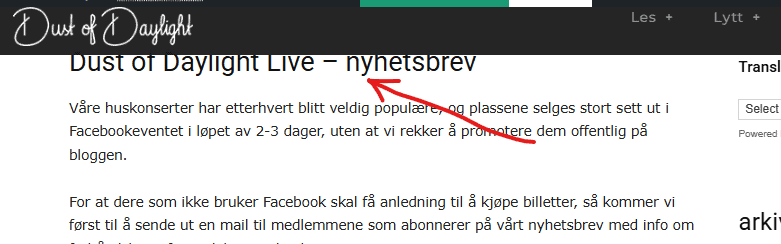
In some browsers you might see half the title, but if I open it in incognito mode, it looks like the first image.
I’m stumped… Header created with TD Composer, I’ve tried putting in empty spaces, extra rows, padding in all thinkable positions, etc. etc. etc. Running v12.7.1, but it’s been this way since I set it up in 2015 (!)
I know the solution is staring me in the face, but I can’t see it, so if anyone has any input – I’ll appreciate it.
 dimitrisv
Hello, are there any plans to support Object Cache (Redis).
The issues that the lack of support is causing are too many to bear.
Also please remove these licensing calls every time we login in to admin. Earlier today your licensing service was down and we could not enter the admin. The errors logged were something like this.
2025/09/09 04:21:22 [error] 5200#5200: *1296 FastCGI sent in stderr: “PHP message: WP_Error Object
(
[errors] => Array
(
[http_request_failed] => Array
(
[0] => cURL error 6: Could not resolve host: cloud.tagdiv.com
)
)
[error_data] => Array
(
)
[additional_data:protected] => Array
(
)
)
; PHP message: PHP Fatal error: Uncaught Error: Object of class WP_Error could not be converted to string in /home/1463218.cloudwaysapps.com/hvwkzdyqhn/public_html/wp-content/plugins/td-composer/includes/tdc_check_domain.php:151
Stack trace:
#0 /home/1463218.cloudwaysapps.com/hvwkzdyqhn/public_html/wp-content/plugins/td-composer/includes/tdc_check_domain.php(108): tdc_check_domain->check_domain()
#1 /home/1463218.cloudwaysapps.com/hvwkzdyqhn/public_html/wp-content/plugins/td-composer/includes/tdc_check_domain.php(41): tdc_check_domain->set_is_domain_active()
#2 /home/1463218.cloudwaysapps.com/hvwkzdyqhn/public_html/wp-content/plugins/td-composer/includes/tdc_check_domain.php(56): tdc_check_domain->__construct()
#3 /home/1463218.cloudwaysapps.com/hvwkzdyqhn/public_html/wp-content/plugins/td-composer/legacy/common/wp_booster/td_js_generator.php(18): tdc_check_domain::init()
#4 /home/1463218.cloudwaysapps.com/hvwkzdyqhn/public_html/wp-includes/class-wp-hook.php(324): td_js_generator()
#5 /home/1463218” while reading response header from upstream, client: 2a02:587:3215:e800:f91d:ec3d:d5eb:60cf, server: wordpress-1463218-5518663.cloudwaysapps.com, request: “GET / HTTP/1.0”, upstream: “fastcgi://unix:/var/run/fpm-hvwkzdyqhn.sock:”, host:
 Andjelko
Hi,
I’m using Newspaper 12.7.1 on WordPress 6.8.2 (PHP 7.4).
When I open Theme Panel → Ads, the request to:
/wp-admin/admin-ajax.php?td_theme_name=Newspaper&v=12.7.1
fails with 500 Internal Server Error.
Error log:
PHP Fatal error: require_once(): Failed opening required
‘/wp-content/plugins/td-composer/legacy/common/wp_booster/wp-admin/panel/views/ajax_boxes/td-panel-ads/td-get-ad-spot-by-id.php’
in /wp-content/plugins/td-composer/legacy/common/wp_booster/wp-admin/panel/panel_core/td_panel_core.php on line 217
It looks like the plugin is trying to load a missing file (td-get-ad-spot-by-id.php).
Legacy panel seems enabled but the file is not included in my Composer package.
Here is a screenshot of the problem:
Instaled plugins:
Thanks in advance!
Calin Hello,
Unfortunately, there isn’t a built-in option in the theme to set up a redirect for the login modal. This can only be achieved by modifying the theme files.
There are two files responsible for the modal login form, depending on the template you are using:
For the cloud template:
wp-content/plugins/td-cloud-library/parts/tdb-login-modal.php
For the standard template:
wp-content/plugins/td-composer/legacy/Newspaper/parts/header/td-login-modal.php
You’ll need to modify the relevant file to implement the redirect.
Thank you!
Calin Hello,
Please make a test and replace the plugins tagDiv Composer and tagDiv Cloud Library with the versions from here:
– https://cdn.tagdiv.com/wp-content/uploads/2025/05/td-composer.zip
– https://cdn.tagdiv.com/wp-content/uploads/2025/06/td-cloud-libraryfix.zip
Thank you!
 Nextepisode
When seeking help with this issue, you may be asked for some of the following information:
WordPress version 6.8.2
Active theme: Newspaper (version 12.7.1)
Current plugin: tagDiv Composer (version 5.4.1 | built on 29.04.2025 10:27)
PHP version 8.3.6
Error Details
=============
An error of type E_ERROR was caused in line 151 of the file /home1/extepiso/public_html/pureaitools/wp-content/plugins/td-composer/includes/tdc_check_domain.php. Error message: Uncaught Error: Object of class WP_Error could not be converted to string in /home1/extepiso/public_html/pureaitools/wp-content/plugins/td-composer/includes/tdc_check_domain.php:151
Stack trace:
#0 /home1/extepiso/public_html/pureaitools/wp-content/plugins/td-composer/includes/tdc_check_domain.php(108): tdc_check_domain->check_domain()
#1 /home1/extepiso/public_html/pureaitools/wp-content/plugins/td-composer/includes/tdc_check_domain.php(41): tdc_check_domain->set_is_domain_active()
#2 /home1/extepiso/public_html/pureaitools/wp-content/plugins/td-composer/includes/tdc_check_domain.php(56): tdc_check_domain->__construct()
#3 /home1/extepiso/public_html/pureaitools/wp-content/plugins/td-composer/legacy/common/wp_booster/td_js.php(62): tdc_check_domain::init()
#4 /home1/extepiso/public_html/pureaitools/wp-content/plugins/td-composer/legacy/common/wp_booster/td_js.php(17): td_js->__construct()
#5 /home1/extepiso/public_html/pureaitools/wp-content/plugins/td-composer/legacy/common/wp_booster/td_js.php(657): td_js::get_instance()
#6 /home1/extepiso/public_html/pureaitools/wp-content/plugins/td-composer/legacy/common/wp_booster/td_wp_booster_functions.php(2758): require_once(‘/home1/extepiso…’)
#7 /home1/extepiso/public_html/pureaitools/wp-content/plugins/td-composer/legacy/Newspaper/functions.php(21): require_once(‘/home1/extepiso…’)
#8 /home1/extepiso/public_html/pureaitools/wp-content/plugins/td-composer/td-composer.php(191): require_once(‘/home1/extepiso…’)
#9 /home1/extepiso/public_html/pureaitools/wp-includes/class-wp-hook.php(324): {closure}(”)
#10 /home1/extepiso/public_html/pureaitools/wp-includes/class-wp-hook.php(348): WP_Hook->apply_filters(NULL, Array)
#11 /home1/extepiso/public_html/pureaitools/wp-includes/plugin.php(517): WP_Hook->do_action(Array)
#12 /home1/extepiso/public_html/pureaitools/wp-content/themes/Newspaper/includes/wp-booster/tagdiv-wp-booster-functions.php(3): do_action(‘td_wp_booster_l…’)
#13 /home1/extepiso/public_html/pureaitools/wp-content/themes/Newspaper/functions.php(19): require_once(‘/home1/extepiso…’)
#14 /home1/extepiso/public_html/pureaitools/wp-settings.php(695): include(‘/home1/extepiso…’)
#15 /home1/extepiso/public_html/pureaitools/wp-config.php(106): require_once(‘/home1/extepiso…’)
#16 /home1/extepiso/public_html/pureaitools/wp-load.php(50): require_once(‘/home1/extepiso…’)
#17 /home1/extepiso/public_html/pureaitools/wp-admin/admin.php(35): require_once(‘/home1/extepiso…’)
#18 /home1/extepiso/public_html/pureaitools/wp-admin/index.php(10): require_once(‘/home1/extepiso…’)
#19 {main}
thrown
 dailynewsng
 Thanks, the Query Monitor used shows that the td composer is having an issue. See the screenshot attached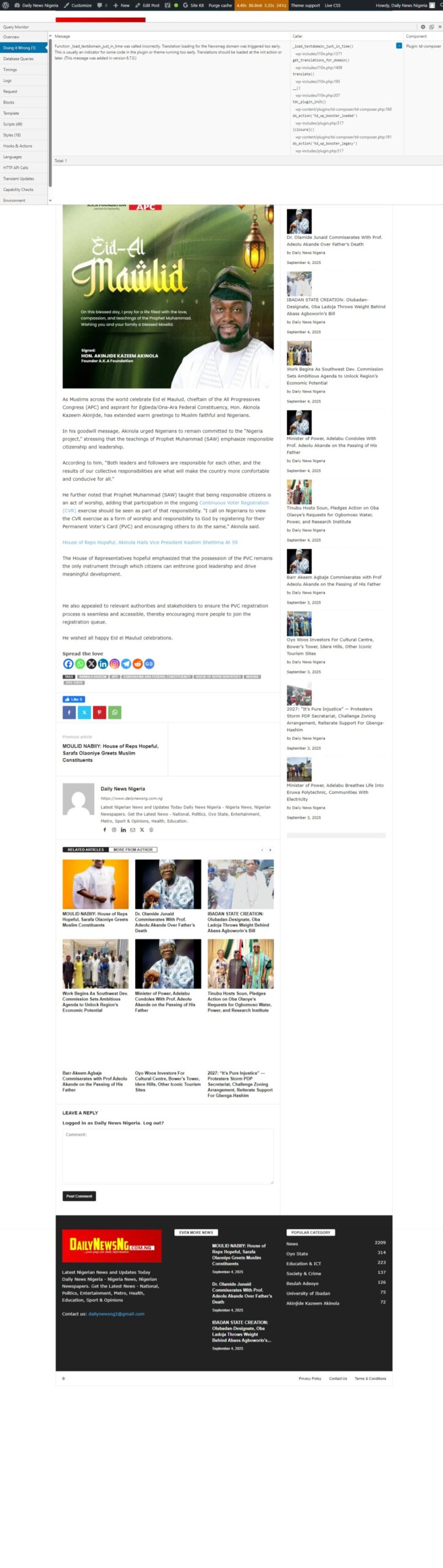
 Madcrumbs
 Hi,
regarding the language, we are actually referring to the content of the email that arrives to the user with the reset link. From what we can see, in the following files of your plugins, where the content of the reset email appears, no language domain is set, which is why we assume that the Italian translation does not appear:
– plugins/td-subscription/includes/tds_update.php
– plugins/td-subscription/includes/tds_ajax.php
– plugins/td-composer/legacy/common/wp_booster/td_login.php
As for the actual password reset, we confirm that disabling SiteGround’s Speed Optimizer plugin solves the problem. We will therefore configure the plugin correctly or ask them directly for support. We would like to ask you why clicking on the reset link does not take you to the site’s login page, but to the administration page. Is there a specific configuration to be made on the theme?
The login page is as follows: https://www.attoricasting.it/accedi/
Thank you
Calin Hi,
This option is only for description; if you want to do it for the title, then you can use this custom css:
.td_block_image_box .td-custom-title {

    top: 90%;

}
The css can be set in the theme panel, custom code, custom css or you can set the css directly in the page with the tagDiv Composer in raw css.
Thank you!
Calin Hi,
I will recommend using a flex block; this can be edited how you want using tagDiv Composer and the settings from it. The old blocks, like the one mentioned, have only a few options and need to be adjusted with css if an option doesn’t exist.
A css that can be used for yor your
.td_block_15  .td-module-title a {

    color: #fff;

}
Thank you!
 srendell
Above is my website and I am using newspaper theme package.
After upgrading td composer plugin I am facing some issues.
I am using advance ad plugin so when I am adding any ads and click on save I am getting following error.
“There has been a critical error on this website. Please check your site admin email inbox for instructions. If you continue to have problems, please try the support forums.”
So I have enabled debug then I found td composer issue.check below notice and warning.
Deprecated: File class-phpmailer.php is deprecated since version 5.5.0! Use wp-includes/PHPMailer/PHPMailer.php instead. The PHPMailer class has been moved to wp-includes/PHPMailer subdirectory and now uses the PHPMailer\PHPMailer namespace. in /home/mcmupw94bhs4/public_html/forcemedia.digital/wp-includes/functions.php on line 6121
Notice: Function _load_textdomain_just_in_time was called incorrectly. Translation loading for the advanced-ads-selling domain was triggered too early. This is usually an indicator for some code in the plugin or theme running too early. Translations should be loaded at the init action or later. Please see Debugging in WordPress for more information. (This message was added in version 6.7.0.) in /home/mcmupw94bhs4/public_html/forcemedia.digital/wp-includes/functions.php on line 6121 Notice: Function _load_textdomain_just_in_time was called incorrectly. Translation loading for the tribe-events-calendar-pro domain was triggered too early. This is usually an indicator for some code in the plugin or theme running too early. Translations should be loaded at the init action or later. Please see Debugging in WordPress for more information. (This message was added in version 6.7.0.) in /home/mcmupw94bhs4/public_html/forcemedia.digital/wp-includes/functions.php on line 6121 Notice: Function _load_textdomain_just_in_time was called incorrectly. Translation loading for the td-cloud-library domain was triggered too early. This is usually an indicator for some code in the plugin or theme running too early. Translations should be loaded at the init action or later. Please see Debugging in WordPress for more information. (This message was added in version 6.7.0.) in /home/mcmupw94bhs4/public_html/forcemedia.digital/wp-includes/functions.php on line 6121
Warning: Undefined array key “9YPsSaYlkyc” in /home/mcmupw94bhs4/public_html/forcemedia.digital/wp-content/plugins/td-composer/legacy/common/wp_booster/td_video_playlist_render.php on line 303 Warning: Undefined array key “4h2FqahPC2M” in /home/mcmupw94bhs4/public_html/forcemedia.digital/wp-content/plugins/td-composer/legacy/common/wp_booster/td_video_playlist_render.php on line 303
Pleas help me on this.
 SnakeEater
For the longest time we have used Point reviews, and the team has used values such as “6/10”, “8/10” etc.
Newspaper never had an issue with it, as it only showed “6” and “8” in the review box, which is what we wanted.
You could say that adding “/10” was unnecessary on our part, but we always did it that way.
Exploring the debug log, I now see stuff like:
[30-Aug-2025 08:06:54 UTC] PHP Warning: A non-numeric value encountered in /home/s132845/domains/domain.com/public_html/wp-content/plugins/td-composer/legacy/common/wp_booster/td_review.php on line 149
My question is, how should we approach this? SQL Query through all the reviews and get rid of “/10”?
I think it would make more sense for the review box to have a validation phase where the text field only accepts numbers, perhaps.
Any input?


