- TutorialsFrom WPBakery to tagDiv Composer
- TutorialsDefault Block Settings Guide
- TutorialsHow to Update the WPBakery Page Builder plugin
 frankiefop
 Thank you for your support, though, I found a way to optimise my site.
However, I have an issue. I can’t edit my homepage with the TD Composer, each time I click on it, it shows the following error: https://paste.pics/S2GD1
Every other Cloud Template pages are loading at the backend unless the homepage. Now, I can’t make any changes to the homepage.
Please, I need your help. Thank you.
 Anamaria
 Hello,
You have malware on the website. Please update to the latest version 12.6.8
If you want to update the theme, you should download the latest version of it from the Theme Forest account and download it.
I recommend that you update the theme manually https://forum.tagdiv.com/how-to-update-the-theme-2/ via FTP/cPanel/File Manager, also if possible disable extra plugins during the theme update to avoid any problems that may arise and make sure that you have activated the tagDiv Standard pack plugin to keep the website’s look. You can try to update the theme on a staging website.
After you update the theme, you need to update the theme plugins too.
In the worst cases, the settings in the theme panel may be lost (there have been isolated cases), in these cases, after the theme plugins that were previously used are activated, you will have to use a backup for the theme panel -> https://forum.tagdiv.com/import-export-theme-settings/
You could consider reinstalling the WordPress version, and checking for this plugin wp-zexit.php. It might be wise to inspect via FTP if it doesn’t appear in the WordPress -> Plugins. Additionally, using Wordfence to scan the website and remove unknown users would be prudent.
Change admin passwords and delete admin accounts you are not familiar with;
– Delete any weird/unknown plugins;
– Delete the weird/unknown themes;
– Clean unfamiliar Theme Panel injected code (example – https://i.imgur.com/4q70kCv.png);
– Clean WordPress files (example – https://i.imgur.com/stJCqiK.png)
Please block /wp-json/tdw/save_css
If an attacker wants to target this URL /wp-json/tdw/save_css they can do so. Even if the website uses a different theme, the attacker can still try that URL. We could add an option to be able to enable/disable the Live CSS, it will be considered. But for now in order to remove it this can only be done with a modification to the composer plugin. I think that all that removing it requires is to comment this line of code – https://prnt.sc/RtwvL5Nc4ikR -> https://prnt.sc/ymZmhdUfp57U But as I mentioned, the attacker can still try to access the URL.
Thank you!
 Calin
Calin Hi vernoncareers,
Thank you for choosing our theme 😀
1. Normally the option is to add a job, an the company to be added via backend – https://i.imgur.com/z3D10aw.png but if it is need it can be create a page where to add companies on frontend, similar with the one for jobs. It is need for a different page with a new form where the elements for company are set and the button is set for post type companies – https://i.imgur.com/J9CtOMk.png) – https://forum.tagdiv.com/custom-fields-support/
2. This can be done by editing the post a job page with tagDiv Composer – https://i.imgur.com/QOX496Z.png and on the row with the message “”you need to be logged in …” add a button and set a link on it to pricing page – https://i.imgur.com/dKzJ6TD.png the results will be – https://i.imgur.com/YSIW0Vp.png
The possibilities are many, but deepens on what you need and how it should work.
Also we have a department of custom work that can create the website as you want, if you are interested you can submit a request here – https://tagdiv.com/submit-a-request/
Thank you!
Anamaria Hello,
Please follow the next steps. Normally, you should not lose your settings.
Please update to the latest version 12.6.8
If you want to update the theme, you should download the latest version of it from the Theme Forest account and download it.
I recommend that you update the theme manually https://forum.tagdiv.com/how-to-update-the-theme-2/ via FTP/cPanel/File Manager, also if possible disable extra plugins during the theme update to avoid any problems that may arise and make sure that you have activated the tagDiv Standard pack plugin to keep the website’s look. You can try to update the theme on a staging website.
After you update the theme, you need to update the theme plugins too.
In the worst cases, the settings in the theme panel may be lost (there have been isolated cases), in these cases, after the theme plugins that were previously used are activated, you will have to use a backup for the theme panel -> https://forum.tagdiv.com/import-export-theme-settings/
You could consider reinstalling the WordPress version, and checking for this plugin wp-zexit.php. It might be wise to inspect via FTP if it doesn’t appear in the WordPress -> Plugins. Additionally, using Wordfence to scan the website and remove unknown users would be prudent.
Change admin passwords and delete admin accounts you are not familiar with;
– Delete any weird/unknown plugins;
– Delete the weird/unknown themes;
– Clean unfamiliar Theme Panel injected code (example – https://i.imgur.com/4q70kCv.png);
– Clean WordPress files (example – https://i.imgur.com/stJCqiK.png)
Please block /wp-json/tdw/save_css
If an attacker wants to target this URL /wp-json/tdw/save_css they can do so. Even if the website uses a different theme, the attacker can still try that URL. We could add an option to be able to enable/disable the Live CSS, it will be considered. But for now in order to remove it this can only be done with a modification to the composer plugin. I think that all that removing it requires is to comment this line of code – https://prnt.sc/RtwvL5Nc4ikR -> https://prnt.sc/ymZmhdUfp57U But as I mentioned, the attacker can still try to access the URL.
Thank you!
 victortrongvu
 Using debugger, I found this:
https://<sitedomain>/wp/index.php/wp-json/td-composer/change_template_name?uuid=f0d05349-cf7e-ae57-7475-7e1eb0852247 404 (Not Found)
Why /wp/index.php/wp-json/td-composer/change_template_name is not found? is it because of index.php?
 thiru
thiru Thanks. First thing, I am not getting alerts when you guys respond to my queries even though I subscribe for alerts.
You can not use flex blocks without the plugin or theme
I dont understand this, I already have installed Newspaper theme and it has installed the required plugins.
The elements from the tagdiv Composer can not be used in the default templates.
Ok, I got this.
Check the settings of the flex blocks: https://forum.tagdiv.com/flex-block-settings-guide/
There are special filters as well and the block knows to filter by the current category for example. You can also copy-paste the block or save it as element and use it in another cloud page
I need more clarity on this, I have used tagdiv composer and used few blocks and created pages. Are you saying I can create a my own elements to be used on Tagdiv composer by using a block, change the settings and save as my own element template for further using on pages?
So you are confirming that there is no provision provided by Newspaper theme/plugins to embed the blocks or posts of specific category or filters on Posts by embedding short codes?
I saw reference to embedding blocks @ https://forum.tagdiv.com/set-block-inside-post-content/ ?
[td_flex_block_1 modules_on_row="" limit="1" hide_audio="yes" show_btn="none" show_excerpt="none" show_review="none" show_com="none" show_date="none" show_author="none" image_floated="float_left" sort="random_posts" image_width="200px" meta_padding="25px 0 0 25px" modules_category="above" modules_category_margin="0 0 10px 0" tdc_css="eyJhbGwiOnsiYm9yZGVyLXRvcC13aWR0aCI6IjEiLCJib3JkZXItYm90dG9tLXdpZHRoIjoiMSIsInBhZGRpbmctdG9wIjoiMTIiLCJwYWRkaW5nLWJvdHRvbSI6IjgiLCJib3JkZXItY29sb3IiOiIjZWFlYWVhIiwiZGlzcGxheSI6IiJ9fQ=="]
-
This reply was modified 2 years by
thiru.
 FranceGallCollection
Hello. I am currently migrating my website http://www.francegallcollection.fr to a new hosting provider (02switch). During the migration, which is being carried out by the hosting provider, the site crashes with a fatal error.
My hosting provider is asking if there are any dependencies or PHP variables required for your theme to function properly that need to be activated on the server side?
Fatal error: Uncaught Error: Class "tdb_util" not found in /home/mulo9847/francegallcollection.fr/wp-content/plugins/td-composer/legacy/common/wp_booster/td_util.php:4559 Stack trace: #0 /home/mulo9847/francegallcollection.fr/wp-content/plugins/td-composer/includes/tdc_map.php(1741): td_util::get_display_restrictions_atts() #1 /home/mulo9847/francegallcollection.fr/wp-content/plugins/td-composer/includes/tdc_main.php(60): require_once('/home/mulo9847/...') #2 /home/mulo9847/francegallcollection.fr/wp-content/plugins/td-composer/td-composer.php(160): require_once('/home/mulo9847/...') #3 /home/mulo9847/francegallcollection.fr/wp-includes/class-wp-hook.php(324): tdc_plugin_init() #4 /home/mulo9847/francegallcollection.fr/wp-includes/class-wp-hook.php(348): WP_Hook->apply_filters() #5 /home/mulo9847/francegallcollection.fr/wp-includes/plugin.php(517): WP_Hook->do_action() #6 /home/mulo9847/francegallcollection.fr/wp-content/plugins/td-composer/legacy/common/wp_booster/td_wp_booster_functions.php(280): do_action() #7 /home/mulo9847/francegallcollection.fr/wp-content/plugins/td-composer/legacy/Newspaper/functions.php(21): require_once('/home/mulo9847/...') #8 /home/mulo9847/francegallcollection.fr/wp-content/plugins/td-composer/td-composer.php(191): require_once('/home/mulo9847/...') #9 /home/mulo9847/francegallcollection.fr/wp-includes/class-wp-hook.php(324): {closure}() #10 /home/mulo9847/francegallcollection.fr/wp-includes/class-wp-hook.php(348): WP_Hook->apply_filters() #11 /home/mulo9847/francegallcollection.fr/wp-includes/plugin.php(517): WP_Hook->do_action() #12 /home/mulo9847/francegallcollection.fr/wp-content/themes/Newspaper/includes/wp-booster/tagdiv-wp-booster-functions.php(3): do_action() #13 /home/mulo9847/francegallcollection.fr/wp-content/themes/Newspaper/functions.php(19): require_once('/home/mulo9847/...') #14 /home/mulo9847/francegallcollection.fr/wp-settings.php(668): include('/home/mulo9847/...') #15 /home/mulo9847/francegallcollection.fr/wp-config.php(39): require_once('/home/mulo9847/...') #16 /home/mulo9847/francegallcollection.fr/wp-load.php(50): require_once('/home/mulo9847/...') #17 /home/mulo9847/francegallcollection.fr/wp-blog-header.php(13): require_once('/home/mulo9847/...') #18 /home/mulo9847/francegallcollection.fr/index.php(17): require('/home/mulo9847/...') #19 {main} thrown in /home/mulo9847/francegallcollection.fr/wp-content/plugins/td-composer/legacy/common/wp_booster/td_util.php on line 4559

Il y a eu une erreur critique sur ce site.
 simchris
 Did you read the installation instructions included with theme?
You need the TD Composer plugin included with theme in order to use the page builder. You need to install that from the theme panel, or from the all files download zip, and do via FTP.
You might find this useful: https://forum.tagdiv.com/whats-included/
(I don’t work here.)
-
This reply was modified 2 years by
simchris.
simchris Calin Hi mixalisandrou, If I correctly understand you want to change the breakpoint in the theme files, now this is a little over hand because it will be need to edit many files, you should start with wp-content/themes/Newspaper/style.css continue with wp-content/plugins/td-composer/legacy/Newspaper/assets/css
I believe it will be easier to use cloud template and set the row width you want – https://forum.tagdiv.com/tagdiv-composer-tutorial/ – https://tagdiv.com/how-to-add-delete-and-duplicate-row-newspaper-theme/ – https://tagdiv.com/flexibility-rows-columns-newspaper-theme/
 David Vascott
 Thank you Bettina. I am using the header login modal. As far as I’m aware, it’s not possible to view the header login modal in TD Composer. I have styled the fonts and colours of the header login modal using the Theme Panel. But the styling is only present on the desktop version, not the mobile version. Is there a way to ensure that the fonts and colours selected in the Theme Panel appear on the mobile site?
Alternatively, is there a way to create a login page that I can link to either through a button or a modal? I cannot see any way to add a login function other than the header login.
All I need is for members to be able to simply log in and log out.
Thanks,
David
 sanseijob
Dear support
I plan to use Flex block builder.
When I try to Module Template of Cloud template with TD, but I cannot edit it.
Error massage is as follows…
https://senkyojoho.com/img/20240925error.png
Please check it and tell me how to fix it.
Regards
 isambits
Whenever I hit save after I edit in tag div composer, it keeps on spinning infinitely. After a while when I hit reload page, sometimes it’s saved and sometimes it’s not. In console it’s showing “td-composer/save_post – ERROR”
 Eighthats
 WP = 6.6.2
PHP = 8.1.29
Newspaper: 12.6.7
This error has occurred on multiple category templates intermittently, displaying the same way.
We have many plugins across the site, things like Advanced Ads Pro, and Advanced Custom Fields Pro, but when we disable those plugins, it doesn’t fix the problem.
Perhaps it is related to the following:
When editing the 6G category (the link I provided that was previously not working), we tried using “Edit” instead of “Edit with TD Composer.” We were then able to assign the category in the Gutenberg editor which resolved the problem BUT made the category template disappear from Cloud Templates on the back end.
It’s strange, sometimes when I click the “Edit” button on a category in the Cloud Templates, it shows the Gutenberg block editor, and sometimes it shows the “Classic Editor” without categories available. Something seems broken here… images attached.
 don_poky
Hi,
I am currently encountering several PHP warnings related to undefined properties in your plugin/theme on my WordPress site. I wanted to bring this to your attention and seek your guidance on how to resolve it.
### Issue Details:
The following warnings are appearing in my server logs repeatedly:
`
2024/09/24 12:37:02 [error] 677#677: *15397 FastCGI sent in stderr: “PHP message: PHP Warning: Undefined property: WP_Post_Type::$slug in wp-content/plugins/td-cloud-library/includes/tdb_functions.php on line 835; PHP message: PHP Warning: Undefined property: WP_Post_Type::$slug in wp-content/plugins/td-cloud-library/includes/tdb_functions.php on line 1586; PHP message: PHP Warning: Undefined property: WP_Post_Type::$term_id in wp-content/plugins/wordpress-seo/src/helpers/current-page-helper.php on line 135; PHP message: PHP Warning: Undefined property: WP_Post_Type::$slug in wp-content/plugins/td-composer/legacy/common/wp_booster/td_util.php on line 1230
`
These warnings occur while accessing certain pages that use custom post types or taxonomies. Below is more specific information:
– **NGINX**
– **PHP Version**: 8.2 (using FastCGI with Nginx)
### Logs:
The errors seem to originate from the following files and lines:
– /wp-content/plugins/td-cloud-library/includes/tdb_functions.php on lines 835 and 1586
– /wp-content/plugins/td-composer/legacy/common/wp_booster/td_util.php on line 1230
– /wp-content/plugins/wordpress-seo/src/helpers/current-page-helper.php on line 135
The warnings mention undefined properties like WP_Post_Type::$slug and WP_Post_Type::$term_id. This seems to suggest there might be an issue with accessing properties that don’t exist in the WP_Post_Type class.
### Site Setup:
– **Custom Post Types**: I am using custom post types, but they are registered with valid slugs. The issue seems to arise when your plugin/theme is trying to interact with these post types.
### Request:
Could you kindly investigate these warnings and suggest a possible fix or workaround? Additionally, if this is something that could be addressed in a future update, please let me know.
If you require any further information or access to my environment to assist in troubleshooting, I would be happy to provide it.
Thank you
—
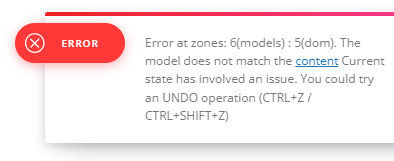
EighthatsThis page: https://www.rcrwireless.com/6g is linking to a webinar page for some reason instead of the normal category archive for “6G” which has about 200 posts using that category, and they should be displaying. When I go to edit the Category Template in Cloud Templates using TD Composer, I get a 404 with this error at the top:
ERROR “Error at rows: 1(models) : 2(dom). The model does not match the content. Current state has involved an issue. You could try an UNDO operation (CTRL+Z / CTRL+SHIFT+Z)”
Hi simchris, you are right, for the moment there is no option to remove those elements and the easier solution is a custom css to hide the comments and post count elements. Now in case you want to remove them so will no longer be loaded on the page, then you need to edit it in the file – wp-content/plugins/td-composer/legacy/Newsmag/parts/page-author-box.php – https://i.imgur.com/yWViXaj.png
Thank you!
 Rifat Sharna
This plugin failed to load properly and is paused during recovery mode.
An error of type E_ERROR was caused in line 166 of the file /home/sassoobx/public_html/wp-content/plugins/td-composer/td-composer.php. Error message: Uncaught Error: Failed opening required ‘css-analyze/css-analyze.php’ (include_path=’.:/opt/alt/php80/usr/share/pear:/opt/alt/php80/usr/share/php:/usr/share/pear:/usr/share/php’) in /home/sassoobx/public_html/wp-content/plugins/td-composer/td-composer.php:166 Stack trace: #0 /home/sassoobx/public_html/wp-includes/class-wp-hook.php(324): tdc_plugin_init() #1 /home/sassoobx/public_html/wp-includes/class-wp-hook.php(348): WP_Hook->apply_filters() #2 /home/sassoobx/public_html/wp-includes/plugin.php(517): WP_Hook->do_action() #3 /home/sassoobx/public_html/wp-content/plugins/td-composer/legacy/common/wp_booster/td_wp_booster_functions.php(236): do_action() #4 /home/sassoobx/public_html/wp-content/plugins/td-composer/legacy/Newspaper/functions.php(22): require_once(‘/home/sassoobx/…’) #5 /home/sassoobx/public_html/wp-content/plugins/td-composer/td-composer.php(191): require_once(‘/home/sassoobx/…’) #6 /home/sassoobx/public_html/wp-includes/class-wp-hook.php(324): {closure}() #7 /home/sassoobx/public_html/wp-includes/class-wp-hook.php(348): WP_Hook->apply_filters() #8 /home/sassoobx/public_html/wp-includes/plugin.php(517): WP_Hook->do_action() #9 /home/sassoobx/public_html/wp-content/themes/Newspaper/includes/wp-booster/tagdiv-wp-booster-functions.php(3): do_action() #10 /home/sassoobx/public_html/wp-content/themes/Newspaper/functions.php(20): require_once(‘/home/sassoobx/…’) #11 /home/sassoobx/public_html/wp-settings.php(668): include(‘/home/sassoobx/…’) #12 /home/sassoobx/public_html/wp-config.php(110): require_once(‘/home/sassoobx/…’) #13 /home/sassoobx/public_html/wp-load.php(50): require_once(‘/home/sassoobx/…’) #14 /home/sassoobx/public_html/wp-login.php(12): require(‘/home/sassoobx/…’) #15 {main} thrown
 _edwin_
Goodmorning, after updating my newspaper theme I have some strange errors. Pressing a blogpost I get an error like, wp_booster error:
td_api_base::mark_used_on_page : a component with the ID: single_template_5 is not set.
/home/customer/www/stressplein.nl/public_html/wp-content/plugins/td-composer/legacy/common/wp_booster/td_api.php
How to solve this????? Thanks
 RyanFarley
Hello TagDiv team,
I am testing my changes from my dev system in a new test system. To migrate I imported the theme settings from my dev system to my test system. Then I exported the cloud templates from my dev system and imported to my test system.
Everything worked great, except for my template for post tag is not displaying my template. Other taxonomies templates are working fine, this is the only one with an issue.
I recorded a video showing the issue here: https://share.customerfx.com/qGunvmZR
As I show in the video, I can see the template associated with Tag in the Cloud Templates area. If I edit in TD Composer from there I see the correct template. If I use View, it shows incorrect even though I can see the same template Id in the URL. I have also ensured that there are no caching plugins active (all other imported cloud templates are displaying fine and just as they are in my dev system, only the post tag template is having this issue)
Also, the incorrect tag template that is showing doesn’t have any of the rest of the header, footer, etc as I do in the dev system.
I am unable to provide access to either the dev or test systems since these are local systems, but I am capable of performing any database queries, or checks of anything needed, to provide the info you need.
Thank you.
Ryan
 aneeislam
whenever i try to edit homepage, it’s redirecting to eror404 page.
 brue
brueHi,
since this morning i have problem with Newspaper theme and namely composer plugin.
In one moment, after not installing anything or updating, i was just searching site database in Participants Database plugin, i received white screen of death but only on admin dashboard (it works normal for visitors).
I have renamed plugins folder, which resulted in restored access to admin dashboard. So i have changed name of plugins folder to plugins.old, formed new one and started checking plugin by plugin. On very start, as soon as i reinstalled Composer, alone in plugins folder, white screen of death comes back. This didn’t happen to any other plugin.
Then i noticed that in Newspaper part of dashboard if i start installing of plugins, i m getting Ajax error.
I ve turned on debug and these messages i m getting first for Newspaper dashboard and second for white screen of death after i put Composer manually and activate it.
Fast Start Your Website
Warning: ftp_fget(): Failed to open file. in /var/www/html/public_html/wp-admin/includes/class-wp-filesystem-ftpext.php on line 146 Warning: ftp_fget(): Failed to open file. in /var/www/html/public_html/wp-admin/includes/class-wp-filesystem-ftpext.php on line 146
1. Install or Update the required Newspaper plugins
Install premium plugins
Install the included plugins with ease. All the plugins are well-tested to work with the theme and we keep them up to date. The theme comes packed with the following premium plugins:
Fatal error: Uncaught TypeError: ftp_fget(): Argument #1 ($ftp) must be of type FTP\Connection, null given in /var/www/html/public_html/wp-admin/includes/class-wp-filesystem-ftpext.php:146 Stack trace: #0 /var/www/html/public_html/wp-admin/includes/class-wp-filesystem-ftpext.php(146): ftp_fget(NULL, Resource id #264, ‘/var/www/html/p…’, 2) #1 /var/www/html/public_html/wp-content/themes/Newspaper/includes/wp-booster/wp-admin/tagdiv-view-theme-plugins.php(125): WP_Filesystem_FTPext->get_contents(‘/var/www/html/p…’) #2 /var/www/html/public_html/wp-content/themes/Newspaper/includes/wp-booster/tagdiv-wp-booster-functions.php(499): require_once(‘/var/www/html/p…’) #3 /var/www/html/public_html/wp-includes/class-wp-hook.php(324): {closure}(”) #4 /var/www/html/public_html/wp-includes/class-wp-hook.php(348): WP_Hook->apply_filters(”, Array) #5 /var/www/html/public_html/wp-includes/plugin.php(517): WP_Hook->do_action(Array) #6 /var/www/html/public_html/wp-admin/admin.php(259): do_action(‘newspaper_page_…’) #7 {main} thrown in /var/www/html/public_html/wp-admin/includes/class-wp-filesystem-ftpext.php on line 146
There has been a critical error on this website. Please check your site admin email inbox for instructions.
And this one for white screen of death:
Fatal error: Uncaught TypeError: ftp_fget(): Argument #1 ($ftp) must be of type FTP\Connection, null given in /var/www/html/public_html/wp-admin/includes/class-wp-filesystem-ftpext.php:146 Stack trace: #0 /var/www/html/public_html/wp-admin/includes/class-wp-filesystem-ftpext.php(146): ftp_fget(NULL, Resource id #64, ‘/var/www/html/p…’, 2) #1 /var/www/html/public_html/wp-content/themes/Newspaper/includes/wp-booster/wp-admin/plugins/class-tagdiv-theme-plugins-setup.php(356): WP_Filesystem_FTPext->get_contents(‘/var/www/html/p…’) #2 /var/www/html/public_html/wp-content/themes/Newspaper/includes/wp-booster/wp-admin/plugins/class-tgm-plugin-activation.php(1977): tagdiv_theme_plugins_setup->theme_plugin_has_update(‘td-composer’) #3 /var/www/html/public_html/wp-content/themes/Newspaper/includes/wp-booster/wp-admin/plugins/class-tgm-plugin-activation.php(1836): TGM_Plugin_Activation->does_plugin_have_update(‘td-composer’) #4 /var/www/html/public_html/wp-content/themes/Newspaper/includes/wp-booster/wp-admin/plugins/class-tgm-plugin-activation.php(422): TGM_Plugin_Activation->is_tgmpa_complete() #5 /var/www/html/public_html/wp-includes/class-wp-hook.php(324): TGM_Plugin_Activation->init(”) #6 /var/www/html/public_html/wp-includes/class-wp-hook.php(348): WP_Hook->apply_filters(NULL, Array) #7 /var/www/html/public_html/wp-includes/plugin.php(517): WP_Hook->do_action(Array) #8 /var/www/html/public_html/wp-settings.php(700): do_action(‘init’) #9 /var/www/html/public_html/wp-config.php(121): require_once(‘/var/www/html/p…’) #10 /var/www/html/public_html/wp-load.php(50): require_once(‘/var/www/html/p…’) #11 /var/www/html/public_html/wp-admin/admin.php(34): require_once(‘/var/www/html/p…’) #12 /var/www/html/public_html/wp-admin/plugins.php(10): require_once(‘/var/www/html/p…’) #13 {main} thrown in /var/www/html/public_html/wp-admin/includes/class-wp-filesystem-ftpext.php on line 146
There has been a critical error on this website. Please check your site admin email inbox for instructions.
Do you have ideas whats going on and help me, please?
thiruHi
I know I need to use Column Text to embed short codes. How do I embed the blocks available in tdcomposer to posts/pages? For eg., If I want to use list of posts belong to category using FlexBlocks or Blocks, how do I embed and pass the required settings as parameters to display as we do using TD Composer visually?
 satheshf12000
I’ve just bought the theme and installed it on beta.thinaboomi.com and I’m getting this error while trying to install the tagDiv plugins.
Parse error: syntax error, unexpected ‘)’ in /home/thinaboomi/public_html/wp-content/plugins/td-composer/legacy/Newspaper/includes/td_config.php on line 9201
Can you please help?
Thanks.
Anamaria Hi,
I recommend you do a clean install of WordPress and the theme. Also, the file is license.txt, not with the extension HTML, so you can try to remane it or delete it. Additionally, please check all the files for the strange code.
Additionally, using Wordfence to scan the website and remove unknown users would be prudent.
Change admin passwords and delete admin accounts you are not familiar with;
– Delete any weird/unknown plugins;
– Delete the weird/unknown themes;
– Clean unfamiliar Theme Panel injected code (example – https://i.imgur.com/4q70kCv.png);
– Clean WordPress files (example – https://i.imgur.com/stJCqiK.png)
Please block /wp-json/tdw/save_css
If an attacker wants to target this URL /wp-json/tdw/save_css they can do so. Even if the website uses a different theme, the attacker can still try that URL. We could add an option to be able to enable/disable the Live CSS, it will be considered. But for now in order to remove it this can only be done with a modification to the composer plugin. I think that all that removing it requires is to comment this line of code – https://prnt.sc/RtwvL5Nc4ikR -> https://prnt.sc/ymZmhdUfp57U But as I mentioned, the attacker can still try to access the URL.
Thank you!