
- TutorialsFrom WPBakery to tagDiv Composer
- TutorialsDefault Block Settings Guide
- TutorialsHow to Update the WPBakery Page Builder plugin
 Graphic Oracle
 Hi Catalin,
Your tech team was able to get the tagDiv plugin to work by editing the .htaccess file with this code:
<IfModule mod_substitute.c>
SubstituteMaxLineLength 10M
</IfModule>
However I was told by them the the actual problem should be fixed, which is a mixed content error that is triggered when attempting to access the tagDiv composer plugin. See error here— https://www.screencast.com/t/Sctdkn81x84Y
Since I have a green padlock and the SSL works fine on the website except for the tagDiv composer plugin, it seems logical to reinstall the tagDiv composer plugin. Could you tell me how to do this?
 Adam Butler
 Hi, I just figured out the second problem (TD composer not working). I just found the solution in other thread.
I add below codes in my Htaccess file and now it perfectly working.
<IfModule mod_substitute.c>
SubstituteMaxLineLength 10M
</IfModule>
I really need to know the solution to the first problem.
Adam ButlerHi,
I just purchased the theme and installed a demo theme namely “classy Magazine”. By default, the blog posts showing a sidebar with social links. Here is the screenshot for your easy understanding, http://prntscr.com/l00q0v
I need to change them but found no options. Neither in the Theme Panel nor in the widget section.
How can I update that?
Another problem I am facing that while I tried to edit a page with TD Composer, the browser shows completely blank. Here is another screenshot for your easy understanding, http://prntscr.com/l00qrz
I clean up cookies and tried 4 other different browsers, but all are same.
What could be the possible reason for this and how I can fix this problem?
Thanks in advance for your kind help.
Best
 arrick
We are getting the following flagged in Wordfence: Are these false positives?
This file may contain malicious executable code: /wp-content/plugins/td-composer/includes/tdc_ajax.php
This file may contain malicious executable code: /wpcontent/themes/Newsmag/includes/wp_booster/td_block.php
This is also on the scan which makes me think we’re probably safe and they’re just trying to sell us services….
“Since you have High Sensitivity scanning enabled, there is a very high likelihood that your results will include false positives. If you think you have indeed been hacked, our team of security experts can help.”
Thanks!
 Simion C.
 I made a test with the same post, flex block 1 vs block 1 (which uses module 4)
– https://www.screencast.com/t/A0uDIZlquz
The result is the same for me. You could use the vertical alignment setting, but I see you use an older version of the theme and composer and the setting is missing for you
– https://www.screencast.com/t/x68ZR9Wz
Try this code in the custom CSS section and see if the images are aligned top in the flex block after entering it
.td_module_flex_1 .td-thumb-css {

background-position: center top;

}
 Calin
Calin I just check your web page again and you set a size for a thumb ( https://www.screencast.com/t/GjUeP44dUT ) please change it on full size.
Open the page with td Composer click on the background image, click on css, remove the image from background ( https://www.screencast.com/t/amOD1Xg1n2Gv ) , click to add one ( https://www.screencast.com/t/RX0A3Ym2EpT ) save and view the page .
Hope this will help you.
Calin Hi duongvh68,
Sorry for this inconvenience, but TD Composer is build specially for page, you can create Homepages, pages, Sections, Single articles, etc. you can create templates but not posts like this
You can read more about tagDiv Composer here: https://forum.tagdiv.com/tagdiv-composer-tutorial/
Thank you for your understanding.
Calin Hi,
Please make sure that the theme system status is configured as mentioned in the requirements guide. Please follow the guide carefully
– https://forum.tagdiv.com/requirements-for-newspaper/
Also please uninstall/delete TD Composer and install it again.
Thank you.
Calin Hi feroz706,
Please make sure that the theme system status is configured as mentioned in the requirements guide.
Please follow the guide carefully:
https://forum.tagdiv.com/requirements-for-newspaper/
Please try this ( https://www.screencast.com/t/pFoqAA4oa6 ):
In order to fix this you have to add the following lines in the .htaccess file located in your website main folder: .htaccess
<IfModule mod_substitute.c>
SubstituteMaxLineLength 10M
</IfModule>
Also ensure that you have the last version of TD Composer.
Thank you for your understanding.
-
This reply was modified 8 years by
 Calin.
Simion C. Hi,
So there is still a problem with the composer. You could try the solution mentioned in this topic, it worked for similar cases when the composer would not load
– https://forum.tagdiv.com/topic/javascript-error-td-composer-wont-load/
Also could be caused by insufficient resources, this is a guide you can read
– https://forum.tagdiv.com/newsmag-requirements-for-newsmag/
Setting a memory limit of 256M would be enough for most users.
In case the problem remains, you could try another suggestion. To eliminate a plugin being the cause, deactivate them all except theme plugins. Check if this has any effect.
Let us know the results after trying these suggestions.
Thanks
 ALM2000
 Thanks for the response.
I followed your directives and the frontpage is now back online. (Still curious though, how it got changed in the first place, because the site was fine for months and I made no changes).
Thanks once again.
However, I’m still unable to edit the page with TD Composer, (Even after adding the code to htaccess, as directed). The panel shows on the left, but the big rolling icon (that shows it’s loading) just keeps going on continuously without ever starting.
Please help.
Thank you.
 artimag
Hello tagDiv team,
Your theme is awesome but I have three problems I can not solve.
1. I have a problem with my full big grid block.
I turned off the date and the author name on the homepage. It works everywhere except the full big grid block at the top.
There appears under the headline a small gray box (remains of the td-module-meta-info)
I can hide the box with ther CSS code
.td_block_big_grid_fl_1 .td-module-meta-info{
display:none;
}
The problem with the method is that when the page loads, the date still appears for about a second and then disappears. Since the big grid block is at the top of the homepage, the date is visible to everyone for a short time.
Interestingly, the little gray box appears in every browser except in Firefox.
2.) In tagDiv Composer I get the error message at the top
Notice: Undefined index: post_ID in */wp-content/plugins/wordpress-seo-premium/premium/classes/premium-metabox.php on line 146
In the file premium-metabox.php is written:
/**
* Retrieves the post ID from the globals.
*
* @return {int} The post ID.
*/
protected function get_post_ID() {
return $GLOBALS[‘post_ID’]; (<- This is line 146)
3.) At Dashboard -> Plugins -> Add New I get the error message at the top
Notice: Undefined property: stdClass::$plugin in */wp-includes/class-wp-list-util.php on line 150
In the file class-wp-list-util.php is written:
/*
* This is simple. Could at some point wrap array_column()
* if we knew we had an array of arrays.
*/
foreach ( $this->output as $key => $value ) {
if ( is_object( $value ) ) {
$this->output[ $key ] = $value->$field; (<-This is line 150)
} else {
$this->output[ $key ] = $value[ $field ];
}
}
return $this->output;
}
/*
Can you help me?
Many Thanks
best regards,
arti
 pavel@earnware.com
So after hitting save button, closing a page, then opening it up again in TD COMPOSER moder – near every ‘ symbol, this symbol is added \ so in the end all ‘ – are – \’
I just added ‘ on this page below, closed it, opened it again – with TD Composer and here is what it added automatically:
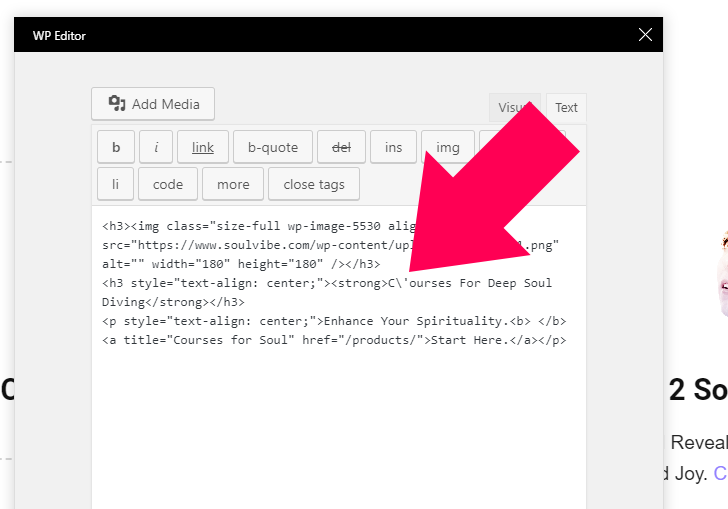
I am talking about ' symbol – ASCII: apostrophe-quote
So to be clear, I close it – open it again – and I work in Column Text.
ALM2000Hello,
Please I need your urgent intervention. The frontpage of my site, http://africanleadership.co.uk, just stopped functioning all of a sudden.
Other pages are still OK, but the frontpage (and all pages also handled by TD Composer plugin) are no longer showing.
All that shows is the top menu.
Thanks for your prompt response
 paragraf22
Hello,
We use the dentist theme as a basis for building our project.
We can not find a way to put a url on the photo(element, column, row) of the specialists and clicking on the individual team photo to lead to an internal database (category) where the profiles of the team’s specialists are announced.
Is there a way to do that?

 bobbymc
 Not sure I made my question clear – for example this page was created with TD Composer https://brandinginasia.com/china-surpasses-u-s-as-samsungs-biggest-market/
I want to convert it to cloud template. I don’t want to have to convert all 5,000+ posts. How can I change a previous post style to the Cloud Template?
Calin Hi,
The best way will be if you migrate to TD Composer, in that way you will be able to use cloud template.
You can read more about How to move your pages to tagDiv Composer here: https://forum.tagdiv.com/visual-composer-tagdiv-composer-transition/
If you decide to take this step please make a full backup first.
Thank you for your understanding.
 themes10
I get this error when I try to open TAGDIV Composer today:
“Errors happened during tdcIframeData.init() -> bindViewsModelsWrappers()!”
How can I fix this ?
Calin Hi,
Using TD Composer that will be very easy just take a look at this example:
For desktop/px: https://www.screencast.com/t/SAFcdXJml
For mobile : https://www.screencast.com/t/Jkyq8kRlsx
You can read more about TD Composer in this documentation: https://forum.tagdiv.com/tagdiv-composer-tutorial/
Thank you.
 Catalin
 Hello ecolohosting,
I have inspected your website and I saw that the layout of your duplicated homepage does not have the same structure -> https://www.screencast.com/t/lktnNvIusM The width if that span it seems to be 100% instead of 25% as it is in the default homepage, as you can see here -> https://www.screencast.com/t/BFsGVWM8 You should edit that page and dd the correct layout you want, like this -> https://www.screencast.com/t/SgiYQrc4v Edit again your page with TD Composer and re-configure the structure of your page.
I hope that you understand that process!
Thanks for your understanding!
Catalin Hello Ben7777,
I guess that you are referring to the following whitespace from here -> https://www.screencast.com/t/SgABC5K0, right? Notice that seems to be a container added by you. Edit the page with TD Composer and manage it as you wish (edit it or remove it).
Thanks for your understanding!
 razvan162
Error at rows: 7(models) : 1(dom). The model does not match the content
My site was ok few hours ago…nou the front page in blank and i have this error on TdComposer.
What should i do?
the site is http://www.myzone.ro
Calin Hi afazja,
Inn order to do that you need to go in Newspaper > Theme panel > Categories and there if you select on individual category just select the category you want to get rid of background and switch off the button for BACKGROUND BOXED LAYOUT ( https://www.screencast.com/t/ASmXemlD2Ai )
After that your page will look like this https://www.screencast.com/t/VAqB4soY
in order to make it box go in cloud templates and search for the category template you set on that category, open it with TD Composer, hover the image and click on row from left top corner and look in general for Row stretch select default ( https://www.screencast.com/t/4oGMubriV5yR ) save it.
See results :
https://www.screencast.com/t/SqkDVa30
Thank you.
Calin Hi erinhumhpreydesign.com,
Please go in /data/18/2/107/137/2596952/user/2848103/htdocs/WordPress/wp-content/plugins/ and remove/delete td-composer after you do that try to install it again.
Thank you for your understanding.
 k2point0
Hello, I have installed Animal News Demo in Yogesh Khetani blog. I want to remove the footer Instagram content completely. How can I? Here is what I am talking about:
It’s not deleting from home page editing options (both Edit With TD Composer and normal WordPress Post edit in html mode)
Here is what I get after doing CTRL + U on homepage:
<div class=”td-main-content-wrap td-footer-instagram-container td-container-wrap “>
<div class=”td-instagram-user”>
<h4 class=”td-footer-instagram-title”>
Follow us on Instagram @wildlifeplanet
</h4>
</div>
I want to remove the footer Instagram content completely. How can I?
