
- NewsmagHow to update a plugin
- NewspaperHow to update a plugin
- NewsmagHow to update the theme
- NewsmagHow to update the WPBakery plugin
- NewspaperHow to update the WPBakery Page Builder plugin
- NewspaperHow to Update the Newspaper Theme
- Apitd_api_top_bar_template::update_key
- Apitd_api_top_bar_template::update
- Apitd_api_single_template::update_key
- Apitd_api_single_template::update
- Apitd_api_footer_template::update_key
- Apitd_api_footer_template::update
- Apitd_api_smart_list::update_key
- Apitd_api_smart_list::update
- Apitd_api_thumb::update_key
- Apitd_api_thumb::update
- Apitd_api_category_top_posts_style::update_key
- Apitd_api_category_top_posts_style::update
- Apitd_api_category_template::update_key
- Apitd_api_category_template::update
 Bogdan B.
 Hello,
1.Sorry but our theme does not support 3 columns on posts. Sorry
2.Infinite loading on posts is not possible in our theme due to it’s custom made nature. We have this request on our list for future updates but we have not found a viable solution for this yet.
Thank you!
 Catalin
 Hello paologalli,
You should update your Visual Composer with the version which comes bundled with the theme packet. To be safe, you should use the version which is in the theme packet.
Thanks for your understanding!
Bogdan B. Hello,
If you want to update the theme in the standard way please use this guide: https://forum.tagdiv.com/how-to-update-the-theme-2/
If you have modifications in the code and only want to replace the changed files these are: td-login-modal.php, td_config and style.css
Thank you!
 ayra03
 Thank you. I use main theme, no child. I disabled all plugins,deleted custom code, cleaned cache, and did all you have told but nothing happened. I still cannot update when I put block in Visual Composer in main blog page.
Maybe there is problem because I use this options within your theme: https://s24.postimg.org/fd319zp1x/image.png (I have to choose something) My main blog “Novosti” is set as static blog page.
When I go to Visual Composer I have to add block to filter categories. So, there isn’t same as your M10 (article display) so I use this https://s23.postimg.org/wymttca57/image.png
Then I can filter categories: https://s30.postimg.org/jrcweclip/image.jpg
But when I click on update https://s30.postimg.org/41i8cof9t/image.png all what I did is deleted and I get this:
https://s28.postimg.org/ckh317yal/image.jpg (like in the beginning).
In my “second blog” I don’t have this problems, probably because it’s not set as main blog.
However, if I cannot do anything I leave as it is. Thank you one more time for patient and great help!
Bogdan B. Please follow the official update guide carefully and make sure you do each step and most important: create a back-up.
https://forum.tagdiv.com/how-to-update-the-theme-2/
A proper update should never result in data loss.
Thank you!
Bogdan B. Hello,
Our theme received compatibility to php 7.0 (not 7.1) in the current version of the theme: (7.6)
Please update your theme and the errors will not be present anymore.
Thank you!
Catalin Hello Patrick,
First of all, I will thank you for your appreciations. In a future update, it is possible but we cannot say for sure if it will get done in the next update because we have a big list of fixes, improvements, and suggestions to implement. It’s hard to filter them and select which one gets implemented now and which one gets postponed. The developers decide if it gets done or not, though.
Thanks for your understanding!
 Finland
 here is my parts > header folder. https://i.hizliresim.com/PnZRRv.jpg

my theme version. i can’t update 3.3 version because i bought so many item from fiverr. like different releated post style. if i update 3.3 my theme edits probably removed. :/
https://i.hizliresim.com/9gjbar.png

-
This reply was modified 9 years by
Finland.
Bogdan B. Yes but the plugin was updated since then. It was a temporary issue in the version that was working at the time. Since then wp super cache has been updated and the issue was resolved.
I did not say to disable the plugin , I just told you about the issue it had at the time
Thank you!
Bogdan B. Hello,
This depends if you altered the theme files or not. People do not want to replace all the theme files because they have modified files in their install. If you do not modify any theme file, you can run the update normally without using any patch. Please use this guide: https://forum.tagdiv.com/how-to-update-the-theme-2/
Thank you!
 paologalli
Hi
I just installed the last update of the theme
should I also update visual composer (or the version in the last theme update is the same of the previous update)?
thx
Paolo
Bogdan B. Hello,
Glad you figure it out. I seem to have forgotten to place the screenshot in my reply above, but it was not an accurate one. I thought the main menu was the issue. But you seem to have figured out the issue. I will add this to our list and fix it in future updates.
Thank you!
Bogdan B. Hello,
1. Unfortunately our theme ad system works across the whole site. It cannot activate or deactivate an ad for specific posts/pages. You will have ti use an ad plugin for such functionality. You can try adrotate for example
2. Well the file gets replaced so any at all customization to the theme files will have to be re-added. Please always make a back-up of your modifications as the theme files get replaced and you will have to re-add the modification after each update.
There is no update proof method of altering the theme files unfortunately
Thank you!
 Simion C.
 Hi,
I don’t fully understand what you are trying to do. You can modify that element by opening your page in Visual composer and editing it there. As for the theme auto update feature please read this tutorial – https://forum.tagdiv.com/how-to-automatically-update-newspaper-theme/
Thanks
 luxechicago
Hi. I want comment box turned off. With the latest update….it is appearing ever where as 0. How can I turn this off.
Also when you go into the post….the by author and date are messed update (the pagination)
Our website is stylechicago.com.
Please let us know how to fix ASAO!
luxechicagoHi. My developer purchased the theme on my behalf and accidentally put the licence in her name. I have paid her for all her services. We are all good.
I then bought another license….because I didn’t want to have to wait for her or be reliant on her for updates.
So I think I’m using the user licence for Newspaper that she bought for us. However, to update the theme….I have installed the envato plugin and have used the token…for the theme I have purchased. Will this work. It seems to be taking a very long time to update.
Thanks.
 Michael
 I did the update via ftp and there were no issues whatsoever, a quick look at those comments (they are open btw) and I would imagine they are on very poor hosting plans that are timing out or can’t handle the file size. There are no missing files.
 vladimirtrajkovic
 Hi guys,
Just to let you know that I found the cause of the issue: PHP 7.1. After I have downgraded to version PHP 7.0 everything looks smooth now.
So, I guess, keep this post in mind for the next update release 🙂
Cheers,
Vladimir
 Ar_farazon
Hello!
Recently server load began to increase. I don`t know why does that happen and tried to deactivate plugins that I use (except those that are necessary for newspaper theme) but nothing changed.
I dont know coding so it is difficult for me to understand whats happening but during reading of google I saw a plugin called “Query Monitor”. I instulled it and loaded disserent posts to see the result. The main thing that I see is that there are too many queries to
update_meta_cache()
wp-includes/meta.php:826
and some other files.(pls., see the screen)
https://www.screencast.com/t/WYeeSaEB7z6
I don`t think that is normal. Please, can you give me some advices?
Thanks.
 AndroidKosmos
Hey,
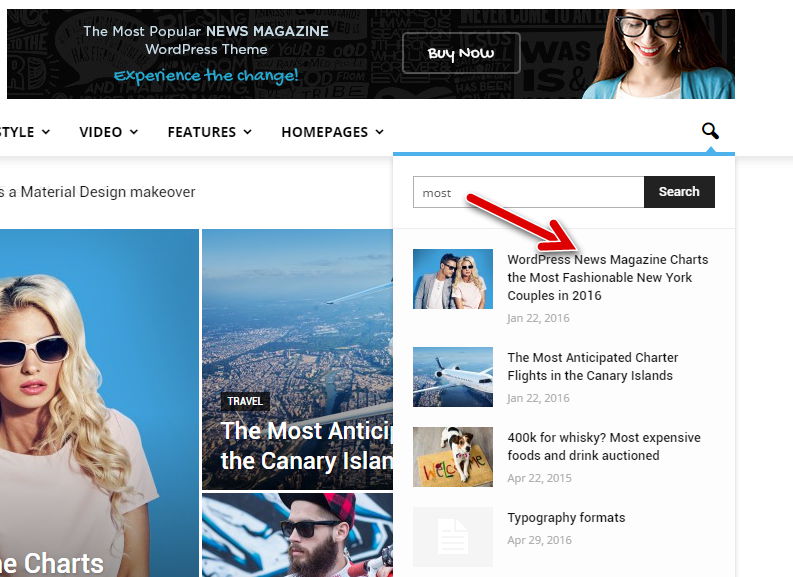
since i have update to 7.6.1 the search preview is gone. How could i get it back?
AndroidKosmos
 Gyuree8282
Dear Support.
I updated my website.. 7.1 to 7.6.1
I use Collapse-O-Matic plugin in author page – (http://arsboni.hu/author/korim-balazs/) version 7.1 is working fine but after the update is not working…
Thank you so much for help!
Have a nice day/night,
Regards,
Gyorgyy
 ChRoM
ChRoM Hey Catalin,
thanks for the workaround. However, I’m still wondering if the top bar menu shouldn’t show up in the hamburger menu? After all, it does show the social icons from the top bar menu, why not the other menu items? Maybe that’s something you can look into for future updates? Anyway, many thanks for the quick help!
 andreabarbieri
On 26th January 2017 I received an email of an update of Newspaper.
I wolud like how to actually update my theme on my website.
I have newspaper 7.3 now.
Thanks
 indianvlogger
 I had updated to the latest version. I dunno how I got the mail yesterday from google stating the same issue.
 shehzadms
 Which files do we need to update ? Can you give us some specifics so our custom code does not get affected/



