- Apitd_api_top_bar_template::update_key
- Apitd_api_top_bar_template::update
- Apitd_api_single_template::update_key
- Apitd_api_single_template::update
- Apitd_api_footer_template::update_key
- Apitd_api_footer_template::update
- Apitd_api_smart_list::update_key
- Apitd_api_smart_list::update
- Apitd_api_thumb::update_key
- Apitd_api_thumb::update
- Apitd_api_category_top_posts_style::update_key
- Apitd_api_category_top_posts_style::update
- Apitd_api_category_template::update_key
- Apitd_api_category_template::update
- Apitd_api_module::update_key
- Apitd_api_module::update
- Apitd_api_block::update_key
- Apitd_api_block::update
- Apitd_api_header_style::update_key
- Apitd_api_header_style::update
 Edragon
 And when I try to update plugins. An error occurred while updating WPBakery Visual Composer: To receive automatic updates license activation is required. Please visit Settings to activate your Visual Composer.
And visual Compsers says that to activate visual composer I need to pay more money. WTF is going on? I paid almost 100 dollars for theme and now I need to pay for required plugins one by one again? What sort of scam it is?
 Cosmin
Themeforest says last theme update was on December 2nd, but the change log from the Themeforest download (update_log) modification date is 01.11.2016:
_ _
| \ | ___ _ _ _ ___ ___ ___ ___ ___ _ _
| |/ ._>| | | |<_-<| . \<_> || . \/ ._>| ‘_>
|_\_|\___.|__/_/ /__/| _/<___|| _/\___.|_|
|_| |_|
~ tagDiv 2016 ~
Thanks for your support and feel free to contact us any time 🙂
https://forum.tagdiv.com – support forum
http://tagdiv.com
Made with love by:
~ Marius, Alin, Nicu, Radu, Emil, Alina S., Alina G., Lucian, Bogdan, Catalin, Cristi and Andrei ~
[ Version 7.5 ]
– new: author block – this block shows the author picture, socials and description. All in a nice and customizable design.
– new: image box block – this block is not just a simple image, it can be used to create banners, show featured categories with custom images or just to show some images. It’s auto adjusting and fully customizable.0
– fix: overlapping of Visual Composer and Newspaper tooltips while editing a page after the first install
– improvement: various core code refactoring and optimizations.
– improvement: better theme documentation and better help text in panel
– improvement: added used on for thumbnails in theme panel
– improvement: file path and names are now visible on each module, smart list, template etc on hover
– improvement: breadcrumbs markup, added BreadcrumbList schema
– improvement: in the System status panel, the theme now shows the license key used on the current install and we also have a button to remove the license from the install.
– fix: our blocks sometimes had issues auto adjusting the column count when placed in a inner row that is in a row
– fix: wrong recommended columns in Visual Composer, new users found it difficult to find out on what column layouts our blocks work best
– fix: drag and drop metabox flicker in wp-admin while editing a page
– improvement: system status now checks for mbstring and DOMDocument extension. We use DOMDocument for the new inline ad system.
Was there an update or not on December 2nd?
 simchris
 See the docs on how to update.
You can update via WP theme panel after you download the theme zip from themeforest.
Best way is via FTP to ensure it always works; and so you can make site backup at same time.
 itduck2020
Hi,
The WP Envato Toolkit or WP Theme Update stopped at 2.3.6. How do we continue to update the theme? Thanks.
simchris *** YOU DO NOT NEED to ‘activate’ the plugin with WP Bakery to use it; that is a feature they put there to get you to register for updates and support if you have a paid license.
With the bundled version, you get updates when the theme is updated. Period.
You can ignore the “nag screen to register/activate” with WP Bakery, which you cannot do, since you don’t have a paid license with the ‘bundled’ free version, which works with the theme.
Simply ignore the nag screen. 25,000 other people with the theme use it without activating it, so that should give you some measure of comfort — you do *not* need to ‘activate’ it with WP Bakery to use it. That option only applies if you paid for a separate individual license in order to activate updates and support with WP Bakery who make the plugin — since you didn’t buy a single license for the plugin, you cannot activate it for their updates/support, and have to wait for current tested version with each theme update.
The v5 version is fairly new, and does not add a gigantic number of things to the version still included.
The demos on ThemeForest are all built with the version you have, and that is the version you should use to work with the theme if you want to.
 Alin [tagDiv]
 Hi,
I can only tell you that we have tested the latest theme version and did no found any issues. Dropping traffic may be caused also by the server configuration, but I cannot say for sure why the above users reported this. They did not specified the cause(an error) and they only asked for 7.2 version. If it is an error on the site it should appear on errorlog file.
I can only suggest to update the theme and monitor your traffic for few days and if it drops please check the errorlog and see if you can find an error that may cause this.
Let us know!
Thanks!
 Kevin P. King
 Hey Sasser Good news! The Jet pack subscription app is working again after the latest update.
 marcar
 This is a concern for me, I have a relatively high traffic site, 8 to 9 million page views per month.
I’m currently on 7.2 and haven’t updated, my concern is if I do update, my traffic can vary 20% to 30% per day anyway depending on popularity of content. So it would be very difficult to tell if I was effected
Do the people effected drive the majority of their traffic through Google? 90% of my traffic is from Facebook.
For people who run an advertising based business, this is serious, no one wants to see a 20% dip in revenues.
 Bogdan B.
 Hello,
I understand what you mean and I will pass this information on to the development team as a suggestion for future updates. We are open to suggestions, we are not stubborn. What I meant is that i cannot provide the code you need right now but I cannot promise it will get implemented as we have lots of requests and we have to prioritize. What i meant is that we cannot offer customization services via the theme support, not disregard suggestions 🙂
Thank you and sorry for the misunderstanding.
 m0re
m0re Any word on the tagDiv Composer as older version of Visual Composer keep clashing with the cache plugin and home page doesn’t update
 Catalin
 Hello m0re,
The TagDiv Composer was removed for improvements and we shall return to it when will be updated.
Thanks for your understanding!
 dangitelman
 I’ve done everything just as you said and the problem still persists.
It seems other problems have arisen since the WordPress update. In addition to visual composer crashing, the images on the mobile (iPhone) homepage once you scroll down are blank (you can see for yourself).
Is there anything we could do to fix this?
Thanks
 onemichael
 Hi Catalin,
I wasn’t able to find any customizations that we made (none to the actual code-base, by the way), that would have caused this. But I ended up just making some minor updates to the styles.css which has fixed the problem.
thanks,
Michael
simchris You can’t.
You only get latest ‘bundled’ version of the VC plugin when the theme itself is updated, not at any other point in time. Current bundled version is included with the theme in the /plugins/ folder.
m0reHi,
I have tried to update the visual composer plugin as per your guidelines but you people don’t have the latest version 5.0 in the plugin folder, rather it is 4.12. So there is no way to get updated copy. Even your own plugin “tagDiv Composer” for home page isn’t available on the link provide. It gives 404 error.
How i can update to the latest version of VC, or, if your own plugin is better and finalized, how i can download it?
 awesomenezz
Since the update when I click on editor to to try to get to my header the page freezes on the Newspaper: stylesheet.css and then it forces me to kill the page and reload. It will not let me in to edit anything.
this is the area –> theme-editor.php
How do I fix this?
 meceware
 Hi Bogdan,
This is the theme responsibility. I’m not using a free theme that never updates. I have the proper code knowledge as I’m a software developer as well, I’m pretty familiar what I can do around PHP and wordpress. I already made my changes at the code but on the next release of Newspaper theme, I will lose my code and change it again.
Instead, the theme can be responsible for developers as well as users instead of being stubborn about it, no offense. Take a look at the premium themes, each one has the necessary hooks around their code.
As I told before, you already put a hook right after header, which is great. What I’m asking is another hook right before header. (See I have coding skills, I have checked your code, understood it, I don’t need a developer for this.) This is not a customization. If it’s a customization, why would you add it already? This is a premium theme responsibility. It’s just a line of code, for God’s sake.
 mdimran899
 Hi,
Thanks for the update.
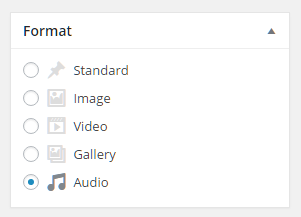
can you please let me know when i’m posting why posting format’s shows only two default & video.
how can i add the post format like below link shows.
https://www.mattcromwell.com/wp-content/uploads/2016/07/PostFormats-Metabox-1.png
currently in my wordpress showing only 2 formats
Standard & video.
how to add the other format as attached
Bogdan B. Hello,
Version 5.0 of the plugin will be available in the next theme update. We do not have a release date yet as it’s still in the works. We are not updating the theme just for visual composer 5, of course. We will improve our code as we do on each update and add extra compatibility and functionality. We also try to include php 7 compatibility but I cannot promise anything. We will try as much as possible to include it in this update (and hope to succeed).
Thank you!
Bogdan B. Hello,
I suggest reinstalling the theme using ftp: https://forum.tagdiv.com/how-to-update-the-theme-2/ and then testing without plugins: please disable all plugins except visual composer, clear cache and reset cdn files if you use it. Please also check any custom code you might have added to the theme panel or the theme files. If you use a child theme, please switch to the main theme to make sure it does not affect the proper functionality of the theme.
Thank you!
Bogdan B. Hello,
The latest version of visual composer is not yet included in our theme. We will include it in the next theme update. Please read this guide: https://forum.tagdiv.com/how-to-update-visual-composer-plugin/
Thank you!
Bogdan B. As I replied above:
We will include it in the next theme update.
When the them update is released, it will contain the new version of visual composer.
Thank you!
 cloin1
 VC update is minor and will not change much.. I’m sure your site is working just fine as it is… I would’nt worry too much about it.. When the Theme is updated I’m sure it will be for an overall purpose not just to update VC
 melcu
melcu Salut,
Am inteles. Vad ca a facut update. E ok asa.
Tot am o problema cu youtube. Ma puteti ajuta ?
Bogdan B. Hello,
Please make all of these tests without plugins. Plugins are the number one reason the theme functionality is affected. Please disable all plugins and only leave visual composer active. Then clear all caching from the cache plugin (we only recommend wp super cache), from the cdn server and from the host if there is any hosting related cache.
Then after all this test if you can save anything in the theme panel, check if you can disable the ads or add other ads, check if the social icons can be deactivated: http://screencast.com/t/5r8ZPkZdCbV
If you use a child theme, that can also cause issues if it’s not been updated.
If you still have trouble please contact us on our email address at contact@tagdiv.com and provide a link to your site and wp-admin (login information and admin rights) so we can login and investigate. Please also include a link to this conversation.
Thank you!