
- NewsmagHow to use the Visual Composer plugin
- NewsmagtagDiv Composer Tutorial
- NewsmagWhat’s included in Newsmag theme package
- NewsmagNewsmag documentation
- NewsmagBlock settings tutorial
- NewsmagHow to update the WPBakery plugin
- NewsmagCustom ad spots
 Alin [tagDiv]
 Hi,
The stretch row is a Visual Composer feature and the javascript code is used for it and it is not an easy task to change it. The theme doesn’t alter this css and it’s doesn’t support rtl, sorry!
Thanks!
 croboy
 I figured it out. I used visual composer to add block and then switched to classic mode and g otcode.
🙂
<?php echo do_shortcode('[vc_row][vc_column][td_block_16 custom_title="Name of block title" category_id="XYZ" limit="5"][/vc_column][/vc_row]'); ?>
Tnx anyway
-
This reply was modified 10 years by
croboy.
 ldjohn
 The URL is http://misfitsbliss.com/
The Active Widgets are as follows:
Akismet
Social Media and Share Icons (Ultimate Social Media)
W3 Total Cache
WP Product Review
WP User Avatar
WP Smush
WPBakery Visual Composer (4.7.4)
Yoast SEO
I will definetely be backing up in future. Just puzzled why the theme reset.
 whpro
whpro You can only notice the strange displacement of the website when the 728×90 “Navy Ad Campaign” leaderboard is present next to the logo. Also the ad size is no different then any other 728×90 banner we use in that same ad slot but those ads don’t displace content on the website.
I did notice that 728×90 “Navy Ad Campaign” ad giving us problems has only one noticeable difference from others. The banner is visually interactive and it expands when touched by a user’s browser, I am assuming that’s the reason why this happens?
Thanks for your help everyone.
Alin [tagDiv] Hi,
Please note that the theme doesn’t come with rtl support and you will need custom modifications for it and it is not an easy task. The parallax feature from Visual Composer use javascript and it is not an easy task to change it. I suggest to hire a professional developer for this as the time doesn’t allow us to provide custom work, sorry!
Thanks!
 Andrei L.
 Hi,
Try to deactivate lazy load animation from theme panel > template settings: http://screencast.com/t/pFGo6zqq also deactivate all plugins except Visual Composer, clear all caches ant test again. Ther Lazy load animation create issues when Rocket loader or any other tools wich minify the js are used.
Let us know how it goes!
Thanks.
 Bogdan B.
 Hi,
I have inspected the issue closer. Please disable Rocket loader plugin as it is known to cause problems with our theme. Please disable the lazyload option from the theme panel http://screencast.com/t/bxf83Vbp and disable all plugins except visual composer.
Thanks.
 Catalin
 Hi @Yannik97,
If you want to use a different symbol for every block used in visual composer, in CSS code you need to add a speccific class for each block: (.td_block_1 or .td_block_2 or .td_block_3 … or .td_block_18).
For my example, the CSS code look like that:
.td_block_1 .block-title span::before {

content: '\';

margin-right: 10px;

}
Thanks and let me how it goes!
Bogdan B. Hello,
Visual composer elements were not tested on posts. They work but lose their CSS and styling. You need custom work to get them to display like on a page.
As an alternative, you can use a different block to achieve your goals. For example a block 14: http://screencast.com/t/JzduopNO1
and style it with CSS:
.single-post .td_module_mx1{

padding-bottom:5px;

padding-right:1px;

}

.single-post .td_block_14{

margin-top:15px;

}
You can change the padding/margin values to your preference.
Add the code to the theme panel->Custom CSS box.
Thanks
Bogdan B. Hi,
You can replicate the slider you use with an image carousel element in visual composer and set it up similar to your plugin: http://screencast.com/t/eEFvzM1VA or you can apply a custom CSS for your slider to make it scroll on the mobile version as well:
 @media(max-width: 767px) {

.ult-carousel-wrapper .slick-list {

overflow: visible;

}

.ult-carousel-wrapper .slick-prev {

left: 0px;

}

.ult-carousel-wrapper .slick-next {

right: 0;

}

}
result: http://screencast.com/t/9sBHDo0SPb
Thanks.
Alin [tagDiv] Hi,
Please test this without any plugins active except of Visual Composer, remove also any custom modifications, like this image that can affect your test. Please test an article from our demo and see if works. We use only the recommended plugins.
Here you can find all the thumbs used by the theme including the featured image size – http://screencast.com/t/vMglIyJrQ
If you want to change this or add a new thumb size you will have to edit the td_config.php file – http://screencast.com/t/ylE0NAKMzG and here is used on default post template – http://screencast.com/t/3qEXetvMDH7
If you make any changes you will have to regenerate thumbnails – https://forum.tagdiv.com/existing-content/
You can find more details here(it is from newsmag docs, but it is the same also for newspaper) – https://forum.tagdiv.com/image-size/
I have also checked you site on Ipad Mini and the page is loading. Please provide more details about the issue you have.
Thanks!
Bogdan B. Hello Carly,
The latest version of visual composer was tested with our theme and should not cause any errors. That is why it’s bundled with the theme. Please install the visual composer version that comes with the theme and not other ones.
Here is the guide on how to update the plugin – https://forum.tagdiv.com/update-the-visual-composer-plugin-wpbakery/
You can also try to disable all other plugins except visual composer and check if your problem does not originate from a conflicting plugin.
Let us know how it goes.
Thanks you!
Bogdan B. Hello,
The theme has a few options to insert ads. Please read the doccumentation on how you can use ads: https://forum.tagdiv.com/header-ad/ (there are 8 sections on ads)
For pages you can use visual composer’s ad box element.
Headers have their own ad space you can use. If you want to place another ad besides the one provided by the theme you will have to alter the theme core files.
If you want to use the code method for example in the category pages, you can use a ‘do_shortcode’ function and set it to use one of the custom ad spots from the theme panel:<?php echo do_shortcode('[td_block_ad_box spot_id="custom_ad_1"]');?> and place the code in the corresponding category file: http://screencast.com/t/LgZK8Zys2Uw
I hope this helps.
Thanks.
-
This reply was modified 10 years by Bogdan B..
Alin [tagDiv] Hi,
I’m not sure what you have deleted and how all your image disappeared.
I recommend to do more investigations regarding this, a start can be to ask your host about this. I’m sure he can offer more information on why those files were deleted(user action or plugin).
Also you could check the security settings on your site, look for the parameters specified in the following guide – http://codex.wordpress.org/Hardening_WordPress
Regarding the video thumbnails, when featured video is used the thumb from video provider(youtube, vimeo) is downloaded and used as featured image and it should not be any issues even if you use the same video url, so please check this without any plugins active except of Visual Composer, clear cache and see if you still have this issue. Also please make sure you use the latest theme version 6.5.1 and the plugins provided with the theme.
Thanks!
Alin [tagDiv] Hi,
In version 6 of the theme we have more blocks that can help you to create your page using Visual Composer pagebuilder. And now you can add the excerpt length fore each module and like you can see it is specified also the block(s) where the modules is used – http://screencast.com/t/WwPwgyC11m3K
Thanks!
Bogdan B. Hello,
Please try to disable all your plugins except visual composer, clear your cache and purge CDN if you use it. If the problem is still there, check your system status to see if any of the parameters there need to be adjusted: http://screencast.com/t/yrsLFrV3M1q. You can follow this tutorial: https://forum.tagdiv.com/system-status-parameters-guide/
Let us know how it goes.
Thanks.
 doucare1971
 Nevermind, I am looking for a carousel where it just picks from categories without adding the content manually and I don’t think the tabbed content on visual composer does this. I think you just got it set where you added certain posts or media to it and that is it. I am looking for random post carousel thing and there is nothing like that in visual composer. Kind of like the big grid 3 but in a rotating carousel. So don’t worry about showing me what you did.
 Yannik97
Hi,
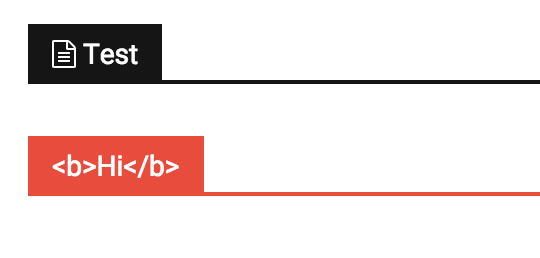
I want to use font awesome icons in titles of blocks.
When I add a icon with the <i> tag the title does not show up. When I insert a html block via visual composer I can add a icon but then I can’t change the color of the title background.
 Javier
 Hello Bogdan,
It seems that does not work great because not all the rows are the same height. So If I set max-height:700px there are “free space” between rows and If I set max-height:500px, some images are bigger than the row in which they are included.
In other themes that work with Visual Composer, I do not have problems with blank space between rows. I just create rows and put content inside.
Any suggestion? Thank you in advance.
Alin [tagDiv] Hi,
The tagdiv gallery was not designed to be used in a text block using Visual Composer. If you add it in a post content without using VC you will see that it wont be any issues. This is on our list and we will fix it as soon as possible.
You can try this custom css in Theme Panel > Custom Css until we fix it – http://screencast.com/t/ATzbkNYW
.single .td-pb-span12 .wpb_text_column .td-slide-on-2-columns .td-slide-galery-figure {

width: 100%;

}

.single .td-pb-span12 .wpb_text_column .td-slide-on-2-columns .td-doubleSlider-1 .td-slide-item img {

max-width: 100%;

}
Thanks!
Bogdan B. Hello Carly,
I set your Instagram account on my counter and your followers get picked up: http://screencast.com/t/mXLCiU694
Please clear your cache and purge CDN files if you use it. If it doesn’t work, you can try to disable all other plugins except visual composer and social counter and check it again.
Let us know how it goes!
Thanks.
 dizajn
 Yes, thanks for looking into it. One featured image wasnt resized during the upload and i deleted that post. Now it is ok back to normal.
For the second page i also use visual composer.
http://notranjskoprimorske.si/napovednik/
Here are also squares.
And if you click on event and you get eventcard poped up, you see in header of event card where date is displayed, there are also squares.
Alin [tagDiv] Hi,
I have tested your site again and seems that you don’t get this error anymore – http://screencast.com/t/vGQ8iwXb0m
Maybe it was something on your page that affected this.
Not sure why you have this issue only for your homepage, please disable all your plugins except of Visual Composer and Events plugin, clear cache and check if you still have this issue.
Do you use Visual Composer also for your second page?
Thanks!
 fluxresearch
Visual Composer’s General Settings allow you to restrict access to various user groups.
But the individual posts still have access to Post Settings which I assume is part of the Newspaper Theme.
Is there a way to limit the Post Settings by user role or to make only one available?
I’m actually using a standard format for all my posts so if I could hide the Post Settings entirely that would work as well.
Thanks!
 webdream
 Hi Alin, thanks for fast reply.
I just tried to use TAG as workaround to my issue but it doesn’t works:
I had created a new TAG inside Articles named “tag-a” and I bind it to 3 articles.
I had created a new TAG inside Events Manager Tag named “tag-a” (same slug) and I bind it to 1 event.
Editing my page with Visual Composer inside block-module named “Big Grid Side” I have this settings:
GENERAL
– Big grid style: Grid Style 1
– Offset posts: *null*
– Autoplay slider (at x seconds): *null*
– Limit post number: 8
FILTER
– Category filter: – All Categories –
– Multiple categories filter: *null*
– Filter by tag slug: tag-a
– Multiple authors filter: *null*
– Post Type: post,event
– Sort order: – Latest –
With this configuration I can see only the three posts tagged as tag-a but no event showing.
Removing “Filter by tag slug” I can see all my posts and all my events in this module.
I think that event manager’s tag and article’s tag are not shared.
So, if i can show either articles and events How can I filter all of them for a particular shared tag, category?
Thank you again for your precious assistance.
