No search results were found in Documentation!
 jonathan05
Hello support team,
I recently purchased the Newspaper theme and am using the “DEFAULT PRO” template because I was very impressed with its professional designs. I thought it would allow me to easily create a beautiful blog.
However, I discovered that most of the theme’s blocks (Flex Blocks, Big Grids, etc.) cannot be lazy-loaded, maybe because they use CSS background-image to display images ? I use lscache lazy load function and already tried others plugins.
This forces every single image in these blocks to load even if they are far below the fold. The lazy load option in the theme panel doesn’t improve performance metrics; it seems to be just a visual loading effect. Is that correct?
To keep a good performance score of 95+ on PageSpeed Insights, my only workaround has been to hide all images in these blocks on all single posts. While this fixes the speed issue, it completely defeats the purpose of buying a visually rich theme like Newspaper.
I already use others speed optimization like cache, css/javascript loading optimisation,etc. the only problem I can see is these theme’s blocks images on sidebar and footer not lazy-loaded.
My question is:
Is there a built-in setting or a recommended method to solve this? Or is this something that might be addressed in a future update?
This seems like a critical feature for any modern theme focused on performance.
My website : https://www.entrecampeurs.com/
Thank you for your help and guidance.
 zoldfulu
Good Morning,
I tried to update my (https://egzostive.com/) website’s php to the latest (8.3) via the bluehost dashboard.
After an initial boost in speed the site crashed completely (web, mobile even the WP dashboard), and I had to have it rolled back to 7.4 by the Bluehost helpdesk.
Now the website works but the mobile pages come up with a service not available message (the main page works but none of the posts, e.g. https://egzostive.com/the-ultimate-2025-car-show-and-events-list/?amp=1).
Can you have a look?
Also, what is the latest compatible php for the theme?
If it is already 8.3 how can I upgrade to 8.3 without crashing?
Thanks in advance,
 Peter_86
Hello, we have issues with page responsivness – loading times on page http://www.modre-novice.si. We host on highest performance LiteSpeed server. We tried to optimize page with suggested cache plugin WP Super Cache – still not good, than we optimized it with liteSpeed cache – dedicated cacheing plugin for litespeed servers and it was a bit better but still too slow for an news portal.
We asked host to check on it and these were theirs findings:
Hello,
I checked the status of the website and ran a fairly simple test to see how long the initial response time is. I noticed that the response time for the website itself is indeed as described by the client — it takes more than two seconds for the main page to load.
I reviewed the server settings to see if there was anything that could still be optimized, but it seems the configuration is fine and nothing major has been overlooked. I then started looking into the application itself, so I began disabling WordPress plugins to identify which ones have the biggest impact on performance.
First, I disabled the top half of the plugins, but there was no noticeable change. Then I re-enabled them and repeated the process for the bottom half, where it turned out that some plugins could be problematic. When I started disabling the plugins one by one, I found that the “tagDiv Cloud Library” plugin, when disabled, reduced the total page render time by half.
I continued and disabled the “tagDiv Composer” plugin as well, which significantly reduced the load time even further — down to around 320 ms.
Usually, these modules for building and designing websites generate code that, unfortunately, isn’t very optimized for loading speed, even though the end product often looks nice. When I look at the website’s source code, the first thing I notice is that the <head> section is quite large and contains a huge amount of data.
The <head> tag stretches all the way to line 353 in the source code, and there’s a lot going on in that part of the code. This affects how quickly the browser can start loading the content from the <body> section. If there’s too much “bloat” in the <head> area, the browser has to process all of that before it can begin rendering any content.
My suggestion would be to review this page builder and consider replacing it with something else that would ultimately produce better performance.
If you decide to move to a VPS server, it will definitely be able to handle more of these “slow” requests compared to shared hosting. In addition, once the server is actually under load, we can recheck some parameters, and if the page still doesn’t load as expected (in this case, around 2.5 seconds is a typical result for an uncached single request), we can then increase certain limits on the server to achieve higher throughput.
________________________
What is the solution here?
My layman’s question is whether the website still works and looks the same when those two plugins are disabled? Namely, the news or posts are generated in the classic way under “Posts” without using these specific plugins. I’m wondering if they can remain disabled and only be turned on when needed — for example, when editing content on individual pages (and not on posts).
As for the tagDiv Cloud Library, it seems that this plugin provides the layouts for the posts themselves, the archive page, category pages, etc. Does the website’s visual structure break if this plugin is disabled?
 Calin
Calin Hi,
I totally understand how frustrating this is a 20–30 sec load time is definitely not normal, and we’ll get it faster.
Just to clarify: the Newspaper theme itself isn’t the main problem. A website’s speed depends on more factors working together:
Hosting: If the hosting plan is small or shared, it can limit performance. Upgrading to a stronger plan (for example, VPS or managed WordPress hosting) can make a huge difference.
Examples: SiteGround GrowBig / Cloudways / Hostinger Business.
Optimization & Cache: Make sure you’re using a good caching setup (like WP Rocket pro plugin or LiteSpeed Cache free/pro) and have images optimized (via EWWW Image Optimizer or Imagify).
CDN: Adding a CDN like Cloudflare or BunnyCDN helps load content faster worldwide.
Even the Newspaper can run under 3 seconds when these parts are properly configured.
Thank you!
 mastaliyev
hi
i’m using Newspaper template for about 4-5 year and it’s eary stages i’ve optimized it with some plugins (WP-Optimize, WP super cach) and it worked quite well (some of tricks i’ve learned from this forum,so thank you all). i’m using cloudflare (Free version). my website is quite big (with 200 000 records). in recent month i’ve monitored that website have some delay in first opening. i’m using same server (VPS) and didn’t changed anything. but website working slow and it impact website traffic. is there any recent protocol or suggesting that i can change in my website to speed up? my website is banker.az . thank you for your suggestions. i
Calin Hi,
I see that there is an image that is trying to be loaded on the website, but this no longer exists https://i.imgur.com/xp9ya43.png, so resolving this situation will improve the speed a bit. Here is what you need to do, edit he homepage with tagDiv Composer, go to the footer zone and select the row, then select the css tab and click on remove text that is after the background image option – https://i.imgur.com/Ptl7VNu.png. After that, save the settings.
Also, to have a very fast website, you’ll need an excellent cache plugin and most of the time those are not free, for example WP Rocket – https://forum.tagdiv.com/wp-rocket-and-newspaper-theme-optimization-guide/ and use a CDN so your website is protected and the bots will no longer get on the website to consume extra resources.
Thank you!
 Simion C.
 Hi,
That is huge. Those seem to be transients from the theme, are you using the cache option for the blocks? – https://prnt.sc/XYn0HmoOEei7 The theme creates hose transients when that cache option for the blocks is used. But normally the transients expire and are deleted automatically, and new ones are created. Maybe something is preventing them from being deleted and they keep pilling up.
I see you are using litespeed. I suggest clearing the transients immediately https://prnt.sc/iF9V5OMErmtY There should be a setting in the database section of the litespeed plugin.
Then I suggest disabling the cache option from he theme for all the blocks where you activated it, to stop generating new ones and repeat the problem again.
If you need help doing these please send us an email at contact@tagdiv.com and provide admin login for the website. But until we get to check, Please try to follow my instructions if possible.
Thanks.
 thalesbrandao
 simchris and Calin
thanks for the tips
Check our website http://www.cidademarketing.com.br on Google PageSpeed.
Update the PHP version to 8.3.23; we are currently updating the operating system.
https://support.cpanel.net/hc/en-us/articles/5946421721623-How-to-upgrade-from-CentOS-7-to-AlmaLinux-8-or-CloudLinux-7-to-CloudLinux-8-with-cPanel-ELEvate. We are considering removing a pop-up and permanently removing Google AdSense.
The TTFB isn’t at the ideal level. It’s a situation we haven’t been able to resolve so far.
These are our results via Google PageSpeed - hoping the above actions will improve. I think the latest Google updates (core updates) have disrupted the rankings – which will be gradually adjusted.
our result so far without all the changes above
 support@thenews-chronicle.com
I’m experiencing a significant drop in my website’s active users, according to Google Analytics. The issue began approximately two weeks after I changed my website’s theme, which initially caused a major spike in active users. My goal is to understand the root cause of this decline and find a solution to get my traffic back up.
During the traffic spike, new users reached a peak of over 3,000 per day. During the drop, new users have fallen to less than 500 per day.
Troubleshooting Steps I’ve Already Taken:
I reinstalled my SEO plugin (Rank Math) to address a loss of SEO configurations.
I ran a site audit and have begun fixing 404 errors and broken links.
I have compressed my website’s images and activated preloading in WP Rocket to improve site speed.
I have submitted my sitemap to Google Search Console for re-indexing.
I would appreciate any insights into what might be causing this sudden decline and what steps I should take next.
Thank you.
 SiemenG
Hello,
For my new website speed is very important.
I just read that the speed will improve by deactivating the Standard Pack.
On my website http://www.hola.be the top header is the only thing that isn’t working.
Is it possible to fix this without the standard pack?
Kind Regards,
 News Moto
 Antonio Ungaro, kindly share your litespeed cache settings you are using on your website
 Alex
AlexHi,
Since July, we’ve had an issue with our website that we can’t resolve. Our CLS, measured with PageSpeed Insights, is greater than or equal to 0.30 on mobile. We can’t figure out what’s causing this high CLS. For example, on the desktop side, we have a CLS of 0.002. The problem only affects mobile, and since this issue began, the site hasn’t met Google’s requirements, preventing our articles from being published on Goolge Discover (before, when we met all the mobile requirements, we were always on Goolge Discover).
Our magazine is this: http://www.moviemag.it
Can you check and tell us how to fix the problem?
Thanks for your help.
See this screenshot https://ibb.co/M5KM0LV2
Calin Hello,
Upon checking the console, it appears that the website is unable to locate an image and is trying to load it from the following URLs:
I suggest verifying whether this image is set as a background under the mobile menu or search background in the EWSapper > Theme Pane > Background section. You can check here:
If the image is present, simply remove it and save the settings. Afterward, please clear all cache. This should help improve the website’s loading speed.
Once this is done, we can check if the website is loading faster and assess what further optimizations can be made.
Thank you!
 dailynewsng
Hello, since the last time i updated my theme and WP to the newest version, I have been experiencing issues relating with website (dailynewsng.com.ng) dragging and unnecessary breakdown from my backend and visitors’ side. And as a matter of fact, I started having my hosting resource limit eating up.
I have queried the hosting company severally, and part of the suggestion is to reach out to my theme support for a probable theme error or in conflict with WP new version.
I’m currently on WP Professional hosting plan on my website with the following allocations, how they are not enough to handle the website request is what is not clear. The hosting plan is even far from what I needed on my website, but I upgraded to it maybe to have enough allocations to handle the downtime. But still same dragging and downtime always.
SPEED Usage — 400%
I/O Usage.— 4MB/s
IOPS — 1024
NPROC — 100
Entry Processes.— 30
Physical Memory Usage — 4G
Please, what is the way out of this issue? Thanks
 BMBDigital
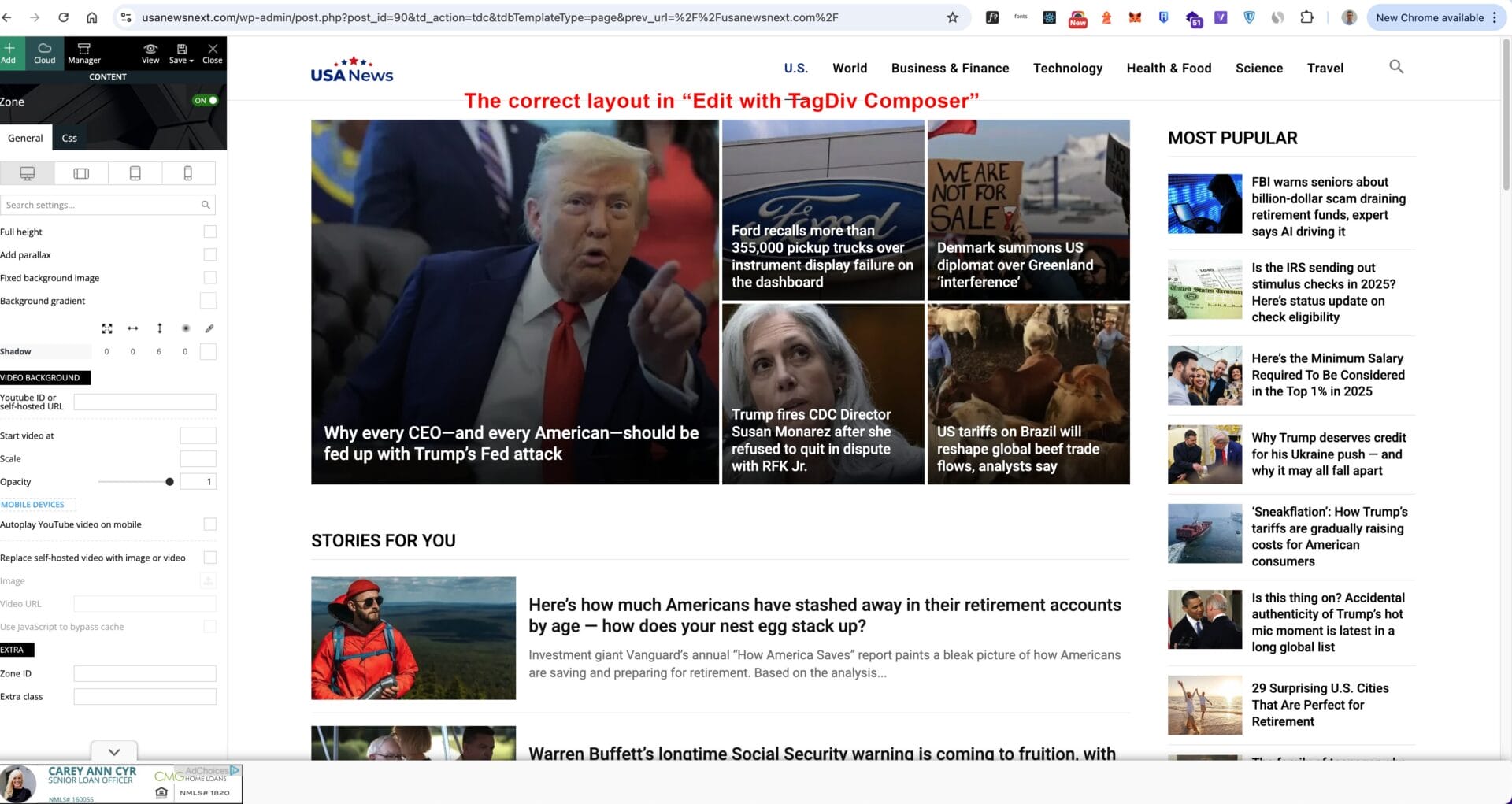
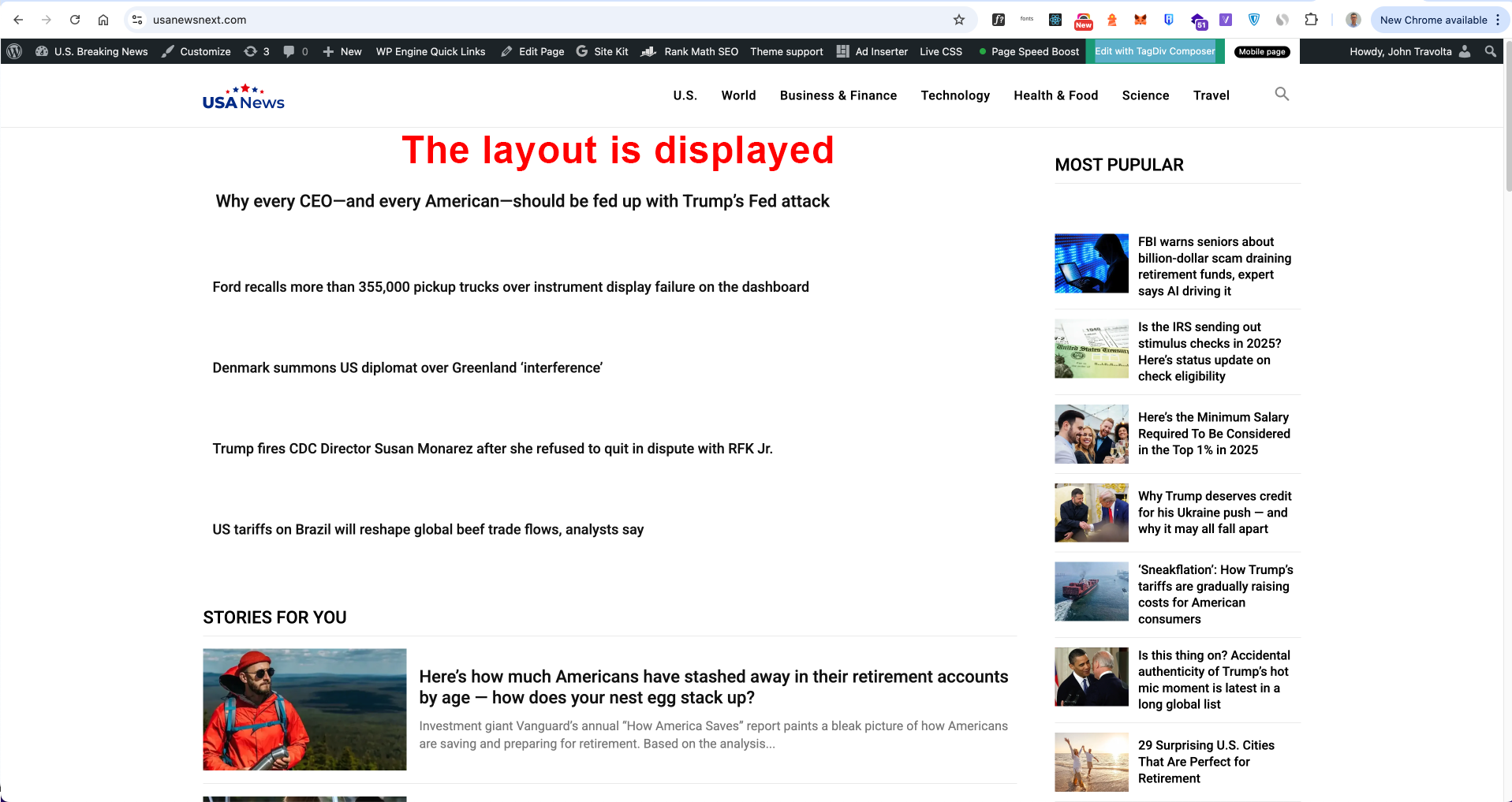
Can you please help me check my homepage? Why are the images not loading on the front end? The editor should reflect exactly what is displayed. I ruled out Page Speed Boost being the problem because even with it disabled, the images still do not show. I have also run a file permissions fix.
Please see the images for more information:
https://usanewsnext.com/wp-content/uploads/2025/08/image-7-1.jpg
https://usanewsnext.com/wp-content/uploads/2025/08/image-1-1.png
My website: https://usanewsnext.com/
Looking for support!!!
Thanks!
Calin Hi,
There are a few recommendations:
I will recommend using a good cache plugin, if you have the possibility WP Rocket will be the best, if not, Litespeed is one of the free cache plugins that provide the best results in the free version. Also, we recommend using Cloudflare (CDN), which will help you prevent attackers from getting on your website and also has options to improve the speed. The free version can be used; there is no need for a premium account.
For accessibility, you should check the H elements to be in order on your website, for example, there are 3 H1 and no H2 – https://i.imgur.com/co6Twat.png H1, is usually coming from logo and if you have the logo on the header, footer and mobile header, for the start there are 3 H1, what can be done is tu use tagDiv Composer, select the footer logo and also the mobile logo and make sure taht the option to disable H1 is checked – https://i.imgur.com/8yxrxU9.png – https://i.imgur.com/c7c0DPU.png
Thank you!
Simion C. Hi,
Such issues are most likely caused by the caching configuration. When using the options mentioned above for the header, the caching must be configured to create separate caches for desktop and mobile. Most caching plugins have a setting for it. Litespeed has this setting https://prnt.sc/Fq7cLtLU-HWS If you use litespeed, please activate that option, clear the cache and the problem should be solved.
Please try it. Or in case you use something different for caching, or you already activated that setting and the problem remains, please send us an email with the website link and admin login and we will take a closer look.
Thank you!
 emmalabbe
Hi,
We’re currently facing serious performance issues on our website, which uses the Newspaper theme and TagDiv modules. Over the past few weeks, we’ve noticed a significant slowdown specifically related to the loading of TagDiv components.
Our server infrastructure is robust (o2switch – 48GB RAM, NVMe disks, high-performance CPUs), and everything runs smoothly with a clean WordPress installation. However, with the Newspaper setup, we’re seeing 5 to 7 seconds of loading time on both the frontend and the WordPress admin, which is not acceptable—especially for SEO.
To give you more context:
• Production: https://devenirbilingue.com
• Staging: https://new.devenirbilingue.com (fresh WP install + duplicated DB from prod)
We’ve already tried the following:
• Installed Query Monitor: SQL queries are fast (< 0.5s), so it’s not a database bottleneck.
• Tested with caching (W3 Total Cache and WP Super Cache): helps when cached, but uncached pages are still very slow.
• Deactivated all plugins: no improvement.
• Switched to the parent theme and even to default themes: the issue seems to lie deeper in the TagDiv components.
This performance degradation started around June 2025. Before that, everything was running smoothly under the same setup.
We’re happy to provide access to both environments if needed.
Would you be able to help us troubleshoot this issue?
Attached is a screenshot with few query monitor screenshots:

<image 1>
Admin dashboard loading time
<image 2>
Homepage loading time
<image 3>
Another random page. The red part is external queries but all errors on them are .04s so not the issue.
Thank you in advance.
Emma
 regio-online
Hi there at tagdiv,
I am troubleshooting my website https://regioonline.nl, a newssite with 64 subpages and 50.000+ posts. The databaseservice mariadb gets killed every day a few times when working in the backend. At first I was using a VPS with 16 CPU core and 60GB RAM, and now a shared hosting with 24 CPU core and 16GB RAM. In both cases the database issue is persistent, only on the (unmanaged) VPS the mariadb.service was not automaticly restarted (had to restart the server). I had someone managing that VPS for me, but he got another job (so I moved to shared hosting). Now I am more up to speed about use a Linux VPS (Debian 12) with Plesk and SSH, but still figuring things out before moving the site back again.
The site has a big database (3.2GB) with the main table being postmeta (2.7GB), serving all images from Google Drive through a plugin (WP Media Folder+addon).
With the use of Code Profiler and Query Monitor I am troubleshooting for main issues. All my (sub)pages generate about 459 Query’s per page of witch 416 are from td-composer (see https://prnt.sc/lwOgOlsnsEf2
The page I measured this on was https://www.regioonline.nl//regio-tilburg/, but all (sub)pages (see https://regioonline.nl/regiopagina/) are with the same result. The homepage is even a bit larger
On the mentioned page of Tilburg I disabled all Ajax pagination and block caching.
Using any caching solution (be it with plugins like WP Rocket or WP Supercache, or using serverside caching options like Varnish, Redis Object Cache or OPcache) will make the issue of the database server getting killed a lot worse. Ofcourse tried every combination possible, but only not caching anything, reduces the issue to a few times a day, instead off every 20 minutes or so.
Is this a question of too many blocks on a page (disabled block caching for Flex Blocks aswell) so td-composer generate that many query’s? What is the best option to reduce this to an acceptable level, not killing the databaseservice every time?
Do I need to tune down the number of topics/blocks on every page? Do I need to reduce the number of pages?
Good to now that every menuitems has it’s own seperat link. I also tried the deactivate all (sub)pages except the homepage and made links to to automatic generated category pages of every item, but even did not solve the issue.
Hope you can help me a few steps further, or can give any advise on how to proceed. If I tune down on settings, blocks and pages, is this info removed from the database (mainly postmeta) also? If not, how can I solve that?
Sorry for the bloat of information, but I am hoping to make the issue clear. I know this is not only a theme issue, so I have already contacted several pluginbuilders also. This helped already in reducing databasequery’s.
Calin Hi,
If the Standard Pack plugin is disabled, less CSS will be loaded.
Additionally, the CWV will be updated only after some time, typically taking around 28 days.
I just checked the website pagespeed, and on desktop everything is on green, which is good, but on mobile, one single element is not on green https://i.imgur.com/WN2zvdF.png, and from what I can see, the LCP can be reduced by interfering over the images https://i.imgur.com/6NBenLS.png
– https://docs.wp-rocket.me/article/1387-largest-contentful-paint
– https://www.youtube.com/watch?v=ysV2yO_m4Bk
– https://www.youtube.com/watch?v=teByAZ75R7c
Thanks
Calin Hi,
I checked the website and I see that you have the tagdiv mobile theme plugin enabled, but the lightspeed plugin cache that you are using do not have the cache option for mobile enabled. So it will deliver the mobile version on desktop. Also, do you want to have a different version on mobile, different from desktop and simple? If yes, then keep the mobile theme plugin, if no, then please disable and remove the plugin so the responsive version will be used.
The footer you have can be edited suing tagDiv Composer https://forum.tagdiv.com/footer-templates/ also, now I see that all elements have a hover color that is working.
Can you please provide an example for how you should like the time to be display? I will check and see what can be done.
Thank you!
 olebm
olebmDear TagDiv Support Team,
I am using the latest version of the Newspaper 12 theme. Since launching the website live last week, we have been experiencing severe performance issues.
According to the “Code Profiler” plugin, the Newspaper theme appears to be the main cause of the high server load and slow page speeds. These problems only started occurring after the website went live — performance was much better in the development environment.
I would greatly appreciate urgent assistance, as the site is now live and the performance issues are significantly affecting the user experience.
Thank you in advance for your support.
Best regards,
Ole
Calin Hi,
No, tagDiv modules shouldn’t generate thousands of td_query_ transients so quickly. This is a sign of too many unique, uncached queries.
This situation usually appears when the website has a large number of articles, pages, tags … also, those can be created by the flex cache option https://forum.tagdiv.com/use-flex-blocks-cache-option/
Use caching properly:
Enable a persistent object cache (Redis or Memcached).
Use a good page cache plugin (e.g., WP Rocket, LiteSpeed).
 beyondtechnology2023
Hi my site eng is http://beyondtechnology.net/ and I use WMPL to translate the site to spanish (https://beyondtechnology.net/es/).
When I login i can see the footer in spanish perfectly, but when i tried as guest mode, in te spanish website I only see the footer in inglish, I disabled my cache plugin (litespeed) but this not solve the problem as suppose, so I think is not a caché theme.
Also in the builder spanish home page, i see the footer in spanish, also I verified the ‘global footer template’ in spanish and english, but are different versions, so i don’t know whats happing, please help 🙁
Expected behavoir:
Different footer for languange.
Current behaviour:
Same footer for both languages.
Calin Hi,
The iframe you’re embedding is still being modified at render time LiteSpeed (or another plugin or theme) is treating it like a lazy-load target. – https://i.imgur.com/nTvP1ZK.png https://i.imgur.com/oP6VoTW.png
Go to LiteSpeed Cache → Page Optimization → Tuning and in the “Lazy Load Excludes” field, add these rules each on its own line: iframe youtube.com
If the problem still persists and is possible to provide temporary access to the website please contact us via email at contact@tagdiv.com.
Thank you!