
No search results were found in Documentation!
 Simion C.
 Hi,
That depends, which social sharing button are you referring to? Pressing the sharing buttons on mobile may open the mobile apps, to share the post. For example pressing the WhatsApp sharing button will open the WhatsApp app.
Could you provide an example of the problem you mention? I will check, let me know.
Thank you!
 Bettina
 Hello!
If you sent an email, then we will take a look and reply to you as soon as possible.
Sorry for the delay, please be patient.
Support Hours (GMT+2)
Monday – Friday:
8:00 AM – 17:00 PM
Please note that we do not offer support via Whatsapp!
Thank you!
 mgiannelis
 Hello.
I have had emails from you. I send login details but after that I did not hear back from anyone.
I have also request to be contacted by whatsapps. But still no one has contacted me to help me get my sidebars equal.
Thanks
 Jeffmart
In an old version of the Newsmag theme (4<), Sharing via whatsapp worked fine. But I recently bought the new version and since the update it has stopped working. Not even now, with version 5. This only affects shares via whatsapp. It is not a break for the size of the image, according to Whatsapp standards. Neither the image (thumbnail) nor the post description appears in the share. The og:image tag seems to be correctly added, so it works for other networks (eg FB, IG, Telegram). But it doesn’t work for Whatsapp. I’ve been trying to solve this problem for a year, without identifying what the cause is!
I’ve seen posts from other users with the same problem on Newspaper. And an admin recommended a Yoast Forum post. I use Yoast on dozens of websites and it’s not the problem as it works on all of them. I only have problems on the site that uses the Newsmag theme.
Can you help us?
Thx,
Jeff
Jeffmart The topic ‘Featured image is not showing when shared via WhatsApp’ is closed to new replies.
But issue os not solved ?
And I’m saying: it’s not a problem with Yoast or WhatsApp. I use the same combination on dozens of websites. And it just doesn’t work with Newsmag/Newspaper.
-
This reply was modified 4 years by
Jeffmart.
 observatorulprahovean
Hello. I am using the single post share on my article page, it works perfectly, but the thing is, on desktop every time i try to share on facebook/twitter/whatsapp, it opens both a pop-up page with the share and redirects the page from where i’m trying to share to share page of facebook/twitter/whatsapp. On mobile it works fine. I tried to use the rel attributes but with no result. What should i do? Thank you for your time
 Anamaria
 Hello @Jeffmart,
This section is for Newspaper, for newsmag you can write herehttps://forum.tagdiv.com/forum/newsmag/
Indeed seems to be a problem, but only on WhatsApp. Please check this topic https://wporg.ibadboy.net/support/topic/featured-image-is-not-showing-when-shared-via-whatsapp/
Thank you!
Jeffmart Apparently that’s not the problem. In an old version of the Newsmag theme (4<) it worked fine. I recently bought the new version and since the update it has stopped working. Not even now, with version 5. This only affects shares via whatsapp. It is not a break for the size of the image, according to Whatsapp standards. Neither the image (thmbnail) nor the post description appears in the share. The og:image tag seems to be correctly added, so it works for other networks (eg FB, IG, Telegram). But it doesn’t work for Whatsapp. I’ve been trying to solve this problem for a year, without identifying what the cause is!
Can you help us?
Thx,
Jeff
-
This reply was modified 4 years by
 Abdul Mueed
 image modal is not working on post page. when i click on image it display balnk pop without image, secondly how can i add whatsapp share option on post page.
 prem
prem HI Calin,
Is there any update regarding my query?
we can subscribe to WhatsApp users and share the news link or if the system can manage to send the link directly to the subscriber without any manual sharing?
 Bruno Riggs
Hello.
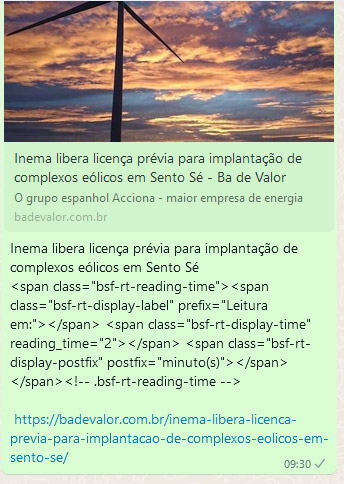
When sharing via WhatsApp the system adds html codes, can you help me with this? I’ve already tried to see where I can configure it, but I haven’t found it.
Anamaria Hello,
To share a post with a featured image, please follow this guide: https://forum.tagdiv.com/facebook-share/ use SEO Yoast (in this guide you will know how to display the og image using Yoast plugin).
I found that WhatsApp shows pictures of 90 * 90 in the web interface, and 140 * 140 in the Android version. So the best choice would be to use a square image, and I don’t recommend larger than 400px * 400px -> https://wordpress.org/support/topic/featured-image-is-not-showing-when-shared-via-whatsapp/
Thank you!
 suaraumkm
Helo,
Why when iam paste link on whatsapp chat,
(example : https://suaraumkm.com/2022/03/22/perputaran-capai-500m-di-motogp-mandalika-umkm-karang-taruna-kebagian/ )
isnt show this images featured (https://imgur.com/a/6NMGbKH),
but showing another images like this : https://imgur.com/a/nkjaQ0k also like this too https://imgur.com/a/GBO65ko
seems this is logo or i dont know what it is
hopefully you can help, thx
 Prateek
Hello, team tagDiv.
The copy url button in share section isn’t working for me while logged into my admin dashboard. A button is showing but without the link icon and when I click on it, it just reloads the same page.
As soon as I logout, the icon shows up and it starts working. But there are a few issues—
1.) When logged out, on clicking, the link is indeed copied but the tick mark’s color is white which is almost invisible if the button background color is light.
2.) On amp pages, the button does not show anything. Just empty space. When clicked, same problem, it reloads the page.
3.) Apart from copy url button, the Flipboard share button also doesn’t show anything on amp pages.
Lastly, I just noticed that the WhatsApp and Telegram buttons, unlike before, are showing up on desktop as well. Is this part of the update?
 CosmoShiva
Hello,
I created Share Buttons in the Single Post template. But I don’t want to show all platforms. How can I delete some of them, I only need Facebook, Twitter, Pinterest, WhatsApp and Telegram.
In Tagdiv-Composer something doesn’t work fine. I hide the share text but it is still shown. https://imgur.com/O6E789W
Hope you can help.
Thanks, Melanie
Anamaria Hello,
I found that WhatsApp shows pictures of 90 * 90 in the web interface, and 140 * 140 in the Android version. So the best choice would be to use a square image, and I don’t recommend larger than 400px * 400px -> https://wordpress.org/support/topic/featured-image-is-not-showing-when-shared-via-whatsapp/
Thank you!
 rrvoigt
Hi,
First of all thanks for make such a great theme.
We are looking to integrated ACF to display some contact information fields (phone, email and whatsapp).
When we use the example in this link we can see the data, but we need some assistance with the proper formatting.
https://forum.tagdiv.com/topic/display-advanced-custom-fields-on-post-pages/
In our case we are trying to add the extra contact field data to our travel site, so we can also add post as listings for business when needed (just like one of the NYC sites).
This is our structure:https://tinyurl.com/y78bj2mh
And our fields are:
—
Telefoon 1: [acf field=”telefoon_1″]<br>
Telefoon 2: [acf field=”telefoon_2″]<br>
Telefoon 3: [acf field=”telefoon_3″]<br>
Telefoon 4: [acf field=”telefoon_4″]<br>
Telefoon 5: [acf field=”telefoon_5″]<br>
WhatsApp: [acf field=”whatsapp”]<br>
E-mail: [acf field=”e-mail”]
We need to only show the labels when the fields are populated and have to display the fields next to each other without the <br> (otherwise when empty other pages will get spaces.
We are also looking to like the whatsapp to an url (https://wa.me/field) to be clickable and also the email fields should be to mailto:
Is there any way you can help achieve this, otherwise we don’t see the theme working for us 🙁
P.s.: we tried some php in the shortcode field, but this isn’t working.
https://www.advancedcustomfields.com/resources/hiding-empty-fields/
Regards,
Robert
 buxarkhabar
Hi, this is my site http://www.buxarkhabar.com/
I am not getting the featured image displayed after sharing any post on Whatsapp, on other social network it is working fine. My image size is also less than 300 KB. Please help me into this. I have disabled site accelerator in Jetpack also, I tried almost everything.
Bettina Hello @mededleads !
There is a limitation for the featured image to have a size less than 300KB, please check: https://stackify.dev/308878-provide-an-image-for-whatsapp-link-sharing
Thank you!
 mededleads
Featured Image is not showing when i share my posts on WhatsApp
 Calin
Calin Hi,
I see that you have og:image therefore the featured image should work in whatsapp, I think that the og image need to be under 300kb -> https://theme.co/forum/t/whatsapp-share-thumbnail-not-showing/52140
Thank you!
 baijubenance
when i trying to share post in whatsapp preview is not showing featured image , android or some network
iphone sharing preview is waking perfectly
 shasankagogoi
 Is there any way by which i can change the logo of any of these : https://prnt.sc/26ntml8 so that i can add my whatsapp logo there instead ?
Bettina Hello @shasankagogoi !
Unfortunately, the Whatsapp icon was not implemented in that element, but on the element called “Social share”. Check this article: https://forum.tagdiv.com/social-sharing/
I will add this request on our improvement list.
Check this topic too, it could help you: https://forum.tagdiv.com/topic/how-do-i-add-a-patreon-social-link/
Thank you!
shasankagogoiHow can i add whatsapp logo here : https://prnt.sc/26npep0
Whatsapp option is not available
