

 Edward
 Response support:
We are currently investigating the cause of the issue. A solution will be provided as soon as possible. Sorry for any created inconvenience.
https://forum.tagdiv.com/topic/weather-ai-error-invalid-api-key/
Edward 

And may be some customization will be useful for you (Image Caption of the Featured Image for Post Template Style 8): https://forum.tagdiv.com/topic/featured-image-show-caption/
Edward Edward Edward Do I understand correctly that this problem exists, and it is not solved?
It is not known whether it will be fixed by the developers of Facebook?
Edward No.
For example try to sharing this link: https://demo.tagdiv.com/newspaper/wordpress-news-magazine-charts-the-most-fashionable-new-york-couples-in-2016/
Result:

Tag from url is correctly:
<meta property=article:author content="https://www.facebook.com/TagDiv/" />
Edward Edward If you want ot hide the header an footer for a particular page you can try the solutions provided in these topics, and create a code based on the unique page Id
– https://forum.tagdiv.com/topic/create-new-page-without-header-and-footer/
– https://forum.tagdiv.com/topic/create-clean-page/
– https://forum.tagdiv.com/topic/hiding-header-and-footer-for-specific-page/
https://forum.tagdiv.com/topic/landing-page-without-menu-etc-at-the-top/
Or search for more about this here on the forum.
Edward Try this solution from FAQ:
Question: I am using WordPress. Why is the inScore not working?
Answer: WordPress is incompatible with the inScore code. That is why we have developed the WordPress inScore plugin for you. You can download it here. You will find ID of the inScore under your code in the member area.
Edward The answer was given here: https://forum.tagdiv.com/topic/how-to-create-a-child-theme-for-newspaper-theme/
Read carefully this manual: https://forum.tagdiv.com/the-child-theme-support-tutorial/
A sample child theme (with style.css and functions.php files) is available in the /code/ folder in the package that you downloaded form Themeforest:

Edward Edward Отключите непротестированные плагины. Иначе техподдержка откажет вам в помощи.
Edward @jforum
Theme panel – Translations:

Edward Check your system status and try again.
https://forum.tagdiv.com/system-status-parameters-guide/
Get all of the settings in the green zone: https://www.screencast.com/t/t6Zr0efJGD2g
Edward Только вручную. Придётся править исходники. После апдейта темы файлы придётся перезаписывать заново. Учите английский! 😉
Unfortunately the theme panel cannot be translated from the theme settings. If you want to translate it, you will have to edit the code to do so.
Any at all customization to the theme files will be lost in a theme update. You will have to re-add your customization after the update.
https://forum.tagdiv.com/topic/user-interface/
https://forum.tagdiv.com/topic/language-packs-for-theme-panel/
Edward Surely this is not a problem of the theme. Try switching to another WordPress theme (like simple Twenty Twelve) and test again.
Edward The better way is update theme via ftp.
Don’t forget about backups.
In brief – manually delete folder Newspaper with old theme from hosting then copy archive with new theme on same place (sorry for my poor English), then extract it there.
I hope official documentation you have read: https://forum.tagdiv.com/how-to-update-the-theme-2/
> but will i loose my settings such as colors, filtering etc.?
Upd. No, your settings will not be lost.
Edward https://forum.tagdiv.com/topic/update-tagdiv-8-1-1-october-18/#post-197966
Support (Catalin) was wrote:
Sorry for this but please notice that way of theme installing is not a stable one and could appear some problems with installing the theme, sorry! Please use the FTP method because this is the surest theme’s method.
Edward > If I want to use the parent theme from now,
> can I just activate the parent theme and all the setting remains??
Yes.
https://forum.tagdiv.com/the-child-theme-support-tutorial/
-
This reply was modified 9 years by
Edward.
Edward > on my site http://www.kreditwuerdigkeit.de/ you see everywhere postingdates.
> How I can delete them?
For Block – Check this point: Theme panel – Block Settings – Meta info on Modules/Blocks
> Below on my site you see the column “Neueste Beträge”. How I can remove this?
For homepage do not use this template:
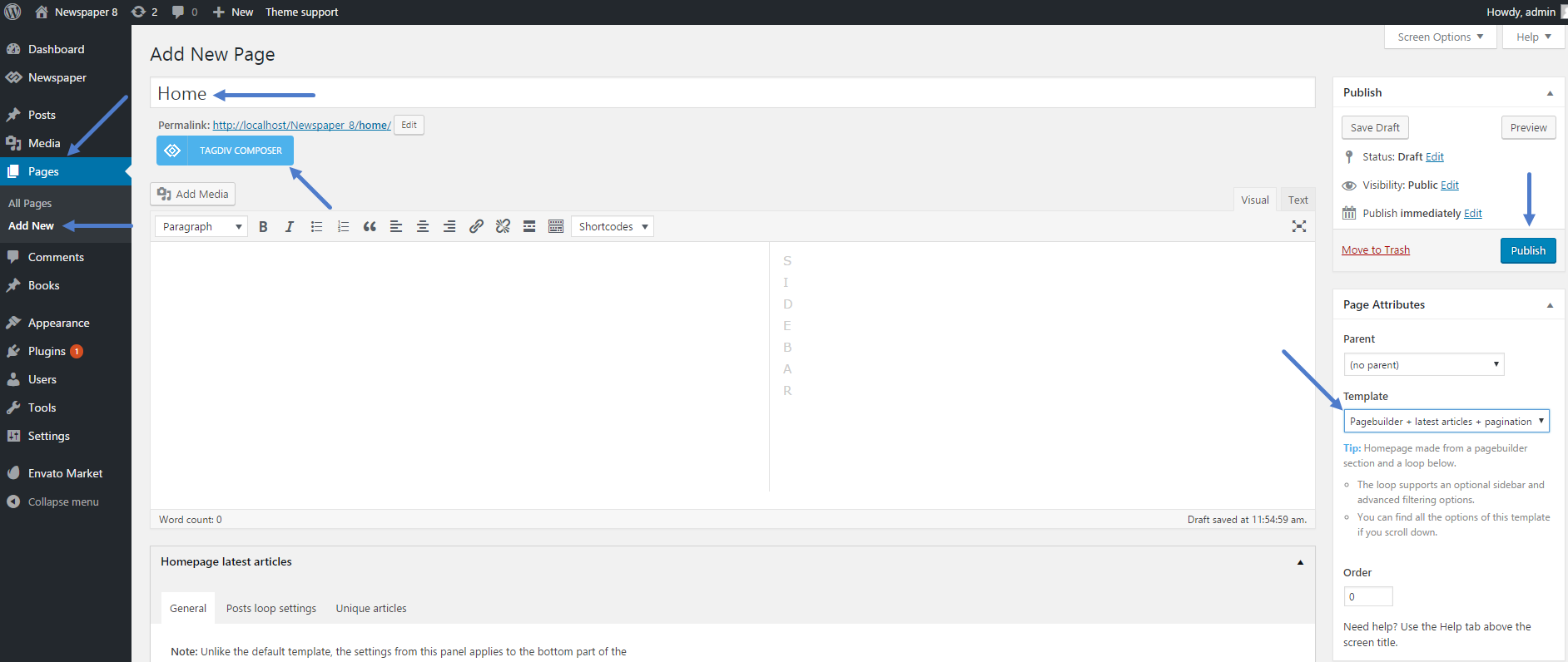
-
This reply was modified 9 years by
Edward > am having trouble with removing on author name
> and comments icon from displaying on home page and etc…
For Block – Check this point: Theme panel – Block Settings – Meta info on Modules/Blocks
Edward Edward Read carefully (!!!) this manual (there are all described in detail): How to update the theme
https://forum.tagdiv.com/how-to-update-the-theme-2/
Also section A. Update the theme via FTP
Edward 
 Edward
 Yes.
https://forum.tagdiv.com/how-to-update-the-theme-2/
Read all items carefully:
Step 7 – Update the plugins. The theme required and recommended plugins are included in the theme package inside the ../Newspaper-tf/plugins folder.
