

 Edward
 https://forum.tagdiv.com/topic/disable-scroll-to-top-button/
Copy header.php file in your child theme and try to remove the lines 17 & 18.
Sorry, I’m not sure this method is correct. Wait for the answer of developers…
Edward Edward https://forum.tagdiv.com/how-to-update-visual-composer-plugin/
The theme includes a license for this plugin so you don’t have to buy it.
You don’t have to activate the plugin license, it’s already activated.
You can’t update Visual Composer directly from it’s producer.
You don’t have to worry about the plugin update warnings.
We provide updates on a regular basis, after we test the plugin for theme compatibility we include it in the latest theme update, inside the ../plugins folder
Edward Set for this slot banner size 728 x 90 px force:

Result:

Sorry for my bad English but I think you understand me.
Edward Edward Деактивируйте плагин WP Fastest Cache и попробуйте снова.
Edward Edward 1. You can use different types of Quotes as in live example shown: http://demo.tagdiv.com/newspaper/blockquotes-pullquotes/
Quotes – This option lets you set up your quotes with style. There are 8 types of formatting options to make your quotes eye-caching: https://forum.tagdiv.com/post-formats-for-tinymce/
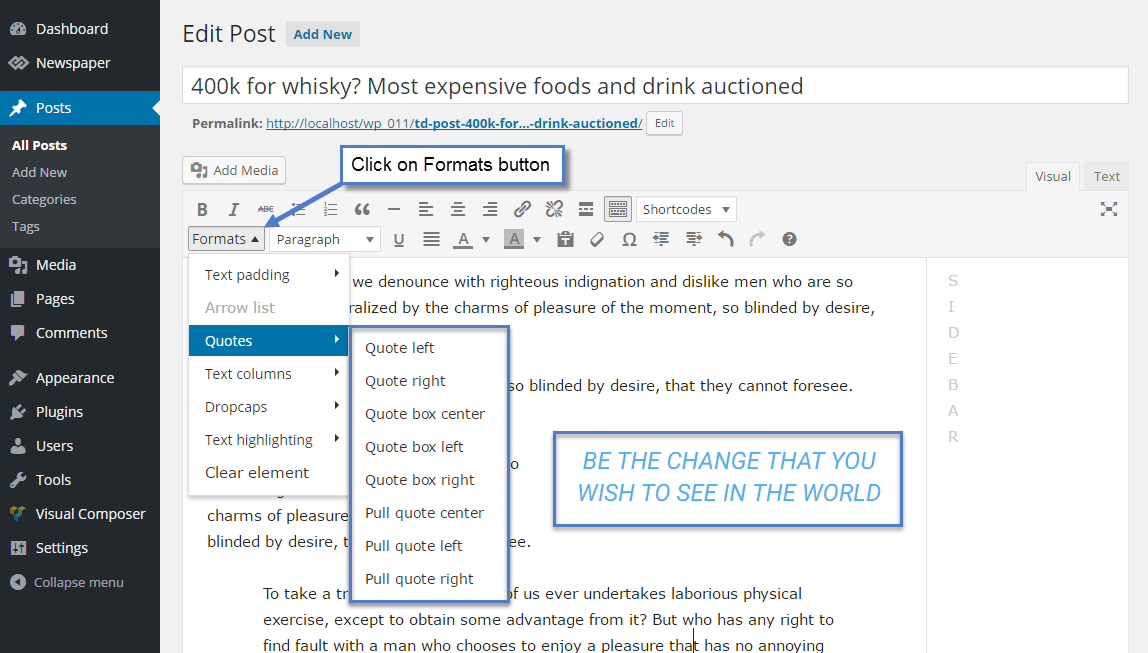
2. To change font settings in Quotes here:

Edward 1. Edit your post with video.
2. Try set again your own Featured image from Media Library.
3. Save post.
Edward Read please this manual: https://forum.tagdiv.com/mega-menu/
Edward About whatsapp can not advise anything. Facebook – see here: https://forum.tagdiv.com/facebook-share/
Edward Envato recommends against the use of download managers, to download your purchased files from Envato Market.
https://help.market.envato.com/hc/en-us/articles/202500504?_ga=1.68035348.424484147.1472560982
Edward https://forum.tagdiv.com/topic/how-do-i-remove-the-lens-icon-from-the-navbar/
Or:
You can remove the search icon from the code by commenting out or deleting this part: http://screencast.com/t/R1WLS2cH
https://forum.tagdiv.com/topic/searchbarbuttonauthoryoutube/#post-150488
Edward Please keep in mind that the “Trending Now” is just a simple block which displays only the posts title which can be filtered in several ways, like this -> http://screencast.com/t/bLYCdawIC3WC All the settings for this block can be found in Visual Composer -> News Ticker because this is a simple Visual Composer element. Check the Block Settings and there you should find all the available settings for this. You can consult our documentation here -> https://forum.tagdiv.com/block-settings-guide/ We have a useful tutorial which teaches you how you can correctly use the Visual Composer, like this -> https://forum.tagdiv.com/how-to-use-visual-composer/
Hope this helps!
Thanks for your understanding!
https://forum.tagdiv.com/topic/how-insert-and-configure-trending-now-step-by-step/#post-144828
-
This reply was modified 9 years by
Edward.
Edward  Edward
 https://forum.tagdiv.com/how-to-update-the-theme-2/
See section “A. Update the theme via FTP“
Edward As for the images, you can replace the default placeholder images here: http://screencast.com/t/ZFYxku1ggNs
You will have to keep their name and thumb size though otherwise they will not work.
Edward Don’t worry. After replacing (overwrite the existing files) all files and folders from Patch Folder your version will be 7.6.1.
-
This reply was modified 9 years by
Edward All this Files and Folders:

Edward [ Version 7.6.1 ]
– fix: We modified the login modal window code to only appear on the page when front page login is enabled. The hidden window was causing some Chrome browsers to mark a page as not secure (We have done extensive tests and it appears that the latest version of Chrome works as expected). Please note that chrome will mark all HTTP pages that request a password or credit card as not secure. The only way to get around this warning and still use a login window is to use SSL. If the login window is not important for you, please disable it.
File "update_log.txt" in zip-archive.
Edward Title length: https://forum.tagdiv.com/excerpts-introduction/
Edward Edward What in your understanding of “box version of the theme”?
Edward How do i change my website to box version of the theme
https://forum.tagdiv.com/background-introduction/
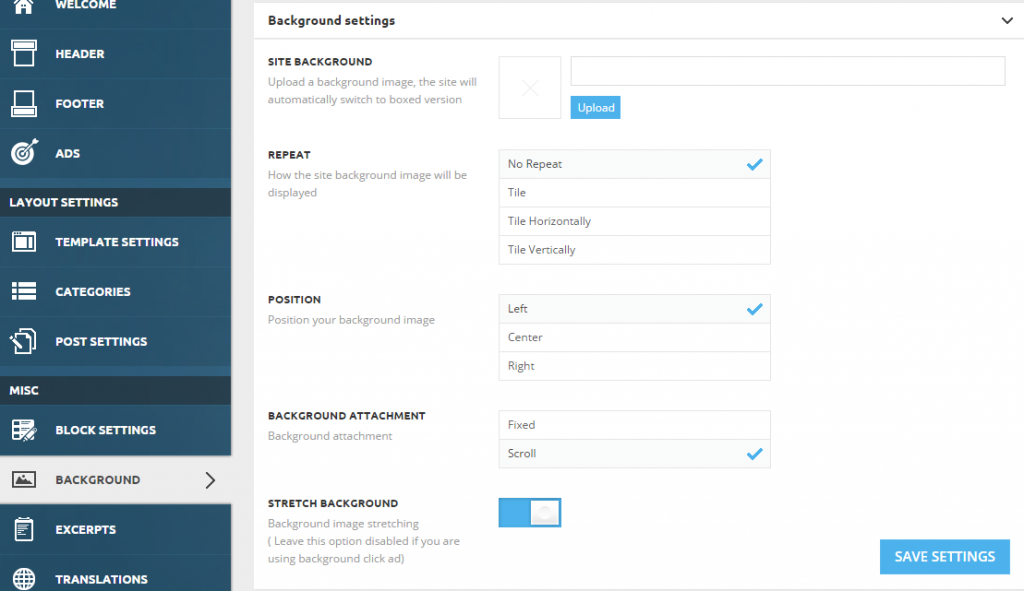
Site background – The theme will automatically transform the site into a boxed version.
or Use a Color
You can set it from Theme Panel > Theme Colors > General Theme Colors

Note: When you set a color or an image as a background, your website will automatically change to the boxed version.
