

 Edward
 Read carefully this manual: https://forum.tagdiv.com/how-to-update-the-theme-2/
The developers recommend to update the theme via FTP.
Your content will not be lost, but please note that if you have modifications to the theme code they will be lost. You have to reapply them after the update is over.
Edward Edward Edward Edward 
Edward 1. Firstly check carefully your system parameters: https://forum.tagdiv.com/requirements-for-newspaper/
2. Try to activate the theme manually like this:
– https://www.screencast.com/t/y9OSLcsc
– https://www.screencast.com/t/AEKaTQM0
Edward 2@agarg94:
Try to add this CSS-code in “Custom CSS” section of the Theme:
/* Responsive tables */

.table-responsive {

width: 100%;

overflow: auto;

-webkit-overflow-scrolling: touch;

}
And to add your table in article like this:
<div class="table-responsive">

Insert code of your table here...

</div>
Edward @WebMasterhi, also read here: https://forum.tagdiv.com/post-formats-for-tinymce/
Quotes – This option lets you set up your quotes with style. There are 8 types of formatting options to make your quotes eye-catching.
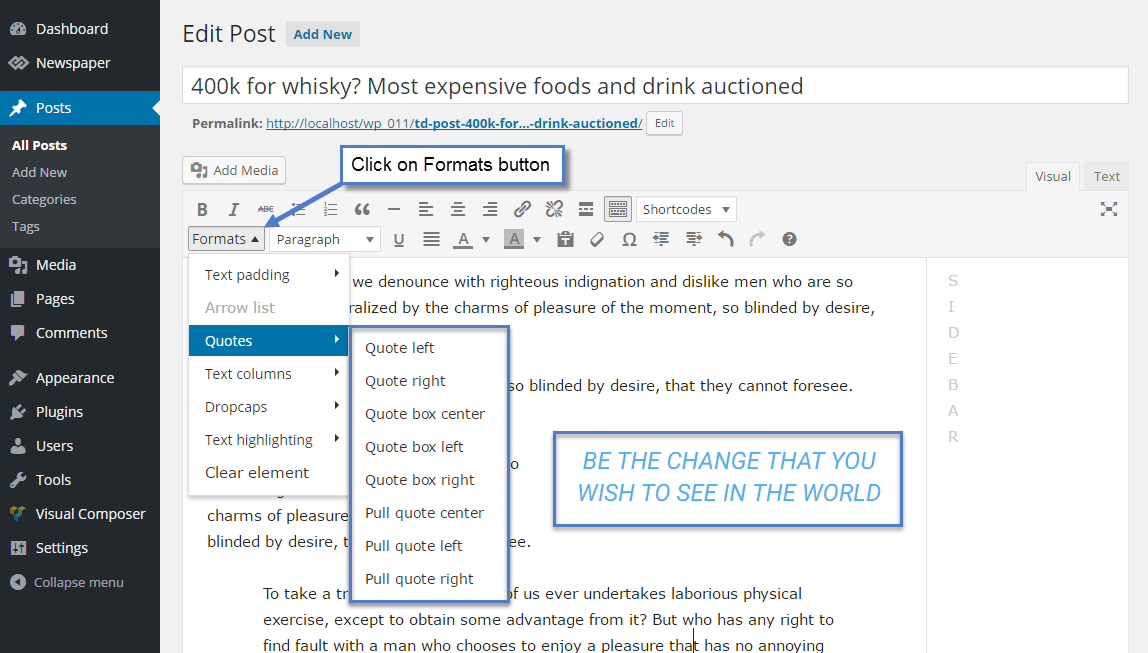
Live examples: https://demo.tagdiv.com/newspaper/blockquotes-pullquotes/
Edward Edward https://wordpress.org/plugins/wpforo/ – my choise.
Edward Тут смотрели?
Edward I think the answer of the developers will be as follows:
We cannot provide support for untested plugins, sorry.
Hire is the list with the plugins that we tested https://www.screencast.com/t/kZgFJRYJeG
However, wait for the official answer.
Edward https://forum.tagdiv.com/search/malware/
for example:
https://forum.tagdiv.com/topic/my-newspaper-hacked-please-help/
https://forum.tagdiv.com/topic/malware-redirect/
https://forum.tagdiv.com/topic/malware-redirect-2/
https://forum.tagdiv.com/topic/traffictrade-malware-newspaper-8-1-all-updated/
and etc…
Edward Developers recommend Yoast SEO plugin to use: https://forum.tagdiv.com/topic/tittle-tag-meta-description-and-keywords/
Edward  Edward
 This problem appears when you install the theme on a site that already has content. The theme comes with it’s own thumbnails to minimize the page size and increase the page loading speed.
Read more: https://forum.tagdiv.com/thumbnails-fix-strange-looking-images-on-blocks/
Edward Scroll down this page:
https://themeforest.net/item/newspaper/5489609
Last version:
Version 9.2.2 – December 17th, 2018
Update your theme via FTP: https://forum.tagdiv.com/how-to-update-the-theme-2/
Edward According to the new Google recommendation featured images should be at least 1200 pixels wide.
https://developers.google.com/search/docs/data-types/article
https://forum.tagdiv.com/topic/image-size-smaller-than-recommended-size-amp-issue/
https://forum.tagdiv.com/topic/tagdiv-amp-google-error-report/
Edward > Image size is less than recommended
https://developers.google.com/search/docs/data-types/article
image
Images should be at least 1200 pixels wide.
…
For best results, provide multiple high-resolution images (minimum of 800,000 pixels when multiplying width and height) with the following aspect ratios: 16×9, 4×3, and 1×1.
Edward Try this:
Style: Normal (Remove italic)

Edward Edward https://forum.tagdiv.com/topic/seo-theme/#post-239483:
So you want to remove the last category, the one the user is currently viewing
– https://www.screencast.com/t/HrXWt2w5fLAN
This would be where it is defined, try to comment these lines of code
– https://www.screencast.com/t/zbA2MGRkEIa
– https://www.screencast.com/t/roXY1NtugiZs
– https://www.screencast.com/t/6JPT1LhW2
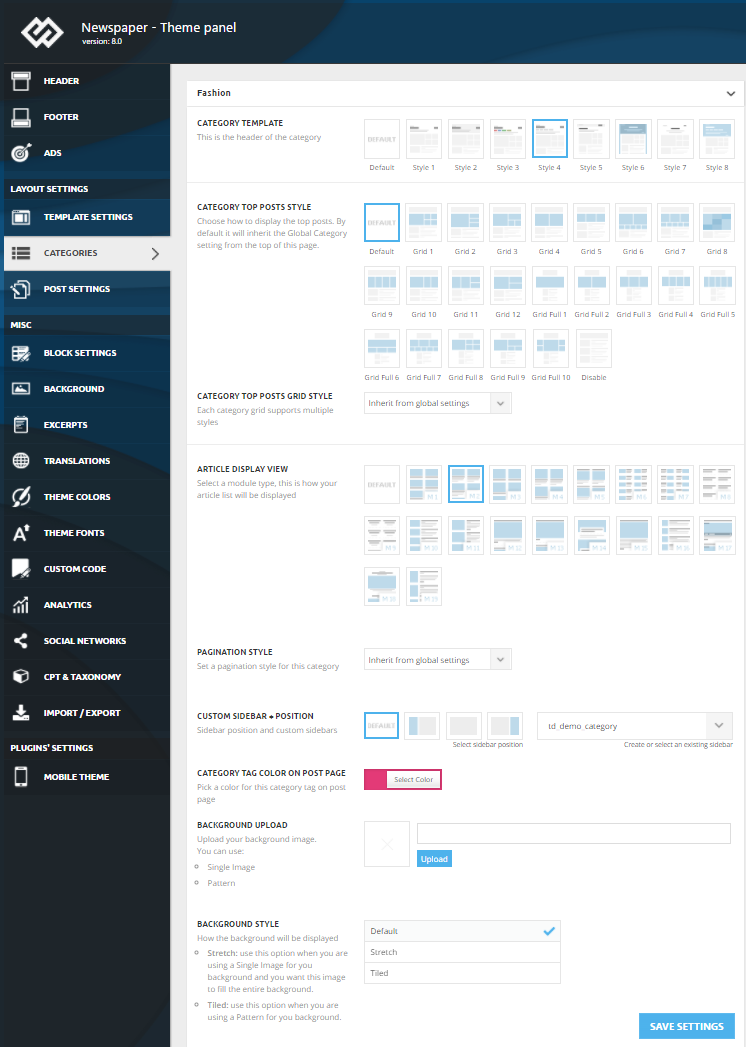
Edward Edward See Translations section in the Theme panel:

Edward 1 code = 1 website
