

 Manoel
 You are absolutely right, google seems to randomly detect it or not. I’m currently at 95 points on desktop an no blocking CSS. The only thing standing between me and the 100 is Minify CSS. It tells me the style.css of the theme and my child theme can be reduced by 16% and 91%. Any thoughts on what to do here? I suppose it’s not that critical but at this point I just want to see if I can hit the 100 haha.
Manoel Actually scratch that, forgot to re-install the plugin. Everything works fine now 🙂
Manoel I also have got a notice and in fact the version number is different. It’s 8.5.1 now. Possibly a Patch for the child-theme issue with the multipurpose plugin. When you download it from envato/themeforest you’ll find a folder called “patch_8.5_8.5.1” also there should be a html file with all files modified and added. However I just replaced the 8.5 files with the ones from the patch folder and still the child-theme issue isn’t fixed.
Manoel Can we at least use Visual Composer and enable it only for posts but not for pages so it won’t conflict with td-composer?
Manoel Update: Can approve this workaround does the job. Still can’t figure out what about childthemes triggers the issue. I tried adding the two files mentioned in the wp-booster folder of the child-theme but it doesn’t seem to do anything.
Manoel oooooh so using the original theme instead of a child solves the issue? Because this is exactly what I am getting
Manoel Exactly the same issue here and judging by the forums many others have this error too…
come on tagdiv something is seriously wrong with this update!
Manoel Same problem here. Was all excited about the new blank template but seems like the update wasn’t tested?
Manoel I need exactly the same thing I’m trying to build Landigpages for different keywords and in the best case change the title of the site as well.
Manoel Seems unlikely. I disabled all plugins, so currently there is only PressForward active and it still doesn’t work. However when I keep the plugins turned off and also switch from Newspaper 8 to Twenteyeleven Theme, PressForward works fine. So I’m pretty sure it has something to do with the theme itself. Support from PressForward is…well, I haven’t got a reply in about 2 months now. I’ve set WP Debug on now, so maybe I find something that helps in there.
Manoel +1 for this 🙂
Maybe optional for people that like to have more controll but can’t see why you wouldn’t want it to be H2. Quick question, will I need to change something in the css so that the same style rules apply although it’s not a p class anymore but a h2?
Manoel Kimhoang I am personally interested in how you will do this because I would like to do the same (but change the logo as well) Do you have a WordPress Multisite installation or a plugin for this?
Manoel Thanks!
My solution now is using Advanced Custom Fields Plugin and inserting this line

then style it with custom css in the theme panel.
Still a feature within the theme would be cooler 🙂
-
This reply was modified 9 years by
Manoel.
Manoel Hey there, just wanted to modify the authors box too but on the current version of the theme the file you mention here seems to be gone. Where is it located now?
Manoel Manoel You might be right, overdoing it is my sickness 😀
Looking into https at the moment and from what I heard google likes it when the entire page runs on it but so you happen to know if there are any flaws regarding speed over normal http?
Manoel I understand but there are some things that just don’t work with AMP. For example the video post type, smart lists or review function. 🙁
Manoel But Newspaper has no dedicated AMP CSS File does it?
Manoel Is AMP and Facebook Instant Articles Supported by Newspaper now? Can we use the Plugin from PageFrog? https://de.wordpress.org/plugins/pagefrog/
Manoel So Instant Articles is live now but seems there are problems. I used the Plugin Facebook adviced and I believe I did everything right, however it seems it isn’t fetching the article content. I honestly don’t know if it is my configuration, the plugin, facebook or the theme.
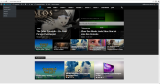
Manoel Let me grab you some screenshots:
Without AdBlock
With AdBlock on
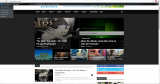
I don’t think there is anything that could trigger the adblock machanism.
-
This reply was modified 10 years by
Manoel Is this still the best method or is there a way to achieve this trough the theme panel?
Manoel Same Problem here, hoping for a fix 🙁
Manoel That’s exactly the issue 😀
I set the image as featured but it doesn’t show up in the Big Grid. It only occurs with the imported articles though. I copy&pasted some articles now so they are “new” for wordpress and set the featured image = everything is fine. But as soon as I use an imported article there is no way. Even if the featured image is set it is not showing up. Right now I’m at the point of giving up and just re-create all 470 posts…Gonna be a long night
