

 menneskedyr
 Check TD Cloud Library plugin. After I updated to 12.4 it showed as latest version, but it wasn’t. Try to force it to update.
menneskedyr Hi,
So if I understand correctly, there is currently no way to add Google Maps location via ACF to CPT, other than a manual shortcode?
menneskedyr Thanks again. Yes, I’m aware of that and we’re working on a new, Cloud Templates-based website. Standard Pack is discontinued then, I guess. Note that this was not always there, this bug appeared after the latest update. Until then, Standard Pack worked fine.
With that in mind, there are probably still people out there that have had Newspaper powering their websites for 5+ years and many are still using old designs, with old Newspaper templates. Maybe this helps someone.
It could also be useful for debugging if a site is running Standard Pack and experiences massive SQL spikes.
Have a good day 🙂
-
This reply was modified 4 years by
menneskedyr.
menneskedyr Thank you for the quick response, but that’s not quite it. Yes, TD Composer has a lot of queries and we live with it, but this was caused by a single (double, actually) repeating query from TD Standard Pack apparently fetching the site logo, using what seems to be a highly inefficient function:
attachment_url_to_postid()
And it was doing it twice, once for the desktop and once for the mobile logo, on every single page load. This caused mysqld to spike to 200% and above.
I see now that I have posted the wrong screenshot above, sorry. Here’s the correct one:
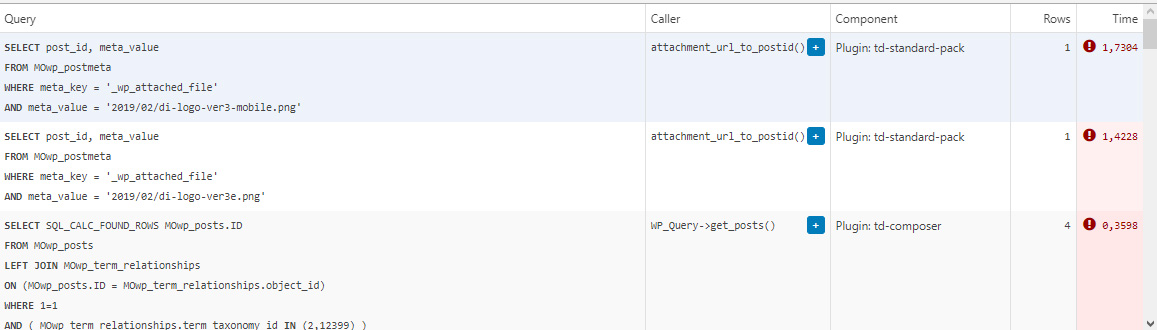
This morning I managed to patch up the problem, it’s a crude solution but may help someone. In header template I found that it was loading the logos from
plugins/td-standard-pack/Newspaper/parts/header/header-menu-h1.php
(yours may be different of course)
There I simply removed the PHP block fetching the logos and hardcoded the HTML for the logos in. As soon as I did that, the SQL spike went away. So I’d say it’s a bug, or inefficient code at least.
To be clear, we’re running the latest versions of WP, PHP, MySQL, the theme & plugins, all on a solid VPS. Yes there is quite a bit of SQL load, we’re working to optimize it with new blocks and Cloud Templates, but this was something else. Could be related to the latest Standard Pack update, don’t know, team didn’t report it before.
-
This reply was modified 4 years by
menneskedyr Here:
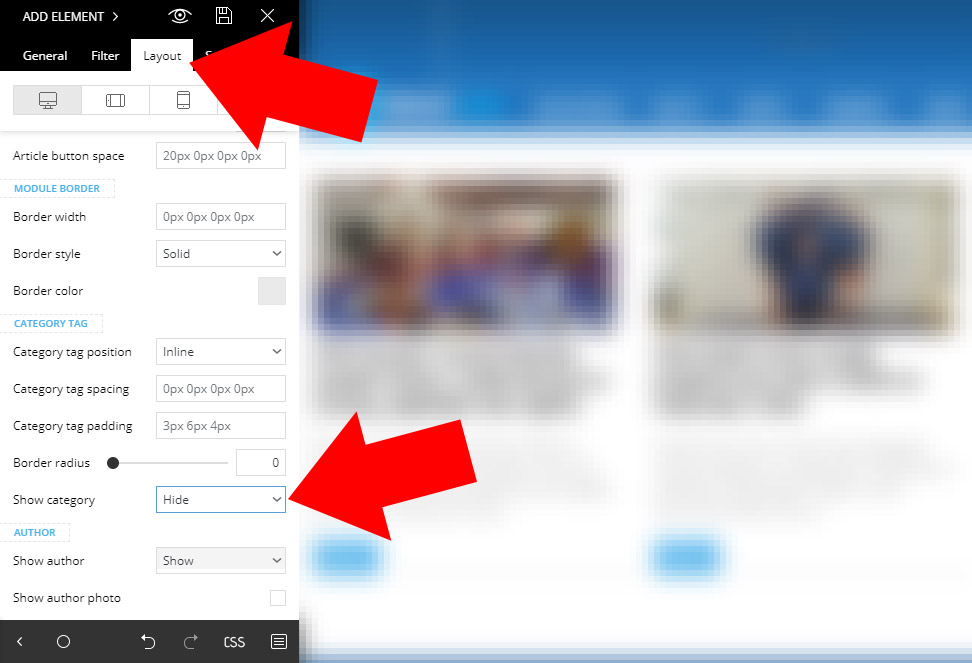
menneskedyr You are using Flex Blocks which, apparently, can override settings from Theme Panel.
Categories on Flex Blocks can be disabled in TD Composer, on Layout tab of selected element.
menneskedyr That’s a menu. You can find it in Appearance > Menus > Footer Menu.
menneskedyr Your admin area is now available, I sent you an e-mail.
menneskedyr I have some time to kill so I could have a quick look at it if you’d like.
Send me FTP credentials to vikingkrok@gmail.com.
menneskedyr They will get to this thread, yesterday was their national holiday so I presume they’re quite busy now.
But honestly in this situation I would ask my host to restore the backup from before the error. They should at least be doing weekly backups. Then download everything locally so you have your own backup and start the process again. There could be a number of causes and error 500 is notorious for being hard to catch. And trying to solve it has potentially made it even more complicated.
EDIT Sorry just went back to the original post and saw that it’s not an option. Try to find a local developer to have a look at it.
-
This reply was modified 7 years by
menneskedyr Well that is certainly… complicated.
Maybe theme support guys will have an idea, but again, this may not be caused by the theme.
For reference, what else did you do when you updated the theme? Did you uninstall WP Rocket before or after the error? Did you reinstall entire WP?
What about your host, have they checked it out? Maybe you could ask them to restore a backup and work from there.
menneskedyr menneskedyr You have a massive number of errors caused first by load.php and then later by wp-db.php file. Both are called via your CDN.
This sounds like either cache or CDN problem.
Make sure you have completely cleaned up WP Rocket installation, maybe try reinstalling it and then uninstalling it properly through its own interface. Purge CDN caches again and see what happens.
Check again that WP Rocket didn’t leave any code in .htaccess file.
menneskedyr Note that this is not necessarily related to the theme. (Disclaimer: I don’t work for them).
Upload it to your Dropbox or WeTransfer or anything really. Or take a screenshot of most recent lines and post it to http://www.screencast.com/
You can also use https://codeshare.io/ for example.
Don’t upload anything that could compromise your security.
-
This reply was modified 7 years by
menneskedyr It would also be a good idea to see if WP Rocket was uninstalled properly: https://docs.wp-rocket.me/article/694-uninstalling-wp-rocket
Don’t forget to clean your .htacess if anything remained there.
menneskedyr Upload it somewhere, it will probably be useful for TagDiv support guys as well.
menneskedyr Try deleting the child theme.
Error 500 has a number of likely causes. Here’s what I’d check:
– Make sure you have no errors in .htaccess and wp-config.php files, particularly syntax errors. If you have edited wp-config.php, check that your editor uses UTF-8 encoding and not something else.
– Increasing WP memory limit will have no effect if PHP memory is lower than that. Check with your host if you can’t configure PHP yourself via php.ini or user.ini or however you have it st.
– Empty all caches, purge CDN cache as well if you use it.
– Delete all plugins that come with the theme (TD Composer in particular) then upload the new versions.
– Check your Child theme code, maybe some changes are required there. (You can see the default template in /code folder that came with the theme).
– Deactivate all security options temporarily (firewalls etc).
– Anything in your error_log file?
menneskedyr What version did you update from?
Did you do anything else apart from deleting “Newspaper” folder and uploading new one?
menneskedyr One way is this:
Go to WordPress Settings > General.
Select Date Format > Custom and add time string behind the date in the field.
For example, if date is set as “j.n.Y.”, add ” H:i”. This will output 24.1.2019. 13:10.
You can find the list of supported characters here: http://php.net/manual/en/function.date.php
menneskedyr Perhaps your numbers are still too low. It would probably be a good idea to check with your host.
menneskedyr WP_MEMORY_LIMIT is set in wp-config.php:
define( 'WP_MEMORY_LIMIT', '256M' );
max_input_vars is set in php.ini, user.ini or .htaccess file, depends on how your server is configured – if you don’t know how to find it you’ll have to ask your host to do that for you.
It’s all described in https://forum.tagdiv.com/requirements-for-newspaper/
menneskedyr This is usually because of insufficient server resources. Happened to me recently on a test installation.
Try increasing max_input_vars and WP_MEMORY_LIMIT. That solved the issue for me.
See https://forum.tagdiv.com/requirements-for-newspaper/
-
This reply was modified 7 years by
menneskedyr Sorry for bothering you – it’s created by WordPress.
If anyone looks to disable it, see here https://wordpress.stackexchange.com/questions/251789/prevent-wordpress-from-generating-medium-large-768px-size-of-image-uploads
menneskedyr Thanks for trying. If you do come up with something, please let me know 🙂
menneskedyr Thank you. Could you please tell me how to modify that part of the code to tell the slider to use the original, not-resized image? (Which is at 1068px width upon upload). I only need the 3-column version.
The point is that while some other thumbnails are useful, this large one is needed only for the slider and there is really no point in having all the other images resized to this big thumbnail that only like 1% of images will ever really use.
